> ## Documentation Index
> Fetch the complete documentation index at: https://translations.mintlify.site/llms.txt
> Use this file to discover all available pages before exploring further.
> Learn about the Actions Password Reset Flow, which is executed after a user completes the first challenge but before the user sets a password.
# Password Reset Triggers
The Password Reset triggers run during the password reset process when a user completes the first challenge, typically a link to the [user's email](/docs/secure/multi-factor-authentication/authenticate-using-ropg-flow-with-mfa/enroll-and-challenge-email-authenticators), but before a new password is set. You can use this to challenge a user with an additional multi-factor authentication (MFA) factor or to redirect the user to an external site, such as a third-party verifier.
After verification, users can provide the new password for their account.
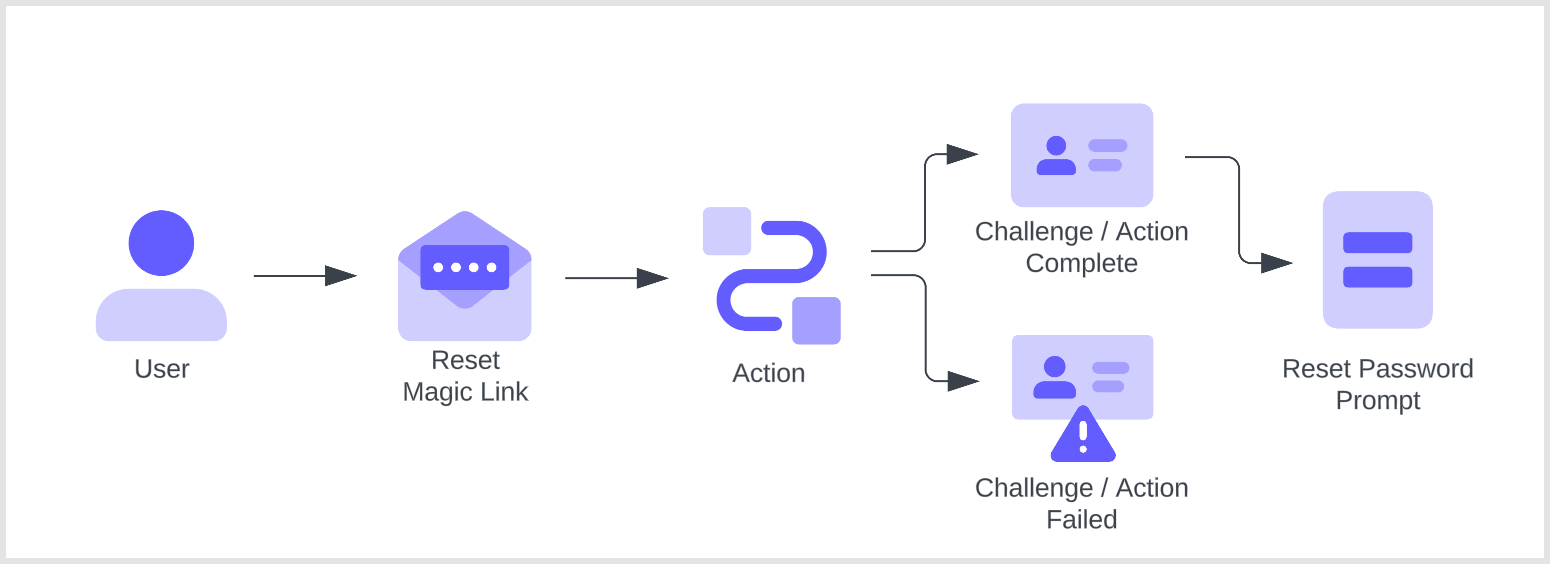 Actions in this flow are blocking (synchronous), which means they execute as part of a trigger's process and will prevent the rest of the Auth0 pipeline from running until the Action is complete.
In order for these Actions to run properly, you must have Universal Login enabled. These Actions cannot be triggered when using Classic Login.
## Triggers
### PostChallenge
The `post-challenge` trigger is a function that executes after a user completes the first password reset challenge, typically an email magic link. You can create up to four Actions in your tenant that leverage the `post-challenge` trigger.
#### References
* [Event object](/docs/customize/actions/explore-triggers/password-reset-triggers/post-challenge-trigger/post-challenge-event-object): Provides contextual information about a single user logging in via Auth0.
* [API object](/docs/customize/actions/explore-triggers/password-reset-triggers/post-challenge-trigger/post-challenge-api-object): Provides methods for changing the behavior of the flow.
## Limitations
Password Reset triggers do not support [Active Directory/LDAP connections](/docs/authenticate/identity-providers/enterprise-identity-providers/active-directory-ldap).
## Common use cases
### Secure password reset with additional MFA factors
A `password-reset` / `post-challenge` Actions can issue an MFA challenge after the user completes the first challenge. For example, you can issue a WebAuthn-based challenge as a secondary factor if your tenant has WebAuthN enabled as a factor.
```javascript lines theme={null}
/**@type {PasswordResetPostChallengeAction}**/
module.exports.onExecutePostChallenge = async (event, api) => {
const enrolledFactors = event.user.enrolledFactors.map((x) => ({
type: x.type
}));
api.authentication.challengeWith({ type: 'webauthn-roaming' }, { additionalFactors: enrolledFactors });
};
```
### Redirect users to a third-party application
In addition to an MFA challenge, you can also try adding a redirect in the custom Action, for example, to a third-party verifier or risk assessor.
```javascript lines theme={null}
/** @type {PasswordResetPostChallengeAction}
* This sample action redirects the user to an example app
* and then continues the action after the redirect to challenge
* the user with an MFA factor
*/
module.exports.onExecutePostChallenge = async (event, api) => {
// Send the user to https://my-app.example.com
api.redirect.sendUserTo('https://my-app.example.com');
};
module.exports.onContinuePostChallenge = async (event, api) => {
const enrolledFactors = event.user.enrolledFactors.map((x) => ({
type: x.type
}));
// Challenge the user with email otp OR another enrolled factor
api.authentication.challengeWith({ type: 'email' }, { additionalFactors: enrolledFactors });
// Example of how to challenge the user with multiple options
// in this case email otp OR sms otp
// api.authentication.challengeWithAny([{ type: 'email' }, { type: 'sms' }]);
};
```
The Actions pipeline is not active while Auth0 redirects the user. Once the user continues the Auth0 login process, the Actions pipeline resumes. Actions that were executed prior to the redirect are not executed again. To learn more, review [Redirect with Actions](/docs/customize/actions/explore-triggers/signup-and-login-triggers/login-trigger/redirect-with-actions).
Actions in this flow are blocking (synchronous), which means they execute as part of a trigger's process and will prevent the rest of the Auth0 pipeline from running until the Action is complete.
In order for these Actions to run properly, you must have Universal Login enabled. These Actions cannot be triggered when using Classic Login.
## Triggers
### PostChallenge
The `post-challenge` trigger is a function that executes after a user completes the first password reset challenge, typically an email magic link. You can create up to four Actions in your tenant that leverage the `post-challenge` trigger.
#### References
* [Event object](/docs/customize/actions/explore-triggers/password-reset-triggers/post-challenge-trigger/post-challenge-event-object): Provides contextual information about a single user logging in via Auth0.
* [API object](/docs/customize/actions/explore-triggers/password-reset-triggers/post-challenge-trigger/post-challenge-api-object): Provides methods for changing the behavior of the flow.
## Limitations
Password Reset triggers do not support [Active Directory/LDAP connections](/docs/authenticate/identity-providers/enterprise-identity-providers/active-directory-ldap).
## Common use cases
### Secure password reset with additional MFA factors
A `password-reset` / `post-challenge` Actions can issue an MFA challenge after the user completes the first challenge. For example, you can issue a WebAuthn-based challenge as a secondary factor if your tenant has WebAuthN enabled as a factor.
```javascript lines theme={null}
/**@type {PasswordResetPostChallengeAction}**/
module.exports.onExecutePostChallenge = async (event, api) => {
const enrolledFactors = event.user.enrolledFactors.map((x) => ({
type: x.type
}));
api.authentication.challengeWith({ type: 'webauthn-roaming' }, { additionalFactors: enrolledFactors });
};
```
### Redirect users to a third-party application
In addition to an MFA challenge, you can also try adding a redirect in the custom Action, for example, to a third-party verifier or risk assessor.
```javascript lines theme={null}
/** @type {PasswordResetPostChallengeAction}
* This sample action redirects the user to an example app
* and then continues the action after the redirect to challenge
* the user with an MFA factor
*/
module.exports.onExecutePostChallenge = async (event, api) => {
// Send the user to https://my-app.example.com
api.redirect.sendUserTo('https://my-app.example.com');
};
module.exports.onContinuePostChallenge = async (event, api) => {
const enrolledFactors = event.user.enrolledFactors.map((x) => ({
type: x.type
}));
// Challenge the user with email otp OR another enrolled factor
api.authentication.challengeWith({ type: 'email' }, { additionalFactors: enrolledFactors });
// Example of how to challenge the user with multiple options
// in this case email otp OR sms otp
// api.authentication.challengeWithAny([{ type: 'email' }, { type: 'sms' }]);
};
```
The Actions pipeline is not active while Auth0 redirects the user. Once the user continues the Auth0 login process, the Actions pipeline resumes. Actions that were executed prior to the redirect are not executed again. To learn more, review [Redirect with Actions](/docs/customize/actions/explore-triggers/signup-and-login-triggers/login-trigger/redirect-with-actions).