> ## Documentation Index
> Fetch the complete documentation index at: https://translations.mintlify.site/llms.txt
> Use this file to discover all available pages before exploring further.
> Découvrez comment promouvoir une connexion au niveau du domaine à l’aide de l’Auth0 Dashboard ou de l’Auth0 Management API.
# Promouvoir des connexions au niveau du domaine
export const AuthCodeGroup = ({children, dropdown}) => {
const [processedChildren, setProcessedChildren] = useState(children);
useEffect(() => {
let unsubscribe = null;
function init() {
unsubscribe = window.autorun(() => {
const processChildren = node => {
if (typeof node === "string") {
let processedNode = node;
for (const [key, value] of window.rootStore.variableStore.values.entries()) {
const escapedKey = key.replaceAll(/[.*+?^${}()|[\]\\]/g, (String.raw)`\$&`);
processedNode = processedNode.replaceAll(new RegExp(escapedKey, "g"), value);
}
return processedNode;
} else if (Array.isArray(node)) {
return node.map(processChildren);
} else if (node && node.props && node.props.children) {
return {
...node,
props: {
...node.props,
children: processChildren(node.props.children)
}
};
}
return node;
};
setProcessedChildren(processChildren(children));
});
}
if (window.rootStore) {
init();
} else {
window.addEventListener("adu:storeReady", init);
}
return () => {
window.removeEventListener("adu:storeReady", init);
unsubscribe?.();
};
}, [children]);
return {processedChildren};
};
export const AuthCodeBlock = ({filename, icon, language, highlight, children}) => {
const [displayText, setDisplayText] = useState(children);
const [copyText, setCopyText] = useState(children);
const wrapperRef = React.useRef(null);
useEffect(() => {
let unsubscribe = null;
function init() {
if (!window.autorun || !window.rootStore) {
return;
}
unsubscribe = window.autorun(() => {
let processedChildrenForDisplay = children;
let processedChildrenForCopy = children;
for (const [key, value] of window.rootStore.variableStore.values.entries()) {
const escapedKey = key.replaceAll(/[.*+?^${}()|[\]\\]/g, (String.raw)`\$&`);
let displayValue = value;
if (key === "{yourClientSecret}" && value !== "{yourClientSecret}") {
displayValue = value.substring(0, 3) + "*****MASQUÉ*****";
}
processedChildrenForDisplay = processedChildrenForDisplay.replaceAll(new RegExp(escapedKey, "g"), displayValue);
processedChildrenForCopy = processedChildrenForCopy.replaceAll(new RegExp(escapedKey, "g"), value);
}
setDisplayText(processedChildrenForDisplay);
setCopyText(processedChildrenForCopy);
});
}
if (window.rootStore) {
init();
} else {
window.addEventListener("adu:storeReady", init);
}
return () => {
window.removeEventListener("adu:storeReady", init);
unsubscribe?.();
};
}, [children]);
useEffect(() => {
if (!wrapperRef.current) return;
const originalWriteText = navigator.clipboard.writeText.bind(navigator.clipboard);
let isOverriding = false;
const handleClick = e => {
const button = e.target.closest('[data-testid="copy-code-button"]');
if (!button || !wrapperRef.current.contains(button)) return;
isOverriding = true;
navigator.clipboard.writeText = text => {
if (isOverriding) {
isOverriding = false;
navigator.clipboard.writeText = originalWriteText;
return originalWriteText(copyText);
}
return originalWriteText(text);
};
setTimeout(() => {
if (isOverriding) {
isOverriding = false;
navigator.clipboard.writeText = originalWriteText;
}
}, 100);
};
const wrapper = wrapperRef.current;
wrapper.addEventListener('click', handleClick, true);
return () => {
wrapper.removeEventListener('click', handleClick, true);
if (navigator.clipboard.writeText !== originalWriteText) {
navigator.clipboard.writeText = originalWriteText;
}
};
}, [copyText]);
return
{displayText}
;
};
Lorsque vous rendez une connexion disponible à l’échelle du domaine, toute [application tierce](/docs/fr-ca/get-started/applications/third-party-applications) de votre tenant peut l’utiliser pour authentifier des utilisateurs. Cela permet aux applications tierces d’accéder à vos fournisseurs d’identité. Les applications tierces ne peuvent utiliser que des connexions au niveau du domaine, sauf par l’intermédiaire de [Cross App Access (XAA)](/docs/fr-ca/ai-agents-mcp/cross-app-access), où l’accès est autorisé dans l’IdP d’entreprise correspondant.
Comme les clients enregistrés dynamiquement ne peuvent pas être mappés individuellement aux connexions au moment de leur création, vous devez rendre les connexions disponibles à l’échelle du domaine lorsque vous utilisez [Dynamic Client Registration](/docs/fr-ca/get-started/applications/dynamic-client-registration).
Vous pouvez rendre une connexion disponible à l’échelle du domaine à l’aide du Auth0 Dashboard ou de la Management API.
Vous pouvez promouvoir une connexion au niveau du domaine directement dans l’Auth0 Dashboard. Cette option est offerte pour tous les types de connexion (**Database**, **Social**, **Enterprise** et **Passwordless**).
1. Accédez à **Dashboard > Authentication** et sélectionnez le type de connexion (p. ex., **Database, Social, Enterprise**).
2. Créez une nouvelle connexion ou sélectionnez une connexion existante à configurer.
3. Accédez à l’onglet **Settings**.
4. Faites défiler la page jusqu’au paramètre **Promote Connection to Domain Level**, qui se trouve généralement dans la section **Advanced**.
5. Activez le commutateur.
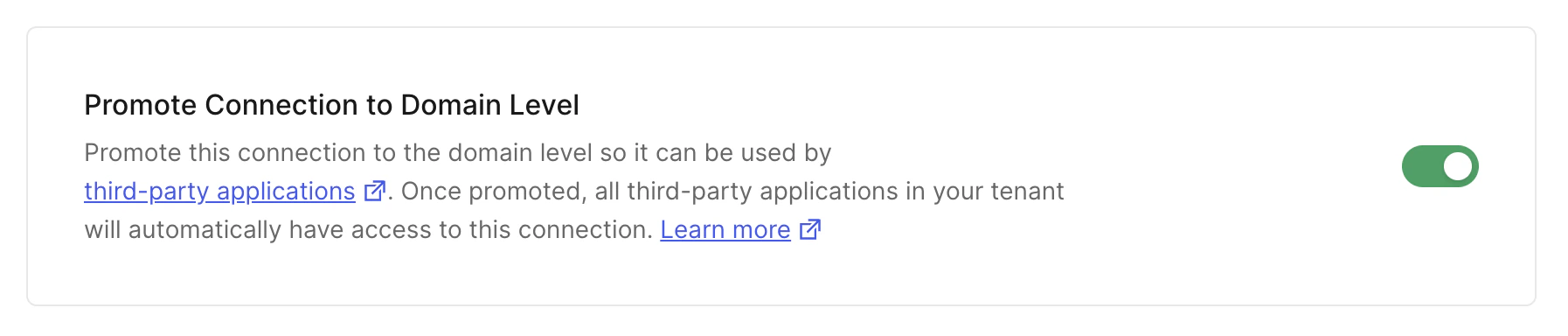 6. Cliquez sur **Save Changes**.
Vous pouvez également promouvoir une connexion en effectuant une requête `PATCH` vers le [point de terminaison Update a Connection](https://auth0.com/docs/api/management/v2#!/Connections/patch_connections_by_id) de la Management API. Assurez-vous de remplacer les valeurs de l'espace réservé `CONNECTION_ID` et `MGMT_API_ACCESS_TOKEN` par vos propres informations.
```bash cURL theme={null}
curl --request PATCH \
--url 'https://{yourDomain}/api/v2/connections/CONNECTION_ID' \
--header 'authorization: Bearer MGMT_API_ACCESS_TOKEN' \
--header 'cache-control: no-cache' \
--header 'content-type: application/json' \
--data '{ "is_domain_connection": true }'
```
```csharp C# theme={null}
var client = new RestClient("https://{yourDomain}/api/v2/connections/CONNECTION_ID");
var request = new RestRequest(Method.PATCH);
request.AddHeader("content-type", "application/json");
request.AddHeader("authorization", "Bearer MGMT_API_ACCESS_TOKEN");
request.AddHeader("cache-control", "no-cache");
request.AddParameter("application/json", "{ "is_domain_connection": true }", ParameterType.RequestBody);
IRestResponse response = client.Execute(request);
```
```go Go theme={null}
package main
import (
"fmt"
"strings"
"net/http"
"io/ioutil"
)
func main() {
url := "https://{yourDomain}/api/v2/connections/CONNECTION_ID"
payload := strings.NewReader("{ "is_domain_connection": true }")
req, _ := http.NewRequest("PATCH", url, payload)
req.Header.Add("content-type", "application/json")
req.Header.Add("authorization", "Bearer MGMT_API_ACCESS_TOKEN")
req.Header.Add("cache-control", "no-cache")
res, _ := http.DefaultClient.Do(req)
defer res.Body.Close()
body, _ := ioutil.ReadAll(res.Body)
fmt.Println(res)
fmt.Println(string(body))
}
```
```java Java theme={null}
HttpResponse response = Unirest.patch("https://{yourDomain}/api/v2/connections/CONNECTION_ID")
.header("content-type", "application/json")
.header("authorization", "Bearer MGMT_API_ACCESS_TOKEN")
.header("cache-control", "no-cache")
.body("{ "is_domain_connection": true }")
.asString();
```
```javascript Node.JS theme={null}
var axios = require("axios").default;
var options = {
method: 'PATCH',
url: 'https://{yourDomain}/api/v2/connections/CONNECTION_ID',
headers: {
'content-type': 'application/json',
authorization: 'Bearer MGMT_API_ACCESS_TOKEN',
'cache-control': 'no-cache'
},
data: {is_domain_connection: true}
};
axios.request(options).then(function (response) {
console.log(response.data);
}).catch(function (error) {
console.error(error);
});
```
```php PHP theme={null}
$curl = curl_init();
curl_setopt_array($curl, [
CURLOPT_URL => "https://{yourDomain}/api/v2/connections/CONNECTION_ID",
CURLOPT_RETURNTRANSFER => true,
CURLOPT_ENCODING => "",
CURLOPT_MAXREDIRS => 10,
CURLOPT_TIMEOUT => 30,
CURLOPT_HTTP_VERSION => CURL_HTTP_VERSION_1_1,
CURLOPT_CUSTOMREQUEST => "PATCH",
CURLOPT_POSTFIELDS => "{ "is_domain_connection": true }",
CURLOPT_HTTPHEADER => [
"authorization: Bearer MGMT_API_ACCESS_TOKEN",
"cache-control: no-cache",
"content-type: application/json"
],
]);
$response = curl_exec($curl);
$err = curl_error($curl);
curl_close($curl);
if ($err) {
echo "cURL Error #:" . $err;
} else {
echo $response;
}
```
```python Python theme={null}
import http.client
conn = http.client.HTTPSConnection("")
payload = "{ "is_domain_connection": true }"
headers = {
'content-type': "application/json",
'authorization': "Bearer MGMT_API_ACCESS_TOKEN",
'cache-control': "no-cache"
}
conn.request("PATCH", "/{yourDomain}/api/v2/connections/CONNECTION_ID", payload, headers)
res = conn.getresponse()
data = res.read()
print(data.decode("utf-8"))
```
```ruby Ruby theme={null}
require 'uri'
require 'net/http'
require 'openssl'
url = URI("https://{yourDomain}/api/v2/connections/CONNECTION_ID")
http = Net::HTTP.new(url.host, url.port)
http.use_ssl = true
http.verify_mode = OpenSSL::SSL::VERIFY_PEER
request = Net::HTTP::Patch.new(url)
request["content-type"] = 'application/json'
request["authorization"] = 'Bearer MGMT_API_ACCESS_TOKEN'
request["cache-control"] = 'no-cache'
request.body = "{ "is_domain_connection": true }"
response = http.request(request)
puts response.read_body
```
| Valeur | Description |
| ----------------------- | ----------------------------------------------------------------------------------------------------------------------------------------------------------------- |
| `CONNECTION_ID` | L’ID de la connexion à promouvoir. |
| `MGMT_API_ACCESS_TOKEN` | [Jeton d’accès pour l’API Management](https://auth0.com/docs/api/management/v2/tokens) doté de la [portée](/docs/fr-ca/glossary?term=scope) `update:connections`. |
6. Cliquez sur **Save Changes**.
Vous pouvez également promouvoir une connexion en effectuant une requête `PATCH` vers le [point de terminaison Update a Connection](https://auth0.com/docs/api/management/v2#!/Connections/patch_connections_by_id) de la Management API. Assurez-vous de remplacer les valeurs de l'espace réservé `CONNECTION_ID` et `MGMT_API_ACCESS_TOKEN` par vos propres informations.
```bash cURL theme={null}
curl --request PATCH \
--url 'https://{yourDomain}/api/v2/connections/CONNECTION_ID' \
--header 'authorization: Bearer MGMT_API_ACCESS_TOKEN' \
--header 'cache-control: no-cache' \
--header 'content-type: application/json' \
--data '{ "is_domain_connection": true }'
```
```csharp C# theme={null}
var client = new RestClient("https://{yourDomain}/api/v2/connections/CONNECTION_ID");
var request = new RestRequest(Method.PATCH);
request.AddHeader("content-type", "application/json");
request.AddHeader("authorization", "Bearer MGMT_API_ACCESS_TOKEN");
request.AddHeader("cache-control", "no-cache");
request.AddParameter("application/json", "{ "is_domain_connection": true }", ParameterType.RequestBody);
IRestResponse response = client.Execute(request);
```
```go Go theme={null}
package main
import (
"fmt"
"strings"
"net/http"
"io/ioutil"
)
func main() {
url := "https://{yourDomain}/api/v2/connections/CONNECTION_ID"
payload := strings.NewReader("{ "is_domain_connection": true }")
req, _ := http.NewRequest("PATCH", url, payload)
req.Header.Add("content-type", "application/json")
req.Header.Add("authorization", "Bearer MGMT_API_ACCESS_TOKEN")
req.Header.Add("cache-control", "no-cache")
res, _ := http.DefaultClient.Do(req)
defer res.Body.Close()
body, _ := ioutil.ReadAll(res.Body)
fmt.Println(res)
fmt.Println(string(body))
}
```
```java Java theme={null}
HttpResponse response = Unirest.patch("https://{yourDomain}/api/v2/connections/CONNECTION_ID")
.header("content-type", "application/json")
.header("authorization", "Bearer MGMT_API_ACCESS_TOKEN")
.header("cache-control", "no-cache")
.body("{ "is_domain_connection": true }")
.asString();
```
```javascript Node.JS theme={null}
var axios = require("axios").default;
var options = {
method: 'PATCH',
url: 'https://{yourDomain}/api/v2/connections/CONNECTION_ID',
headers: {
'content-type': 'application/json',
authorization: 'Bearer MGMT_API_ACCESS_TOKEN',
'cache-control': 'no-cache'
},
data: {is_domain_connection: true}
};
axios.request(options).then(function (response) {
console.log(response.data);
}).catch(function (error) {
console.error(error);
});
```
```php PHP theme={null}
$curl = curl_init();
curl_setopt_array($curl, [
CURLOPT_URL => "https://{yourDomain}/api/v2/connections/CONNECTION_ID",
CURLOPT_RETURNTRANSFER => true,
CURLOPT_ENCODING => "",
CURLOPT_MAXREDIRS => 10,
CURLOPT_TIMEOUT => 30,
CURLOPT_HTTP_VERSION => CURL_HTTP_VERSION_1_1,
CURLOPT_CUSTOMREQUEST => "PATCH",
CURLOPT_POSTFIELDS => "{ "is_domain_connection": true }",
CURLOPT_HTTPHEADER => [
"authorization: Bearer MGMT_API_ACCESS_TOKEN",
"cache-control: no-cache",
"content-type: application/json"
],
]);
$response = curl_exec($curl);
$err = curl_error($curl);
curl_close($curl);
if ($err) {
echo "cURL Error #:" . $err;
} else {
echo $response;
}
```
```python Python theme={null}
import http.client
conn = http.client.HTTPSConnection("")
payload = "{ "is_domain_connection": true }"
headers = {
'content-type': "application/json",
'authorization': "Bearer MGMT_API_ACCESS_TOKEN",
'cache-control': "no-cache"
}
conn.request("PATCH", "/{yourDomain}/api/v2/connections/CONNECTION_ID", payload, headers)
res = conn.getresponse()
data = res.read()
print(data.decode("utf-8"))
```
```ruby Ruby theme={null}
require 'uri'
require 'net/http'
require 'openssl'
url = URI("https://{yourDomain}/api/v2/connections/CONNECTION_ID")
http = Net::HTTP.new(url.host, url.port)
http.use_ssl = true
http.verify_mode = OpenSSL::SSL::VERIFY_PEER
request = Net::HTTP::Patch.new(url)
request["content-type"] = 'application/json'
request["authorization"] = 'Bearer MGMT_API_ACCESS_TOKEN'
request["cache-control"] = 'no-cache'
request.body = "{ "is_domain_connection": true }"
response = http.request(request)
puts response.read_body
```
| Valeur | Description |
| ----------------------- | ----------------------------------------------------------------------------------------------------------------------------------------------------------------- |
| `CONNECTION_ID` | L’ID de la connexion à promouvoir. |
| `MGMT_API_ACCESS_TOKEN` | [Jeton d’accès pour l’API Management](https://auth0.com/docs/api/management/v2/tokens) doté de la [portée](/docs/fr-ca/glossary?term=scope) `update:connections`. |