> ## Documentation Index
> Fetch the complete documentation index at: https://translations.mintlify.site/llms.txt
> Use this file to discover all available pages before exploring further.
> OIDC バックチャネルログアウトイニシエーターの仕組みと、アプリケーションでの設定方法について説明します。
# OIDC バックチャネルログアウトイニシエーター
export const AuthCodeBlock = ({filename, icon, language, highlight, children}) => {
const [displayText, setDisplayText] = useState(children);
const [copyText, setCopyText] = useState(children);
const wrapperRef = React.useRef(null);
useEffect(() => {
let unsubscribe = null;
function init() {
if (!window.autorun || !window.rootStore) {
return;
}
unsubscribe = window.autorun(() => {
let processedChildrenForDisplay = children;
let processedChildrenForCopy = children;
for (const [key, value] of window.rootStore.variableStore.values.entries()) {
const escapedKey = key.replaceAll(/[.*+?^${}()|[\]\\]/g, (String.raw)`\$&`);
let displayValue = value;
if (key === "{yourClientSecret}" && value !== "{yourClientSecret}") {
displayValue = value.substring(0, 3) + "*****MASKED*****";
}
processedChildrenForDisplay = processedChildrenForDisplay.replaceAll(new RegExp(escapedKey, "g"), displayValue);
processedChildrenForCopy = processedChildrenForCopy.replaceAll(new RegExp(escapedKey, "g"), value);
}
setDisplayText(processedChildrenForDisplay);
setCopyText(processedChildrenForCopy);
});
}
if (window.rootStore) {
init();
} else {
window.addEventListener("adu:storeReady", init);
}
return () => {
window.removeEventListener("adu:storeReady", init);
unsubscribe?.();
};
}, [children]);
useEffect(() => {
if (!wrapperRef.current) return;
const originalWriteText = navigator.clipboard.writeText.bind(navigator.clipboard);
let isOverriding = false;
const handleClick = e => {
const button = e.target.closest('[data-testid="copy-code-button"]');
if (!button || !wrapperRef.current.contains(button)) return;
isOverriding = true;
navigator.clipboard.writeText = text => {
if (isOverriding) {
isOverriding = false;
navigator.clipboard.writeText = originalWriteText;
return originalWriteText(copyText);
}
return originalWriteText(text);
};
setTimeout(() => {
if (isOverriding) {
isOverriding = false;
navigator.clipboard.writeText = originalWriteText;
}
}, 100);
};
const wrapper = wrapperRef.current;
wrapper.addEventListener('click', handleClick, true);
return () => {
wrapper.removeEventListener('click', handleClick, true);
if (navigator.clipboard.writeText !== originalWriteText) {
navigator.clipboard.writeText = originalWriteText;
}
};
}, [copyText]);
return
{displayText}
;
};
OIDC バックチャネルログアウトイニシエーター を使用すると、セッション終了イベントに基づいて、ユーザーを各アプリケーションからリモートでログアウトさせることができます。OIDC バックチャネルログアウトイニシエーター はプロトコルをまたいで機能します。たとえば、アイデンティティプロバイダー主導の (IdP-initiated) SAMLログアウトリクエストなどに対応しており、サードパーティ Cookie の制限による影響も受けません。
この機能は、標準の OIDC back-channel 仕様を拡張したものです。パスワード変更やセッションの有効期限切れなど、特定のセッション終了イベントに対して OIDC Back-Channel Logout リクエストを開始するよう設定することも、すべてのセッション終了イベントに対して開始するよう設定することもできます。
管理者は、Auth0 の Management API を使用して、この機能を特定のアプリケーションに対して有効にできます。
## OIDC Back-Channel Logout Initiator の仕組み
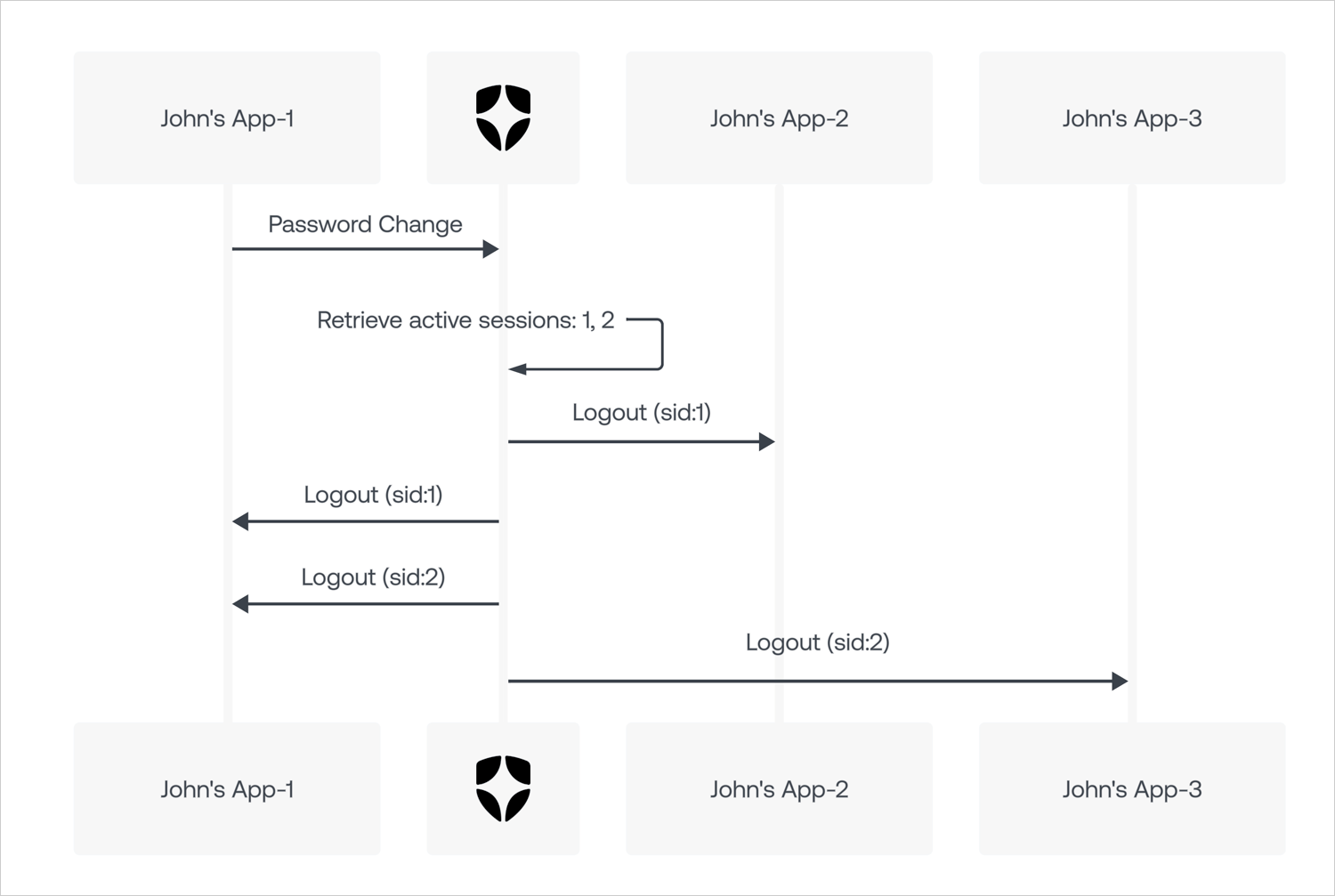
Initiator は、OIDC Back-Channel Logout のレスポンスをセッション終了イベントに関連付けます。イベントを検知し、それを利用して、指定されたセッションに関連付けられたすべてのアプリケーションで OIDC ログアウトトークンをトリガーします。
Initiator は、セッション終了イベントを含む、テナント内のセッション管理を制御するものではありません。
次の図は、パスワード変更イベントに対して OIDC Back-Channel Logout Initiator がどのように機能するかを示しています。
## OIDC バックチャネルログアウトイニシエーターを設定する
Auth0 Management API を使用して、OIDC バックチャネルログアウトイニシエーターを設定できます。
### Management API
[Update a Client](https://auth0.com/docs/api/management/v2/clients/patch-clients-by-id) エンドポイントを使用すると、Management API でアプリケーションの OIDC バックチャネルログアウトイニシエーター を設定できます。
1. `update:clients` scope を持つ [Management API access token](/docs/ja-jp/secure/tokens/access-tokens/management-api-access-tokens) を取得します。
2. 適切な設定データを payload に含めて、[Update a Client](https://auth0.com/docs/api/management/v2/clients/patch-clients-by-id) エンドポイントを呼び出します。たとえば、password change イベントの後にアプリケーションをログアウトさせるには、次のように指定します。
export const codeExample1 = ` PATCH /api/v2/clients/{yourClientId}
{
...
"oidc_logout": {
"backchannel_logout_urls": ["https://example.com/cb"]
"backchannel_logout_initiators": {
"mode":"custom",
"selected_initiators": ["rp-logout", "idp-logout", "password-changed"]
}
}
...
}
`;
#### プロパティ
`backchannel_logout_initiators` オブジェクトでは、次のプロパティをサポートしています。
| プロパティ | 型 | 必須? | 説明 | 指定可能な値 |
| --------------------- | --- | ------------------------ | --------------------- | ---------------------------------------------------------------------------------------------------------------------------------- |
| `mode` | 文字列 | 必須 | イニシエーターを有効にするための設定方法。 | `custom`, `all` |
| `selected_initiators` | 配列 | `mode` が `custom` の場合は必須 | 有効にするイニシエーターの一覧。 | `rp-logout`, `idp-logout`, `password-changed`, `session-expired`, `session-revoked`, `account-deleted`, `email-identifier-changed` |
##### `mode` プロパティ
`mode` プロパティは、イニシエーターを有効にするための設定方法を指定します。
デフォルトでは `custom` に設定されており、有効にするイニシエーターを指定できます。IdP のセッションが終了するたびにアプリケーションをログアウトさせたい場合は、`all` に設定します。
`mode` プロパティでは、次の値を使用できます。
| 値 | 説明 |
| -------- | ----------------------------------------------- |
| `custom` | `selected_initiators` 配列に指定されたイニシエーターのみを有効にします。 |
| `all` | 現在および今後追加されるすべてのイニシエーターを自動的に有効にします。 |
##### `selected_initiators` プロパティ
`selected_initiators` プロパティには、指定されたアプリケーションで有効にするイニシエーターの一覧が含まれます。
`selected_initiators` プロパティでは、次の値を指定できます。
| Value | Description |
| -------------------------- | ---------------------------------------------- |
| `rp-logout` | リクエストが Relying Party (RP) によって開始されたことを示します。 |
| `idp-logout` | リクエストが外部アイデンティティプロバイダー (IdP) によって開始されたことを示します。 |
| `password-changed` | リクエストがパスワード変更によって開始されたことを示します。 |
| `session-expired` | リクエストがセッションの有効期限切れによって開始されたことを示します。 |
| `session-revoked` | リクエストがセッションの削除によって開始されたことを示します。 |
| `account-deleted` | リクエストがアカウントの削除によって開始されたことを示します。 |
| `email-identifier-changed` | リクエストがメールアドレス識別子の変更によって開始されたことを示します。 |
#### 例
##### アプリケーションを現在および今後のすべてのイニシエーターに登録する
export const codeExample2 = `PATCH /api/v2/clients/{yourClientId}
{
...
"oidc_logout": {
"backchannel_logout_urls": ["https://example.com/cb"]
"backchannel_logout_initiators": {
"mode":"all"
}
}
...
}`;
##### アプリケーションを password-changed イニシエーターのみに登録する (rp-logout と idp-logout が必要)
export const codeExample3 = `PATCH /api/v2/clients/{yourClientId}
{
...
"oidc_logout": {
"backchannel_logout_urls": ["https://example.com/cb"]
"backchannel_logout_initiators": {
"mode":"custom",
"selected_initiators": ["rp-logout", "idp-logout", "password-changed"]
}
}
...
}`;
##### すべてのイニシエーターの購読を解除する (デフォルトは引き続き rp-logout)
export const codeExample4 = `PATCH /api/v2/clients/{yourClientId}
{
...
"oidc_logout": {
"backchannel_logout_urls": ["https://example.com/cb"]
}
...
}`;
### Auth0 Dashboard
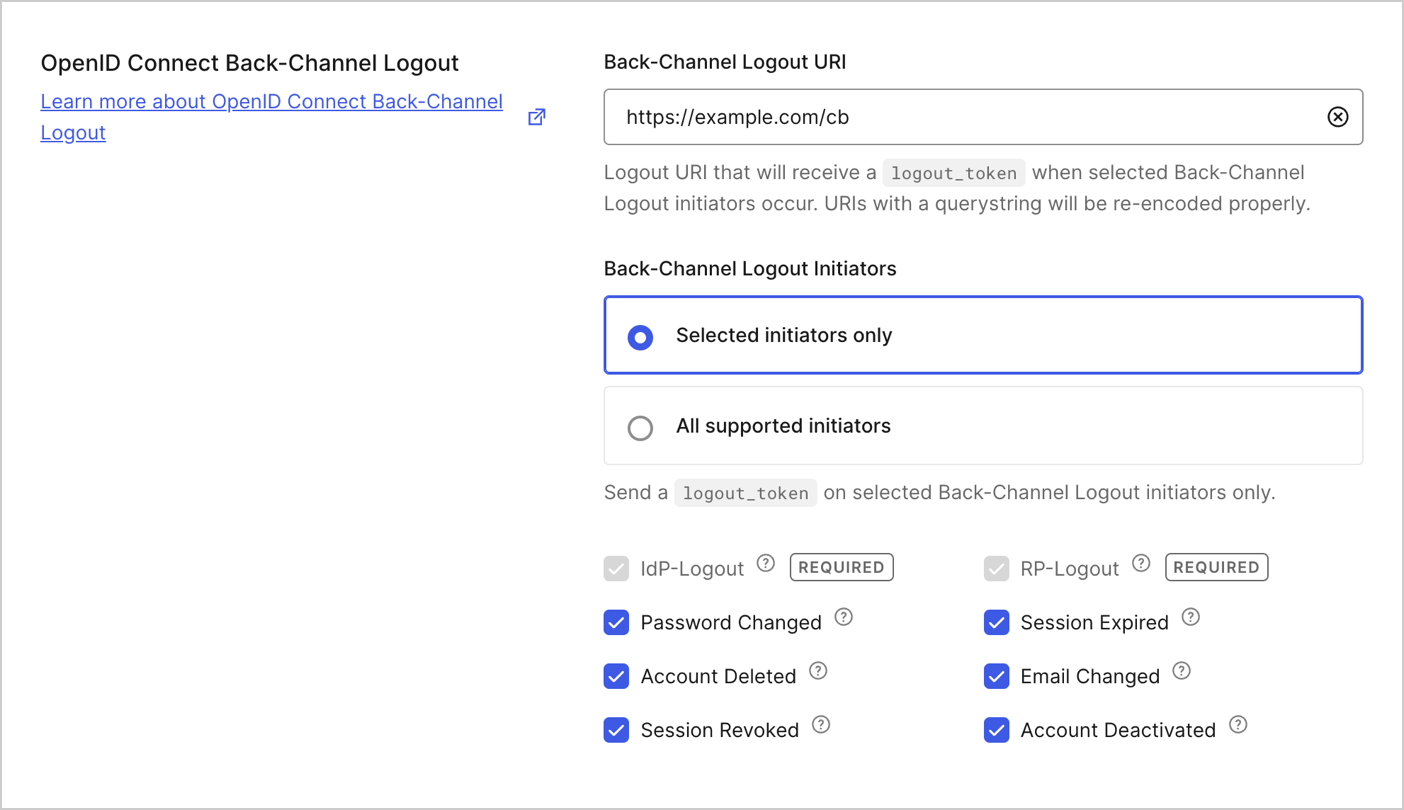
OpenID Connect バックチャネルログアウトは、ほかのアプリケーション設定とあわせて設定できます。この機能は、バックチャネルログアウト URI を指定すると自動的に有効になります。
#### 選択したイニシエータのみ
デフォルトでは、必要なイニシエータ (`rp-logout` と `idp-logout`) のみが自動的に選択されます。今後追加されるものも含め、それ以外のイニシエーターがアプリケーションからのログアウトを開始できるようにするには、事前に選択しておく必要があります。
選択したイニシエータからのログアウトのみを許可する場合は、このオプションを選択します。
#### サポート対象のすべてのイニシエーター
今後追加されるものを含め、サポート対象のすべてのイニシエーターがデフォルトで購読対象になります。
IdP セッションが終了するたびにアプリケーションもログアウトさせたい場合は、このオプションを選択します。