> ## Documentation Index
> Fetch the complete documentation index at: https://translations.mintlify.site/llms.txt
> Use this file to discover all available pages before exploring further.
> returnTo と許可されたログアウト URL を渡して、従来の logout エンドポイントを使用し、サインアウト後にユーザーを URL へリダイレクトする方法を学びます。
# 代替の Logout でユーザーをリダイレクトする
export const AuthCodeBlock = ({filename, icon, language, highlight, children}) => {
const [displayText, setDisplayText] = useState(children);
const [copyText, setCopyText] = useState(children);
const wrapperRef = React.useRef(null);
useEffect(() => {
let unsubscribe = null;
function init() {
if (!window.autorun || !window.rootStore) {
return;
}
unsubscribe = window.autorun(() => {
let processedChildrenForDisplay = children;
let processedChildrenForCopy = children;
for (const [key, value] of window.rootStore.variableStore.values.entries()) {
const escapedKey = key.replaceAll(/[.*+?^${}()|[\]\\]/g, (String.raw)`\$&`);
let displayValue = value;
if (key === "{yourClientSecret}" && value !== "{yourClientSecret}") {
displayValue = value.substring(0, 3) + "*****MASKED*****";
}
processedChildrenForDisplay = processedChildrenForDisplay.replaceAll(new RegExp(escapedKey, "g"), displayValue);
processedChildrenForCopy = processedChildrenForCopy.replaceAll(new RegExp(escapedKey, "g"), value);
}
setDisplayText(processedChildrenForDisplay);
setCopyText(processedChildrenForCopy);
});
}
if (window.rootStore) {
init();
} else {
window.addEventListener("adu:storeReady", init);
}
return () => {
window.removeEventListener("adu:storeReady", init);
unsubscribe?.();
};
}, [children]);
useEffect(() => {
if (!wrapperRef.current) return;
const originalWriteText = navigator.clipboard.writeText.bind(navigator.clipboard);
let isOverriding = false;
const handleClick = e => {
const button = e.target.closest('[data-testid="copy-code-button"]');
if (!button || !wrapperRef.current.contains(button)) return;
isOverriding = true;
navigator.clipboard.writeText = text => {
if (isOverriding) {
isOverriding = false;
navigator.clipboard.writeText = originalWriteText;
return originalWriteText(copyText);
}
return originalWriteText(text);
};
setTimeout(() => {
if (isOverriding) {
isOverriding = false;
navigator.clipboard.writeText = originalWriteText;
}
}, 100);
};
const wrapper = wrapperRef.current;
wrapper.addEventListener('click', handleClick, true);
return () => {
wrapper.removeEventListener('click', handleClick, true);
if (navigator.clipboard.writeText !== originalWriteText) {
navigator.clipboard.writeText = originalWriteText;
}
};
}, [copyText]);
return
{displayText}
;
};
ユーザーは、ログアウト後に特定の URL へリダイレクトできます。リダイレクト URL は、テナントまたはアプリケーションの設定に登録する必要があります。Auth0 では、ログアウト後は許可リストに登録された URL にのみリダイレクトされます。アプリケーションごとに異なるリダイレクト先が必要な場合は、各アプリケーションの設定にある許可リストへ URL を追加できます。
1. リダイレクト先 URL を値として `returnTo` クエリ文字列パラメーターを追加します。渡すリダイレクト先 URL はエンコードしてください。たとえば、ログアウト後にユーザーを `https://www.example.com` にリダイレクトするには、次のリクエストを送信します:
`https://{yourDomain}/v2/logout?returnTo=https%3A%2F%2Fwww.example.com`.
2. エンコードしていない `returnTo` URL (たとえば `https://www.example.com`) を、次の 2 か所のいずれかにある **Allowed Logout URLs** に追加します:
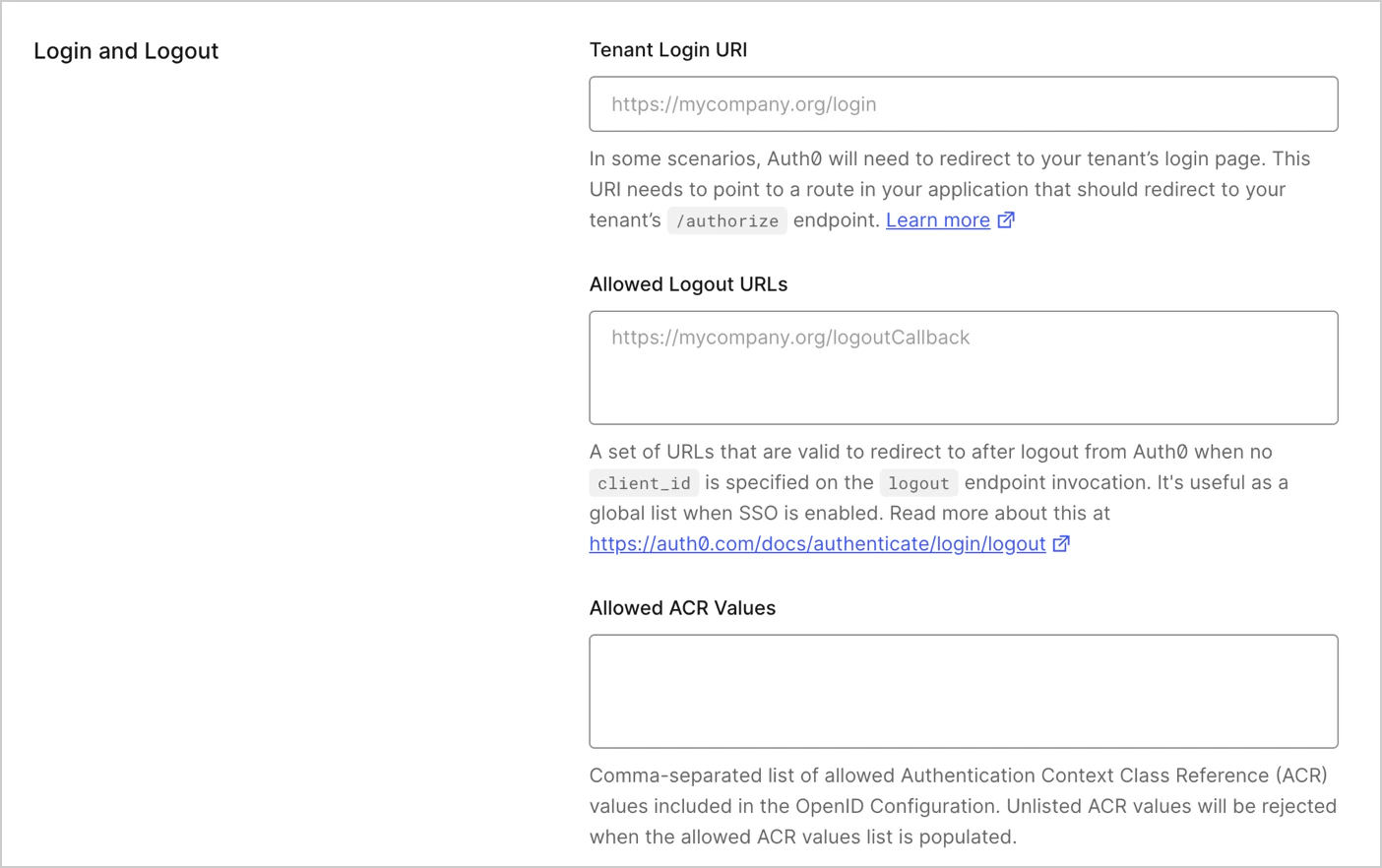
* **Tenant Settings**: `client_id` パラメーターを含まない logout リクエストでは、`returnTo` URL を [Tenant Settings の Advanced タブ](https://manage.auth0.com/#/tenant/advanced)にある **Allowed Logout URLs** リストに追加する必要があります。
テナントレベルで、ログアウト後にユーザーをリダイレクトできる URL の一覧を追加するには、Auth0 Dashboard の [Tenant Settings > Advanced](https://manage.auth0.com/#/tenant/advanced) に移動します。
 * **Auth0 Application Settings**: `client_id` パラメーターを含む logout リクエストでは、関連付けられた Auth0 アプリケーションの **Settings** タブにある **Allowed Logout URLs** リストに `returnTo` URL を追加する必要があります。
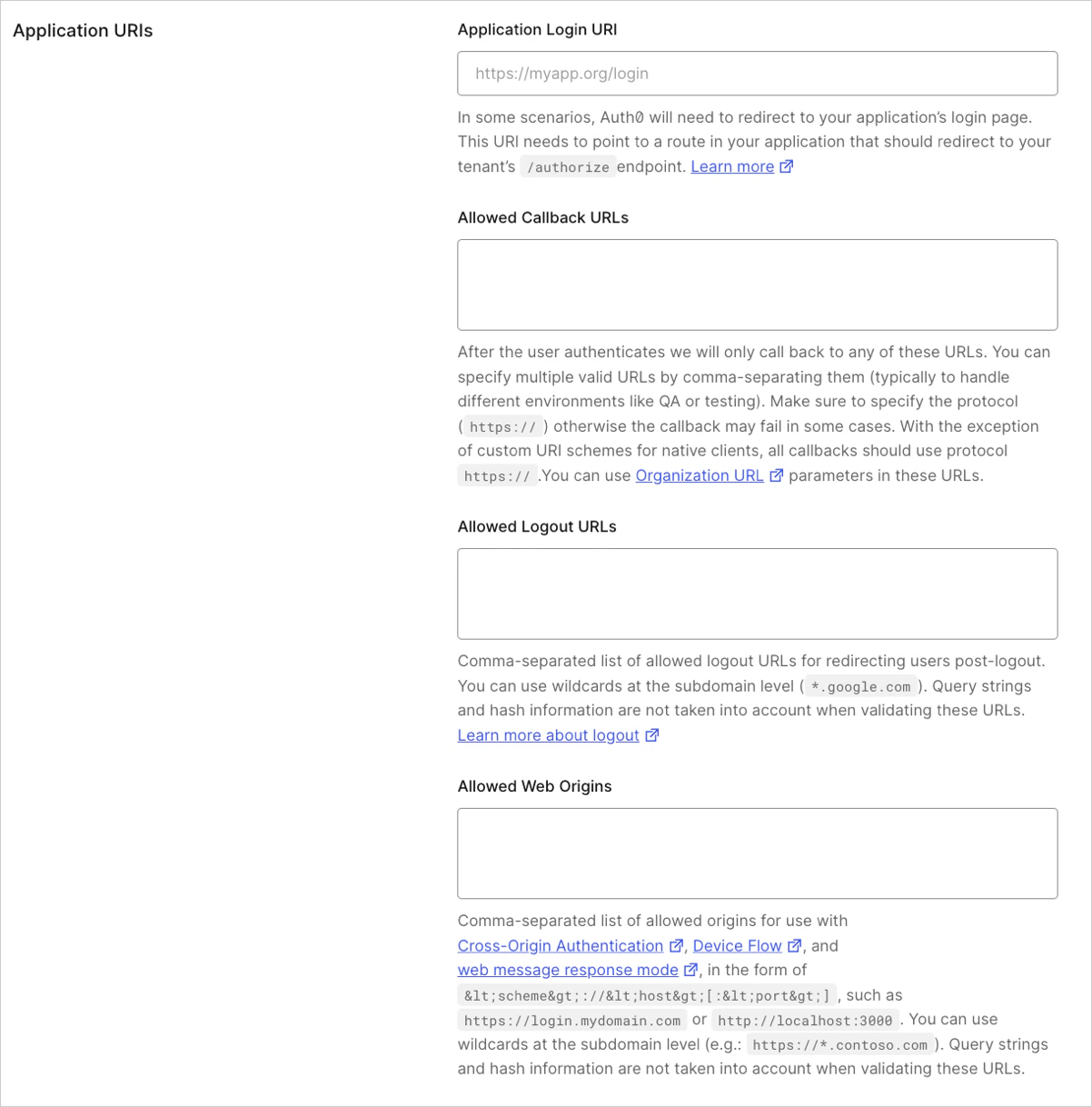 URL リストを指定する際は、次のことができます:
1. 有効な URL をカンマ区切りで複数指定する。
2. `*` を[サブドメイン用のワイルドカード](/docs/ja-jp/get-started/applications/wildcards-for-subdomains)として使用する (例: `http://*.example.com`) 。
`client_id` パラメーターが含まれていて、`returnTo` URL が設定されていない場合、サーバーはユーザーを Auth0 Dashboard で最初に設定されている Allowed Logout URLs にリダイレクトします。
検証エラーを避けるため、URL には必ずプロトコル部分を含めてください。たとえば、値を `*.example.com` に設定すると検証エラーになるため、代わりに `http://*.example.com` を使用する必要があります。
Auth0 の `oidc/logout` エンドポイントを使用してリダイレクトするには、[Use OIDC Endpoint to Log Users Out of Auth0](/docs/ja-jp/authenticate/login/logout/log-users-out-of-auth0) を参照してください。
URL リストを指定する際は、次のことができます:
1. 有効な URL をカンマ区切りで複数指定する。
2. `*` を[サブドメイン用のワイルドカード](/docs/ja-jp/get-started/applications/wildcards-for-subdomains)として使用する (例: `http://*.example.com`) 。
`client_id` パラメーターが含まれていて、`returnTo` URL が設定されていない場合、サーバーはユーザーを Auth0 Dashboard で最初に設定されている Allowed Logout URLs にリダイレクトします。
検証エラーを避けるため、URL には必ずプロトコル部分を含めてください。たとえば、値を `*.example.com` に設定すると検証エラーになるため、代わりに `http://*.example.com` を使用する必要があります。
Auth0 の `oidc/logout` エンドポイントを使用してリダイレクトするには、[Use OIDC Endpoint to Log Users Out of Auth0](/docs/ja-jp/authenticate/login/logout/log-users-out-of-auth0) を参照してください。
## フェデレーテッドログアウト
[いくつかのプロバイダー](/docs/ja-jp/authenticate/login/logout/log-users-out-of-idps#federated-logout-support) はフェデレーテッドログアウトをサポートしています。
フェデレーテッドログアウトを使用するアプリケーションからユーザーをリダイレクトするには、次のエンドポイントでフェデレーテッドログアウトを開始します。
`https://{yourDomain}/v2/logout?federated`
リダイレクトする前に、アプリケーションでユーザーセッションを終了しておく必要があります。
ユーザーが `/logout` エンドポイントにアクセスすると、Auth0 は Auth0 のセッションを終了し、ユーザーをIDプロバイダーの logout エンドポイントにリダイレクトしたうえで、IDプロバイダーとのセッションも終了します。
## 制限事項
* `returnTo` パラメーターの値として指定された URL の検証、query string、および URL の一部として含まれるハッシュ情報は考慮されません。
* ソーシャルプロバイダーにおけるフェデレーテッドログアウトの動作には一貫性がありません。各プロバイダーで `returnTo` パラメーターの扱いが異なり、プロバイダーによっては機能しない場合もあります。`returnTo` パラメーターを受け入れるかどうか、およびどのように動作するかを、ソーシャルプロバイダーの設定で確認してください。
* **Allowed Logout URLs** リストに指定された URL では大文字と小文字が区別されるため、ログアウトに使用する URL は、Auth0 Dashboard で設定したログアウト URL と大文字小文字まで一致している必要があります。ただし、スキーム部分とホスト部分は大文字と小文字を区別しません。たとえば、URL が `http://www.Example.Com/FooHoo.html` の場合、`http://www.Example.Com` の部分は大文字小文字を区別しませんが、`FooHoo.html` の部分は区別されます。
Google や Facebook などのソーシャルアイデンティティプロバイダーを使用している場合は、ログアウトが正しく機能するよう、[Auth0 Dashboard](https://manage.auth0.com/#) でそれらのプロバイダーの `Client ID` と `Secret` を設定する必要があります。
## Facebook の追加要件
ログアウト後のリダイレクト先を指定するには、`returnTo` パラメーターを使用します。
すべての IdP が `returnTo` をサポートしているわけではありません。
Facebook では、以下のコード例で `returnTo` パラメーターを使用し、リダイレクト先の Web サイトを指定しています。
export const codeExample = `https://{yourDomain}/v2/logout?federated&
returnTo=https://{yourDomain}/logout?returnTo=http://www.example.com
&access_token={facebookAccessToken}`;
## 詳細情報
* [アプリケーションからユーザーをログアウトさせる](/docs/ja-jp/authenticate/login/logout/log-users-out-of-applications)
* [OIDCエンドポイントを使用して Auth0 からユーザーをログアウトさせる](/docs/ja-jp/authenticate/login/logout/log-users-out-of-auth0)
* [IDプロバイダーからユーザーをログアウトさせる](/docs/ja-jp/authenticate/login/logout/log-users-out-of-idps)
* [SAML IDプロバイダーからユーザーをログアウトさせる](/docs/ja-jp/authenticate/login/logout/log-users-out-of-saml-idps)