> ## Documentation Index
> Fetch the complete documentation index at: https://translations.mintlify.site/llms.txt
> Use this file to discover all available pages before exploring further.
# カスタムトークン交換
> Auth0 Authorization Server がユーザーのログインのためにカスタムトークン交換リクエストを受信した際に実行される、カスタムトークン交換 Actions について説明します。
カスタムトークン交換 (CTE) は現在、すべての Auth0 B2C Professional、B2B Professional、Enterprise のお客様に早期アクセスとして提供されています。この機能を使用することで、[Okta の Master Subscription Agreement](https://www.okta.com/legal/) に記載されている該当する Free Trial 条項に同意したものとみなされます。Auth0 の製品リリースサイクルの詳細については、[製品リリースステージ](/docs/ja-jp/troubleshoot/product-lifecycle/product-release-stages)を参照してください。サブスクリプションの種類の詳細については、Auth0 の[料金](https://auth0.com/pricing)ページを参照してください。
`custom-token-exchange` トリガーは、Auth0 パイプラインの最初のステップです。Auth0 Authorization Server がカスタムトークン交換リクエストを検証し、それが既存の[カスタムトークン交換プロファイル](/docs/ja-jp/authenticate/custom-token-exchange/configure-custom-token-exchange#create-custom-token-exchange-profile)にマッピングされていることを確認すると、トリガーはそのプロファイルに関連付けられた 1 つの Action を実行します。Action が正常に完了し、トランザクションのユーザーが設定されると、そのログイン済みユーザーに対して `post-login` Actions と残りの Auth0 パイプラインが実行されます。
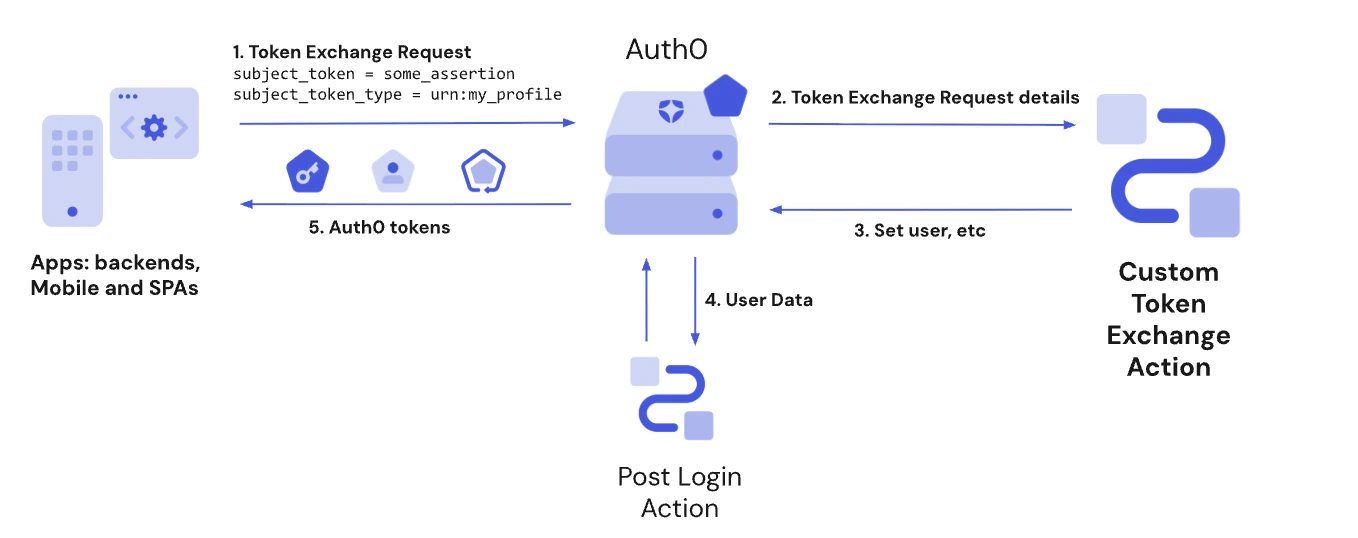 このフローの Actions はブロッキング (同期) であり、トリガー処理の一部として実行されます。Action が完了するまで、残りの Auth0 パイプラインは実行されません。
## カスタムトークン交換とPost Login Actionsの比較
Post Login Actionsトリガーは、トランザクションに設定したユーザーに対するカスタムトークン交換Actionの実行後に実行されます。アクセストークンにカスタムクレームを追加する場合など、その他のユースケースでは、[Post Login Actionトリガー](/docs/ja-jp/customize/actions/explore-triggers/post-login)を使用してください。
カスタムトークン交換ではトークン交換グラントタイプを使用します。この場合、Post Login Actionトリガーの`event.transaction.protocol`には`oauth2-token-exchange`が設定されます。カスタムトークン交換とネイティブソーシャルログインは、どちらもトークン交換グラントタイプを使用します。両者を区別するには、`subject_token_type`の値を使用します。この値は、いずれかのカスタムトークン交換プロファイルに対応している必要があります。
カスタムトークン交換の早期アクセスでは、`api.authentication.challengeWith()`および`api.authentication.enrollWith()`はサポートされていません。Post-Login Actionsでこれらのメソッドを使用すると、トランザクションは回復不能なエラーで失敗します。`subject_token_type`の値に応じて、`event.transaction.protocol === 'oauth2-token-exchange'`の場合は、必ずこれら2つのメソッドをスキップしてください。
## 委譲におけるアクターのサポート
`custom-token-exchange` トリガーは、委譲認可のシナリオをサポートします。Action は [`api.authentication.setActor()`](/docs/ja-jp/customize/actions/reference/custom-token-exchange/custom-token-exchange-api-object#api-authentication-setactor-actor) を呼び出すことで、発行されるトークンに `act` クレームを含め、対象ユーザーの代理で動作するプリンシパルを識別できます。
`setActor()` は、リクエストに `actor_token` が含まれているかどうかにかかわらず呼び出せます。`actor_token` パラメータは、呼び出し元アプリケーションがアクター情報を Action に渡す方法の1つですが、アクターのアイデンティティは `subject_token` 自体に埋め込むことも、Action コード内の別のカスタム手段で取得することもできます。
リクエストに `actor_token` と `actor_token_type` が含まれる場合、これらの値は [`event.transaction`](/docs/ja-jp/customize/actions/reference/custom-token-exchange/custom-token-exchange-event-object#event-transaction) で利用できます。`actor_token_type` が `urn:ietf:params:oauth:token-type:id_token` であり、そのトークンが同じ tenant の有効な Auth0 ID トークンである場合、サーバーは自動的にトークンを検証し、アクターのユーザープロファイルを `event.transaction.actor_token_user` に設定します。
`setActor()` で設定された `act` クレームは、Post-Login Actions でも [`event.transaction.actor`](/docs/ja-jp/customize/actions/reference/post-login/post-login-event-object#event-transaction) を通じて利用できます。
Auth0 では、コンテキストにアクターを含む Session Transfer Token を発行できるため、別のユーザーの代理として Web セッションを確立できます。詳細については、[Session Delegation](/docs/ja-jp/authenticate/single-sign-on/session-delegation) を参照してください。
## 参照
* [イベントオブジェクト](/docs/ja-jp/customize/actions/reference/custom-token-exchange/custom-token-exchange-event-object): `subject_token`、IPアドレス、クライアントなど、トークン交換リクエストに関するコンテキスト情報を提供します。
* [APIオブジェクト](/docs/ja-jp/customize/actions/reference/custom-token-exchange/custom-token-exchange-api-object): ユーザーの設定、委譲におけるアクターの設定、トランザクションの拒否、ユーザーメタデータの設定、Actionsキャッシュへのアクセスなどを行うための、Token Exchange Actionで使用できるメソッドを提供します。
## 一般的なユースケース
カスタムトークン交換の一般的なユースケースについては、[ユースケースの例](/docs/ja-jp/authenticate/custom-token-exchange/cte-example-use-cases)をご覧ください。