> ## Documentation Index
> Fetch the complete documentation index at: https://translations.mintlify.site/llms.txt
> Use this file to discover all available pages before exploring further.
# Password Reset Post Challenge
> ユーザーがパスワードリセット中に最初のチャレンジを完了した後、新しいパスワードを設定する前に実行されるPassword Reset Post Challenge Actionsについて説明します。
`post-challenge` トリガーは、パスワードリセット中に、ユーザーが最初のチャレンジ (通常は[ユーザーのメールアドレス](/docs/ja-jp/secure/multi-factor-authentication/authenticate-using-ropg-flow-with-mfa/enroll-and-challenge-email-authenticators)へのリンク) を完了した後、新しいパスワードを設定する前に実行されます。このトリガーを使用すると、追加の多要素認証 (MFA) 認証要素でユーザーにチャレンジを行ったり、サードパーティの検証サービスなどの外部サイトにユーザーをリダイレクトしたりできます。検証後、ユーザーはアカウントの新しいパスワードを設定できます。`post-challenge` トリガーを利用するActionは、tenantごとに最大4つ作成できます。
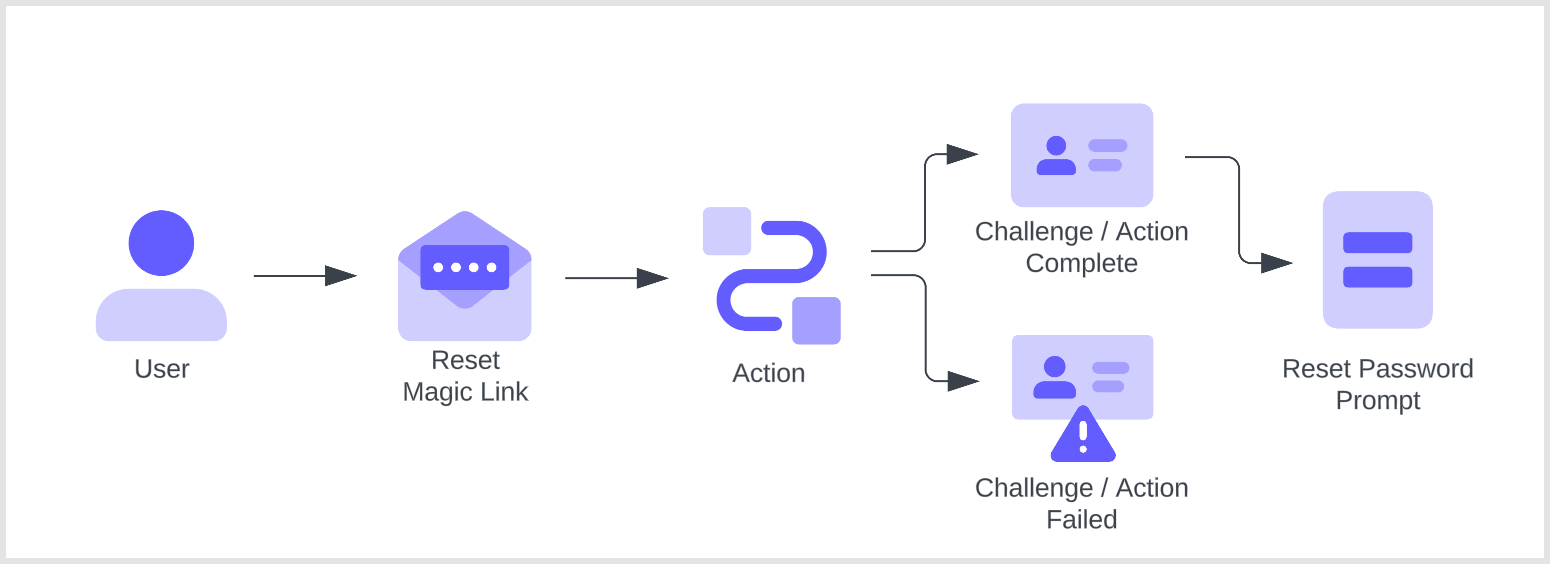 このフローのActionsはブロッキング (同期) です。トリガーの処理の一部として実行され、Actionが完了するまでAuth0 pipelineの残りの処理は実行されません。
これらのActionsを正しく実行するには、Universal Loginを有効にする必要があります。クラシックログインを使用している場合、これらのActionsはトリガーされません。
このフローのActionsはブロッキング (同期) です。トリガーの処理の一部として実行され、Actionが完了するまでAuth0 pipelineの残りの処理は実行されません。
これらのActionsを正しく実行するには、Universal Loginを有効にする必要があります。クラシックログインを使用している場合、これらのActionsはトリガーされません。
## リファレンス
* [イベントオブジェクト](/docs/ja-jp/customize/actions/reference/password-reset-post-challenge/password-reset-post-challenge-event-object): パスワードをリセットするユーザーに関するコンテキスト情報を提供します。
* [API object](/docs/ja-jp/customize/actions/reference/password-reset-post-challenge/password-reset-post-challenge-api-object): フローの動作を変更するためのメソッドを提供します。
## 制限事項
Password Reset トリガーでは、[Active Directory/LDAP 接続](/docs/ja-jp/authenticate/identity-providers/enterprise-identity-providers/active-directory-ldap)はサポートされていません。
## 一般的なユースケース
### 追加のMFA認証要素による安全なパスワードリセット
ユーザーが最初のチャレンジを完了した後、post-challenge ActionでMFAチャレンジを実行できます。たとえば、tenantでWebAuthnが認証要素として有効になっている場合、二次認証要素としてWebAuthnベースのチャレンジを実行できます。
```javascript lines theme={null}
/**
* @param {Event} event - パスワードをリセットするユーザーに関する詳細。
* @param {PasswordResetPostChallengeAPI} api - パスワードリセットの動作を変更できるメソッドを提供するインターフェース。
*/
exports.onExecutePostChallenge = async (event, api) => {
const enrolledFactors = event.user.enrolledFactors.map((x) => ({
type: x.type
}));
api.authentication.challengeWith({ type: 'webauthn-roaming' }, { additionalFactors: enrolledFactors });
};
```
### ユーザーをサードパーティアプリケーションにリダイレクトする
MFAチャレンジに加えて、カスタムActionにリダイレクトを追加することもできます。たとえば、サードパーティの検証サービスやリスク評価サービスにリダイレクトできます。このサンプルActionでは、ユーザーをサンプルアプリケーションにリダイレクトした後、Actionの処理を再開し、MFA認証要素によるチャレンジをユーザーに提示します。
```javascript lines theme={null}
/**
* @param {Event} event - パスワードをリセットするユーザーに関する情報。
* @param {PasswordResetPostChallengeAPI} api - パスワードリセットの動作を変更するためのメソッドを提供するインターフェース。
*/
exports.onExecutePostChallenge = async (event, api) => {
// ユーザーを https://my-app.example.com にリダイレクトする
api.redirect.sendUserTo('https://my-app.example.com');
};
/**
* @param {Event} event - パスワードをリセットするユーザーに関する情報。
* @param {PasswordResetPostChallengeAPI} api - パスワードリセットの動作を変更するためのメソッドを提供するインターフェース。
*/
exports.onContinuePostChallenge = async (event, api) => {
const enrolledFactors = event.user.enrolledFactors.map((x) => ({
type: x.type
}));
// メール OTP または登録済みの別の認証要素でユーザーにチャレンジする
api.authentication.challengeWith({ type: 'email' }, { additionalFactors: enrolledFactors });
// 複数の選択肢でユーザーにチャレンジする例
// この場合はメール OTP または SMS OTP
// api.authentication.challengeWithAny([{ type: 'email' }, { type: 'sms' }]);
};
```
Auth0 がユーザーをリダイレクトしている間は、Actions pipeline は実行されません。ユーザーが Auth0 のログインプロセスを続行すると、Actions pipeline が再開されます。リダイレクト前に実行された Actions が再度実行されることはありません。詳細については、[Redirect with Actions](/docs/ja-jp/customize/actions/redirect-with-actions) を参照してください。