> ## Documentation Index
> Fetch the complete documentation index at: https://translations.mintlify.site/llms.txt
> Use this file to discover all available pages before exploring further.
> Auth Dashboard または Management API を使用したルールの作成方法を説明します。
# ルールの作成
export const AuthCodeGroup = ({children, dropdown}) => {
const [processedChildren, setProcessedChildren] = useState(children);
useEffect(() => {
let unsubscribe = null;
function init() {
unsubscribe = window.autorun(() => {
const processChildren = node => {
if (typeof node === "string") {
let processedNode = node;
for (const [key, value] of window.rootStore.variableStore.values.entries()) {
const escapedKey = key.replaceAll(/[.*+?^${}()|[\]\\]/g, (String.raw)`\$&`);
processedNode = processedNode.replaceAll(new RegExp(escapedKey, "g"), value);
}
return processedNode;
} else if (Array.isArray(node)) {
return node.map(processChildren);
} else if (node && node.props && node.props.children) {
return {
...node,
props: {
...node.props,
children: processChildren(node.props.children)
}
};
}
return node;
};
setProcessedChildren(processChildren(children));
});
}
if (window.rootStore) {
init();
} else {
window.addEventListener("adu:storeReady", init);
}
return () => {
window.removeEventListener("adu:storeReady", init);
unsubscribe?.();
};
}, [children]);
return {processedChildren};
};
export const AuthCodeBlock = ({filename, icon, language, highlight, children}) => {
const [displayText, setDisplayText] = useState(children);
const [copyText, setCopyText] = useState(children);
const wrapperRef = React.useRef(null);
useEffect(() => {
let unsubscribe = null;
function init() {
if (!window.autorun || !window.rootStore) {
return;
}
unsubscribe = window.autorun(() => {
let processedChildrenForDisplay = children;
let processedChildrenForCopy = children;
for (const [key, value] of window.rootStore.variableStore.values.entries()) {
const escapedKey = key.replaceAll(/[.*+?^${}()|[\]\\]/g, (String.raw)`\$&`);
let displayValue = value;
if (key === "{yourClientSecret}" && value !== "{yourClientSecret}") {
displayValue = value.substring(0, 3) + "*****MASKED*****";
}
processedChildrenForDisplay = processedChildrenForDisplay.replaceAll(new RegExp(escapedKey, "g"), displayValue);
processedChildrenForCopy = processedChildrenForCopy.replaceAll(new RegExp(escapedKey, "g"), value);
}
setDisplayText(processedChildrenForDisplay);
setCopyText(processedChildrenForCopy);
});
}
if (window.rootStore) {
init();
} else {
window.addEventListener("adu:storeReady", init);
}
return () => {
window.removeEventListener("adu:storeReady", init);
unsubscribe?.();
};
}, [children]);
useEffect(() => {
if (!wrapperRef.current) return;
const originalWriteText = navigator.clipboard.writeText.bind(navigator.clipboard);
let isOverriding = false;
const handleClick = e => {
const button = e.target.closest('[data-testid="copy-code-button"]');
if (!button || !wrapperRef.current.contains(button)) return;
isOverriding = true;
navigator.clipboard.writeText = text => {
if (isOverriding) {
isOverriding = false;
navigator.clipboard.writeText = originalWriteText;
return originalWriteText(copyText);
}
return originalWriteText(text);
};
setTimeout(() => {
if (isOverriding) {
isOverriding = false;
navigator.clipboard.writeText = originalWriteText;
}
}, 100);
};
const wrapper = wrapperRef.current;
wrapper.addEventListener('click', handleClick, true);
return () => {
wrapper.removeEventListener('click', handleClick, true);
if (navigator.clipboard.writeText !== originalWriteText) {
navigator.clipboard.writeText = originalWriteText;
}
};
}, [copyText]);
return
{displayText}
;
};
Rules と Hooks のサポート終了 (EOL) 日は **2026年11月18日** です。また、**2023年10月16日** 以降に作成された新規テナントでは、これらはすでに利用できません。Hooks が有効な既存のテナントでは、サポート終了日まで Hooks へのアクセスが維持されます。
Auth0 を拡張するには、Actions の利用を強くお勧めします。Actions では、豊富な型情報、インラインドキュメント、公開されている `npm` パッケージを利用できるほか、拡張性を高める外部連携にも対応できます。Actions でできることについて詳しくは、[Understand How Auth0 Actions Work](/docs/ja-jp/customize/actions/actions-overview) をご覧ください。
移行を支援するために、[migrate from Rules to Actions](/docs/ja-jp/customize/actions/migrate/migrate-from-rules-to-actions) および [migrate from Hooks to Actions](/docs/ja-jp/customize/actions/migrate/migrate-from-hooks-to-actions) のガイドを用意しています。また、機能比較、[an Actions demo](https://www.youtube.com/watch?v=UesFSY1klrI)、移行に役立つその他のリソースを紹介した専用の [Move to Actions](https://auth0.com/platform/extensibility/movetoactions) ページもあります。
Rules と Hooks の非推奨化について詳しくは、ブログ記事 [Preparing for Rules and Hooks End of Life](https://auth0.com/blog/preparing-for-rules-and-hooks-end-of-life/) をご覧ください。
2026年に Rules と Hooks の機能を削除する予定のため、新しい Rules や Hooks を作成する場合は、Development 環境でのみ、Actions への移行をテストする目的に限って作成してください。
Rules を Actions に移行する方法については、[Migrate from Rules to Actions](/docs/ja-jp/customize/actions/migrate/migrate-from-rules-to-actions) をご覧ください。Hooks を Actions に移行する方法については、[Migrate from Hooks to Actions](/docs/ja-jp/customize/actions/migrate/migrate-from-hooks-to-actions) をご覧ください。
特定の機能要件に対応するために、独自のルールを作成できます。既存のルール テンプレートを変更することも、用意されているサンプルの 1 つを使ってゼロから始めることもできます。Auth0 では、目的の達成に役立つよう、多数の既存ルールやルール テンプレートを提供しています。一覧については、[GitHub 上の rules リポジトリ](https://github.com/auth0/rules) をご覧ください。
## ルールの仕組み
ルールは、ユーザーがアプリケーションに認証するときに実行される JavaScript 関数です。認証プロセスが完了すると実行され、Auth0 の機能をカスタマイズしたり拡張したりするために利用できます。セキュリティ上の理由から、ルールのコードはサンドボックス内で、他の Auth0 テナントのコードから隔離された状態で実行されます。ルールはトークンのリフレッシュフロー中にも実行されます。詳しくは、[Refresh Tokens](/docs/ja-jp/secure/tokens/refresh-tokens) を参照してください。
Auth0 でルールを使用する場合、認証トランザクションのフローは次のようになります。
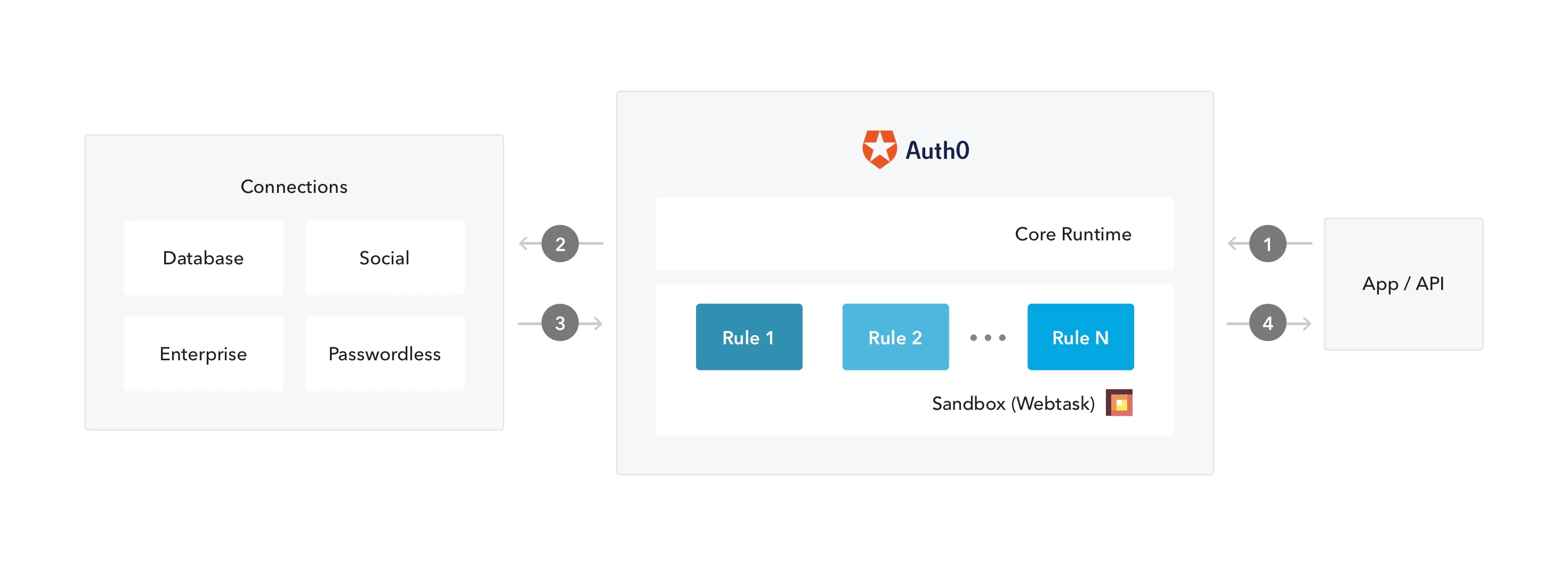 1. アプリが Auth0 に認証リクエストを送信します。
2. Auth0 は、設定された接続を通じてそのリクエストを ID プロバイダーにルーティングします。
3. ユーザーが正常に認証されます。
4. ID トークンおよび/またはアクセストークンはルールのパイプラインを通過した後、アプリケーションに送信されます。
1. アプリが Auth0 に認証リクエストを送信します。
2. Auth0 は、設定された接続を通じてそのリクエストを ID プロバイダーにルーティングします。
3. ユーザーが正常に認証されます。
4. ID トークンおよび/またはアクセストークンはルールのパイプラインを通過した後、アプリケーションに送信されます。
## 前提条件
ルールでグローバル変数を使用する場合は、事前にルール変数を設定してください。詳しくは、[ルールのグローバル変数を設定する](/docs/ja-jp/customize/rules/configure-global-variables-for-rules)をご覧ください。
## Dashboard を使う
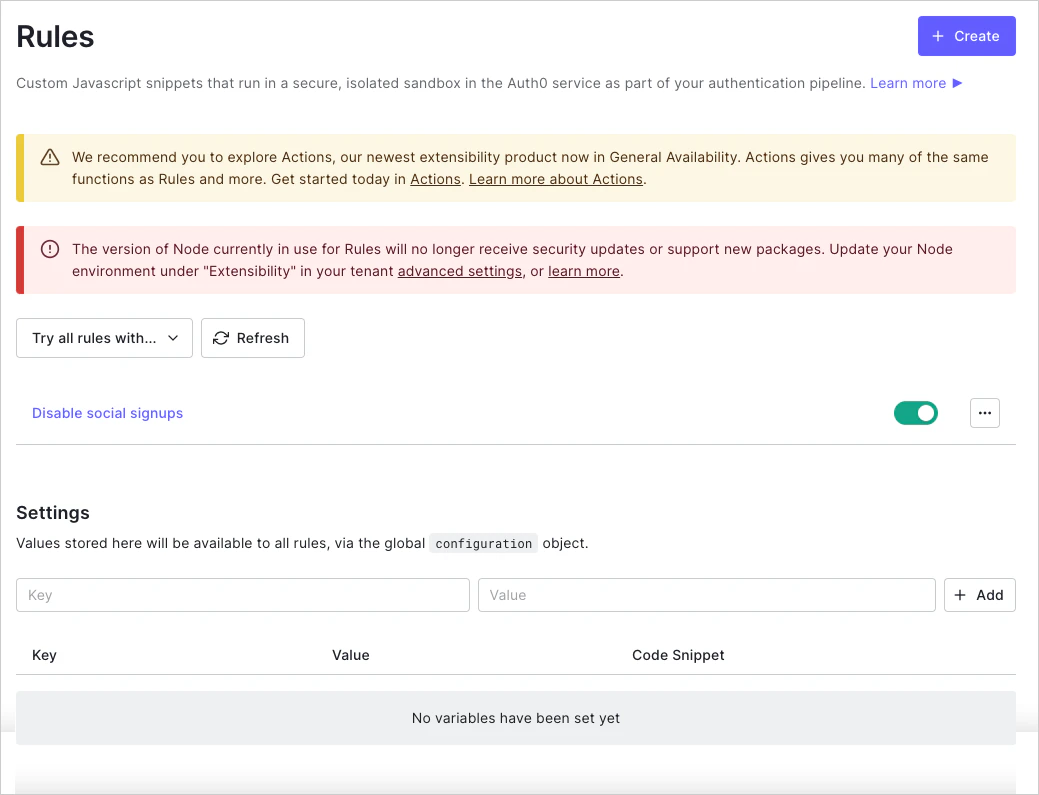
1. [Dashboard > Auth Pipeline > Rules](https://manage.auth0.com/#/rules) に移動し、**Create** をクリックします。
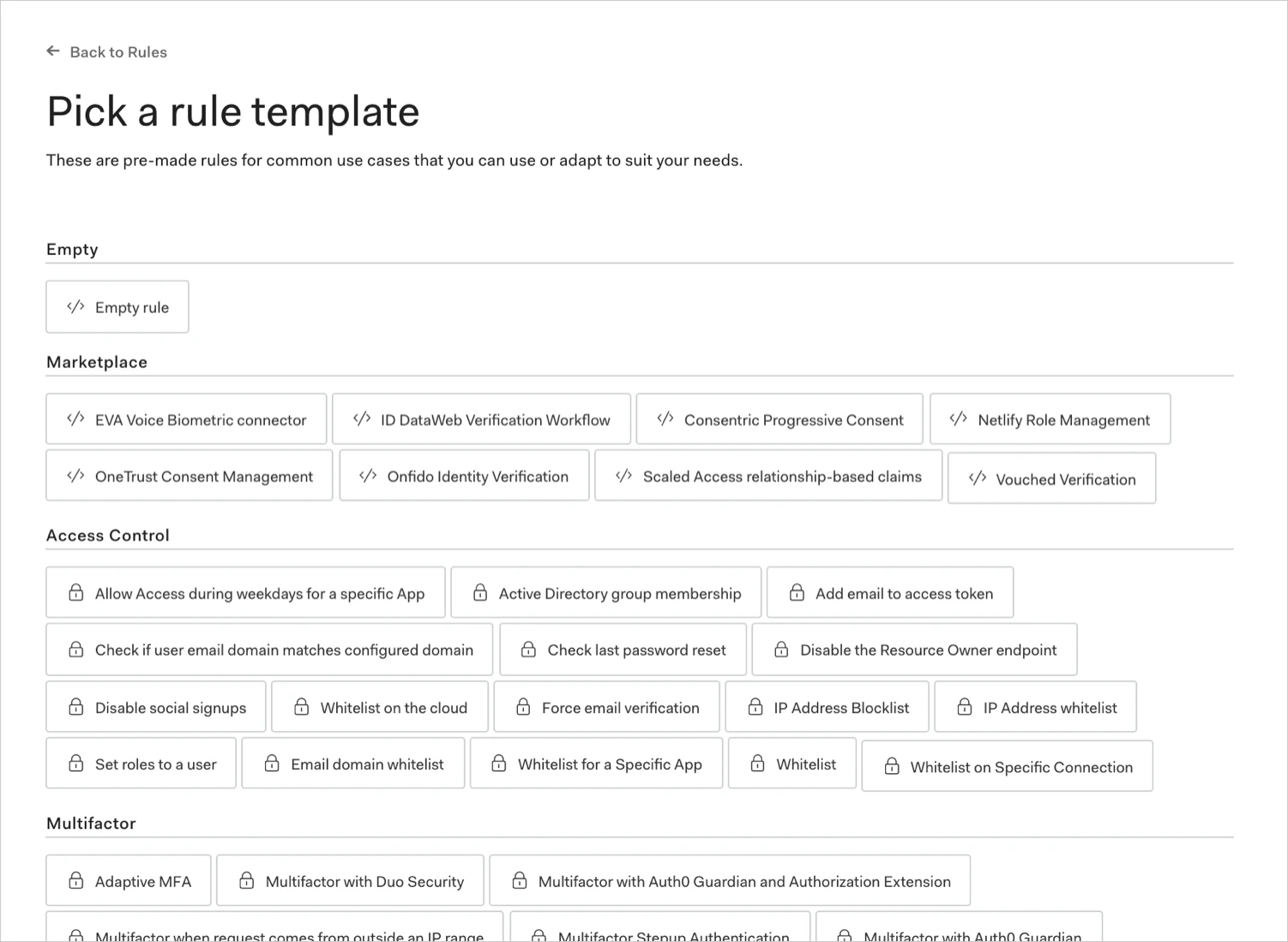
 2. ルールのテンプレートを選択します。
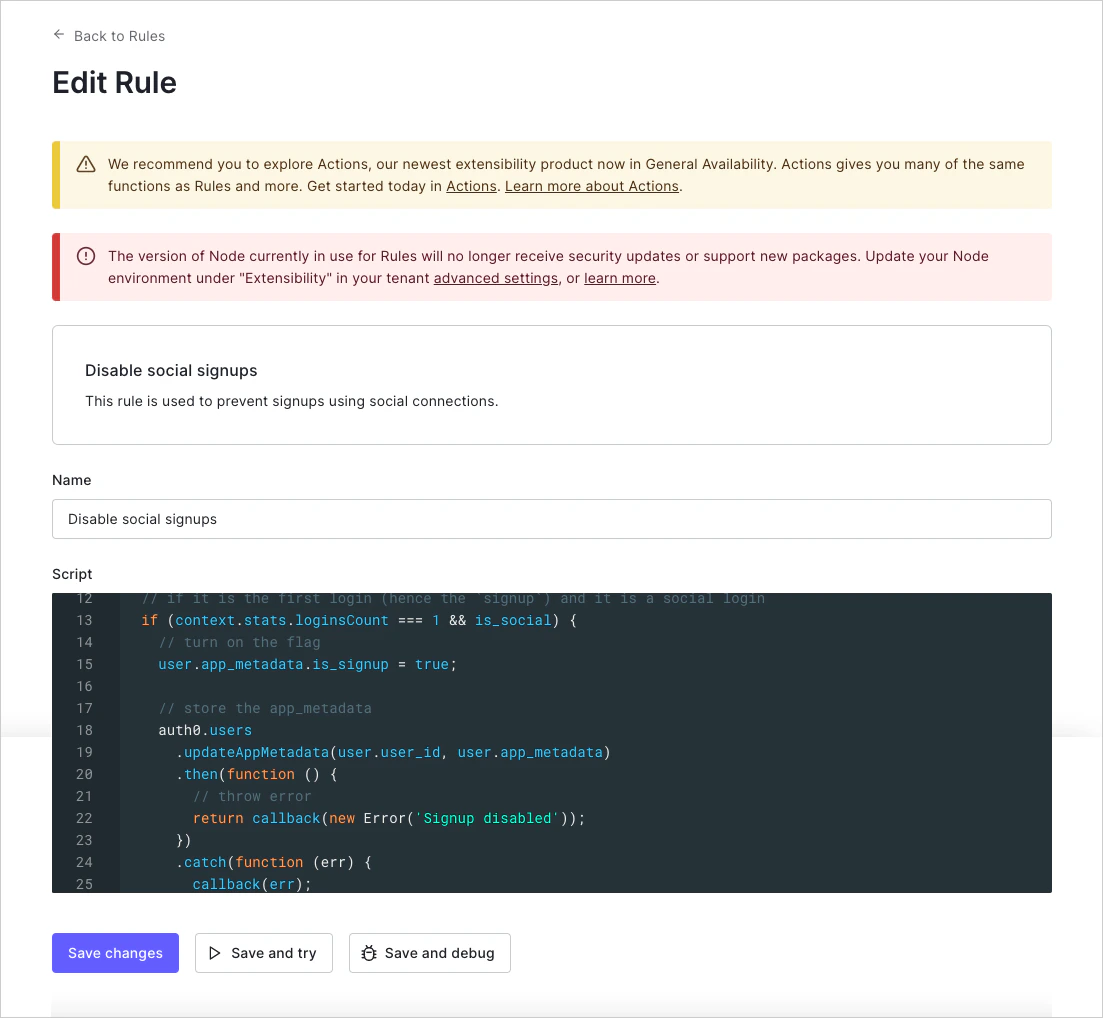
 3. ルールに名前を付け、必要に応じてスクリプトを編集して、**Save changes** をクリックします。
## Management API を使用する
[Create Rule エンドポイント](https://auth0.com/docs/api/management/v2#!/Rules/post_rules) に `POST` リクエストを送信します。`MGMT_API_ACCESS_TOKEN`、`RULE_NAME`、`RULE_SCRIPT`、`RULE_ORDER`、`RULE_ENABLED` のプレースホルダー値は、それぞれご自身の Management API Access Token、ルール名、ルールスクリプト、ルールの順序番号、ルールの有効化設定の値に必ず置き換えてください。
```bash cURL theme={null}
curl --request POST \
--url 'https://{yourDomain}/api/v2/rules' \
--header 'authorization: Bearer MGMT_API_ACCESS_TOKEN' \
--header 'cache-control: no-cache' \
--header 'content-type: application/json' \
--data '{ "name": "RULE_NAME", "script": "RULE_SCRIPT" }'
```
```csharp C# theme={null}
var client = new RestClient("https://{yourDomain}/api/v2/rules");
var request = new RestRequest(Method.POST);
request.AddHeader("content-type", "application/json");
request.AddHeader("authorization", "Bearer MGMT_API_ACCESS_TOKEN");
request.AddHeader("cache-control", "no-cache");
request.AddParameter("application/json", "{ "name": "RULE_NAME", "script": "RULE_SCRIPT" }", ParameterType.RequestBody);
IRestResponse response = client.Execute(request);
```
```go Go theme={null}
package main
import (
"fmt"
"strings"
"net/http"
"io/ioutil"
)
func main() {
url := "https://{yourDomain}/api/v2/rules"
payload := strings.NewReader("{ "name": "RULE_NAME", "script": "RULE_SCRIPT" }")
req, _ := http.NewRequest("POST", url, payload)
req.Header.Add("content-type", "application/json")
req.Header.Add("authorization", "Bearer MGMT_API_ACCESS_TOKEN")
req.Header.Add("cache-control", "no-cache")
res, _ := http.DefaultClient.Do(req)
defer res.Body.Close()
body, _ := ioutil.ReadAll(res.Body)
fmt.Println(res)
fmt.Println(string(body))
}
```
```java Java theme={null}
HttpResponse response = Unirest.post("https://{yourDomain}/api/v2/rules")
.header("content-type", "application/json")
.header("authorization", "Bearer MGMT_API_ACCESS_TOKEN")
.header("cache-control", "no-cache")
.body("{ "name": "RULE_NAME", "script": "RULE_SCRIPT" }")
.asString();
```
```javascript Node.JS theme={null}
var axios = require("axios").default;
var options = {
method: 'POST',
url: 'https://{yourDomain}/api/v2/rules',
headers: {
'content-type': 'application/json',
authorization: 'Bearer MGMT_API_ACCESS_TOKEN',
'cache-control': 'no-cache'
},
data: {name: 'RULE_NAME', script: 'RULE_SCRIPT'}
};
axios.request(options).then(function (response) {
console.log(response.data);
}).catch(function (error) {
console.error(error);
});
```
```php PHP theme={null}
$curl = curl_init();
curl_setopt_array($curl, [
CURLOPT_URL => "https://{yourDomain}/api/v2/rules",
CURLOPT_RETURNTRANSFER => true,
CURLOPT_ENCODING => "",
CURLOPT_MAXREDIRS => 10,
CURLOPT_TIMEOUT => 30,
CURLOPT_HTTP_VERSION => CURL_HTTP_VERSION_1_1,
CURLOPT_CUSTOMREQUEST => "POST",
CURLOPT_POSTFIELDS => "{ "name": "RULE_NAME", "script": "RULE_SCRIPT" }",
CURLOPT_HTTPHEADER => [
"authorization: Bearer MGMT_API_ACCESS_TOKEN",
"cache-control: no-cache",
"content-type: application/json"
],
]);
$response = curl_exec($curl);
$err = curl_error($curl);
curl_close($curl);
if ($err) {
echo "cURL Error #:" . $err;
} else {
echo $response;
}
```
```python Python theme={null}
import http.client
conn = http.client.HTTPSConnection("")
payload = "{ "name": "RULE_NAME", "script": "RULE_SCRIPT" }"
headers = {
'content-type': "application/json",
'authorization': "Bearer MGMT_API_ACCESS_TOKEN",
'cache-control': "no-cache"
}
conn.request("POST", "/{yourDomain}/api/v2/rules", payload, headers)
res = conn.getresponse()
data = res.read()
print(data.decode("utf-8"))
```
```ruby Ruby theme={null}
require 'uri'
require 'net/http'
require 'openssl'
url = URI("https://{yourDomain}/api/v2/rules")
http = Net::HTTP.new(url.host, url.port)
http.use_ssl = true
http.verify_mode = OpenSSL::SSL::VERIFY_PEER
request = Net::HTTP::Post.new(url)
request["content-type"] = 'application/json'
request["authorization"] = 'Bearer MGMT_API_ACCESS_TOKEN'
request["cache-control"] = 'no-cache'
request.body = "{ "name": "RULE_NAME", "script": "RULE_SCRIPT" }"
response = http.request(request)
puts response.read_body
```
| 値 | 説明 |
| ------------------------- | -------------------------------------------------------------------------------- |
| `MGMT_API_ACCESS_TOKEN` | `create:rules` のscopeを持つManagement APIのアクセストークン。 |
| `RULE_NAME` | 作成するルールの名前。ルール名には英数字、スペース、ハイフンのみ使用でき、先頭または末尾にスペースやハイフンを付けることはできません。 |
| `RULE_SCRIPT` | ルールのコードを含むスクリプト。Dashboardで新しいルールを作成する際に入力する内容と一致している必要があります。 |
| `RULE_ORDER` (optional) | 他のルールとの関係で、そのルールをどの順序で実行するかを表す整数。数値が小さいルールほど先に実行されます。順序番号が指定されていない場合は、最後に実行されます。 |
| `RULE_ENABLED` (optional) | ルールが有効 (`true`) か無効 (`false`) かを表すブール値。 |
公開エンドポイント (例: `travel0.us.auth0.com`) では IPv6 アドレスを公開しています。IPv6 をサポートするマシンからリクエストが送信されると、`context.request.ip` プロパティには IPv6 アドレスが含まれます。IP アドレスを手動で処理する場合は、[ipaddr.js@1.9.0 library](https://www.npmjs.com/package/ipaddr.js/v/1.9.0) を使用することをお勧めします。
## レート制限の管理
Auth0 API を呼び出すルールでは、`X-RateLimit-Remaining` ヘッダーを確認し、返された値が 0 に近づいたら適切に対応することで、常にレート制限に対処するようにしてください。また、定められたレート制限を超過して HTTP ステータスコード 429 (Too Many Requests) を受け取った場合に備えたロジックも追加する必要があります。この場合、再試行が必要であれば、無限に再試行を繰り返す事態を避けるため、バックオフを設けるのが最善です。レート制限の詳細については、[Rate Limit Policy For Auth0 APIs](/docs/ja-jp/troubleshoot/customer-support/operational-policies/rate-limit-policy) を参照してください。
## 利用可能なモジュール
ルールは、特定の Node.js バージョン向けに構成された JavaScript サンドボックス内で実行されます。
このサンドボックスは、設定された Node.js バージョンで利用可能なすべての JavaScript 言語機能 (および関連する構文) と、多数の Node.js モジュールをサポートしています。サポートされているサンドボックスモジュールの一覧は、[Can I require: Auth0 Extensibility](https://auth0-extensions.github.io/canirequire/) をご覧ください。
## 詳細はこちら
* [ルールのグローバル変数を設定する](/docs/ja-jp/customize/rules/configure-global-variables-for-rules)