> ## Documentation Index
> Fetch the complete documentation index at: https://translations.mintlify.site/llms.txt
> Use this file to discover all available pages before exploring further.
# テナント名またはテナント ID を確認する
> SDK の設定、API の呼び出し、または Auth0 ドキュメント内の変数の置き換えに使用する Auth0 テナント名と ID を Auth0 Dashboard で確認します。
すべての Auth0 テナントには名前があります。この名前は、コード内でテナントを識別するためによく使用します。Auth0 のドキュメントで `{yourTenantId}`、`{yourTenantName}`、`{yourTenant}` などの変数を見かけたら、その変数をテナント名に置き換えてください。
1. [Auth0 Dashboard](https://manage.auth0.com/#) に移動します。
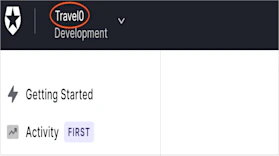
2. 左上の Auth0 ロゴの横に表示されているテナント名を確認します。
## さらに詳しく
* [テナント設定](/docs/ja-jp/get-started/tenant-settings)
* [マルチテナントアプリケーションのベストプラクティス](/docs/ja-jp/get-started/auth0-overview/create-tenants/multi-tenant-apps-best-practices)