> ## Documentation Index
> Fetch the complete documentation index at: https://translations.mintlify.site/llms.txt
> Use this file to discover all available pages before exploring further.
# LoginId
> Universal Login の `login-id` 画面をカスタマイズするために利用できる、すべてのプロパティとメソッドについて説明します。
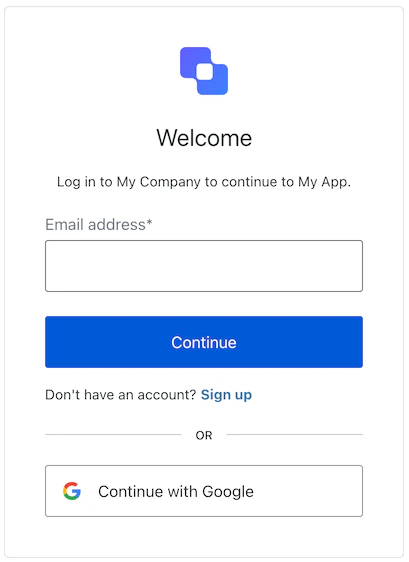
LoginId クラスは、`login-id` 画面の機能を実装します。この画面では、identifier 優先の認証フローの最初のステップとしてユーザーの identifier を収集します。テナントによっては、この identifier としてメールアドレス、電話番号、またはユーザー名を使用できます。パスキーログイン、フェデレーテッド ID プロバイダー、Google One Tap もサポートしています。
## コンストラクタ
LoginId 画面マネージャーのインスタンスを作成します:
```typescript Example theme={null}
import LoginId from "@auth0/auth0-acul-js/login-id";
const loginIdManager = new LoginId();
loginIdManager.getLoginIdentifiers();
```
## プロパティ
BrandingMembers }>
ブランディングテーマや設定など、ブランディングに関連する設定を提供します。
ClientMembers }>
`login-id` 画面向けに、`id`、`name`、`logoUrl` などのクライアント関連の設定を提供します。
OrganizationMembers }>
ユーザーの組織に関する情報 (`id` や `name` など) を提供します。
PromptMembers }>
認証フローにおける現在の prompt に関するデータを含みます。
ScreenMembersOnLoginId }>
設定やコンテキストを含む、`login-id` 画面固有の詳細を含みます。
TenantMembers }>
`id` や関連するメタデータなど、テナント に関連するデータを含みます。
TransactionMembersOnLoginId }>
アクティブな identifier やフローの状態など、`login-id` 画面に固有のトランザクション データを提供します。
UntrustedDataMembers }>
ログイン時のユーザー入力など、SDK に渡される信頼されていないデータを扱います。
UserMembers }>
アクティブなユーザーの詳細 (`username`、`email`、`roles` など) を含みます。
## メソッド
このメソッドは、Universal Login ページの表示言語を変更します。
```typescript Example theme={null}
import LoginId from "@auth0/auth0-acul-js/login-id";
const loginIdManager = new LoginId();
loginIdManager.changeLanguage({
language: 'fr',
});
```
**メソッドのパラメータ**
[LanguageChangeOptions](/docs/ja-jp/libraries/acul/js-sdk/Screens/interfaces/LanguageChangeOptions)。
変更先の言語のロケールコードです (例: `'en'`、`'fr'`、`'es'`) 。
`'session'` に設定すると、選択した言語はセッション中保持されます。
このメソッドは、認証のためにユーザーを[ソーシャル](/docs/ja-jp/authenticate/identity-providers/social-identity-providers)または[エンタープライズのアイデンティティプロバイダー](/docs/ja-jp/authenticate/identity-providers/enterprise-identity-providers) (IdP) にリダイレクトします。
```typescript Example theme={null}
import LoginId from "@auth0/auth0-acul-js/login-id";
const loginIdManager = new LoginId();
loginIdManager.federatedLogin({
connection: "google-oauth2"
});
```
**メソッドのパラメータ**
ソーシャルまたはエンタープライズのアイデンティティプロバイダーの接続名です。
Error []}>
このメソッドは、コンテキストからトランザクションのエラー配列を取得します。存在しない場合は空の配列を返します。トランザクションのコンテキストに含まれるエラーオブジェクトの配列です。
ScreenIdentifierType [] | null}>
このメソッドは、login-id 画面で有効になっている identifier タイプを取得します。
```typescript Example theme={null}
import LoginId from "@auth0/auth0-acul-js/login-id";
const loginIdManager = new LoginId();
loginIdManager.getLoginIdentifiers();
```
このメソッドは、ユーザーにユーザー名の入力を求めます。
```typescript Example theme={null}
import LoginId from "@auth0/auth0-acul-js/login-id";
const loginIdManager = new LoginId();
loginIdManager.login({
username: "testUser"
});
```
**メソッドのパラメータ**
[LoginOptions](/docs/ja-jp/libraries/acul/js-sdk/Screens/interfaces/LoginOptions)。
ユーザーの identifier です。
captcha の code、または CAPTCHA provider からのレスポンスです。Auth0 テナントで [ボット検出](/docs/ja-jp/secure/attack-protection/bot-detection) が有効になっている場合、このプロパティは必須です。
`ulp-` で始まる追加のカスタムフィールドです (例: `'ulp-custom-field'`) 。
このメソッドは、指定されたパスキーを使用してユーザーを認証し、成功すると `redirect_url` にリダイレクトします。
```typescript Example theme={null}
import LoginId from "@auth0/auth0-acul-js/login-id";
const loginIdManager = new LoginId();
loginIdManager.passkeyLogin();
```
**メソッドのパラメータ**
[CustomOptions](/docs/ja-jp/libraries/acul/js-sdk/Screens/interfaces/CustomOptions)。
`ulp-` で始まる追加のカスタムフィールドです (例: `'ulp-custom-field'`) 。
このメソッドは Google One Tap 資格情報を使用してユーザーを認証し、別のログインページにリダイレクトせずにワンクリックでサインインできるようにします。
Google One Tap プロンプトをレンダリングする前に `screen.googleOneTapConfig` を確認してください。この機能がサーバー側で有効になっていない場合、値は `null` です。
```typescript Example theme={null}
import LoginId from "@auth0/auth0-acul-js/login-id";
const loginIdManager = new LoginId();
loginIdManager.googleOneTap({ one_tap_credential: credential });
```
**メソッド パラメータ**
Google Identity Services プロンプトから返される Google One Tap 資格情報トークン。
このメソッドはユーザーを国番号の選択リストにリダイレクトし、電話番号の国番号プレフィックスを更新できるようにします。
```typescript Example theme={null}
import LoginId from "@auth0/auth0-acul-js/login-id";
const loginIdManager = new LoginId();
loginIdManager.pickCountryCode();
```
このメソッドは、`mediation: conditional` を指定した `navigator.credentials.get()` を使用して、受動的な WebAuthn 資格情報リクエストを初期化します。サポートされている場合、ブラウザーは保存済みのパスキーをユーザー名フィールドの autocomplete ドロップダウンに直接表示できます。
```typescript Example theme={null}
import LoginId from '@auth0/auth0-acul-js/login-id';
async function initializeLogin() {
const loginId = new LoginId();
await loginId.registerPasskeyAutofill('username');
}
initializeLogin().catch(console.error);
```
**メソッド パラメータ**
ユーザー名 `