> ## Documentation Index
> Fetch the complete documentation index at: https://translations.mintlify.site/llms.txt
> Use this file to discover all available pages before exploring further.
# MfaPushChallengePush
> Universal Login の `mfa-push-challenge-push` 画面をカスタマイズするために使用できる、すべてのプロパティとメソッドについて説明します。
MfaPushChallengePush クラスは、`mfa-push-challenge-push` 画面の機能を実装します。この画面は、MFA でユーザーがプッシュ通知を承認する必要がある場合に表示されます。
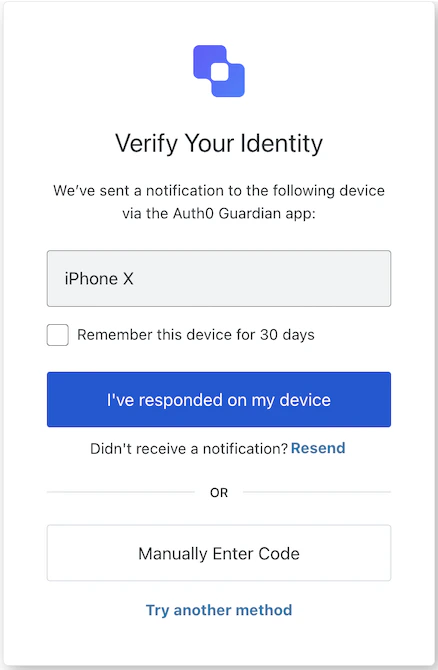
## コンストラクター
MFA プッシュチャレンジのプッシュ画面マネージャーのインスタンスを生成します:
```typescript Example theme={null}
import MfaPushChallengePush from '@auth0/auth0-acul-js/mfa-push-challenge-push';
const mfaPushChallengePush = new MfaPushChallengePush();
await mfaPushChallengePush.continue();
```
## プロパティ
BrandingMembers}>
ブランディングテーマや設定など、branding 関連の構成を提供します。
ClientMembers}>
`mfa-push-challenge-push` 画面向けに、`id`、`name`、`logoUrl` などのクライアント関連の構成を提供します。
OrganizationMembers}>
ユーザーの Organization に関する情報 (`id` や `name` など) を提供します。
PromptMembers}>
認証フローにおける現在の prompt に関するデータを含みます。
ScreenMembersOnMfaPushChallengePush}>
設定やコンテキストなど、`mfa-push-challenge-push` 画面に固有の詳細を含みます。
TenantMembers}>
`id` や関連するメタデータなど、tenant に関連するデータを含みます。
TransactionMembers}>
有効な identifier やフローの状態など、`mfa-push-challenge-push` 画面に固有の transaction データを提供します。
UntrustedDataMembersOnMfaPushChallengePush}>
MFAプッシュチャレンジ中のユーザー入力など、SDK に渡される信頼できないデータを扱います。
UserMembers}>
アクティブなユーザーの詳細 (`username`、`email`、`roles` など) を含みます。
## メソッド
このメソッドは、Universal Login ページの表示言語を変更します。
```typescript Example theme={null}
import MfaPushChallengePush from '@auth0/auth0-acul-js/mfa-push-challenge-push';
const mfaPushChallengePush = new MfaPushChallengePush();
mfaPushChallengePush.changeLanguage({
language: 'fr',
});
```
**メソッドパラメーター**
[LanguageChangeOptions](/docs/ja-jp/libraries/acul/js-sdk/Screens/interfaces/LanguageChangeOptions)。
使用する言語の locale コード (例: `'en'`、`'fr'`、`'es'`) 。
`'session'` に設定すると、選択した言語がセッション中は維持されます。
このメソッドは、プッシュ通知 チャレンジ を続行します。
```typescript Example theme={null}
import MfaPushChallengePush from '@auth0/auth0-acul-js/mfa-push-challenge-push';
const mfaPushChallengePush = new MfaPushChallengePush();
await mfaPushChallengePush.continue();
```
**メソッドパラメーター**
[WithRememberOptions](/docs/ja-jp/libraries/acul/js-sdk/Screens/interfaces/WithRememberOptions)。
デバイスを記憶するかどうかを指定します。
このメソッドは、確認コードを手動で入力する画面に切り替えます。
```typescript Example theme={null}
import MfaPushChallengePush from '@auth0/auth0-acul-js/mfa-push-challenge-push';
const mfaPushChallengePush = new MfaPushChallengePush();
await mfaPushChallengePush.enterCodeManually();
```
Error[]}>
このメソッドは、コンテキスト から transaction エラーの配列を取得します。存在しない場合は空の配列を返します。
MfaPushPollingControl}>
このメソッドは、MFAプッシュチャレンジのポーリングを開始し、管理します。
指定された間隔でMFAプッシュチャレンジのエンドポイントを繰り返し確認するポーリングセッションを作成し、チャレンジが承認されるかエラーが発生するまで続行します。承認条件が満たされると、指定された[onCompleted](/docs/ja-jp/libraries/acul/js-sdk/Screens/type-aliases/MfaPollingOptions#oncompleted)コールバックが呼び出され、ポーリングは自動的に停止します。
返される[MfaPushPollingControl](/docs/ja-jp/libraries/acul/js-sdk/Screens/interfaces/MfaPushPollingControl)を使用すると、いつでもポーリング処理の開始、停止、またはステータスの確認ができます。
以下を備えた[MfaPushPollingControl](/docs/ja-jp/libraries/acul/js-sdk/Screens/interfaces/MfaPushPollingControl)インスタンスを返します:
* `startPolling()` — ポーリングを開始または再開します。
* `stopPolling()` — ポーリングを即座にキャンセルします。
* `isRunning()` — ポーリングが現在実行中かどうかを示します。
```typescript Example theme={null}
import MfaPushChallengePush from '@auth0/auth0-acul-js/mfa-push-challenge-push';
const mfaPushChallengePush = new MfaPushChallengePush();
// プッシュチャレンジが承認されるまで5秒ごとにポーリングを開始
const control = mfaPushChallengePush.pollingManager({
intervalMs: 5000,
onCompleted: () => mfaPushChallengePush.continue(),
onError: (error) => console.error('Polling error:', error),
});
// 後で必要に応じてポーリングをキャンセル
control.stopPolling();
```
**備考**
* HTTP 429 (レート制限) レスポンスは内部的に処理されます。ポーリングは再試行の前に、レート制限がリセットされるまで自動的に待機します。
* `startPolling()`は複数回呼び出しても安全です。すでに実行中の場合は何も起こりません。
**メソッドのパラメーター**
[MfaPollingOptions](/docs/ja-jp/libraries/acul/js-sdk/Screens/type-aliases/MfaPollingOptions)。
連続するポーリングリクエストの間隔をミリ秒単位で指定する省略可能な値です。省略した場合は、SDKの内部デフォルト間隔 (通常は5000ミリ秒) が使用されます。
MFAプッシュチャレンジが正常に承認されてポーリングが完了したときに実行される、任意のコールバックです。呼び出されるのは1回だけで、その後ポーリングは自動的に停止します。
ポーリング中にエラーが発生した場合に呼び出される任意のコールバックです。`status` (HTTPステータスコード) と`responseText` (生のレスポンス本文) を含む`ULError`オブジェクトを受け取ります。
このメソッドは、プッシュ通知を再送します。
```typescript Example theme={null}
import MfaPushChallengePush from '@auth0/auth0-acul-js/mfa-push-challenge-push';
const mfaPushChallengePush = new MfaPushChallengePush();
await mfaPushChallengePush.resendPushNotification();
```
**メソッドのパラメーター**
[WithRememberOptions](/docs/ja-jp/libraries/acul/js-sdk/Screens/interfaces/WithRememberOptions)。
デバイスを記憶するかどうかを示します。
このメソッドを使用すると、ユーザーは別のMFA方式を試すことができます。
```typescript Example theme={null}
import MfaPushChallengePush from '@auth0/auth0-acul-js/mfa-push-challenge-push';
const mfaPushChallengePush = new MfaPushChallengePush();
await mfaPushChallengePush.tryAnotherMethod();
```