> ## Documentation Index
> Fetch the complete documentation index at: https://translations.mintlify.site/llms.txt
> Use this file to discover all available pages before exploring further.
# 組織でのサードパーティアプリケーションによるアクセスを有効にする
> サードパーティアプリケーションが組織内のユーザーを認証できるようにする方法を説明します。
export const AuthCodeGroup = ({children, dropdown}) => {
const [processedChildren, setProcessedChildren] = useState(children);
useEffect(() => {
let unsubscribe = null;
function init() {
unsubscribe = window.autorun(() => {
const processChildren = node => {
if (typeof node === "string") {
let processedNode = node;
for (const [key, value] of window.rootStore.variableStore.values.entries()) {
const escapedKey = key.replaceAll(/[.*+?^${}()|[\]\\]/g, (String.raw)`\$&`);
processedNode = processedNode.replaceAll(new RegExp(escapedKey, "g"), value);
}
return processedNode;
} else if (Array.isArray(node)) {
return node.map(processChildren);
} else if (node && node.props && node.props.children) {
return {
...node,
props: {
...node.props,
children: processChildren(node.props.children)
}
};
}
return node;
};
setProcessedChildren(processChildren(children));
});
}
if (window.rootStore) {
init();
} else {
window.addEventListener("adu:storeReady", init);
}
return () => {
window.removeEventListener("adu:storeReady", init);
unsubscribe?.();
};
}, [children]);
return {processedChildren};
};
組織 では、デフォルトで[サードパーティアプリケーション](/docs/ja-jp/get-started/applications/third-party-applications)によるユーザー認証が拒否されます。サードパーティアプリケーションが組織内のユーザーを認証できるようにするには、その組織で明示的に許可する設定が必要です。
## 始める前に
* テナントに少なくとも1つのサードパーティアプリケーションが設定されていること。詳細については、[サードパーティアプリケーションの設定](/docs/ja-jp/get-started/applications/third-party-applications/configure-third-party-applications)を参照してください。
* サードパーティアプリケーションに、アクセスが必要なAPIの[クライアントグラント](/docs/ja-jp/get-started/applications/application-access-to-apis-client-grants)があること。
* Login に使用する接続が[ドメインレベル](/docs/ja-jp/authenticate/identity-providers/promote-connections-to-domain-level)に昇格されていること (`is_domain_connection: true`) 。これと、以下の 組織 のオプトインの両方が必要です。
## 組織でサードパーティアプリケーションのアクセスを有効にする
Auth0 Dashboard または Management API を使用して、サードパーティアプリケーションによるアクセスを有効にできます。
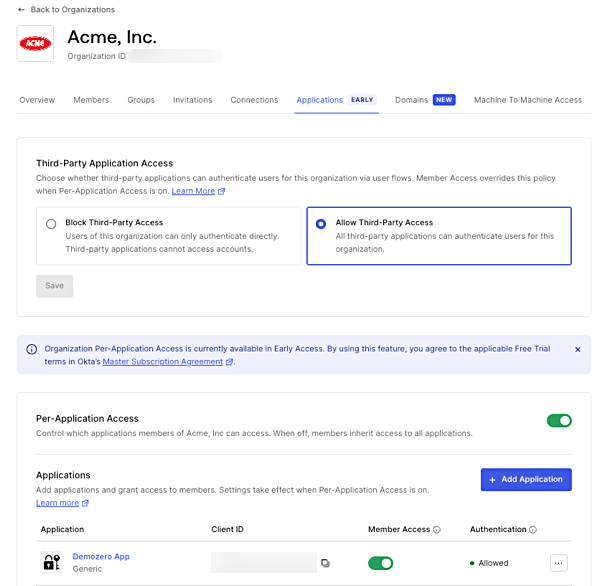
1. [Auth0 Dashboard > 組織](https://manage.auth0.com/#/organizations) に移動し、組織を選択します。
2. **アプリケーション** タブを開きます。
3. **サードパーティアプリケーションアクセス** で、**サードパーティアプリケーションアクセスを許可** を選択します。
4. **保存** を選択します。
組織に対して[アプリケーションごとのアクセス](/docs/ja-jp/manage-users/organizations/configure-organizations/grant-application-access)を有効にすると、このポリシーは組織の「アプリケーション」タブに明示的に追加されていないサードパーティアプリケーションにのみ適用されます。リストに追加したサードパーティアプリケーションには、代わりに個別のメンバーアクセス設定が適用されます。
 `third_party_client_access` プロパティを指定して、[組織を更新](https://auth0.com/docs/api/management/v2/organizations/patch-organizations-by-id)エンドポイントに `PATCH` リクエストを送信します。
```bash cURL wrap lines theme={null}
curl --request PATCH \
--url 'https://YOUR_DOMAIN/api/v2/organizations/ORG_ID' \
--header 'Authorization: Bearer YOUR_MANAGEMENT_API_TOKEN' \
--header 'Content-Type: application/json' \
--data '{
"third_party_client_access": "allow"
}'
```
| **パラメータ** | **説明** |
| --------------------------- | --------------------------------------------------------------------------------------------------- |
| `third_party_client_access` | サードパーティアプリケーションがこの組織のユーザーを認証できるかどうかを制御します。アクセスを有効にするには `allow` に設定します。`deny` (デフォルト) はアクセスをブロックします。 |
変更を確認するには、[組織を取得](https://auth0.com/docs/api/management/v2/organizations/get-organizations-by-id)エンドポイントに `GET` リクエストを送信し、`third_party_client_access` が `allow` になっていることを確認します。
```bash cURL wrap lines theme={null}
curl --request GET \
--url 'https://YOUR_DOMAIN/api/v2/organizations/ORG_ID' \
--header 'Authorization: Bearer YOUR_MANAGEMENT_API_TOKEN'
```
```json theme={null}
{
"id": "org_hilSy17Fkb3Ks4bk",
"name": "acme",
"display_name": "Acme",
"third_party_client_access": "allow"
}
```
`third_party_client_access` プロパティを指定して、[組織を更新](https://auth0.com/docs/api/management/v2/organizations/patch-organizations-by-id)エンドポイントに `PATCH` リクエストを送信します。
```bash cURL wrap lines theme={null}
curl --request PATCH \
--url 'https://YOUR_DOMAIN/api/v2/organizations/ORG_ID' \
--header 'Authorization: Bearer YOUR_MANAGEMENT_API_TOKEN' \
--header 'Content-Type: application/json' \
--data '{
"third_party_client_access": "allow"
}'
```
| **パラメータ** | **説明** |
| --------------------------- | --------------------------------------------------------------------------------------------------- |
| `third_party_client_access` | サードパーティアプリケーションがこの組織のユーザーを認証できるかどうかを制御します。アクセスを有効にするには `allow` に設定します。`deny` (デフォルト) はアクセスをブロックします。 |
変更を確認するには、[組織を取得](https://auth0.com/docs/api/management/v2/organizations/get-organizations-by-id)エンドポイントに `GET` リクエストを送信し、`third_party_client_access` が `allow` になっていることを確認します。
```bash cURL wrap lines theme={null}
curl --request GET \
--url 'https://YOUR_DOMAIN/api/v2/organizations/ORG_ID' \
--header 'Authorization: Bearer YOUR_MANAGEMENT_API_TOKEN'
```
```json theme={null}
{
"id": "org_hilSy17Fkb3Ks4bk",
"name": "acme",
"display_name": "Acme",
"third_party_client_access": "allow"
}
```
## 接続の要件
サードパーティアプリケーションが組織内のユーザーを認証するには、次の2つの接続条件を両方満たす必要があります。
1. 接続が[ドメインレベル](/docs/ja-jp/authenticate/identity-providers/promote-connections-to-domain-level)に昇格されている必要があります (`is_domain_connection: true`) 。組織を使用するかどうかにかかわらず、サードパーティアプリケーションはドメインレベルの接続を介してのみユーザーを認証できます。
2. 接続が[組織で有効化](/docs/ja-jp/manage-users/organizations/configure-organizations/enable-connections)されている必要があります。
これらの条件のいずれか一方だけを満たしても十分ではありません。
このドメインレベルの接続要件は、[Cross App Access (XAA)](/docs/ja-jp/ai-agents-mcp/cross-app-access)を通じて付与されるサードパーティアプリケーションへのアクセスには適用されません。XAA では、サードパーティアプリケーションへのアクセスはエンタープライズ IdP の Cross App Access ポリシーで直接承認されます。詳細については、[環境の設定](/docs/ja-jp/ai-agents-mcp/cross-app-access/set-up-xaa-test-environment)を参照してください。
## サードパーティアプリケーション向けの組織ログインフロー
サードパーティアプリケーションは外部の開発者によって管理されているため、認可リクエストで `organization` パラメータが渡されることを前提にはできません。アプリケーションが `organization` を直接送信する必要がある認証フロー (**No Prompt** ログインフロー) は、サードパーティアプリケーションでは信頼性に欠けます。
ユーザーを正しい組織コンテキストにルーティングするには、アプリケーションで次のいずれかを設定します。
* **Prompt for Credentials**: ユーザーはまず認証を行い、ログイン後に Auth0 から組織を選択するよう求められます。
* **Prompt for Organization**: ユーザーは認証前に組織を指定します。外部アプリケーションから何が送信されるかにかかわらず機能します。必要に応じて **組織 Domain Discovery** を有効にすると、ユーザーのメールドメインまたは組織名から組織を自動的に検出できます。[検証済みの組織ドメイン](/docs/ja-jp/manage-users/organizations/configure-organizations/create-org-domains)が必要です。
詳細については、[Login Flows for 組織](/docs/ja-jp/manage-users/organizations/login-flows-for-organizations)を参照してください。
## マシンツーマシンアクセス
`third_party_client_access` 設定は、ユーザー認証フロー (認可コード) にのみ適用されます。クライアント認証情報フローを使用するマシンツーマシンアクセスでは、この設定は考慮されません。M2M アクセスは、[organization クライアントグラント](/docs/ja-jp/manage-users/organizations/organizations-for-m2m-applications) のみで制御されます。
サードパーティアプリケーションでは、`allow_any_organization` は使用できません。各組織は、`organization_client_grant` によって明示的に認可する必要があります。詳しくは、[マシンツーマシンアクセスを設定する](/docs/ja-jp/manage-users/organizations/organizations-for-m2m-applications/manage-m2m-access#authorize-m2m-access) を参照してください。
## ユーザー同意
サードパーティアプリケーションに対するユーザー同意は、組織コンテキストごとに設定されます。ある組織で同意したユーザーが別の組織を通じて同じアプリケーションにアクセスする場合は、再度同意する必要があります。詳細については、[組織 での同意](/docs/ja-jp/get-started/applications/third-party-applications/user-consent-and-third-party-applications#consent-with-organizations)を参照してください。
## 詳細情報
* [サードパーティアプリケーション](/docs/ja-jp/get-started/applications/third-party-applications)
* [サードパーティアプリケーションのセキュリティ制御](/docs/ja-jp/get-started/applications/third-party-applications/security-controls)
* [サードパーティアプリケーションの設定](/docs/ja-jp/get-started/applications/third-party-applications/configure-third-party-applications)
* [ユーザーの同意とサードパーティアプリケーション](/docs/ja-jp/get-started/applications/third-party-applications/user-consent-and-third-party-applications)
* [組織のログインフロー](/docs/ja-jp/manage-users/organizations/login-flows-for-organizations)
* [組織 Connections を有効にする](/docs/ja-jp/manage-users/organizations/configure-organizations/enable-connections)