> ## Documentation Index
> Fetch the complete documentation index at: https://translations.mintlify.site/llms.txt
> Use this file to discover all available pages before exploring further.
> Twilio、Auth0 組み込みプロバイダー、またはカスタムプロバイダーを使用してワンタイムコードを配信する Auth0 MFA 認証要素として SMS と音声通知を設定します。
# MFA の SMS および音声通知を設定する
export const AuthCodeGroup = ({children, dropdown}) => {
const [processedChildren, setProcessedChildren] = useState(children);
useEffect(() => {
let unsubscribe = null;
function init() {
unsubscribe = window.autorun(() => {
const processChildren = node => {
if (typeof node === "string") {
let processedNode = node;
for (const [key, value] of window.rootStore.variableStore.values.entries()) {
const escapedKey = key.replaceAll(/[.*+?^${}()|[\]\\]/g, (String.raw)`\$&`);
processedNode = processedNode.replaceAll(new RegExp(escapedKey, "g"), value);
}
return processedNode;
} else if (Array.isArray(node)) {
return node.map(processChildren);
} else if (node && node.props && node.props.children) {
return {
...node,
props: {
...node.props,
children: processChildren(node.props.children)
}
};
}
return node;
};
setProcessedChildren(processChildren(children));
});
}
if (window.rootStore) {
init();
} else {
window.addEventListener("adu:storeReady", init);
}
return () => {
window.removeEventListener("adu:storeReady", init);
unsubscribe?.();
};
}, [children]);
return {processedChildren};
};
export const AuthCodeBlock = ({filename, icon, language, highlight, children}) => {
const [displayText, setDisplayText] = useState(children);
const [copyText, setCopyText] = useState(children);
const wrapperRef = React.useRef(null);
useEffect(() => {
let unsubscribe = null;
function init() {
if (!window.autorun || !window.rootStore) {
return;
}
unsubscribe = window.autorun(() => {
let processedChildrenForDisplay = children;
let processedChildrenForCopy = children;
for (const [key, value] of window.rootStore.variableStore.values.entries()) {
const escapedKey = key.replaceAll(/[.*+?^${}()|[\]\\]/g, (String.raw)`\$&`);
let displayValue = value;
if (key === "{yourClientSecret}" && value !== "{yourClientSecret}") {
displayValue = value.substring(0, 3) + "*****MASKED*****";
}
processedChildrenForDisplay = processedChildrenForDisplay.replaceAll(new RegExp(escapedKey, "g"), displayValue);
processedChildrenForCopy = processedChildrenForCopy.replaceAll(new RegExp(escapedKey, "g"), value);
}
setDisplayText(processedChildrenForDisplay);
setCopyText(processedChildrenForCopy);
});
}
if (window.rootStore) {
init();
} else {
window.addEventListener("adu:storeReady", init);
}
return () => {
window.removeEventListener("adu:storeReady", init);
unsubscribe?.();
};
}, [children]);
useEffect(() => {
if (!wrapperRef.current) return;
const originalWriteText = navigator.clipboard.writeText.bind(navigator.clipboard);
let isOverriding = false;
const handleClick = e => {
const button = e.target.closest('[data-testid="copy-code-button"]');
if (!button || !wrapperRef.current.contains(button)) return;
isOverriding = true;
navigator.clipboard.writeText = text => {
if (isOverriding) {
isOverriding = false;
navigator.clipboard.writeText = originalWriteText;
return originalWriteText(copyText);
}
return originalWriteText(text);
};
setTimeout(() => {
if (isOverriding) {
isOverriding = false;
navigator.clipboard.writeText = originalWriteText;
}
}, 100);
};
const wrapper = wrapperRef.current;
wrapper.addEventListener('click', handleClick, true);
return () => {
wrapper.removeEventListener('click', handleClick, true);
if (navigator.clipboard.writeText !== originalWriteText) {
navigator.clipboard.writeText = originalWriteText;
}
};
}, [copyText]);
return
{displayText}
;
};
Unified Phone Experience では、テナント 内の電話プロバイダー設定を 1 か所に集約できるため、さまざまな電話認証要素ごとに同じ電話プロバイダーを何度も設定する必要がありません。詳しくは、[多要素認証で Auth0's Unified Phone Experience を使用する](/docs/ja-jp/customize/phone-messages/unified-phone/use-auth0s-unified-phone-experience-for-multi-factor-authentication)をご覧ください。
認証要素として SMS または音声を使用している場合、エンドユーザーが application で認証を試みると、SMS または音声でコードが送信され、トランザクションを完了するにはそのコードを入力する必要があります。つまり、ユーザーはログイン 資格情報を把握しているだけでなく、MFA 用として登録したデバイスも所持していることになります。
SMS および音声要素は、Auth0 Dashboard または Management API を使用して設定でき、SMS や音声でメッセージを送信したり、エンドユーザーがコードの受信方法を選択できるようにしたりできます。配信プロバイダーは Actions を使用して設定することも、Twilio アカウントを設定することもできます。また、顧客に SMS のみを送信したい場合は、Auth0 のデフォルトのメッセージ配信サービスを設定できます。MFA の音声通知を有効にするには、Universal Login を使用する必要があります。
この機能を利用できるかどうかは、使用しているログイン実装と Auth0 のプランまたはカスタム契約の両方によって異なります。詳しくは、[Pricing](https://auth0.com/pricing)をご覧ください。
## 仕組み
SMS と音声の両方を有効にすると、ユーザーは SMS または音声でコードを受け取って登録できます。
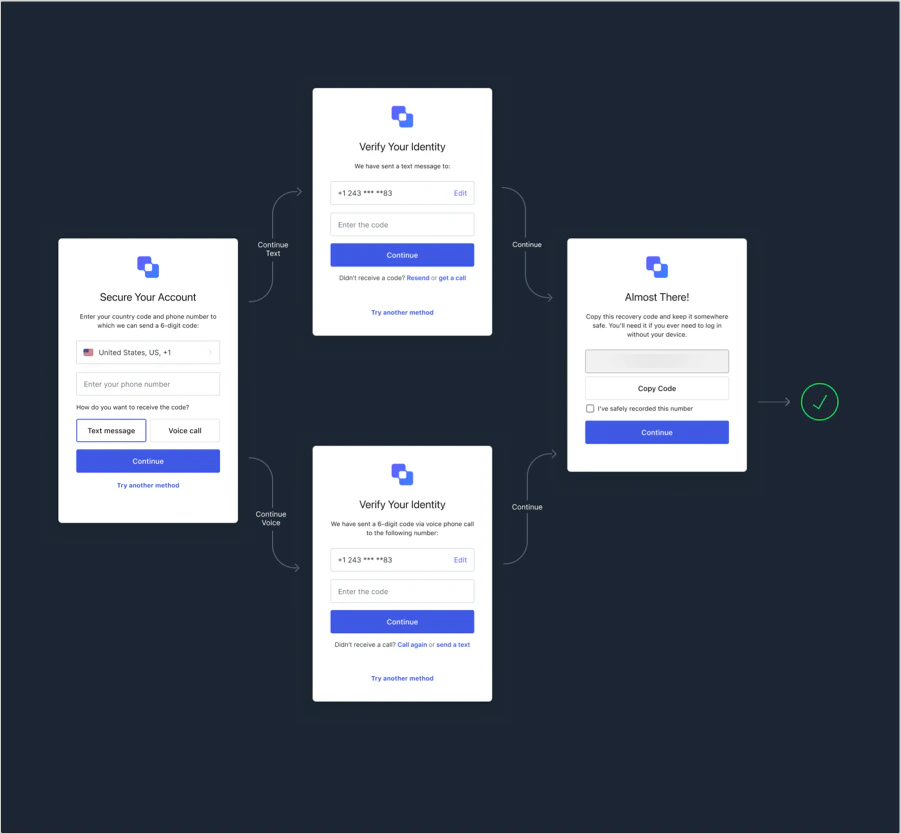 SMS のみを有効にした場合は、フローがよりシンプルになります。
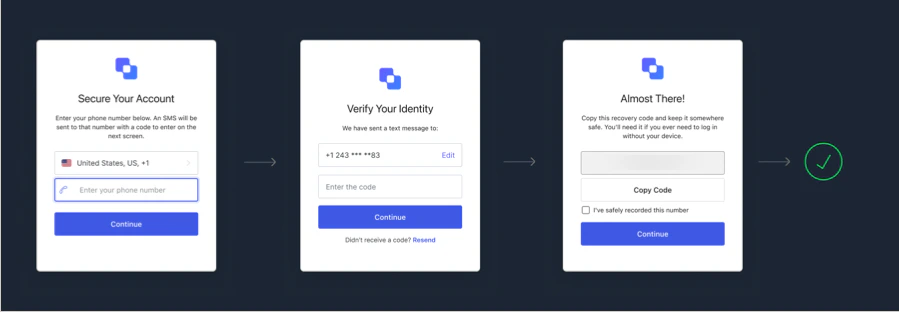 ユーザーが登録を完了すると、次回の認証時に、登録済みの電話番号に音声通話または SMS メッセージが届きます。
## Auth0 Dashboardを使用する
1. [**Auth0 Dashboard > Security > Multi-factor Auth**](https://manage.auth0.com/#/multifactor-auth) に移動します。
2. **Phone Message** を選択し、上部のトグルスイッチを有効にします。
3. 使用するメッセージ配信プロバイダーを選択します。
4. ユーザーが SMS と音声で認証できるようにするには、SMS 認証要素と音声認証要素を有効にし、使用する配信方法を選択する必要があります。
1. **Auth0**: このプロバイダーでは音声メッセージを送信できません。Auth0 が内部設定した SMS 配信プロバイダーを使用して SMS メッセージを送信します。利用できるのは評価およびテスト目的に限られ、テナントの存続期間全体を通じて 1 テナントあたり最大 100 件までです。100 件の上限に達すると、新しいコードは受信されなくなります。
2. **Twilio**: SMS の送信には [Twilio Programmable SMS API](https://www.twilio.com/sms)、音声の送信には [Twilio Programmable Voice API](https://www.twilio.com/voice) を使用します。Test Credentials ではなく、Twilio Live Credentials を使用してください。Test Credentials は本番環境でメッセージを送信するためのものではありません。
3. **Custom**: [Send Phone Message Flow](/docs/ja-jp/customize/actions/explore-triggers/mfa-notifications-trigger) の Action を呼び出してメッセージを送信します。
また、ユーザーが SMS テキストメッセージ、音声通話、またはその両方を受け取れるようにすることもできます。
### Twilio の設定
ご注意ください。Twilio では、一括インポートされた番号の移管と確認に最大 8 週間かかる場合があります。詳しくは、[Twilio Help Center](https://help.twilio.com/articles/223179468-How-long-does-it-take-to-port-a-number-to-Twilio) をご覧ください。
Twilio 経由で SMS を配信する場合は、次の手順で SMS 認証要素を設定します。
1. Twilio でアカウントを開設します。[Twilio Account SID](https://www.twilio.com/help/faq/twilio-basics/what-is-an-application-sid) と [Twilio Auth Token](https://www.twilio.com/help/faq/twilio-basics/what-is-the-auth-token-and-how-can-i-change-it) が必要です。これらは、Auth0 がユーザーに SMS を送信する際に使用する Twilio API の資格情報です。
2. 地理的リージョンに応じて、[SMS](https://support.twilio.com/hc/en-us/articles/223181108-How-International-SMS-Permissions-work) または [音声](https://www.twilio.com/console/voice/calls/geo-permissions) の権限を有効にする必要がある場合もあります。音声を使用する場合は、音声通話を発信できるよう有効化された Twilio 電話番号がアカウントに必要です。これは [Twilio で確認済み](https://support.twilio.com/hc/en-us/articles/223180048-Adding-a-Verified-Phone-Number-or-Caller-ID-with-Twilio) の外部電話番号でもかまいませんし、アカウント内で Twilio 電話番号を購入して設定することもできます。
3. 接続を設定します。[**Auth0 Dashboard > Security > Multi-factor Auth**](https://manage.auth0.com/#/security/mfa) に移動し、**Phone Message** を選択します。
4. **Choose your delivery provider** で **Twilio** を選択し、配信方法を選びます。
5. 該当するフィールドに **Twilio Account SID** と **Twilio Auth Token** を入力します。
6. **SMS Source** を選択します。
1. **Use From** を選択した場合は、ユーザーに SMS の送信元として表示される **From** 電話番号を入力する必要があります。これは Twilio 側でも設定できます。
2. **Use Messaging Services** を選択した場合は、[Messaging Service SID](https://www.twilio.com/docs/sms/services/services-send-messages) を入力する必要があります。
3. 音声を使用している場合は、SMS で **Message Services** を使用していても、必ず **From** を設定する必要があります。電話番号が SMS と音声メッセージの両方を送信できるよう設定されていることを確認してください。
7. **Save** を選択します。
### SMS または音声メッセージのテンプレートをカスタマイズ
SMS と音声メッセージのテンプレートはカスタマイズできます。詳しくは、[Customize SMS and Voice Messages](/docs/ja-jp/customize/customize-sms-or-voice-messages)をご覧ください。
## Management API を使用する
Management API では、`/api/v2/guardian/factors/phone/message-types` エンドポイントを使用して、有効にするメッセージ配信方法を設定できます。`message_types` パラメーターは配列で、`["sms"]`、`["voice"]`、または `["sms", "voice"]` を指定できます。API を呼び出すには、`update:guardian_factors` スコープを持つ [Management API access token](/docs/ja-jp/secure/tokens/access-tokens/management-api-access-tokens) をベアラートークンとして使用する必要があります。
```bash cURL theme={null}
curl --request PUT \
--url 'https://{yourDomain}/api/v2/guardian/factors/phone/message-types' \
--header 'authorization: Bearer MGMT_API_ACCESS_TOKEN' \
--header 'content-type: application/json' \
--data '{ "message_types": ["sms", "voice"] }'
```
```csharp C# theme={null}
var client = new RestClient("https://{yourDomain}/api/v2/guardian/factors/phone/message-types");
var request = new RestRequest(Method.PUT);
request.AddHeader("content-type", "application/json");
request.AddHeader("authorization", "Bearer MGMT_API_ACCESS_TOKEN");
request.AddParameter("application/json", "{ "message_types": ["sms", "voice"] }", ParameterType.RequestBody);
IRestResponse response = client.Execute(request);
```
```go Go theme={null}
package main
import (
"fmt"
"strings"
"net/http"
"io/ioutil"
)
func main() {
url := "https://{yourDomain}/api/v2/guardian/factors/phone/message-types"
payload := strings.NewReader("{ "message_types": ["sms", "voice"] }")
req, _ := http.NewRequest("PUT", url, payload)
req.Header.Add("content-type", "application/json")
req.Header.Add("authorization", "Bearer MGMT_API_ACCESS_TOKEN")
res, _ := http.DefaultClient.Do(req)
defer res.Body.Close()
body, _ := ioutil.ReadAll(res.Body)
fmt.Println(res)
fmt.Println(string(body))
}
```
```java Java theme={null}
HttpResponse response = Unirest.put("https://{yourDomain}/api/v2/guardian/factors/phone/message-types")
.header("content-type", "application/json")
.header("authorization", "Bearer MGMT_API_ACCESS_TOKEN")
.body("{ "message_types": ["sms", "voice"] }")
.asString();
```
```javascript Node.JS theme={null}
var axios = require("axios").default;
var options = {
method: 'PUT',
url: 'https://{yourDomain}/api/v2/guardian/factors/phone/message-types',
headers: {
'content-type': 'application/json',
authorization: 'Bearer MGMT_API_ACCESS_TOKEN'
},
data: {message_types: ['sms', 'voice']}
};
axios.request(options).then(function (response) {
console.log(response.data);
}).catch(function (error) {
console.error(error);
});
```
```php PHP theme={null}
$curl = curl_init();
curl_setopt_array($curl, [
CURLOPT_URL => "https://{yourDomain}/api/v2/guardian/factors/phone/message-types",
CURLOPT_RETURNTRANSFER => true,
CURLOPT_ENCODING => "",
CURLOPT_MAXREDIRS => 10,
CURLOPT_TIMEOUT => 30,
CURLOPT_HTTP_VERSION => CURL_HTTP_VERSION_1_1,
CURLOPT_CUSTOMREQUEST => "PUT",
CURLOPT_POSTFIELDS => "{ "message_types": ["sms", "voice"] }",
CURLOPT_HTTPHEADER => [
"authorization: Bearer MGMT_API_ACCESS_TOKEN",
"content-type: application/json"
],
]);
$response = curl_exec($curl);
$err = curl_error($curl);
curl_close($curl);
if ($err) {
echo "cURL Error #:" . $err;
} else {
echo $response;
}
```
```python Python theme={null}
import http.client
conn = http.client.HTTPSConnection("")
payload = "{ "message_types": ["sms", "voice"] }"
headers = {
'content-type': "application/json",
'authorization': "Bearer MGMT_API_ACCESS_TOKEN"
}
conn.request("PUT", "/{yourDomain}/api/v2/guardian/factors/phone/message-types", payload, headers)
res = conn.getresponse()
data = res.read()
print(data.decode("utf-8"))
```
```ruby Ruby theme={null}
require 'uri'
require 'net/http'
require 'openssl'
url = URI("https://{yourDomain}/api/v2/guardian/factors/phone/message-types")
http = Net::HTTP.new(url.host, url.port)
http.use_ssl = true
http.verify_mode = OpenSSL::SSL::VERIFY_PEER
request = Net::HTTP::Put.new(url)
request["content-type"] = 'application/json'
request["authorization"] = 'Bearer MGMT_API_ACCESS_TOKEN'
request.body = "{ "message_types": ["sms", "voice"] }"
response = http.request(request)
puts response.read_body
```
## 連携済みの SMS メッセージプロバイダー
Auth0 はデフォルトで、Twilio を使用したメッセージ送信をサポートしています。ただし、別の SMS プロバイダーを使用したり、メッセージ送信前に特定のロジックを追加したり、ユーザーやアプリケーションに応じて異なるメッセージを送信したりすることもできます。そのためには、SMS MFA が [Send Phone Message Flow](/docs/ja-jp/customize/actions/explore-triggers/mfa-notifications-trigger) 内の連携済み [Actions](/docs/ja-jp/customize/actions) のいずれかを使用するように設定します。
連携済みの SMS メッセージプロバイダーには、次のものがあります。
* [Amazon SNS](https://marketplace.auth0.com/integrations/amazon-sms-provider)
* [ClickSend](https://marketplace.auth0.com/integrations/clicksend-sms)
* [Esendex](https://marketplace.auth0.com/integrations/esendex-sms-provider)
* [Infobip](https://marketplace.auth0.com/integrations/infobip-sms-provider)
* [Mitto](https://marketplace.auth0.com/integrations/mitto-sms-provider)
* [Telesign](https://marketplace.auth0.com/integrations/telesign-sms-verification)
## カスタム電話プロバイダー
Actions を使用して、カスタム電話プロバイダーを設定することもできます。詳しくは、[カスタム電話プロバイダーの設定](/docs/ja-jp/customize/phone-messages/configure-phone-messaging-providers/configure-a-custom-phone-provider)をご覧ください。
## セキュリティに関する考慮事項
いずれの Phone Messaging Provider を使用する場合も、攻撃者がサインアップフローを悪用すると、金銭的な損害が発生するおそれがあることに注意してください。
Auth0 では、1 人のユーザーが送信できる SMS または音声メッセージは 1 時間あたり最大 10 件までに制限されており、メールまたは認証器による OTP フローは 5 分ごとに 5 回のリクエストまでに制限されています。 (バーストレートは 10 ですが、新規リクエストでは 1 時間あたり 1 件の音声メッセージのみが送信されます。) アカウントをさらに保護するため、次の対策を検討してください。
* [Suspicious IP Throttling](/docs/ja-jp/secure/attack-protection/suspicious-ip-throttling#signup-attempts) を有効にします。Auth0 は、1 分間に 50 回を超えるサインアップリクエストを試みた IP をブロックします。
* [Log Streaming](/docs/ja-jp/customize/log-streams) を有効にし、`gd_send_voice`、`gd_send_voice_failure`、`gd_send_sms`、または `gd_send_sms_failure` の[ログイベント](/docs/ja-jp/deploy-monitor/logs/log-event-type-codes)件数が急増した場合に、お好みの監視ツールでアラートを設定します。
Phone Messaging Provider には追加の保護機能もあります。Twilio を使用している場合は、[Twilio's Anti-Fraud Developer Guide](https://www.twilio.com/docs/usage/anti-fraud-developer-guide) を参照してください。次のオプションを検討してください。
* [SMS](https://support.twilio.com/hc/en-us/articles/223181108-How-International-SMS-Permissions-work) と [音声](https://support.twilio.com/hc/en-us/articles/223180228-International-Voice-Dialing-Geographic-Permissions-Geo-Permissions-and-How-They-Work) の送信先国を制限します。これは、通常ビジネスを行わない国の中に、[通話料詐欺](https://www.twilio.com/learn/voice-and-video/toll-fraud) のリスクが高い国や通話料金が高額な国がある場合に、特に有効です。
* 不正利用やコーディングミスからアカウントを保護するために、Twilio の [usage triggers](https://support.twilio.com/hc/en-us/articles/223132387-Protect-your-Twilio-project-from-Fraud-with-Usage-Triggers) を有効にします。
## 詳しくはこちら
* [SMS および音声の認証器の登録とチャレンジ](/docs/ja-jp/secure/multi-factor-authentication/authenticate-using-ropg-flow-with-mfa/enroll-challenge-sms-voice-authenticators)
* [攻撃対策](/docs/ja-jp/secure/attack-protection)
* [Log Streams](/docs/ja-jp/customize/log-streams)