> ## Documentation Index
> Fetch the complete documentation index at: https://translations.mintlify.site/llms.txt
> Use this file to discover all available pages before exploring further.
> Aprenda a conectarse a proveedores de identidad OpenID Connect (OIDC) mediante una conexión empresarial.
# Conectarse a un proveedor de identidad OpenID Connect
export const AuthCodeGroup = ({children, dropdown}) => {
const [processedChildren, setProcessedChildren] = useState(children);
useEffect(() => {
let unsubscribe = null;
function init() {
unsubscribe = window.autorun(() => {
const processChildren = node => {
if (typeof node === "string") {
let processedNode = node;
for (const [key, value] of window.rootStore.variableStore.values.entries()) {
const escapedKey = key.replaceAll(/[.*+?^${}()|[\]\\]/g, (String.raw)`\$&`);
processedNode = processedNode.replaceAll(new RegExp(escapedKey, "g"), value);
}
return processedNode;
} else if (Array.isArray(node)) {
return node.map(processChildren);
} else if (node && node.props && node.props.children) {
return {
...node,
props: {
...node.props,
children: processChildren(node.props.children)
}
};
}
return node;
};
setProcessedChildren(processChildren(children));
});
}
if (window.rootStore) {
init();
} else {
window.addEventListener("adu:storeReady", init);
}
return () => {
window.removeEventListener("adu:storeReady", init);
unsubscribe?.();
};
}, [children]);
return {processedChildren};
};
export const AuthCodeBlock = ({filename, icon, language, highlight, children}) => {
const [displayText, setDisplayText] = useState(children);
const [copyText, setCopyText] = useState(children);
const wrapperRef = React.useRef(null);
useEffect(() => {
let unsubscribe = null;
function init() {
if (!window.autorun || !window.rootStore) {
return;
}
unsubscribe = window.autorun(() => {
let processedChildrenForDisplay = children;
let processedChildrenForCopy = children;
for (const [key, value] of window.rootStore.variableStore.values.entries()) {
const escapedKey = key.replaceAll(/[.*+?^${}()|[\]\\]/g, (String.raw)`\$&`);
let displayValue = value;
if (key === "{yourClientSecret}" && value !== "{yourClientSecret}") {
displayValue = value.substring(0, 3) + "*****ENMASCARADO*****";
}
processedChildrenForDisplay = processedChildrenForDisplay.replaceAll(new RegExp(escapedKey, "g"), displayValue);
processedChildrenForCopy = processedChildrenForCopy.replaceAll(new RegExp(escapedKey, "g"), value);
}
setDisplayText(processedChildrenForDisplay);
setCopyText(processedChildrenForCopy);
});
}
if (window.rootStore) {
init();
} else {
window.addEventListener("adu:storeReady", init);
}
return () => {
window.removeEventListener("adu:storeReady", init);
unsubscribe?.();
};
}, [children]);
useEffect(() => {
if (!wrapperRef.current) return;
const originalWriteText = navigator.clipboard.writeText.bind(navigator.clipboard);
let isOverriding = false;
const handleClick = e => {
const button = e.target.closest('[data-testid="copy-code-button"]');
if (!button || !wrapperRef.current.contains(button)) return;
isOverriding = true;
navigator.clipboard.writeText = text => {
if (isOverriding) {
isOverriding = false;
navigator.clipboard.writeText = originalWriteText;
return originalWriteText(copyText);
}
return originalWriteText(text);
};
setTimeout(() => {
if (isOverriding) {
isOverriding = false;
navigator.clipboard.writeText = originalWriteText;
}
}, 100);
};
const wrapper = wrapperRef.current;
wrapper.addEventListener('click', handleClick, true);
return () => {
wrapper.removeEventListener('click', handleClick, true);
if (navigator.clipboard.writeText !== originalWriteText) {
navigator.clipboard.writeText = originalWriteText;
}
};
}, [copyText]);
return
{displayText}
;
};
## Requisitos previos
* [Registra tu aplicación con Auth0](/es/docs/get-started/auth0-overview/create-applications).
* Selecciona un **tipo de aplicación** adecuado.
* Agrega una **URL de callback permitida** de **`{https://yourApp/callback}`**.
* Asegúrate de que los [tipos de concesión](/es/docs/get-started/applications/update-grant-types) de tu aplicación incluyan los flujos correspondientes.
## Pasos
Para conectar su aplicación a un Proveedor de identidad OIDC, debe:
1. [Configurar su aplicación en el proveedor de identidad OpenID Connect](#set-up-your-app-in-the-openid-connect-identity-provider)
2. [Crear una conexión empresarial en Auth0](#create-an-enterprise-connection-in-auth0)
3. [Habilitar la conexión empresarial para su aplicación de Auth0](#enable-the-enterprise-connection-for-your-auth0-application)
4. [Probar la conexión](#test-the-connection)
## Configura tu aplicación en el proveedor de identidad OpenID Connect
Para permitir que los usuarios inicien sesión con un Proveedor de identidad OIDC, debes registrar tu aplicación en el IdP. El proceso varía según el Proveedor de identidad OIDC, por lo que deberás seguir la documentación de tu IdP para completar esta tarea.
Por lo general, debes asegurarte de introducir tu URL de callback en algún momento: `https://{YOUR_AUTH0_DOMAIN}/login/callback`.
Si tu nombre de dominio de Auth0 no aparece arriba y no estás usando nuestra característica de [dominios personalizados](/es/docs/customize/custom-domains), tu nombre de dominio es una concatenación del nombre de tu inquilino, tu subdominio regional y `auth0.com`, separados por el símbolo de punto (`.`).
Por ejemplo, si el nombre de tu inquilino es `exampleco-enterprises` y tu inquilino está en la región de EE. UU., tu nombre de dominio de Auth0 sería `exampleco-enterprises.us.auth0.com` y tu **Redirect URI** sería `https://exampleco-enterprises.us.auth0.com/login/callback`.
Sin embargo, si tu inquilino está en la región de EE. UU. y se creó antes de junio de 2020, tu nombre de dominio de Auth0 sería `exampleco-enterprises.auth0.com` y tu **Redirect URI** sería `https://exampleco-enterprises.auth0.com/login/callback`.
Si estás usando [dominios personalizados](/es/docs/customize/custom-domains), tu **Redirect URI** sería `https:///login/callback`.
Durante este proceso, tu Proveedor de identidad OIDC generará un identificador único para la API registrada, normalmente llamado **ID de cliente** o **ID de aplicación**. Toma nota de este valor; lo necesitarás más adelante.
## Crear una conexión empresarial en Auth0
Antes de configurar una conexión empresarial OIDC en Auth0, asegúrate de tener el **ID de la aplicación (cliente)** y el **Secreto del cliente** que se generan al configurar tu aplicación en el proveedor OIDC.
### Crear una conexión empresarial mediante Auth0 Dashboard
Para que se pueda configurar a través de Auth0 Dashboard, el Proveedor de identidad OIDC debe ser compatible con [OIDC Discovery](https://openid.net/specs/openid-connect-discovery-1_0.html). De lo contrario, puede [configurar la conexión mediante Management API](#configure-the-connection-using-the-management-api).
1. Vaya a [Auth0 Dashboard > Authentication > Enterprise](https://manage.auth0.com/#/connections/enterprise), busque **Open ID Connect** y seleccione **Create**.
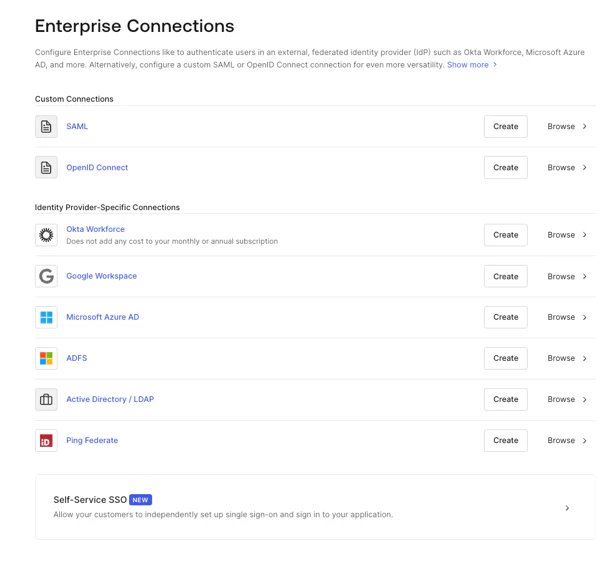 2. Introduzca los detalles de la conexión y seleccione **Create:**
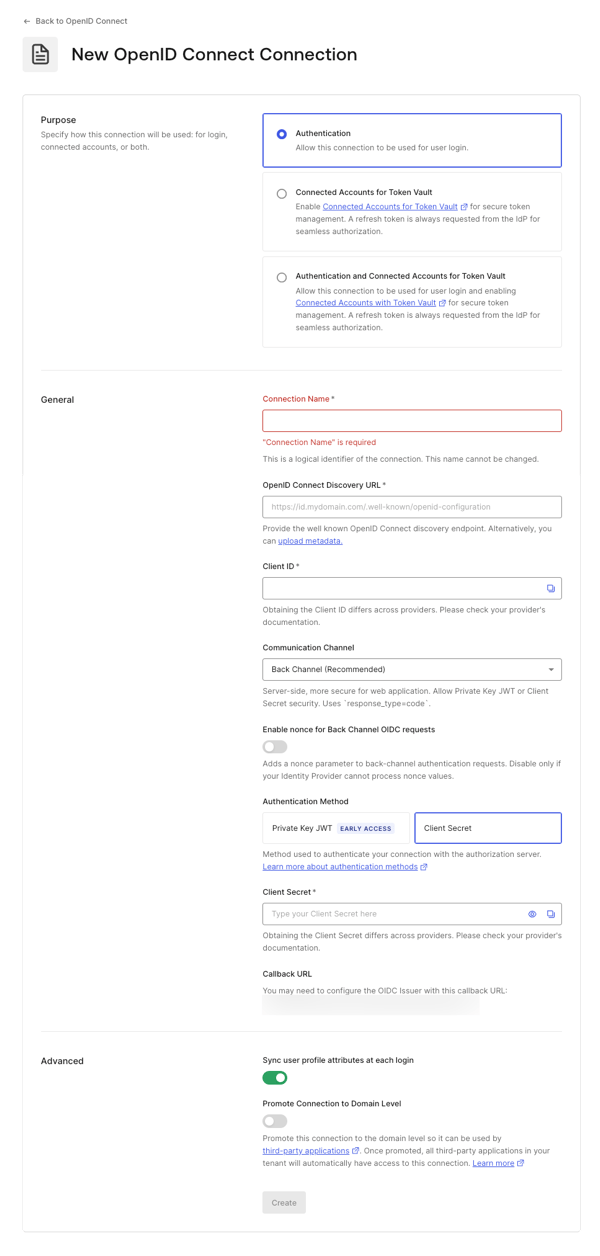 | **Campo** | **Descripción** |
| ----------------------------------------------------------------------------- | ------------------------------------------------------------------------------------------------------------------------------------------------------------------------------------------------------------------------------------------------------------------------------------------------------------------------------------------------------------------------------------------------------------------------------------------------------------------------------------------------------------------------------------------------------------------------------------------------------------------------------------------------------------------------------------------------------------------------------------------------------ |
| **Propósito** | Determina cómo pretende usar la conexión: para autenticar usuarios, para conectar cuentas externas a Auth0 o para ambos fines. Para obtener más información, consulte [Autenticación de usuarios vs. Cuentas conectadas](/es/docs/secure/tokens/token-vault/connected-accounts-for-token-vault#user-authentication-vs-connected-accounts) |
| **Nombre de la conexión** | Identificador lógico de la conexión; debe ser único para su inquilino. Una vez establecido, este nombre no se puede cambiar. |
| **URL de descubrimiento de OpenID Connect** | URL en la que Auth0 puede encontrar el endpoint well-known de descubrimiento de OpenID Connect, normalmente disponible en el endpoint
| **Campo** | **Descripción** |
| ----------------------------------------------------------------------------- | ------------------------------------------------------------------------------------------------------------------------------------------------------------------------------------------------------------------------------------------------------------------------------------------------------------------------------------------------------------------------------------------------------------------------------------------------------------------------------------------------------------------------------------------------------------------------------------------------------------------------------------------------------------------------------------------------------------------------------------------------------ |
| **Propósito** | Determina cómo pretende usar la conexión: para autenticar usuarios, para conectar cuentas externas a Auth0 o para ambos fines. Para obtener más información, consulte [Autenticación de usuarios vs. Cuentas conectadas](/es/docs/secure/tokens/token-vault/connected-accounts-for-token-vault#user-authentication-vs-connected-accounts) |
| **Nombre de la conexión** | Identificador lógico de la conexión; debe ser único para su inquilino. Una vez establecido, este nombre no se puede cambiar. |
| **URL de descubrimiento de OpenID Connect** | URL en la que Auth0 puede encontrar el endpoint well-known de descubrimiento de OpenID Connect, normalmente disponible en el endpoint /.well-known/openid-configuration. Puede introducir la URL base o la URL completa. Verá una marca de verificación verde si puede encontrarse en esa ubicación, una marca roja si no puede encontrarse, o un mensaje de error si se encuentra el archivo pero la información requerida no está presente en el archivo de configuración. Para obtener más información, consulte [Configurar aplicaciones con OIDC Discovery](/es/docs/get-started/applications/configure-applications-with-oidc-discovery). |
| **ID de cliente** | El identificador que le proporcionó su proveedor. Es el identificador único de su aplicación registrada. Introduzca el valor guardado del ID de cliente de la aplicación que registró con el Proveedor de identidad OIDC. Cada proveedor gestiona este paso de forma distinta. |
| **Canal de comunicación** | Configúrelo como Front Channel o Back Channel. Front Channel usa el protocolo OIDC con response\_mode=form\_post y response\_type=id\_token. Back Channel usa response\_type=code. |
| **Método de autenticación** | Elija cómo se autentica su aplicación con Auth0. |
| **Secreto del cliente** | Disponible si antes eligió Back Channel. Es el secreto que le proporcionó su proveedor; cada proveedor gestiona este paso de forma distinta. |
| **URL de callback** | URL a la que Auth0 redirige a los usuarios después de autenticarse. Asegúrese de que este valor esté configurado para la aplicación que registró con el Proveedor de identidad OIDC. |
| **Sincronizar los atributos del perfil del usuario en cada inicio de sesión** | Si se selecciona, su inquilino actualiza los atributos raíz relevantes name, nickname, given\_name, family\_name o picture cada vez que un usuario inicia sesión. |
| **Promover la conexión al nivel de dominio** | Permite que las aplicaciones de terceros accedan a la conexión. |
3. En la vista **Settings**, realice ajustes de configuración adicionales si es necesario.
| **Campo** | **Descripción** |
| --------------------------------------------- | ----------------------------------------------------------------------------------------------------------------------------------------------------------------------------------------------------------------------------------------------------------------------------------------------------------------------------------------------------------- |
| **Nombre de la conexión** | El nombre que proporcionaste al crear esta conexión. No se puede cambiar. |
| **Metadatos de la conexión** | Se generan automáticamente a partir de la URL del endpoint Well-Known que proporcionaste en la pantalla anterior; pueden sobrescribirse cargando un nuevo archivo de metadatos. |
| **Autenticación** | Se configura como **Front Channel** o **Back Channel**. Front Channel usa el protocolo OIDC con `response_mode=form_post` y `response_type=id_token`. Back Channel usa `response_type=code`. Selecciona **Manage Authentication** para actualizarlo en la pestaña Credentials. |
| **Alcances** | Una lista de alcances de Auth0 separada por comas para solicitar al conectarte al Proveedor de identidad OIDC. Esto afectará los datos almacenados en el perfil del usuario. Debes incluir al menos el scope `openid`. Ten en cuenta que la conexión no llama al endpoint `/userinfo` y espera que los claims del usuario estén presentes en el `id_token`. |
| **URL de callback** | Algunos proveedores necesitan esta URL para completar la conexión OIDC. |
| **Asignación de usuarios** | Proporciona plantillas para asignar atributos específicos del usuario a variables de la conexión. |
| **Perfil de la conexión** | Para entender cómo cambiar el perfil de tu conexión, consulta [Configurar PKCE y la asignación de claims para conexiones OIDC](/es/docs/authenticate/identity-providers/enterprise-identity-providers/configure-pkce-claim-mapping-for-oidc). |
| **Propósito** | Determina cómo quieres usar la conexión: para la autenticación de usuarios, para conectar cuentas externas a Auth0 o para ambas cosas. Para obtener más información, consulta [Autenticación de usuarios vs. Connected Accounts](/es/docs/secure/tokens/token-vault/connected-accounts-for-token-vault#user-authentication-vs-connected-accounts) |
| **Revocación global de tokens** | Usa el endpoint proporcionado para finalizar la sesión de Auth0 de un usuario revocando tokens de actualización. Puede usarse con Universal Logout y Okta Workforce Identity Cloud. |
| **Promover la conexión al nivel del dominio** | Permite que las aplicaciones de terceros accedan a la conexión. |
4. En la vista **Provisioning**, configura cómo se crean y actualizan los perfiles de usuario en Auth0.
| **Campo** | **Descripción** |
| ------------------------------------------------------------------------ | -------------------------------------------------------------------------------------------------------------------------------------------------------------------------------------------------------------------------------------------- |
| **Sincronizar atributos del perfil de usuario en cada inicio de sesión** | Cuando está habilitada, Auth0 sincroniza automáticamente los datos del perfil del usuario en cada inicio de sesión, lo que garantiza que los cambios realizados en el origen de la conexión se actualicen automáticamente en Auth0. |
| **Frecuencia de sincronización** | Determina con qué frecuencia debe actualizarse el perfil del usuario. |
| **Sincronizar perfiles de usuario mediante SCIM** | Cuando está habilitada, Auth0 permite sincronizar los datos del perfil del usuario mediante SCIM. Para obtener más información, consulta Configurar SCIM entrante. |
5. En la vista **Login Experience**, configura cómo los usuarios inician sesión con esta conexión.
| Campo | Descripción |
| ----------------------------- | ---------------------------------------------------------------------------------------------------------------------------------------------------------------------------------------------------------------------------------------------------------------------------- |
| **Home Realm Discovery** | Compara el dominio de correo electrónico de un usuario con los dominios del proveedor de identidad proporcionados. Para obtener más información, consulta [Configurar la autenticación Identifier First](/es/docs/authenticate/login/auth0-universal-login/identifier-first) |
| **Mostrar botón de conexión** | Esta opción muestra las siguientes opciones para personalizar el botón de conexión de tu aplicación. |
Los campos opcionales están disponibles solo con Universal Login. Los clientes que usan Classic Login no verán el botón Add, el Button display name ni la Button logo URL.
6. Selecciona **Save Changes**.
### Cree una conexión empresarial con la Management API
Estos ejemplos le mostrarán las distintas formas de crear la conexión con la Management API de Auth0. Puede configurar la conexión proporcionando un URI de metadatos o definiendo explícitamente las URL de OIDC. Para obtener más información, consulte [Proveedores de identidad](/es/docs/authenticate/identity-providers).
#### Usar front-channel con el endpoint de descubrimiento
```bash cURL theme={null}
curl --request POST \
--url 'https://{yourDomain}/api/v2/connections' \
--header 'authorization: Bearer MGMT_API_ACCESS_TOKEN' \
--data '{ "strategy": "oidc", "name": "CONNECTION_NAME", "options": { "type": "front_channel", "discovery_url": "https://IDP_DOMAIN/.well-known/openid-configuration", "client_id" : "IDP_CLIENT_ID", "scopes": "openid profile" } }'
```
```csharp C# theme={null}
var client = new RestClient("https://{yourDomain}/api/v2/connections");
var request = new RestRequest(Method.POST);
request.AddHeader("authorization", "Bearer MGMT_API_ACCESS_TOKEN");
request.AddParameter("undefined", "{ "strategy": "oidc", "name": "CONNECTION_NAME", "options": { "type": "front_channel", "discovery_url": "https://IDP_DOMAIN/.well-known/openid-configuration", "client_id" : "IDP_CLIENT_ID", "scopes": "openid profile" } }", ParameterType.RequestBody);
IRestResponse response = client.Execute(request);
```
```go Go theme={null}
package main
import (
"fmt"
"strings"
"net/http"
"io/ioutil"
)
func main() {
url := "https://{yourDomain}/api/v2/connections"
payload := strings.NewReader("{ "strategy": "oidc", "name": "CONNECTION_NAME", "options": { "type": "front_channel", "discovery_url": "https://IDP_DOMAIN/.well-known/openid-configuration", "client_id" : "IDP_CLIENT_ID", "scopes": "openid profile" } }")
req, _ := http.NewRequest("POST", url, payload)
req.Header.Add("authorization", "Bearer MGMT_API_ACCESS_TOKEN")
res, _ := http.DefaultClient.Do(req)
defer res.Body.Close()
body, _ := ioutil.ReadAll(res.Body)
fmt.Println(res)
fmt.Println(string(body))
}
```
```java Java theme={null}
HttpResponse response = Unirest.post("https://{yourDomain}/api/v2/connections")
.header("authorization", "Bearer MGMT_API_ACCESS_TOKEN")
.body("{ "strategy": "oidc", "name": "CONNECTION_NAME", "options": { "type": "front_channel", "discovery_url": "https://IDP_DOMAIN/.well-known/openid-configuration", "client_id" : "IDP_CLIENT_ID", "scopes": "openid profile" } }")
.asString();
```
```javascript Node.JS theme={null}
var axios = require("axios").default;
var options = {
method: 'POST',
url: 'https://{yourDomain}/api/v2/connections',
headers: {authorization: 'Bearer MGMT_API_ACCESS_TOKEN'},
data: {
strategy: 'oidc',
name: 'CONNECTION_NAME',
options: {
type: 'front_channel',
discovery_url: 'https://IDP_DOMAIN/.well-known/openid-configuration',
client_id: 'IDP_CLIENT_ID',
scopes: 'openid profile'
}
}
};
axios.request(options).then(function (response) {
console.log(response.data);
}).catch(function (error) {
console.error(error);
});
```
```php PHP theme={null}
$curl = curl_init();
curl_setopt_array($curl, [
CURLOPT_URL => "https://{yourDomain}/api/v2/connections",
CURLOPT_RETURNTRANSFER => true,
CURLOPT_ENCODING => "",
CURLOPT_MAXREDIRS => 10,
CURLOPT_TIMEOUT => 30,
CURLOPT_HTTP_VERSION => CURL_HTTP_VERSION_1_1,
CURLOPT_CUSTOMREQUEST => "POST",
CURLOPT_POSTFIELDS => "{ "strategy": "oidc", "name": "CONNECTION_NAME", "options": { "type": "front_channel", "discovery_url": "https://IDP_DOMAIN/.well-known/openid-configuration", "client_id" : "IDP_CLIENT_ID", "scopes": "openid profile" } }",
CURLOPT_HTTPHEADER => [
"authorization: Bearer MGMT_API_ACCESS_TOKEN"
],
]);
$response = curl_exec($curl);
$err = curl_error($curl);
curl_close($curl);
if ($err) {
echo "cURL Error #:" . $err;
} else {
echo $response;
}
```
```python Python theme={null}
import http.client
conn = http.client.HTTPSConnection("")
payload = "{ "strategy": "oidc", "name": "CONNECTION_NAME", "options": { "type": "front_channel", "discovery_url": "https://IDP_DOMAIN/.well-known/openid-configuration", "client_id" : "IDP_CLIENT_ID", "scopes": "openid profile" } }"
headers = { 'authorization': "Bearer MGMT_API_ACCESS_TOKEN" }
conn.request("POST", "/{yourDomain}/api/v2/connections", payload, headers)
res = conn.getresponse()
data = res.read()
print(data.decode("utf-8"))
```
```ruby Ruby theme={null}
require 'uri'
require 'net/http'
require 'openssl'
url = URI("https://{yourDomain}/api/v2/connections")
http = Net::HTTP.new(url.host, url.port)
http.use_ssl = true
http.verify_mode = OpenSSL::SSL::VERIFY_NONE
request = Net::HTTP::Post.new(url)
request["authorization"] = 'Bearer MGMT_API_ACCESS_TOKEN'
request.body = "{ "strategy": "oidc", "name": "CONNECTION_NAME", "options": { "type": "front_channel", "discovery_url": "https://IDP_DOMAIN/.well-known/openid-configuration", "client_id" : "IDP_CLIENT_ID", "scopes": "openid profile" } }"
response = http.request(request)
puts response.read_body
```
#### Usar el back-channel con el endpoint de descubrimiento
```bash cURL theme={null}
curl --request POST \
--url 'https://{yourDomain}/api/v2/connections' \
--header 'authorization: Bearer MGMT_API_ACCESS_TOKEN' \
--data '{ "strategy": "oidc", "name": "CONNECTION_NAME", "options": { "type": "back_channel", "discovery_url": "https://IDP_DOMAIN/.well-known/openid-configuration", "client_id" : "IDP_CLIENT_ID", "client_secret" : "IDP_CLIENT_SECRET", "scopes": "openid profile" } }'
```
```csharp C# theme={null}
var client = new RestClient("https://{yourDomain}/api/v2/connections");
var request = new RestRequest(Method.POST);
request.AddHeader("authorization", "Bearer MGMT_API_ACCESS_TOKEN");
request.AddParameter("undefined", "{ "strategy": "oidc", "name": "CONNECTION_NAME", "options": { "type": "back_channel", "discovery_url": "https://IDP_DOMAIN/.well-known/openid-configuration", "client_id" : "IDP_CLIENT_ID", "client_secret" : "IDP_CLIENT_SECRET", "scopes": "openid profile" } }", ParameterType.RequestBody);
IRestResponse response = client.Execute(request);
```
```go Go theme={null}
package main
import (
"fmt"
"strings"
"net/http"
"io/ioutil"
)
func main() {
url := "https://{yourDomain}/api/v2/connections"
payload := strings.NewReader("{ "strategy": "oidc", "name": "CONNECTION_NAME", "options": { "type": "back_channel", "discovery_url": "https://IDP_DOMAIN/.well-known/openid-configuration", "client_id" : "IDP_CLIENT_ID", "client_secret" : "IDP_CLIENT_SECRET", "scopes": "openid profile" } }")
req, _ := http.NewRequest("POST", url, payload)
req.Header.Add("authorization", "Bearer MGMT_API_ACCESS_TOKEN")
res, _ := http.DefaultClient.Do(req)
defer res.Body.Close()
body, _ := ioutil.ReadAll(res.Body)
fmt.Println(res)
fmt.Println(string(body))
}
```
```java Java theme={null}
HttpResponse response = Unirest.post("https://{yourDomain}/api/v2/connections")
.header("authorization", "Bearer MGMT_API_ACCESS_TOKEN")
.body("{ "strategy": "oidc", "name": "CONNECTION_NAME", "options": { "type": "back_channel", "discovery_url": "https://IDP_DOMAIN/.well-known/openid-configuration", "client_id" : "IDP_CLIENT_ID", "client_secret" : "IDP_CLIENT_SECRET", "scopes": "openid profile" } }")
.asString();
```
```javascript Node.JS theme={null}
var axios = require("axios").default;
var options = {
method: 'POST',
url: 'https://{yourDomain}/api/v2/connections',
headers: {authorization: 'Bearer MGMT_API_ACCESS_TOKEN'},
data: {
strategy: 'oidc',
name: 'CONNECTION_NAME',
options: {
type: 'back_channel',
discovery_url: 'https://IDP_DOMAIN/.well-known/openid-configuration',
client_id: 'IDP_CLIENT_ID',
client_secret: 'IDP_CLIENT_SECRET',
scopes: 'openid profile'
}
}
};
axios.request(options).then(function (response) {
console.log(response.data);
}).catch(function (error) {
console.error(error);
});
```
```php PHP theme={null}
$curl = curl_init();
curl_setopt_array($curl, [
CURLOPT_URL => "https://{yourDomain}/api/v2/connections",
CURLOPT_RETURNTRANSFER => true,
CURLOPT_ENCODING => "",
CURLOPT_MAXREDIRS => 10,
CURLOPT_TIMEOUT => 30,
CURLOPT_HTTP_VERSION => CURL_HTTP_VERSION_1_1,
CURLOPT_CUSTOMREQUEST => "POST",
CURLOPT_POSTFIELDS => "{ "strategy": "oidc", "name": "CONNECTION_NAME", "options": { "type": "back_channel", "discovery_url": "https://IDP_DOMAIN/.well-known/openid-configuration", "client_id" : "IDP_CLIENT_ID", "client_secret" : "IDP_CLIENT_SECRET", "scopes": "openid profile" } }",
CURLOPT_HTTPHEADER => [
"authorization: Bearer MGMT_API_ACCESS_TOKEN"
],
]);
$response = curl_exec($curl);
$err = curl_error($curl);
curl_close($curl);
if ($err) {
echo "cURL Error #:" . $err;
} else {
echo $response;
}
```
```python Python theme={null}
import http.client
conn = http.client.HTTPSConnection("")
payload = "{ "strategy": "oidc", "name": "CONNECTION_NAME", "options": { "type": "back_channel", "discovery_url": "https://IDP_DOMAIN/.well-known/openid-configuration", "client_id" : "IDP_CLIENT_ID", "client_secret" : "IDP_CLIENT_SECRET", "scopes": "openid profile" } }"
headers = { 'authorization': "Bearer MGMT_API_ACCESS_TOKEN" }
conn.request("POST", "/{yourDomain}/api/v2/connections", payload, headers)
res = conn.getresponse()
data = res.read()
print(data.decode("utf-8"))
```
```ruby Ruby theme={null}
require 'uri'
require 'net/http'
require 'openssl'
url = URI("https://{yourDomain}/api/v2/connections")
http = Net::HTTP.new(url.host, url.port)
http.use_ssl = true
http.verify_mode = OpenSSL::SSL::VERIFY_NONE
request = Net::HTTP::Post.new(url)
request["authorization"] = 'Bearer MGMT_API_ACCESS_TOKEN'
request.body = "{ "strategy": "oidc", "name": "CONNECTION_NAME", "options": { "type": "back_channel", "discovery_url": "https://IDP_DOMAIN/.well-known/openid-configuration", "client_id" : "IDP_CLIENT_ID", "client_secret" : "IDP_CLIENT_SECRET", "scopes": "openid profile" } }"
response = http.request(request)
puts response.read_body
```
#### Usar el back-channel y especificar la configuración del emisor
```bash cURL theme={null}
curl --request POST \
--url 'https://{yourDomain}/api/v2/connections' \
--header 'authorization: Bearer MGMT_API_ACCESS_TOKEN' \
--data '{ "strategy": "oidc", "name": "CONNECTION_NAME", "options": { "type": "back_channel", "issuer": "https://IDP_DOMAIN", "authorization_endpoint": "https://IDP_DOMAIN/authorize", "client_secret" : "IDP_CLIENT_SECRET", "client_id" : "IDP_CLIENT_ID", "scopes": "openid profile" } }'
```
```csharp C# theme={null}
var client = new RestClient("https://{yourDomain}/api/v2/connections");
var request = new RestRequest(Method.POST);
request.AddHeader("authorization", "Bearer MGMT_API_ACCESS_TOKEN");
request.AddParameter("undefined", "{ "strategy": "oidc", "name": "CONNECTION_NAME", "options": { "type": "back_channel", "issuer": "https://IDP_DOMAIN", "authorization_endpoint": "https://IDP_DOMAIN/authorize", "client_secret" : "IDP_CLIENT_SECRET", "client_id" : "IDP_CLIENT_ID", "scopes": "openid profile" } }", ParameterType.RequestBody);
IRestResponse response = client.Execute(request);
```
```go Go theme={null}
package main
import (
"fmt"
"strings"
"net/http"
"io/ioutil"
)
func main() {
url := "https://{yourDomain}/api/v2/connections"
payload := strings.NewReader("{ "strategy": "oidc", "name": "CONNECTION_NAME", "options": { "type": "back_channel", "issuer": "https://IDP_DOMAIN", "authorization_endpoint": "https://IDP_DOMAIN/authorize", "client_secret" : "IDP_CLIENT_SECRET", "client_id" : "IDP_CLIENT_ID", "scopes": "openid profile" } }")
req, _ := http.NewRequest("POST", url, payload)
req.Header.Add("authorization", "Bearer MGMT_API_ACCESS_TOKEN")
res, _ := http.DefaultClient.Do(req)
defer res.Body.Close()
body, _ := ioutil.ReadAll(res.Body)
fmt.Println(res)
fmt.Println(string(body))
}
```
```java Java theme={null}
HttpResponse response = Unirest.post("https://{yourDomain}/api/v2/connections")
.header("authorization", "Bearer MGMT_API_ACCESS_TOKEN")
.body("{ "strategy": "oidc", "name": "CONNECTION_NAME", "options": { "type": "back_channel", "issuer": "https://IDP_DOMAIN", "authorization_endpoint": "https://IDP_DOMAIN/authorize", "client_secret" : "IDP_CLIENT_SECRET", "client_id" : "IDP_CLIENT_ID", "scopes": "openid profile" } }")
.asString();
```
```javascript Node.JS theme={null}
var axios = require("axios").default;
var options = {
method: 'POST',
url: 'https://{yourDomain}/api/v2/connections',
headers: {authorization: 'Bearer MGMT_API_ACCESS_TOKEN'},
data: {
strategy: 'oidc',
name: 'CONNECTION_NAME',
options: {
type: 'back_channel',
issuer: 'https://IDP_DOMAIN',
authorization_endpoint: 'https://IDP_DOMAIN/authorize',
client_secret: 'IDP_CLIENT_SECRET',
client_id: 'IDP_CLIENT_ID',
scopes: 'openid profile'
}
}
};
axios.request(options).then(function (response) {
console.log(response.data);
}).catch(function (error) {
console.error(error);
});
```
```php PHP theme={null}
$curl = curl_init();
curl_setopt_array($curl, [
CURLOPT_URL => "https://{yourDomain}/api/v2/connections",
CURLOPT_RETURNTRANSFER => true,
CURLOPT_ENCODING => "",
CURLOPT_MAXREDIRS => 10,
CURLOPT_TIMEOUT => 30,
CURLOPT_HTTP_VERSION => CURL_HTTP_VERSION_1_1,
CURLOPT_CUSTOMREQUEST => "POST",
CURLOPT_POSTFIELDS => "{ "strategy": "oidc", "name": "CONNECTION_NAME", "options": { "type": "back_channel", "issuer": "https://IDP_DOMAIN", "authorization_endpoint": "https://IDP_DOMAIN/authorize", "client_secret" : "IDP_CLIENT_SECRET", "client_id" : "IDP_CLIENT_ID", "scopes": "openid profile" } }",
CURLOPT_HTTPHEADER => [
"authorization: Bearer MGMT_API_ACCESS_TOKEN"
],
]);
$response = curl_exec($curl);
$err = curl_error($curl);
curl_close($curl);
if ($err) {
echo "cURL Error #:" . $err;
} else {
echo $response;
}
```
```python Python theme={null}
import http.client
conn = http.client.HTTPSConnection("")
payload = "{ "strategy": "oidc", "name": "CONNECTION_NAME", "options": { "type": "back_channel", "issuer": "https://IDP_DOMAIN", "authorization_endpoint": "https://IDP_DOMAIN/authorize", "client_secret" : "IDP_CLIENT_SECRET", "client_id" : "IDP_CLIENT_ID", "scopes": "openid profile" } }"
headers = { 'authorization': "Bearer MGMT_API_ACCESS_TOKEN" }
conn.request("POST", "/{yourDomain}/api/v2/connections", payload, headers)
res = conn.getresponse()
data = res.read()
print(data.decode("utf-8"))
```
```ruby Ruby theme={null}
require 'uri'
require 'net/http'
require 'openssl'
url = URI("https://{yourDomain}/api/v2/connections")
http = Net::HTTP.new(url.host, url.port)
http.use_ssl = true
http.verify_mode = OpenSSL::SSL::VERIFY_NONE
request = Net::HTTP::Post.new(url)
request["authorization"] = 'Bearer MGMT_API_ACCESS_TOKEN'
request.body = "{ "strategy": "oidc", "name": "CONNECTION_NAME", "options": { "type": "back_channel", "issuer": "https://IDP_DOMAIN", "authorization_endpoint": "https://IDP_DOMAIN/authorize", "client_secret" : "IDP_CLIENT_SECRET", "client_id" : "IDP_CLIENT_ID", "scopes": "openid profile" } }"
response = http.request(request)
puts response.read_body
```
#### Usar front-channel y especificar la configuración del emisor
```bash cURL theme={null}
curl --request POST \
--url 'https://{yourDomain}/api/v2/connections' \
--header 'authorization: Bearer MGMT_API_ACCESS_TOKEN' \
--data '{ "strategy": "oidc", "name": "CONNECTION_NAME", "options": { "type": "front_channel", "issuer": "https://IDP_DOMAIN", "authorization_endpoint": "https://IDP_DOMAIN/authorize", "token_endpoint": "https://IDP_DOMAIN/oauth/token", "client_id" : "IDP_CLIENT_ID", "scopes": "openid profile" } }'
```
```csharp C# theme={null}
var client = new RestClient("https://{yourDomain}/api/v2/connections");
var request = new RestRequest(Method.POST);
request.AddHeader("authorization", "Bearer MGMT_API_ACCESS_TOKEN");
request.AddParameter("undefined", "{ "strategy": "oidc", "name": "CONNECTION_NAME", "options": { "type": "front_channel", "issuer": "https://IDP_DOMAIN", "authorization_endpoint": "https://IDP_DOMAIN/authorize", "token_endpoint": "https://IDP_DOMAIN/oauth/token", "client_id" : "IDP_CLIENT_ID", "scopes": "openid profile" } }", ParameterType.RequestBody);
IRestResponse response = client.Execute(request);
```
```go Go theme={null}
package main
import (
"fmt"
"strings"
"net/http"
"io/ioutil"
)
func main() {
url := "https://{yourDomain}/api/v2/connections"
payload := strings.NewReader("{ "strategy": "oidc", "name": "CONNECTION_NAME", "options": { "type": "front_channel", "issuer": "https://IDP_DOMAIN", "authorization_endpoint": "https://IDP_DOMAIN/authorize", "token_endpoint": "https://IDP_DOMAIN/oauth/token", "client_id" : "IDP_CLIENT_ID", "scopes": "openid profile" } }")
req, _ := http.NewRequest("POST", url, payload)
req.Header.Add("authorization", "Bearer MGMT_API_ACCESS_TOKEN")
res, _ := http.DefaultClient.Do(req)
defer res.Body.Close()
body, _ := ioutil.ReadAll(res.Body)
fmt.Println(res)
fmt.Println(string(body))
}
```
```java Java theme={null}
HttpResponse response = Unirest.post("https://{yourDomain}/api/v2/connections")
.header("authorization", "Bearer MGMT_API_ACCESS_TOKEN")
.body("{ "strategy": "oidc", "name": "CONNECTION_NAME", "options": { "type": "front_channel", "issuer": "https://IDP_DOMAIN", "authorization_endpoint": "https://IDP_DOMAIN/authorize", "token_endpoint": "https://IDP_DOMAIN/oauth/token", "client_id" : "IDP_CLIENT_ID", "scopes": "openid profile" } }")
.asString();
```
```javascript Node.JS theme={null}
var axios = require("axios").default;
var options = {
method: 'POST',
url: 'https://{yourDomain}/api/v2/connections',
headers: {authorization: 'Bearer MGMT_API_ACCESS_TOKEN'},
data: {
strategy: 'oidc',
name: 'CONNECTION_NAME',
options: {
type: 'front_channel',
issuer: 'https://IDP_DOMAIN',
authorization_endpoint: 'https://IDP_DOMAIN/authorize',
token_endpoint: 'https://IDP_DOMAIN/oauth/token',
client_id: 'IDP_CLIENT_ID',
scopes: 'openid profile'
}
}
};
axios.request(options).then(function (response) {
console.log(response.data);
}).catch(function (error) {
console.error(error);
});
```
```php PHP theme={null}
$curl = curl_init();
curl_setopt_array($curl, [
CURLOPT_URL => "https://{yourDomain}/api/v2/connections",
CURLOPT_RETURNTRANSFER => true,
CURLOPT_ENCODING => "",
CURLOPT_MAXREDIRS => 10,
CURLOPT_TIMEOUT => 30,
CURLOPT_HTTP_VERSION => CURL_HTTP_VERSION_1_1,
CURLOPT_CUSTOMREQUEST => "POST",
CURLOPT_POSTFIELDS => "{ "strategy": "oidc", "name": "CONNECTION_NAME", "options": { "type": "front_channel", "issuer": "https://IDP_DOMAIN", "authorization_endpoint": "https://IDP_DOMAIN/authorize", "token_endpoint": "https://IDP_DOMAIN/oauth/token", "client_id" : "IDP_CLIENT_ID", "scopes": "openid profile" } }",
CURLOPT_HTTPHEADER => [
"authorization: Bearer MGMT_API_ACCESS_TOKEN"
],
]);
$response = curl_exec($curl);
$err = curl_error($curl);
curl_close($curl);
if ($err) {
echo "cURL Error #:" . $err;
} else {
echo $response;
}
```
```python Python theme={null}
import http.client
conn = http.client.HTTPSConnection("")
payload = "{ "strategy": "oidc", "name": "CONNECTION_NAME", "options": { "type": "front_channel", "issuer": "https://IDP_DOMAIN", "authorization_endpoint": "https://IDP_DOMAIN/authorize", "token_endpoint": "https://IDP_DOMAIN/oauth/token", "client_id" : "IDP_CLIENT_ID", "scopes": "openid profile" } }"
headers = { 'authorization': "Bearer MGMT_API_ACCESS_TOKEN" }
conn.request("POST", "/{yourDomain}/api/v2/connections", payload, headers)
res = conn.getresponse()
data = res.read()
print(data.decode("utf-8"))
```
```ruby Ruby theme={null}
require 'uri'
require 'net/http'
require 'openssl'
url = URI("https://{yourDomain}/api/v2/connections")
http = Net::HTTP.new(url.host, url.port)
http.use_ssl = true
http.verify_mode = OpenSSL::SSL::VERIFY_NONE
request = Net::HTTP::Post.new(url)
request["authorization"] = 'Bearer MGMT_API_ACCESS_TOKEN'
request.body = "{ "strategy": "oidc", "name": "CONNECTION_NAME", "options": { "type": "front_channel", "issuer": "https://IDP_DOMAIN", "authorization_endpoint": "https://IDP_DOMAIN/authorize", "token_endpoint": "https://IDP_DOMAIN/oauth/token", "client_id" : "IDP_CLIENT_ID", "scopes": "openid profile" } }"
response = http.request(request)
puts response.read_body
```
## Configurar PKCE y el mapeo de claims
Esta conexión empresarial puede ser compatible con Proof Key for Code Exchange (PKCE), así como con el mapeo de atributos y tokens. Para obtener más información, consulte [Configurar PKCE y el mapeo de claims para conexiones OIDC](/es/docs/authenticate/identity-providers/enterprise-identity-providers/configure-pkce-claim-mapping-for-oidc).
## Habilite la conexión empresarial para su aplicación de Auth0
Para usar su nueva conexión empresarial, primero debe [habilitar la conexión](/es/docs/authenticate/identity-providers/enterprise-identity-providers/enable-enterprise-connections) para sus aplicaciones de Auth0.
## Pruebe la conexión
Ahora está listo para [probar la conexión](/es/docs/authenticate/identity-providers/enterprise-identity-providers/test-enterprise-connections).
## Configurar manualmente los metadatos del emisor
Si hace clic en **Mostrar detalles del emisor** en el endpoint de la URL del emisor, podrá ver esos datos y modificarlos si es necesario.
## Federación con Auth0
La conexión empresarial de OpenID Connect resulta útil para federarse con otro inquilino de Auth0. Introduzca la URL de su inquilino de Auth0 (por ejemplo, `https://.us.auth0.com`) en el campo **Issuer** e introduzca el ID de cliente de cualquier aplicación del inquilino con el que quiera federarse en el campo **Client ID**.
Los inquilinos nuevos incluirán `us` como parte de la URL. Los inquilinos creados antes de la incorporación del dominio regional seguirán funcionando. Por ejemplo, `https://{YOUR ACCOUNT}.auth0.com`.
## Configurar la revocación global de tokens
Este tipo de conexión admite un endpoint de revocación global de tokens, que permite que un Proveedor de identidad compatible revoque las sesiones de usuario de Auth0, revoque los tokens de actualización y active el cierre de sesión por back-channel para las aplicaciones que usan un back-channel seguro.
Esta función se puede usar con Universal Logout en Okta Workforce Identity.
Para obtener más información e instrucciones de configuración, consulte [Universal Logout](/es/docs/authenticate/login/logout/universal-logout).