> ## Documentation Index
> Fetch the complete documentation index at: https://translations.mintlify.site/llms.txt
> Use this file to discover all available pages before exploring further.
> Aprenda a conectarse con proveedores de identidad SAML mediante una conexión empresarial.
# Conecte su aplicación con proveedores de identidad SAML
export const AuthCodeGroup = ({children, dropdown}) => {
const [processedChildren, setProcessedChildren] = useState(children);
useEffect(() => {
let unsubscribe = null;
function init() {
unsubscribe = window.autorun(() => {
const processChildren = node => {
if (typeof node === "string") {
let processedNode = node;
for (const [key, value] of window.rootStore.variableStore.values.entries()) {
const escapedKey = key.replaceAll(/[.*+?^${}()|[\]\\]/g, (String.raw)`\$&`);
processedNode = processedNode.replaceAll(new RegExp(escapedKey, "g"), value);
}
return processedNode;
} else if (Array.isArray(node)) {
return node.map(processChildren);
} else if (node && node.props && node.props.children) {
return {
...node,
props: {
...node.props,
children: processChildren(node.props.children)
}
};
}
return node;
};
setProcessedChildren(processChildren(children));
});
}
if (window.rootStore) {
init();
} else {
window.addEventListener("adu:storeReady", init);
}
return () => {
window.removeEventListener("adu:storeReady", init);
unsubscribe?.();
};
}, [children]);
return {processedChildren};
};
export const AuthCodeBlock = ({filename, icon, language, highlight, children}) => {
const [displayText, setDisplayText] = useState(children);
const [copyText, setCopyText] = useState(children);
const wrapperRef = React.useRef(null);
useEffect(() => {
let unsubscribe = null;
function init() {
if (!window.autorun || !window.rootStore) {
return;
}
unsubscribe = window.autorun(() => {
let processedChildrenForDisplay = children;
let processedChildrenForCopy = children;
for (const [key, value] of window.rootStore.variableStore.values.entries()) {
const escapedKey = key.replaceAll(/[.*+?^${}()|[\]\\]/g, (String.raw)`\$&`);
let displayValue = value;
if (key === "{yourClientSecret}" && value !== "{yourClientSecret}") {
displayValue = value.substring(0, 3) + "*****ENMASCARADO*****";
}
processedChildrenForDisplay = processedChildrenForDisplay.replaceAll(new RegExp(escapedKey, "g"), displayValue);
processedChildrenForCopy = processedChildrenForCopy.replaceAll(new RegExp(escapedKey, "g"), value);
}
setDisplayText(processedChildrenForDisplay);
setCopyText(processedChildrenForCopy);
});
}
if (window.rootStore) {
init();
} else {
window.addEventListener("adu:storeReady", init);
}
return () => {
window.removeEventListener("adu:storeReady", init);
unsubscribe?.();
};
}, [children]);
useEffect(() => {
if (!wrapperRef.current) return;
const originalWriteText = navigator.clipboard.writeText.bind(navigator.clipboard);
let isOverriding = false;
const handleClick = e => {
const button = e.target.closest('[data-testid="copy-code-button"]');
if (!button || !wrapperRef.current.contains(button)) return;
isOverriding = true;
navigator.clipboard.writeText = text => {
if (isOverriding) {
isOverriding = false;
navigator.clipboard.writeText = originalWriteText;
return originalWriteText(copyText);
}
return originalWriteText(text);
};
setTimeout(() => {
if (isOverriding) {
isOverriding = false;
navigator.clipboard.writeText = originalWriteText;
}
}, 100);
};
const wrapper = wrapperRef.current;
wrapper.addEventListener('click', handleClick, true);
return () => {
wrapper.removeEventListener('click', handleClick, true);
if (navigator.clipboard.writeText !== originalWriteText) {
navigator.clipboard.writeText = originalWriteText;
}
};
}, [copyText]);
return
{displayText}
;
};
Auth0 le permite crear conexiones de SAML Proveedor de identidad (IdP).
## Requisitos previos
Antes de comenzar:
* [Registre su aplicación en Auth0](/es/docs/get-started/auth0-overview/create-applications).
* Seleccione un **tipo de aplicación** adecuado.
* Agregue una **URL de callback permitida** de **`{https://yourApp/callback}`**.
* Asegúrese de que los [tipos de concesión](/es/docs/get-started/applications/update-grant-types) de su aplicación incluyan los flujos adecuados.
* Decida el nombre de esta conexión empresarial
* La URL de retorno (también llamada URL del Assertion Consumer Service) pasa a ser: `https://{yourDomain}/login/callback?connection={yourConnectionName}`
* El ID de entidad pasa a ser: `urn:auth0:{yourTenant}:{yourConnectionName}`
## Pasos
Para conectar su aplicación a un proveedor de identidad SAML, debe:
1. Introducir la URL de retorno y el ID de entidad en el IdP (para obtener más información, consulte [Opciones de configuración del proveedor de identidad SAML](/es/docs/authenticate/protocols/saml/saml-identity-provider-configuration-settings)).
2. [Obtener el certificado de firma del IdP](#get-the-signing-certificate-from-the-idp) y [convertirlo a Base64](#convert-signing-certificate-to-base64).
3. [Crear una conexión empresarial en Auth0](#create-an-enterprise-connection-in-auth0).
4. [Habilitar la conexión empresarial para su aplicación de Auth0](#enable-the-enterprise-connection-for-your-auth0-application).
5. [Configurar asignaciones](#set-up-mappings) (innecesario en la mayoría de los casos).
6. [Probar la conexión](#test-the-connection).
## Obtenga el certificado de firma del IdP
Con SAML Login, Auth0 actúa como proveedor de servicios, por lo que deberá obtener un certificado de firma X.509 del IdP de SAML (en formato PEM o CER); más adelante, lo cargará en Auth0. Los métodos para obtener este certificado varían, así que consulte la documentación de su IdP si necesita ayuda adicional.
### Convertir el certificado de firma a Base64
Puede usar la Management API o el Auth0 Dashboard para cargar el certificado de firma X.509. Si usa la Management API, debe convertir el archivo a Base64. Para ello, use una [sencilla herramienta en línea](https://www.base64decode.org/) o ejecute el siguiente comando en Bash: `cat signing-cert.crt | base64`.
## Cifrado de aserciones
Si tus aserciones SAML están cifradas, debes [configurar valores adicionales](/es/docs/authenticate/protocols/saml/saml-sso-integrations/algorithm-profiles) para tu conexión a fin de indicarle a Auth0 cómo debe gestionar el descifrado.
## Crear una conexión empresarial en Auth0
A continuación, deberá crear y configurar una conexión empresarial SAML en Auth0, y cargar su certificado de firma X.509. Esta tarea puede realizarse mediante el Dashboard de Auth0 o la Management API.
### Crear una conexión empresarial con el Dashboard
1. Vaya a [Auth0 Dashboard > Authentication > Enterprise](https://manage.auth0.com/#/connections/enterprise), busque **SAML** y seleccione el icono `+`.
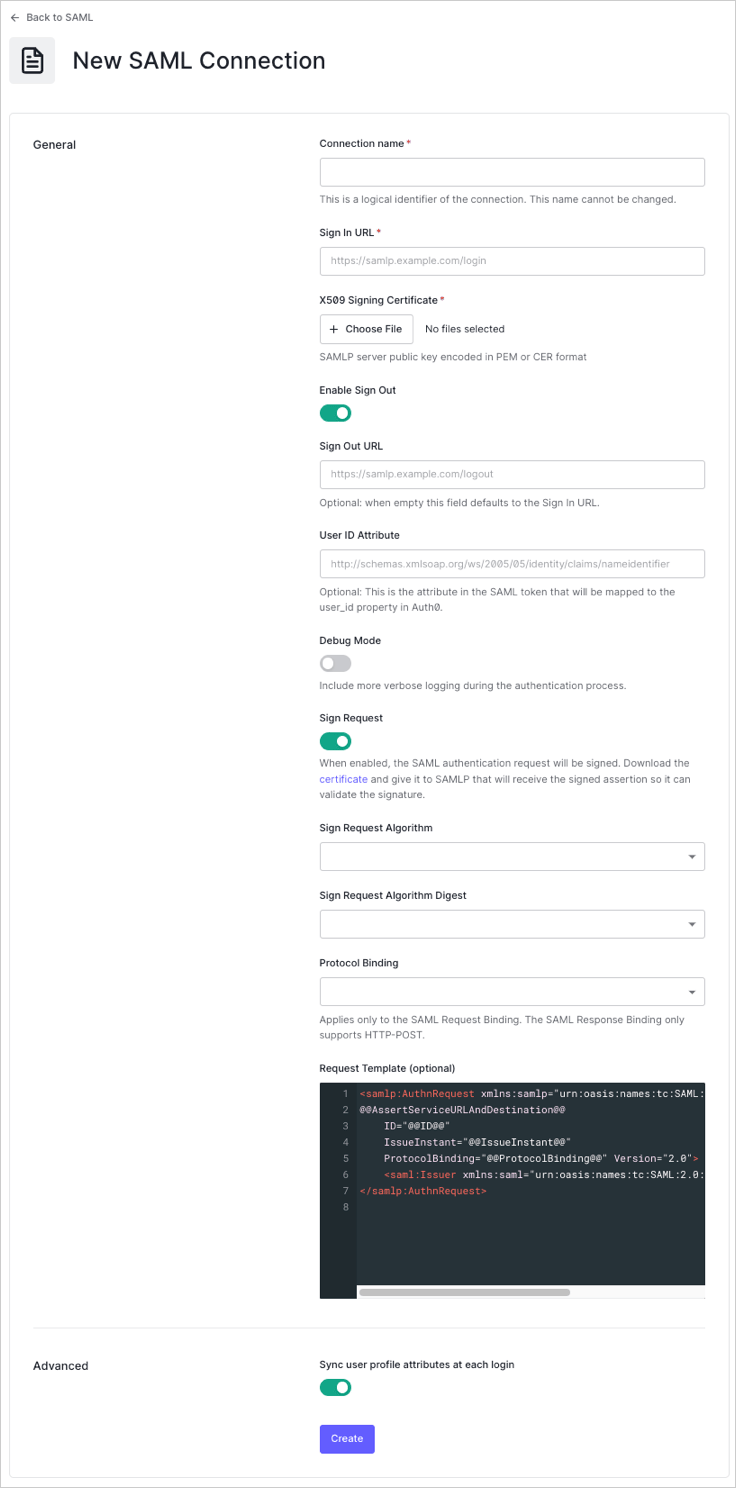
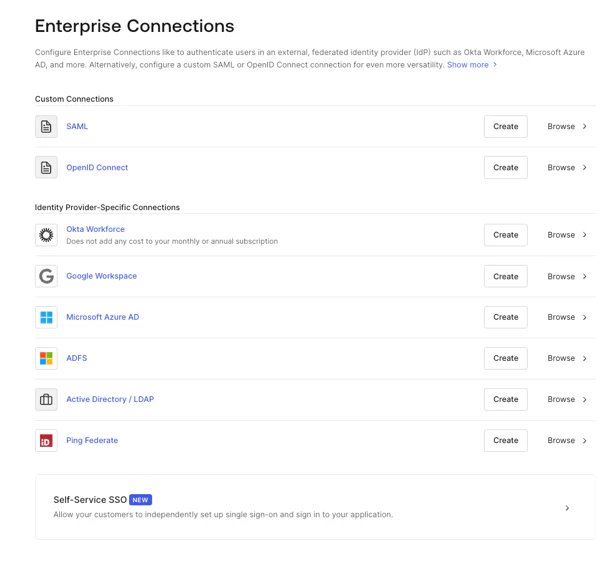 2. Introduzca los detalles de la conexión y seleccione **Crear:**
| Campo | Descripción |
| ---------------------------------------------- | ------------------------------------------------------------------------------------------------------------------------------------------------------------------------------------------------------------------------- |
| **Nombre de la conexión** | Identificador lógico de la conexión; debe ser único para su inquilino y coincidir con el nombre que se usa al configurar la Post-back URL y el Entity ID en el IdP. Una vez establecido, este nombre no se puede cambiar. |
| **URL de inicio de sesión** | URL de inicio de sesión único de SAML. |
| **Certificado de firma X.509** | Certificado de firma (codificado en PEM o CER) que recuperó antes del IdP durante este proceso. |
| **Habilitar cierre de sesión** | Cuando está habilitado, se puede establecer una URL de cierre de sesión específica. De lo contrario, se usa de forma predeterminada la URL de inicio de sesión. |
| **URL de cierre de sesión** (opcional) | URL de cierre de sesión único de SAML. |
| **Atributo de ID de usuario** (opcional) | Atributo del token SAML que se asignará a la propiedad `user_id` en Auth0. |
| **Modo de depuración** | Cuando está habilitado, se generarán registros más detallados durante el proceso de autenticación. |
| **Firmar solicitud** | Cuando está habilitado, la solicitud de autenticación SAML se firmará. (Asegúrese de descargar y proporcionar el certificado correspondiente para que el IdP de SAML pueda validar la firma de las aserciones). |
| **Algoritmo de firma de solicitud** | Algoritmo que Auth0 usará para firmar las aserciones SAML. |
| **Algoritmo de resumen de firma de solicitud** | Algoritmo que Auth0 usará para el resumen de la firma de la solicitud. |
| **Vinculación de protocolo** | Vinculación HTTP compatible con el IdP. |
| **Plantilla de solicitud** (opcional) | Plantilla que da formato a la solicitud SAML. |
2. Introduzca los detalles de la conexión y seleccione **Crear:**
| Campo | Descripción |
| ---------------------------------------------- | ------------------------------------------------------------------------------------------------------------------------------------------------------------------------------------------------------------------------- |
| **Nombre de la conexión** | Identificador lógico de la conexión; debe ser único para su inquilino y coincidir con el nombre que se usa al configurar la Post-back URL y el Entity ID en el IdP. Una vez establecido, este nombre no se puede cambiar. |
| **URL de inicio de sesión** | URL de inicio de sesión único de SAML. |
| **Certificado de firma X.509** | Certificado de firma (codificado en PEM o CER) que recuperó antes del IdP durante este proceso. |
| **Habilitar cierre de sesión** | Cuando está habilitado, se puede establecer una URL de cierre de sesión específica. De lo contrario, se usa de forma predeterminada la URL de inicio de sesión. |
| **URL de cierre de sesión** (opcional) | URL de cierre de sesión único de SAML. |
| **Atributo de ID de usuario** (opcional) | Atributo del token SAML que se asignará a la propiedad `user_id` en Auth0. |
| **Modo de depuración** | Cuando está habilitado, se generarán registros más detallados durante el proceso de autenticación. |
| **Firmar solicitud** | Cuando está habilitado, la solicitud de autenticación SAML se firmará. (Asegúrese de descargar y proporcionar el certificado correspondiente para que el IdP de SAML pueda validar la firma de las aserciones). |
| **Algoritmo de firma de solicitud** | Algoritmo que Auth0 usará para firmar las aserciones SAML. |
| **Algoritmo de resumen de firma de solicitud** | Algoritmo que Auth0 usará para el resumen de la firma de la solicitud. |
| **Vinculación de protocolo** | Vinculación HTTP compatible con el IdP. |
| **Plantilla de solicitud** (opcional) | Plantilla que da formato a la solicitud SAML. |
 3\. En la vista **Provisioning**, configure cómo se crean y actualizan los perfiles de usuario en Auth0.
| Campo | Descripción |
| ------------------------------------------------------------------------ | ----------------------------------------------------------------------------------------------------------------------------------------------------------------------------------------------------------------------------------- |
| **Sincronizar atributos del perfil de usuario en cada inicio de sesión** | Cuando está habilitado, Auth0 sincroniza automáticamente los datos del perfil del usuario en cada inicio de sesión, lo que garantiza que los cambios realizados en el origen de la conexión se actualicen automáticamente en Auth0. |
| **Sincronizar perfiles de usuario usando SCIM** | Cuando está habilitado, Auth0 permite sincronizar los datos del perfil de usuario mediante SCIM. Para obtener más información, consulte [Configure Inbound SCIM](/es/docs/authenticate/protocols/scim/configure-inbound-scim). |
4. En la vista **Login Experience**, configure cómo inician sesión los usuarios con esta conexión.
| Campo | Descripción |
| ----------------------------------------- | ------------------------------------------------------------------------------------------------------------------------------------------------------------------------------------------------------------------------------------------------------------------------- |
| **Home Realm Discovery** | Compara el dominio de correo electrónico de un usuario con los dominios del Proveedor de identidad proporcionados. Para obtener más información, consulte [Configure Identifier First Authentication](/es/docs/authenticate/login/auth0-universal-login/identifier-first) |
| **Mostrar botón de conexión** | Esta opción muestra las siguientes opciones para personalizar el botón de conexión de su aplicación. |
| **Nombre visible del botón** (Opcional) | Texto que se usa para personalizar el botón de inicio de sesión de Universal Login. Cuando se establece, el botón muestra: "Continuar con \{Nombre visible del botón}". |
| **URL del logotipo del botón** (Opcional) | URL de la imagen que se usa para personalizar el botón de inicio de sesión de Universal Login. Cuando se establece, el botón de inicio de sesión de Universal Login muestra la imagen como un cuadrado de 20 px por 20 px. |
Los campos opcionales solo están disponibles con Universal Login. Los clientes que usan Classic Login no verán el botón Add, Nombre visible del botón ni URL del logotipo del botón.
5. Si tiene los permisos administrativos adecuados para completar la integración, haga clic en **Continuar** para conocer los parámetros personalizados necesarios para configurar su IdP. De lo contrario, proporcione la URL indicada a su administrador para que pueda ajustar la configuración requerida.
3\. En la vista **Provisioning**, configure cómo se crean y actualizan los perfiles de usuario en Auth0.
| Campo | Descripción |
| ------------------------------------------------------------------------ | ----------------------------------------------------------------------------------------------------------------------------------------------------------------------------------------------------------------------------------- |
| **Sincronizar atributos del perfil de usuario en cada inicio de sesión** | Cuando está habilitado, Auth0 sincroniza automáticamente los datos del perfil del usuario en cada inicio de sesión, lo que garantiza que los cambios realizados en el origen de la conexión se actualicen automáticamente en Auth0. |
| **Sincronizar perfiles de usuario usando SCIM** | Cuando está habilitado, Auth0 permite sincronizar los datos del perfil de usuario mediante SCIM. Para obtener más información, consulte [Configure Inbound SCIM](/es/docs/authenticate/protocols/scim/configure-inbound-scim). |
4. En la vista **Login Experience**, configure cómo inician sesión los usuarios con esta conexión.
| Campo | Descripción |
| ----------------------------------------- | ------------------------------------------------------------------------------------------------------------------------------------------------------------------------------------------------------------------------------------------------------------------------- |
| **Home Realm Discovery** | Compara el dominio de correo electrónico de un usuario con los dominios del Proveedor de identidad proporcionados. Para obtener más información, consulte [Configure Identifier First Authentication](/es/docs/authenticate/login/auth0-universal-login/identifier-first) |
| **Mostrar botón de conexión** | Esta opción muestra las siguientes opciones para personalizar el botón de conexión de su aplicación. |
| **Nombre visible del botón** (Opcional) | Texto que se usa para personalizar el botón de inicio de sesión de Universal Login. Cuando se establece, el botón muestra: "Continuar con \{Nombre visible del botón}". |
| **URL del logotipo del botón** (Opcional) | URL de la imagen que se usa para personalizar el botón de inicio de sesión de Universal Login. Cuando se establece, el botón de inicio de sesión de Universal Login muestra la imagen como un cuadrado de 20 px por 20 px. |
Los campos opcionales solo están disponibles con Universal Login. Los clientes que usan Classic Login no verán el botón Add, Nombre visible del botón ni URL del logotipo del botón.
5. Si tiene los permisos administrativos adecuados para completar la integración, haga clic en **Continuar** para conocer los parámetros personalizados necesarios para configurar su IdP. De lo contrario, proporcione la URL indicada a su administrador para que pueda ajustar la configuración requerida.
### Crear una conexión empresarial con la Management API
También puede usar la [Management API](https://auth0.com/docs/api/management/v2) para crear su conexión SAML. Al hacerlo, puede optar por especificar manualmente cada campo de configuración de SAML o, en su lugar, indicar un documento de metadatos SAML que contenga los valores de configuración.
#### Crear una conexión con los valores especificados
Realice una llamada `POST` al [endpoint Create a Connection](https://auth0.com/docs/api/management/v2#!/Connections/patch_connections_by_id). Asegúrese de reemplazar los valores de marcador de posición `MGMT_API_ACCESS_TOKEN`, `CONNECTION_NAME`, `SIGN_IN_ENDPOINT_URL`, `SIGN_OUT_ENDPOINT_URL` y `BASE64_SIGNING_CERT` por su Token de acceso de Management API, el nombre de la conexión, la URL de inicio de sesión, la URL de cierre de sesión y el certificado de firma codificado en Base64 (en formato PEM o CER), respectivamente.
```bash cURL theme={null}
curl --request POST \
--url 'https://{yourDomain}/api/v2/connections' \
--header 'authorization: Bearer MGMT_API_ACCESS_TOKEN' \
--header 'cache-control: no-cache' \
--header 'content-type: application/json' \
--data '{ "strategy": "samlp", "name": "CONNECTION_NAME", "options": { "signInEndpoint": "SIGN_IN_ENDPOINT_URL", "signOutEndpoint": "SIGN_OUT_ENDPOINT_URL", "signatureAlgorithm": "rsa-sha256", "digestAlgorithm": "sha256", "fieldsMap": {}, "signingCert": "BASE64_SIGNING_CERT" } }'
```
```csharp C# theme={null}
var client = new RestClient("https://{yourDomain}/api/v2/connections");
var request = new RestRequest(Method.POST);
request.AddHeader("content-type", "application/json");
request.AddHeader("authorization", "Bearer MGMT_API_ACCESS_TOKEN");
request.AddHeader("cache-control", "no-cache");
request.AddParameter("application/json", "{ "strategy": "samlp", "name": "CONNECTION_NAME", "options": { "signInEndpoint": "SIGN_IN_ENDPOINT_URL", "signOutEndpoint": "SIGN_OUT_ENDPOINT_URL", "signatureAlgorithm": "rsa-sha256", "digestAlgorithm": "sha256", "fieldsMap": {}, "signingCert": "BASE64_SIGNING_CERT" } }", ParameterType.RequestBody);
IRestResponse response = client.Execute(request);
```
```go Go theme={null}
package main
import (
"fmt"
"strings"
"net/http"
"io/ioutil"
)
func main() {
url := "https://{yourDomain}/api/v2/connections"
payload := strings.NewReader("{ "strategy": "samlp", "name": "CONNECTION_NAME", "options": { "signInEndpoint": "SIGN_IN_ENDPOINT_URL", "signOutEndpoint": "SIGN_OUT_ENDPOINT_URL", "signatureAlgorithm": "rsa-sha256", "digestAlgorithm": "sha256", "fieldsMap": {}, "signingCert": "BASE64_SIGNING_CERT" } }")
req, _ := http.NewRequest("POST", url, payload)
req.Header.Add("content-type", "application/json")
req.Header.Add("authorization", "Bearer MGMT_API_ACCESS_TOKEN")
req.Header.Add("cache-control", "no-cache")
res, _ := http.DefaultClient.Do(req)
defer res.Body.Close()
body, _ := ioutil.ReadAll(res.Body)
fmt.Println(res)
fmt.Println(string(body))
}
```
```java Java theme={null}
HttpResponse response = Unirest.post("https://{yourDomain}/api/v2/connections")
.header("content-type", "application/json")
.header("authorization", "Bearer MGMT_API_ACCESS_TOKEN")
.header("cache-control", "no-cache")
.body("{ "strategy": "samlp", "name": "CONNECTION_NAME", "options": { "signInEndpoint": "SIGN_IN_ENDPOINT_URL", "signOutEndpoint": "SIGN_OUT_ENDPOINT_URL", "signatureAlgorithm": "rsa-sha256", "digestAlgorithm": "sha256", "fieldsMap": {}, "signingCert": "BASE64_SIGNING_CERT" } }")
.asString();
```
```javascript Node.JS theme={null}
var axios = require("axios").default;
var options = {
method: 'POST',
url: 'https://{yourDomain}/api/v2/connections',
headers: {
'content-type': 'application/json',
authorization: 'Bearer MGMT_API_ACCESS_TOKEN',
'cache-control': 'no-cache'
},
data: {
strategy: 'samlp',
name: 'CONNECTION_NAME',
options: {
signInEndpoint: 'SIGN_IN_ENDPOINT_URL',
signOutEndpoint: 'SIGN_OUT_ENDPOINT_URL',
signatureAlgorithm: 'rsa-sha256',
digestAlgorithm: 'sha256',
fieldsMap: {},
signingCert: 'BASE64_SIGNING_CERT'
}
}
};
axios.request(options).then(function (response) {
console.log(response.data);
}).catch(function (error) {
console.error(error);
});
```
```php PHP theme={null}
$curl = curl_init();
curl_setopt_array($curl, [
CURLOPT_URL => "https://{yourDomain}/api/v2/connections",
CURLOPT_RETURNTRANSFER => true,
CURLOPT_ENCODING => "",
CURLOPT_MAXREDIRS => 10,
CURLOPT_TIMEOUT => 30,
CURLOPT_HTTP_VERSION => CURL_HTTP_VERSION_1_1,
CURLOPT_CUSTOMREQUEST => "POST",
CURLOPT_POSTFIELDS => "{ "strategy": "samlp", "name": "CONNECTION_NAME", "options": { "signInEndpoint": "SIGN_IN_ENDPOINT_URL", "signOutEndpoint": "SIGN_OUT_ENDPOINT_URL", "signatureAlgorithm": "rsa-sha256", "digestAlgorithm": "sha256", "fieldsMap": {}, "signingCert": "BASE64_SIGNING_CERT" } }",
CURLOPT_HTTPHEADER => [
"authorization: Bearer MGMT_API_ACCESS_TOKEN",
"cache-control: no-cache",
"content-type: application/json"
],
]);
$response = curl_exec($curl);
$err = curl_error($curl);
curl_close($curl);
if ($err) {
echo "cURL Error #:" . $err;
} else {
echo $response;
}
```
```python Python theme={null}
import http.client
conn = http.client.HTTPSConnection("")
payload = "{ "strategy": "samlp", "name": "CONNECTION_NAME", "options": { "signInEndpoint": "SIGN_IN_ENDPOINT_URL", "signOutEndpoint": "SIGN_OUT_ENDPOINT_URL", "signatureAlgorithm": "rsa-sha256", "digestAlgorithm": "sha256", "fieldsMap": {}, "signingCert": "BASE64_SIGNING_CERT" } }"
headers = {
'content-type': "application/json",
'authorization': "Bearer MGMT_API_ACCESS_TOKEN",
'cache-control': "no-cache"
}
conn.request("POST", "/{yourDomain}/api/v2/connections", payload, headers)
res = conn.getresponse()
data = res.read()
print(data.decode("utf-8"))
```
```ruby Ruby theme={null}
require 'uri'
require 'net/http'
require 'openssl'
url = URI("https://{yourDomain}/api/v2/connections")
http = Net::HTTP.new(url.host, url.port)
http.use_ssl = true
http.verify_mode = OpenSSL::SSL::VERIFY_NONE
request = Net::HTTP::Post.new(url)
request["content-type"] = 'application/json'
request["authorization"] = 'Bearer MGMT_API_ACCESS_TOKEN'
request["cache-control"] = 'no-cache'
request.body = "{ "strategy": "samlp", "name": "CONNECTION_NAME", "options": { "signInEndpoint": "SIGN_IN_ENDPOINT_URL", "signOutEndpoint": "SIGN_OUT_ENDPOINT_URL", "signatureAlgorithm": "rsa-sha256", "digestAlgorithm": "sha256", "fieldsMap": {}, "signingCert": "BASE64_SIGNING_CERT" } }"
response = http.request(request)
puts response.read_body
```
| Valor | Descripción |
| ----------------------- | ---------------------------------------------------------------------------------------------------------------------------- |
| `MGMT_API_ACCESS_TOKEN` | [Token de acceso para la Management API](https://auth0.com/docs/api/management/v2/tokens) con el scope `create:connections`. |
| `CONNECTION_NAME` | El nombre de la conexión que se va a crear. |
| `SIGN_IN_ENDPONT_URL` | URL de inicio de sesión único de SAML para la conexión que se va a crear. |
| `SIGN_OUT_ENDPOINT_URL` | URL de cierre de sesión único de SAML para la conexión que se va a crear. |
| `BASE64_SIGNING_CERT` | Certificado de firma X.509 (codificado en PEM o CER) que obtuvo del IdP. |
O, en JSON:
```json lines theme={null}
{
"strategy": "samlp",
"name": "CONNECTION_NAME",
"options": {
"signInEndpoint": "SIGN_IN_ENDPOINT_URL",
"signOutEndpoint": "SIGN_OUT_ENDPOINT_URL",
"signatureAlgorithm": "rsa-sha256",
"digestAlgorithm": "sha256",
"fieldsMap": {
...
},
"signingCert": "BASE64_SIGNING_CERT"
}
}
```
#### Crear una conexión mediante metadatos SAML
En lugar de especificar cada campo de la configuración de SAML, puede indicar un documento de metadatos SAML que contenga los valores de configuración. Al indicar un documento de metadatos SAML, puede proporcionar el contenido XML del documento (`metadataXml`) o la URL del documento (`metadataUrl`). Si proporciona la URL, el contenido se descarga solo una vez; la conexión no se reconfigurará automáticamente si el contenido de la URL cambia en el futuro.
##### Proporcione el contenido del documento de metadatos
Use la opción `metadataXml` para proporcionar el contenido del documento:
```bash cURL theme={null}
curl --request POST \
--url 'https://{yourDomain}/api/v2/connections' \
--header 'authorization: Bearer MGMT_API_ACCESS_TOKEN' \
--header 'cache-control: no-cache' \
--header 'content-type: application/json' \
--data '{ "strategy": "samlp", "name": "CONNECTION_NAME", "options": { "metadataXml": "..." } }'
```
```csharp C# theme={null}
var client = new RestClient("https://{yourDomain}/api/v2/connections");
var request = new RestRequest(Method.POST);
request.AddHeader("content-type", "application/json");
request.AddHeader("authorization", "Bearer MGMT_API_ACCESS_TOKEN");
request.AddHeader("cache-control", "no-cache");
request.AddParameter("application/json", "{ "strategy": "samlp", "name": "CONNECTION_NAME", "options": { "metadataXml": "..." } }", ParameterType.RequestBody);
IRestResponse response = client.Execute(request);
```
```go Go theme={null}
package main
import (
"fmt"
"strings"
"net/http"
"io/ioutil"
)
func main() {
url := "https://{yourDomain}/api/v2/connections"
payload := strings.NewReader("{ "strategy": "samlp", "name": "CONNECTION_NAME", "options": { "metadataXml": "..." } }")
req, _ := http.NewRequest("POST", url, payload)
req.Header.Add("content-type", "application/json")
req.Header.Add("authorization", "Bearer MGMT_API_ACCESS_TOKEN")
req.Header.Add("cache-control", "no-cache")
res, _ := http.DefaultClient.Do(req)
defer res.Body.Close()
body, _ := ioutil.ReadAll(res.Body)
fmt.Println(res)
fmt.Println(string(body))
}
```
```java Java theme={null}
HttpResponse response = Unirest.post("https://{yourDomain}/api/v2/connections")
.header("content-type", "application/json")
.header("authorization", "Bearer MGMT_API_ACCESS_TOKEN")
.header("cache-control", "no-cache")
.body("{ "strategy": "samlp", "name": "CONNECTION_NAME", "options": { "metadataXml": "..." } }")
.asString();
```
```javascript Node.JS theme={null}
var axios = require("axios").default;
var options = {
method: 'POST',
url: 'https://{yourDomain}/api/v2/connections',
headers: {
'content-type': 'application/json',
authorization: 'Bearer MGMT_API_ACCESS_TOKEN',
'cache-control': 'no-cache'
},
data: {
strategy: 'samlp',
name: 'CONNECTION_NAME',
options: {
metadataXml: '...'
}
}
};
axios.request(options).then(function (response) {
console.log(response.data);
}).catch(function (error) {
console.error(error);
});
```
```php PHP theme={null}
$curl = curl_init();
curl_setopt_array($curl, [
CURLOPT_URL => "https://{yourDomain}/api/v2/connections",
CURLOPT_RETURNTRANSFER => true,
CURLOPT_ENCODING => "",
CURLOPT_MAXREDIRS => 10,
CURLOPT_TIMEOUT => 30,
CURLOPT_HTTP_VERSION => CURL_HTTP_VERSION_1_1,
CURLOPT_CUSTOMREQUEST => "POST",
CURLOPT_POSTFIELDS => "{ "strategy": "samlp", "name": "CONNECTION_NAME", "options": { "metadataXml": "..." } }",
CURLOPT_HTTPHEADER => [
"authorization: Bearer MGMT_API_ACCESS_TOKEN",
"cache-control: no-cache",
"content-type: application/json"
],
]);
$response = curl_exec($curl);
$err = curl_error($curl);
curl_close($curl);
if ($err) {
echo "cURL Error #:" . $err;
} else {
echo $response;
}
```
```python Python theme={null}
iimport http.client
conn = http.client.HTTPSConnection("")
payload = "{ "strategy": "samlp", "name": "CONNECTION_NAME", "options": { "metadataXml": "..." } }"
headers = {
'content-type': "application/json",
'authorization': "Bearer MGMT_API_ACCESS_TOKEN",
'cache-control': "no-cache"
}
conn.request("POST", "/{yourDomain}/api/v2/connections", payload, headers)
res = conn.getresponse()
data = res.read()
print(data.decode("utf-8"))
```
```ruby Ruby theme={null}
require 'uri'
require 'net/http'
require 'openssl'
url = URI("https://{yourDomain}/api/v2/connections")
http = Net::HTTP.new(url.host, url.port)
http.use_ssl = true
http.verify_mode = OpenSSL::SSL::VERIFY_NONE
request = Net::HTTP::Post.new(url)
request["content-type"] = 'application/json'
request["authorization"] = 'Bearer MGMT_API_ACCESS_TOKEN'
request["cache-control"] = 'no-cache'
request.body = "{ "strategy": "samlp", "name": "CONNECTION_NAME", "options": { "metadataXml": "..." } }"
response = http.request(request)
puts response.read_body
```
##### Proporcione la URL de un documento de metadatos
Use la opción `metadataUrl` para indicar la URL del documento:
```bash cURL theme={null}
curl --request POST \
--url 'https://{yourDomain}/api/v2/connections' \
--header 'authorization: Bearer MGMT_API_ACCESS_TOKEN' \
--header 'cache-control: no-cache' \
--header 'content-type: application/json' \
--data '{ "strategy": "samlp", "name": "CONNECTION_NAME", "options": { "metadataUrl": "https://saml-idp/samlp/metadata/uarlU13n63e0feZNJxOCNZ1To3a9H7jX" } }'
```
```csharp C# theme={null}
var client = new RestClient("https://{yourDomain}/api/v2/connections");
var request = new RestRequest(Method.POST);
request.AddHeader("content-type", "application/json");
request.AddHeader("authorization", "Bearer MGMT_API_ACCESS_TOKEN");
request.AddHeader("cache-control", "no-cache");
request.AddParameter("application/json", "{ "strategy": "samlp", "name": "CONNECTION_NAME", "options": { "metadataUrl": "https://saml-idp/samlp/metadata/uarlU13n63e0feZNJxOCNZ1To3a9H7jX" } }", ParameterType.RequestBody);
IRestResponse response = client.Execute(request);
```
```go Go theme={null}
package main
import (
"fmt"
"strings"
"net/http"
"io/ioutil"
)
func main() {
url := "https://{yourDomain}/api/v2/connections"
payload := strings.NewReader("{ "strategy": "samlp", "name": "CONNECTION_NAME", "options": { "metadataUrl": "https://saml-idp/samlp/metadata/uarlU13n63e0feZNJxOCNZ1To3a9H7jX" } }")
req, _ := http.NewRequest("POST", url, payload)
req.Header.Add("content-type", "application/json")
req.Header.Add("authorization", "Bearer MGMT_API_ACCESS_TOKEN")
req.Header.Add("cache-control", "no-cache")
res, _ := http.DefaultClient.Do(req)
defer res.Body.Close()
body, _ := ioutil.ReadAll(res.Body)
fmt.Println(res)
fmt.Println(string(body))
}
```
```java Java theme={null}
HttpResponse response = Unirest.post("https://{yourDomain}/api/v2/connections")
.header("content-type", "application/json")
.header("authorization", "Bearer MGMT_API_ACCESS_TOKEN")
.header("cache-control", "no-cache")
.body("{ "strategy": "samlp", "name": "CONNECTION_NAME", "options": { "metadataUrl": "https://saml-idp/samlp/metadata/uarlU13n63e0feZNJxOCNZ1To3a9H7jX" } }")
.asString();
```
```javascript Node.JS theme={null}
var axios = require("axios").default;
var options = {
method: 'POST',
url: 'https://{yourDomain}/api/v2/connections',
headers: {
'content-type': 'application/json',
authorization: 'Bearer MGMT_API_ACCESS_TOKEN',
'cache-control': 'no-cache'
},
data: {
strategy: 'samlp',
name: 'CONNECTION_NAME',
options: {
metadataUrl: 'https://saml-idp/samlp/metadata/uarlU13n63e0feZNJxOCNZ1To3a9H7jX'
}
}
};
axios.request(options).then(function (response) {
console.log(response.data);
}).catch(function (error) {
console.error(error);
});
```
```php PHP theme={null}
$curl = curl_init();
curl_setopt_array($curl, [
CURLOPT_URL => "https://{yourDomain}/api/v2/connections",
CURLOPT_RETURNTRANSFER => true,
CURLOPT_ENCODING => "",
CURLOPT_MAXREDIRS => 10,
CURLOPT_TIMEOUT => 30,
CURLOPT_HTTP_VERSION => CURL_HTTP_VERSION_1_1,
CURLOPT_CUSTOMREQUEST => "POST",
CURLOPT_POSTFIELDS => "{ "strategy": "samlp", "name": "CONNECTION_NAME", "options": { "metadataUrl": "https://saml-idp/samlp/metadata/uarlU13n63e0feZNJxOCNZ1To3a9H7jX" } }",
CURLOPT_HTTPHEADER => [
"authorization: Bearer MGMT_API_ACCESS_TOKEN",
"cache-control: no-cache",
"content-type: application/json"
],
]);
$response = curl_exec($curl);
$err = curl_error($curl);
curl_close($curl);
if ($err) {
echo "cURL Error #:" . $err;
} else {
echo $response;
}
```
```python Python theme={null}
import http.client
conn = http.client.HTTPSConnection("")
payload = "{ "strategy": "samlp", "name": "CONNECTION_NAME", "options": { "metadataUrl": "https://saml-idp/samlp/metadata/uarlU13n63e0feZNJxOCNZ1To3a9H7jX" } }"
headers = {
'content-type': "application/json",
'authorization': "Bearer MGMT_API_ACCESS_TOKEN",
'cache-control': "no-cache"
}
conn.request("POST", "/{yourDomain}/api/v2/connections", payload, headers)
res = conn.getresponse()
data = res.read()
print(data.decode("utf-8"))
```
```ruby Ruby theme={null}
require 'uri'
require 'net/http'
require 'openssl'
url = URI("https://{yourDomain}/api/v2/connections")
http = Net::HTTP.new(url.host, url.port)
http.use_ssl = true
http.verify_mode = OpenSSL::SSL::VERIFY_NONE
request = Net::HTTP::Post.new(url)
request["content-type"] = 'application/json'
request["authorization"] = 'Bearer MGMT_API_ACCESS_TOKEN'
request["cache-control"] = 'no-cache'
request.body = "{ "strategy": "samlp", "name": "CONNECTION_NAME", "options": { "metadataUrl": "https://saml-idp/samlp/metadata/uarlU13n63e0feZNJxOCNZ1To3a9H7jX" } }"
response = http.request(request)
puts response.read_body
```
Cuando se proporciona la URL, el contenido se descarga solo una vez; la conexión no se reconfigura automáticamente si el contenido de la URL cambia en el futuro.
##### Actualice la información de una conexión existente con la URL de metadatos
Este proceso solo funcionará si la conexión se creó manualmente con `metadataUrl`.
Si tiene una implementación B2B y federa con Auth0 mediante su propio proveedor de identidad SAML, es posible que necesite actualizar la información de la conexión almacenada en Auth0, como cambios en el certificado de firma, cambios en la URL del endpoint o nuevos campos de aserción. Auth0 lo hace automáticamente para las conexiones ADFS, pero no para las conexiones SAML.
Puede crear un proceso por lotes (`cron job`) para realizar una actualización periódica. El proceso puede ejecutarse cada pocas semanas y realizar una llamada PATCH al endpoint `/api/v2/connections/CONNECTION_ID`, pasando un cuerpo que contenga `{options: {metadataUrl: '$URL'}}`, donde `$URL` es la misma URL de metadatos con la que creó la conexión. Use la URL de metadatos para crear una nueva conexión temporal y luego comparar las propiedades de la conexión antigua y la nueva. Si hay alguna diferencia, actualice la nueva conexión y luego elimine la conexión temporal.
1. Cree una conexión SAML con `options.metadataUrl`. El objeto de conexión se completará con la información de los metadatos.
2. Actualice el contenido de los metadatos en la URL.
3. Envíe un PATCH al endpoint `/api/v2/connections/CONNECTION_ID` con `{options: {metadataUrl: '$URL'}}`. Ahora el objeto de conexión se actualiza con el nuevo contenido de los metadatos.
Si usa el parámetro `options`, sobrescribirá todo el objeto `options`. Asegúrese de que todos los parámetros estén presentes.
## Especifique un ID de entidad personalizado
Para especificar un ID de entidad personalizado, use la Management API para reemplazar el valor predeterminado `urn:auth0:YOUR_TENANT:YOUR_CONNECTION_NAME`. Establezca la propiedad `connection.options.entityID` cuando se cree la conexión por primera vez o al actualizar una conexión existente.
El siguiente ejemplo de JSON puede usarse para crear una nueva conexión SAML mediante la URL de metadatos del IdP de SAML y, al mismo tiempo, especificar un ID de entidad personalizado. El ID de entidad sigue siendo único, ya que se crea con el nombre de la conexión.
```json lines theme={null}
{
"strategy": "samlp",
"name": "{yourConnectionName}",
"options": {
"metadataUrl": "https://saml-idp/samlp/metadata/uarlU13n63e0feZNJxOCNZ1To3a9H7jX",
"entityId": "urn:your-custom-sp-name:{yourConnectionName}"
}
}
```
## Habilitar la conexión empresarial para su aplicación de Auth0
Para usar su nueva conexión empresarial SAML, primero debe [habilitar la conexión](/es/docs/authenticate/identity-providers/enterprise-identity-providers/enable-enterprise-connections) en sus aplicaciones de Auth0.
## Configurar asignaciones
Si está configurando una conexión empresarial SAML para un servidor PingFederate no estándar, **debe** actualizar las asignaciones de atributos.
Seleccione la vista **Mappings**, introduzca las asignaciones entre `{}` y seleccione **Guardar**.
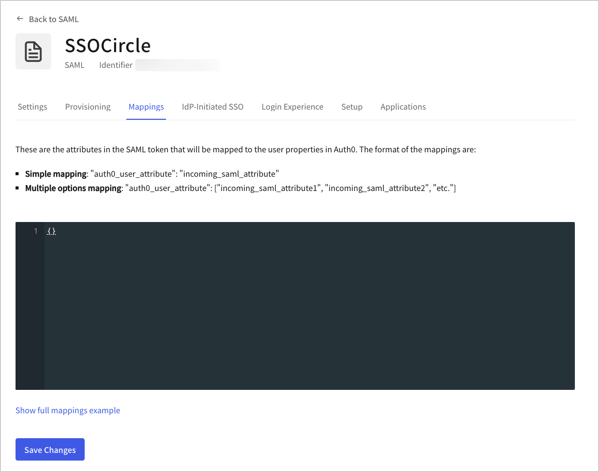 **Asignaciones para servidores PingFederate no estándar:**
```json lines theme={null}
{
"user_id": "http://schemas.xmlsoap.org/ws/2005/05/identity/claims/nameidentifier",
"email": "http://schemas.xmlsoap.org/ws/2005/05/identity/claims/nameidentifier"
}
```
**Asignaciones para SSO Circle**
```json lines theme={null}
{
"email": "EmailAddress",
"given_name": "FirstName",
"family_name": "LastName"
}
```
**Asignar una de estas dos claims a un atributo de usuario**
```json lines theme={null}
{
"given_name": [
"http://schemas.xmlsoap.org/ws/2005/05/identity/claims/givenname",
"http://schemas.xmlsoap.org/ws/2005/05/identity/claims/name"
]
}
```
**Cómo asignar el identificador de nombre a un atributo del usuario**
```json lines theme={null}
{
"user_id": [
"http://schemas.xmlsoap.org/ws/2005/05/identity/claims/nameidentifier",
"http://schemas.xmlsoap.org/ws/2005/05/identity/claims/upn",
"http://schemas.xmlsoap.org/ws/2005/05/identity/claims/name"
]
}
```
**Asignaciones para servidores PingFederate no estándar:**
```json lines theme={null}
{
"user_id": "http://schemas.xmlsoap.org/ws/2005/05/identity/claims/nameidentifier",
"email": "http://schemas.xmlsoap.org/ws/2005/05/identity/claims/nameidentifier"
}
```
**Asignaciones para SSO Circle**
```json lines theme={null}
{
"email": "EmailAddress",
"given_name": "FirstName",
"family_name": "LastName"
}
```
**Asignar una de estas dos claims a un atributo de usuario**
```json lines theme={null}
{
"given_name": [
"http://schemas.xmlsoap.org/ws/2005/05/identity/claims/givenname",
"http://schemas.xmlsoap.org/ws/2005/05/identity/claims/name"
]
}
```
**Cómo asignar el identificador de nombre a un atributo del usuario**
```json lines theme={null}
{
"user_id": [
"http://schemas.xmlsoap.org/ws/2005/05/identity/claims/nameidentifier",
"http://schemas.xmlsoap.org/ws/2005/05/identity/claims/upn",
"http://schemas.xmlsoap.org/ws/2005/05/identity/claims/name"
]
}
```
## Pruebe la conexión
Ahora puede [probar la conexión](/es/docs/authenticate/identity-providers/enterprise-identity-providers/test-enterprise-connections).
## Configurar la revocación global de tokens
Este tipo de conexión admite un endpoint de revocación global de tokens, que permite a un proveedor de identidad compatible revocar las sesiones de usuario de Auth0, revocar los tokens de actualización y activar el cierre de sesión por canal secundario para las aplicaciones que usan un canal secundario seguro.
Esta función se puede usar con Universal Logout en Okta Workforce Identity.
Para obtener más información e instrucciones de configuración, consulta [Universal Logout](/es/docs/authenticate/login/logout/universal-logout).
## Más información
* [Universal Logout](/es/docs/authenticate/login/logout/universal-logout)