> ## Documentation Index
> Fetch the complete documentation index at: https://translations.mintlify.site/llms.txt
> Use this file to discover all available pages before exploring further.

> Configura un formulario de actualización de políticas con Forms for Actions

# Casos de uso: Configurar un formulario de actualización de políticas con Forms

<Card title="Antes de comenzar">
  1. Crea una [aplicación de máquina a máquina](/es/docs/get-started/auth0-overview/create-applications/machine-to-machine-apps) con los siguientes alcances habilitados:

  * `read:users`
  * `update:users`
  * `create:users`
  * `read:users_app_metadata`
  * `update:users_app_metadata`
  * `create:users_app_metadata`

  2. Agrega una [conexión de Vault](/es/docs/customize/forms/vault) con las credenciales de la aplicación M2M.
</Card>

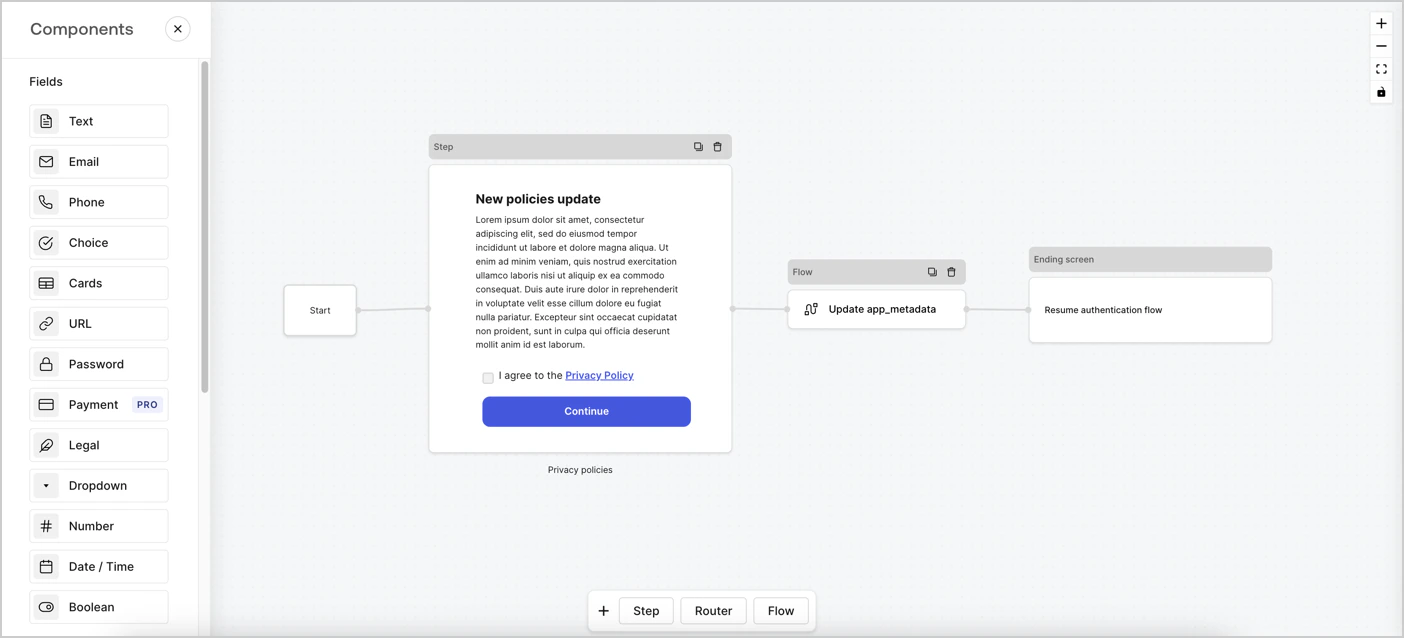
Forms for Actions te permite crear flujos personalizados de políticas de privacidad y almacenar el consentimiento en el objeto `app_metadata`.
<Frame>
  <img src="https://mintcdn.com/translations/6GE5Z24GDCZehiJ9/docs/images/cdy7uua7fh8z/6i68dMvHDTijfRmSgN1x8Q/ad900e7d4c0fb34645921435472b8684/privavy-policy-form.png?fit=max&auto=format&n=6GE5Z24GDCZehiJ9&q=85&s=aaf5d82ec9e0c23862c09fd906777545" alt="Dashboard > Actions > Forms > Caso de uso de política de privacidad" data-og-width="1404" width="1404" data-og-height="638" height="638" data-path="docs/images/cdy7uua7fh8z/6i68dMvHDTijfRmSgN1x8Q/ad900e7d4c0fb34645921435472b8684/privavy-policy-form.png" data-optimize="true" data-opv="3" srcset="https://mintcdn.com/translations/6GE5Z24GDCZehiJ9/docs/images/cdy7uua7fh8z/6i68dMvHDTijfRmSgN1x8Q/ad900e7d4c0fb34645921435472b8684/privavy-policy-form.png?w=280&fit=max&auto=format&n=6GE5Z24GDCZehiJ9&q=85&s=46093802f68f26b5c578f0ab5b677916 280w, https://mintcdn.com/translations/6GE5Z24GDCZehiJ9/docs/images/cdy7uua7fh8z/6i68dMvHDTijfRmSgN1x8Q/ad900e7d4c0fb34645921435472b8684/privavy-policy-form.png?w=560&fit=max&auto=format&n=6GE5Z24GDCZehiJ9&q=85&s=42c3c915dbf43ebfe47ca86b143322da 560w, https://mintcdn.com/translations/6GE5Z24GDCZehiJ9/docs/images/cdy7uua7fh8z/6i68dMvHDTijfRmSgN1x8Q/ad900e7d4c0fb34645921435472b8684/privavy-policy-form.png?w=840&fit=max&auto=format&n=6GE5Z24GDCZehiJ9&q=85&s=7ef405e34d733c94fc65c28917e15747 840w, https://mintcdn.com/translations/6GE5Z24GDCZehiJ9/docs/images/cdy7uua7fh8z/6i68dMvHDTijfRmSgN1x8Q/ad900e7d4c0fb34645921435472b8684/privavy-policy-form.png?w=1100&fit=max&auto=format&n=6GE5Z24GDCZehiJ9&q=85&s=281eb3fb82949d957271cfe8118398d8 1100w, https://mintcdn.com/translations/6GE5Z24GDCZehiJ9/docs/images/cdy7uua7fh8z/6i68dMvHDTijfRmSgN1x8Q/ad900e7d4c0fb34645921435472b8684/privavy-policy-form.png?w=1650&fit=max&auto=format&n=6GE5Z24GDCZehiJ9&q=85&s=c5a90b77070383bcc07deb22c647b6ab 1650w, https://mintcdn.com/translations/6GE5Z24GDCZehiJ9/docs/images/cdy7uua7fh8z/6i68dMvHDTijfRmSgN1x8Q/ad900e7d4c0fb34645921435472b8684/privavy-policy-form.png?w=2500&fit=max&auto=format&n=6GE5Z24GDCZehiJ9&q=85&s=ebb73b4fa432547f5fc1bf9c9f636c13 2500w" />
</Frame>

En las secciones siguientes se explica cómo crear un formulario de actualización de políticas con nodos y flujos, además de los pasos para agregarlo a una Action de [Post Login](/es/docs/customize/actions/explore-triggers/signup-and-login-triggers/login-trigger).

<div id="create-a-form-from-scratch">
  ## Crear un formulario desde cero
</div>

Sigue estos pasos para crear un formulario y recopilar información:

1. Abre el editor de formularios seleccionando **Auth0 Dashboard > Actions > Forms.**
2. Selecciona **Create Form** > **Start from scratch**.

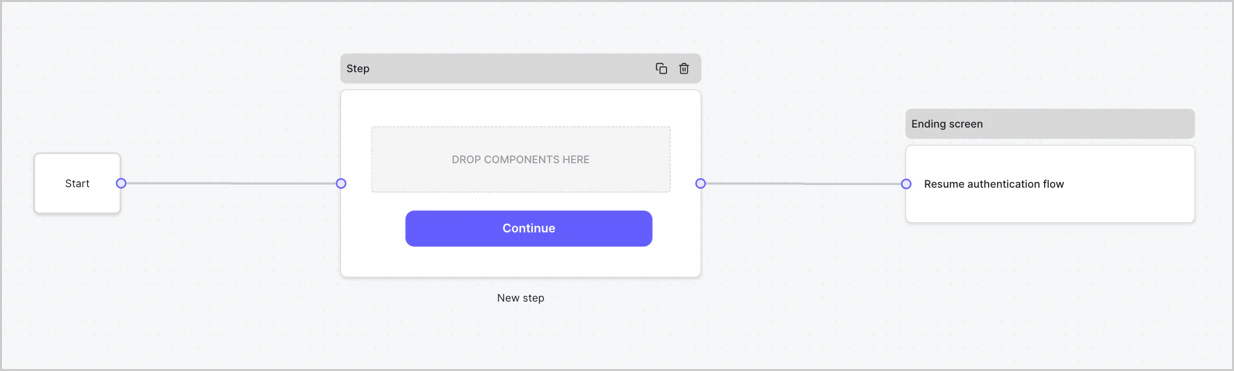
De forma predeterminada, un formulario nuevo contiene un nodo Start, un nodo Step y un nodo de pantalla final.
<Frame>
  <img src="https://mintcdn.com/translations/Dcx0M11uuptU53TX/docs/images/cdy7uua7fh8z/2TZ9jSjgEcARFpULI6hz4R/a4319a1bd482f2ee5cc23100fdb2f42c/New-form-Forms-for-action-use-case.png?fit=max&auto=format&n=Dcx0M11uuptU53TX&q=85&s=9d84cbac3e62af2aa02cfe1a79d88e89" alt="Dashboard > Forms > Use Cases > Form" data-og-width="1234" width="1234" data-og-height="371" height="371" data-path="docs/images/cdy7uua7fh8z/2TZ9jSjgEcARFpULI6hz4R/a4319a1bd482f2ee5cc23100fdb2f42c/New-form-Forms-for-action-use-case.png" data-optimize="true" data-opv="3" srcset="https://mintcdn.com/translations/Dcx0M11uuptU53TX/docs/images/cdy7uua7fh8z/2TZ9jSjgEcARFpULI6hz4R/a4319a1bd482f2ee5cc23100fdb2f42c/New-form-Forms-for-action-use-case.png?w=280&fit=max&auto=format&n=Dcx0M11uuptU53TX&q=85&s=90f658e64ee4db52dd801b0b3a9cc5f1 280w, https://mintcdn.com/translations/Dcx0M11uuptU53TX/docs/images/cdy7uua7fh8z/2TZ9jSjgEcARFpULI6hz4R/a4319a1bd482f2ee5cc23100fdb2f42c/New-form-Forms-for-action-use-case.png?w=560&fit=max&auto=format&n=Dcx0M11uuptU53TX&q=85&s=0142cb0e6b542f3f6fb28a86564966e7 560w, https://mintcdn.com/translations/Dcx0M11uuptU53TX/docs/images/cdy7uua7fh8z/2TZ9jSjgEcARFpULI6hz4R/a4319a1bd482f2ee5cc23100fdb2f42c/New-form-Forms-for-action-use-case.png?w=840&fit=max&auto=format&n=Dcx0M11uuptU53TX&q=85&s=a387dbdcff51c1414d133a7a0ecc22e5 840w, https://mintcdn.com/translations/Dcx0M11uuptU53TX/docs/images/cdy7uua7fh8z/2TZ9jSjgEcARFpULI6hz4R/a4319a1bd482f2ee5cc23100fdb2f42c/New-form-Forms-for-action-use-case.png?w=1100&fit=max&auto=format&n=Dcx0M11uuptU53TX&q=85&s=47295de6a4fc2408153380510492809e 1100w, https://mintcdn.com/translations/Dcx0M11uuptU53TX/docs/images/cdy7uua7fh8z/2TZ9jSjgEcARFpULI6hz4R/a4319a1bd482f2ee5cc23100fdb2f42c/New-form-Forms-for-action-use-case.png?w=1650&fit=max&auto=format&n=Dcx0M11uuptU53TX&q=85&s=bb15314f7f7017c91d0450e80273d964 1650w, https://mintcdn.com/translations/Dcx0M11uuptU53TX/docs/images/cdy7uua7fh8z/2TZ9jSjgEcARFpULI6hz4R/a4319a1bd482f2ee5cc23100fdb2f42c/New-form-Forms-for-action-use-case.png?w=2500&fit=max&auto=format&n=Dcx0M11uuptU53TX&q=85&s=4431480842db7e65b5ee761a61702d7e 2500w" />
</Frame>

<div id="configure-the-step-node">
  ### Configurar el nodo Step
</div>

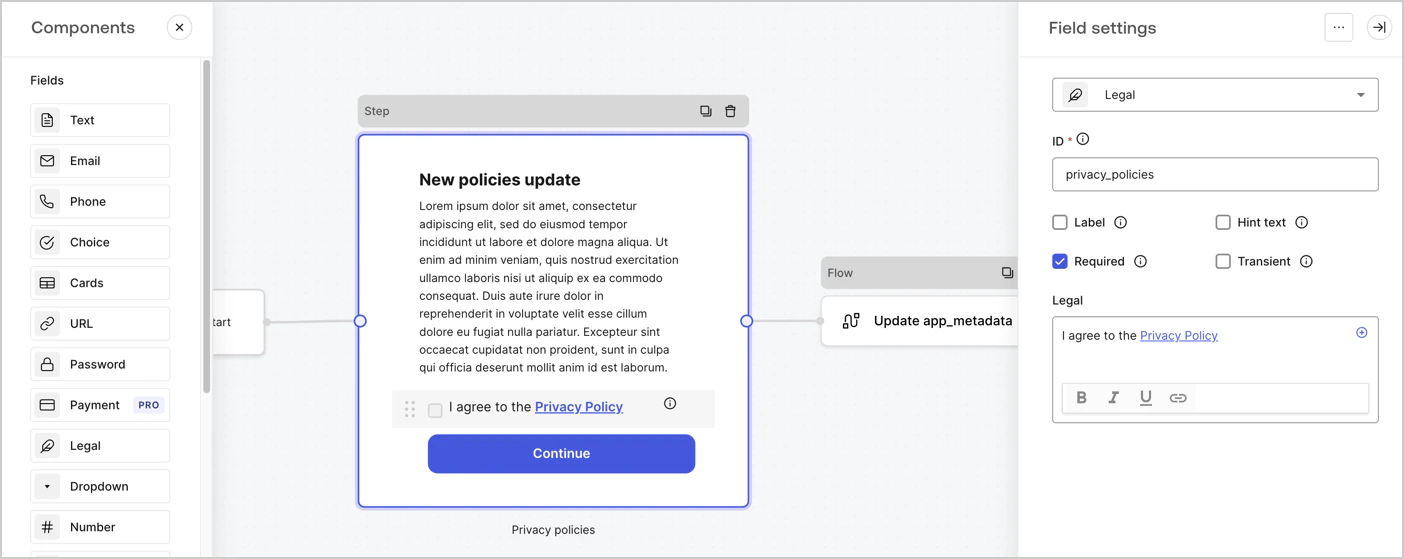
El nodo Step es la interfaz gráfica que ven los usuarios. Agregue [Fields](/es/docs/customize/forms/nodes-and-components) al nodo Step para recopilar el nuevo valor de aceptación del acuerdo siguiendo estos pasos:

1. Arrastre un campo de **Rich text** desde el **menú Components** al nodo **Step**.

   * **Rich text**: Introduzca una descripción de las actualizaciones de sus políticas de privacidad.
   * Seleccione **Save**.
2. Arrastre un campo **Legal** al nodo **Step**.

   * **ID**: Introduzca `privacy_policies`.
   * **Required**: Active la casilla.
   * **Legal**: Introduzca `I agree to the Privacy Policy`.
   * Seleccione **Save**.
3. Seleccione **Publish** para guardar.
<Frame>
  <img src="https://mintcdn.com/translations/MV7tE-x71x8RWRES/docs/images/cdy7uua7fh8z/59zFFjQjAnjogkc2QGIqqJ/0ad66b1b636544122aa4e65968b76c2c/privacy-policy-step-node.png?fit=max&auto=format&n=MV7tE-x71x8RWRES&q=85&s=91c2b9965093d07a7526c0c8ae664573" alt="Dashboard > Actions > Forms > Caso de uso de la política de privacidad del nodo Step" data-og-width="1404" width="1404" data-og-height="559" height="559" data-path="docs/images/cdy7uua7fh8z/59zFFjQjAnjogkc2QGIqqJ/0ad66b1b636544122aa4e65968b76c2c/privacy-policy-step-node.png" data-optimize="true" data-opv="3" srcset="https://mintcdn.com/translations/MV7tE-x71x8RWRES/docs/images/cdy7uua7fh8z/59zFFjQjAnjogkc2QGIqqJ/0ad66b1b636544122aa4e65968b76c2c/privacy-policy-step-node.png?w=280&fit=max&auto=format&n=MV7tE-x71x8RWRES&q=85&s=54da153db1acfdf7abeebd6bb0faba7c 280w, https://mintcdn.com/translations/MV7tE-x71x8RWRES/docs/images/cdy7uua7fh8z/59zFFjQjAnjogkc2QGIqqJ/0ad66b1b636544122aa4e65968b76c2c/privacy-policy-step-node.png?w=560&fit=max&auto=format&n=MV7tE-x71x8RWRES&q=85&s=b103d92b8fb2684d93cea6fa3e2ce5a1 560w, https://mintcdn.com/translations/MV7tE-x71x8RWRES/docs/images/cdy7uua7fh8z/59zFFjQjAnjogkc2QGIqqJ/0ad66b1b636544122aa4e65968b76c2c/privacy-policy-step-node.png?w=840&fit=max&auto=format&n=MV7tE-x71x8RWRES&q=85&s=d20256dc0fad2d3719f43a84378f8288 840w, https://mintcdn.com/translations/MV7tE-x71x8RWRES/docs/images/cdy7uua7fh8z/59zFFjQjAnjogkc2QGIqqJ/0ad66b1b636544122aa4e65968b76c2c/privacy-policy-step-node.png?w=1100&fit=max&auto=format&n=MV7tE-x71x8RWRES&q=85&s=035b43fa7ef14d1b52145c7fec6ba77d 1100w, https://mintcdn.com/translations/MV7tE-x71x8RWRES/docs/images/cdy7uua7fh8z/59zFFjQjAnjogkc2QGIqqJ/0ad66b1b636544122aa4e65968b76c2c/privacy-policy-step-node.png?w=1650&fit=max&auto=format&n=MV7tE-x71x8RWRES&q=85&s=440c4665245e4903f707bef006551369 1650w, https://mintcdn.com/translations/MV7tE-x71x8RWRES/docs/images/cdy7uua7fh8z/59zFFjQjAnjogkc2QGIqqJ/0ad66b1b636544122aa4e65968b76c2c/privacy-policy-step-node.png?w=2500&fit=max&auto=format&n=MV7tE-x71x8RWRES&q=85&s=e19f3adea6fea8d8b62a1f54d552297b 2500w" />
</Frame>

<div id="configure-the-flow-node">
  ### Configurar el nodo Flow
</div>

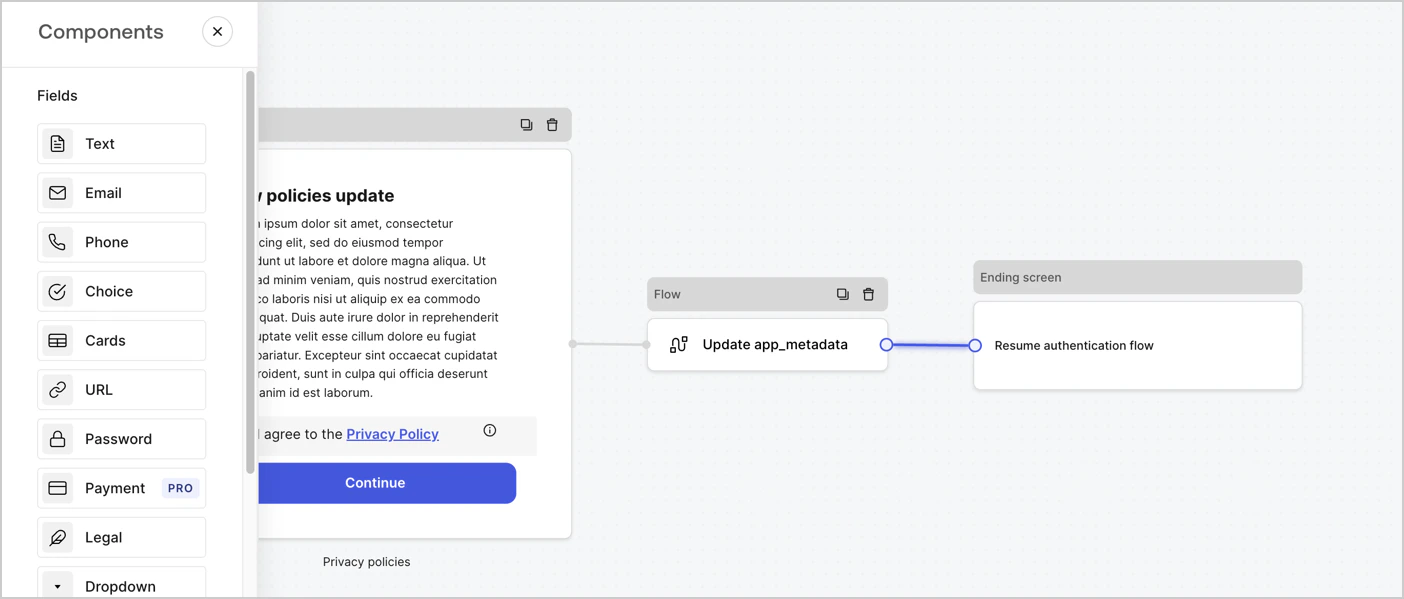
Agregue un nodo **Flow** después del nodo **Step** para actualizar `app_metadata` y reanudar el flujo de autenticación. Para ello, siga estos pasos:

1. Seleccione **Flow** en la parte inferior del editor de formularios.
2. Elimine el vínculo existente entre los nodos **Step** y **Ending Screen**.
3. Seleccione el nuevo **Flow** > **Click to add a flow** > **Create a new flow.**

   * Introduzca `Update app_metadata` en el campo **nombre**.
   * Seleccione **Create**.
   * Seleccione **Save**.
4. Vincule el nodo **Flow** a los nodos **Step** y **Ending Screen**, como se muestra a continuación.
5. Seleccione **Publish** para guardar.
<Frame>
  <img src="https://mintcdn.com/translations/6GE5Z24GDCZehiJ9/docs/images/cdy7uua7fh8z/6YIkzm7SrpM9LW76AXuRzh/353c518fe82bbaa440836da1d83596d6/link-policies.png?fit=max&auto=format&n=6GE5Z24GDCZehiJ9&q=85&s=b63b526849cbbf88b4cbf4aa647bd56f" alt="Dashboard > Actions > Forms > Form" data-og-width="1404" width="1404" data-og-height="599" height="599" data-path="docs/images/cdy7uua7fh8z/6YIkzm7SrpM9LW76AXuRzh/353c518fe82bbaa440836da1d83596d6/link-policies.png" data-optimize="true" data-opv="3" srcset="https://mintcdn.com/translations/6GE5Z24GDCZehiJ9/docs/images/cdy7uua7fh8z/6YIkzm7SrpM9LW76AXuRzh/353c518fe82bbaa440836da1d83596d6/link-policies.png?w=280&fit=max&auto=format&n=6GE5Z24GDCZehiJ9&q=85&s=5344af155f2abf62072c49c7666d7fc5 280w, https://mintcdn.com/translations/6GE5Z24GDCZehiJ9/docs/images/cdy7uua7fh8z/6YIkzm7SrpM9LW76AXuRzh/353c518fe82bbaa440836da1d83596d6/link-policies.png?w=560&fit=max&auto=format&n=6GE5Z24GDCZehiJ9&q=85&s=bae307e80ed60b7ebf117df50c486921 560w, https://mintcdn.com/translations/6GE5Z24GDCZehiJ9/docs/images/cdy7uua7fh8z/6YIkzm7SrpM9LW76AXuRzh/353c518fe82bbaa440836da1d83596d6/link-policies.png?w=840&fit=max&auto=format&n=6GE5Z24GDCZehiJ9&q=85&s=b7eab74e2daa101fb22f332ee6d06802 840w, https://mintcdn.com/translations/6GE5Z24GDCZehiJ9/docs/images/cdy7uua7fh8z/6YIkzm7SrpM9LW76AXuRzh/353c518fe82bbaa440836da1d83596d6/link-policies.png?w=1100&fit=max&auto=format&n=6GE5Z24GDCZehiJ9&q=85&s=714f56d8a365b5e5f887cebc536acafd 1100w, https://mintcdn.com/translations/6GE5Z24GDCZehiJ9/docs/images/cdy7uua7fh8z/6YIkzm7SrpM9LW76AXuRzh/353c518fe82bbaa440836da1d83596d6/link-policies.png?w=1650&fit=max&auto=format&n=6GE5Z24GDCZehiJ9&q=85&s=ad6efa6cef4084561f9d2629c9a70eb9 1650w, https://mintcdn.com/translations/6GE5Z24GDCZehiJ9/docs/images/cdy7uua7fh8z/6YIkzm7SrpM9LW76AXuRzh/353c518fe82bbaa440836da1d83596d6/link-policies.png?w=2500&fit=max&auto=format&n=6GE5Z24GDCZehiJ9&q=85&s=3f1c6e6d5ff06721c381c7ee5d3b8e2d 2500w" />
</Frame>

Agregue una acción **Update user** de Auth0 al flujo siguiendo estos pasos:

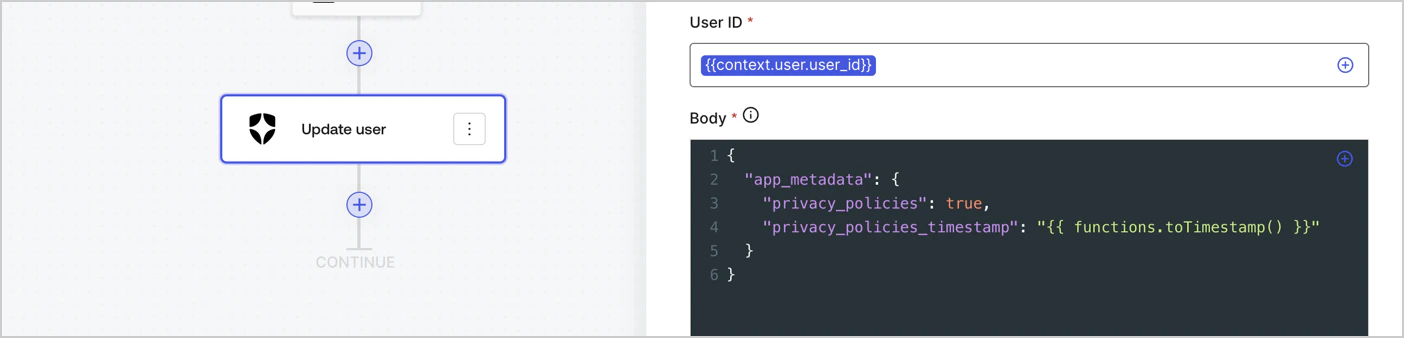
1. Seleccione **Flow** **Update app\_metadata** > **Edit flow** para abrir el editor de Flow en una pestaña nueva.
2. Debajo de StartAction, seleccione el icono **+** para agregar una acción **Update user**. Complete los siguientes campos y, a continuación, seleccione **Save** para continuar.

   * **Connection**: Seleccione en el menú desplegable la conexión de Vault correspondiente a su aplicación M2M.

   * **User ID**: Introduzca `{{context.user.user_id}}`.

   * **Body**: Copie y pegue el siguiente código para actualizar `app_metadata` con las propiedades `privacy_policies` y `privacy_policies_timestamp`.

     ```text lines theme={null}
     {
       "app_metadata": {
         "privacy_policies": true,
         "privacy_policies_timestamp": "{{ functions.toTimestamp() }}"
       }
     }
     ```

   * Seleccione **Save**.
3. Seleccione **Publish** para guardar.
<Frame>
  <img src="https://mintcdn.com/translations/mMSz-RNYLuOm2GmQ/docs/images/cdy7uua7fh8z/CvMNIwWrOUwaFW4X3G28p/1fb70ae57a20749d9ffaaba8dc0b7e26/update-user-privacy.png?fit=max&auto=format&n=mMSz-RNYLuOm2GmQ&q=85&s=307dec467b13927e5ade051a523cd3d6" alt="Dashboard > Actions > Forms > User case privacy policy code" data-og-width="1404" width="1404" data-og-height="338" height="338" data-path="docs/images/cdy7uua7fh8z/CvMNIwWrOUwaFW4X3G28p/1fb70ae57a20749d9ffaaba8dc0b7e26/update-user-privacy.png" data-optimize="true" data-opv="3" srcset="https://mintcdn.com/translations/mMSz-RNYLuOm2GmQ/docs/images/cdy7uua7fh8z/CvMNIwWrOUwaFW4X3G28p/1fb70ae57a20749d9ffaaba8dc0b7e26/update-user-privacy.png?w=280&fit=max&auto=format&n=mMSz-RNYLuOm2GmQ&q=85&s=6b79d6a94db4482d793aa296e0524328 280w, https://mintcdn.com/translations/mMSz-RNYLuOm2GmQ/docs/images/cdy7uua7fh8z/CvMNIwWrOUwaFW4X3G28p/1fb70ae57a20749d9ffaaba8dc0b7e26/update-user-privacy.png?w=560&fit=max&auto=format&n=mMSz-RNYLuOm2GmQ&q=85&s=79455897aa3ff4a8db63450272eefd4c 560w, https://mintcdn.com/translations/mMSz-RNYLuOm2GmQ/docs/images/cdy7uua7fh8z/CvMNIwWrOUwaFW4X3G28p/1fb70ae57a20749d9ffaaba8dc0b7e26/update-user-privacy.png?w=840&fit=max&auto=format&n=mMSz-RNYLuOm2GmQ&q=85&s=b921bbbfe036e7c59cfde2d6deb6f434 840w, https://mintcdn.com/translations/mMSz-RNYLuOm2GmQ/docs/images/cdy7uua7fh8z/CvMNIwWrOUwaFW4X3G28p/1fb70ae57a20749d9ffaaba8dc0b7e26/update-user-privacy.png?w=1100&fit=max&auto=format&n=mMSz-RNYLuOm2GmQ&q=85&s=a01292fd630fd66e0b1ac819256c79f7 1100w, https://mintcdn.com/translations/mMSz-RNYLuOm2GmQ/docs/images/cdy7uua7fh8z/CvMNIwWrOUwaFW4X3G28p/1fb70ae57a20749d9ffaaba8dc0b7e26/update-user-privacy.png?w=1650&fit=max&auto=format&n=mMSz-RNYLuOm2GmQ&q=85&s=40ad096e7c5cd43a4551f51345747b0d 1650w, https://mintcdn.com/translations/mMSz-RNYLuOm2GmQ/docs/images/cdy7uua7fh8z/CvMNIwWrOUwaFW4X3G28p/1fb70ae57a20749d9ffaaba8dc0b7e26/update-user-privacy.png?w=2500&fit=max&auto=format&n=mMSz-RNYLuOm2GmQ&q=85&s=e0c929345c4186ef9a7609fd490622e5 2500w" />
</Frame>

<Callout icon="file-lines" color="#0EA5E9" iconType="regular">
  El flujo **Update app\_metadata** agrega el valor `privacy_policies true` al objeto `app_metadata` y también genera una marca de tiempo con una [función auxiliar.](/es/docs/customize/forms/variables)
</Callout>

<div id="retrieve-the-form-render-code">
  ## Obtener el código de renderizado del formulario
</div>

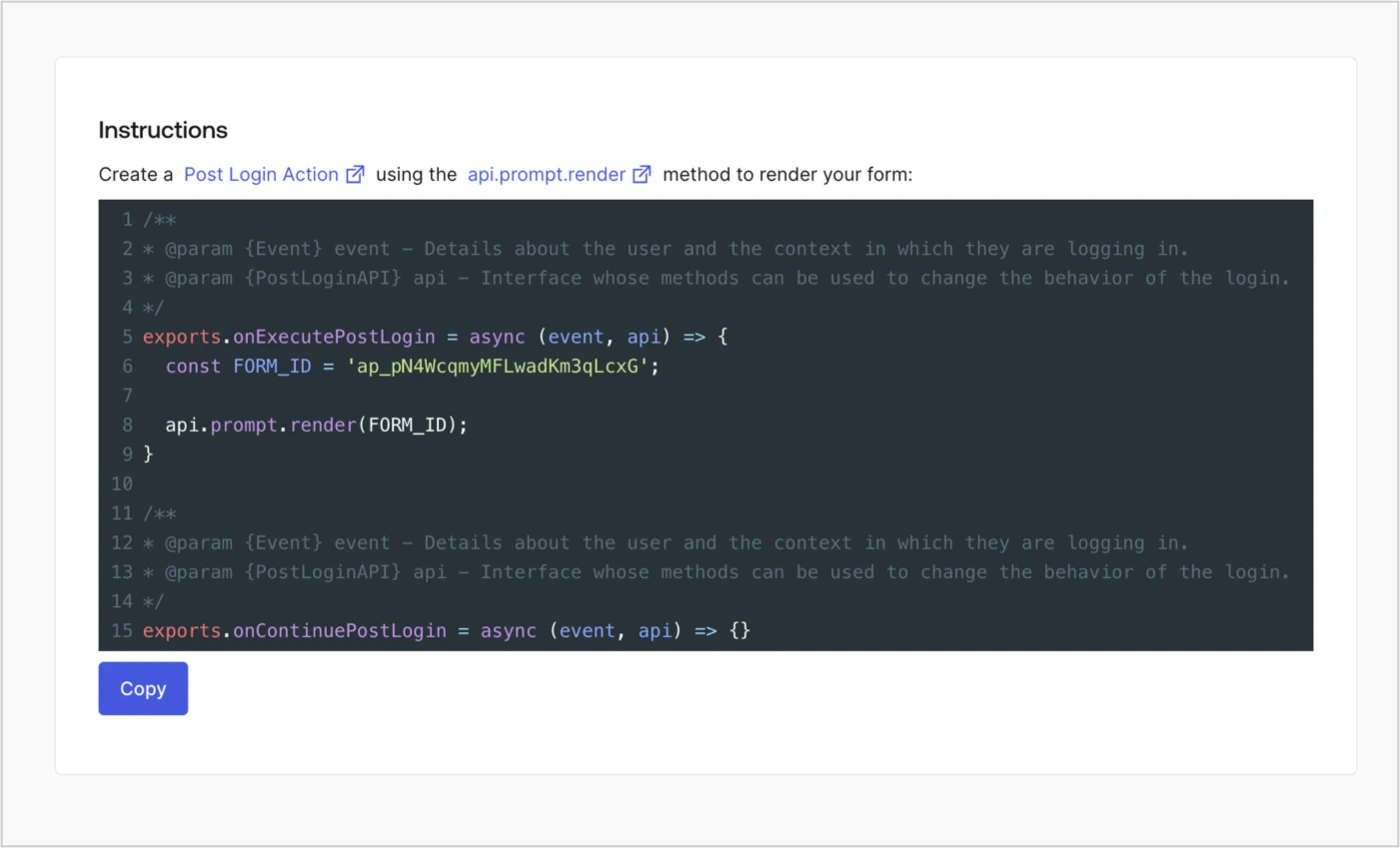
Obtenga el código de renderizado del formulario para renderizar visualmente el formulario con una Action personalizada de Post Login siguiendo estos pasos:

* En el editor de formularios, seleccione **`<> Render`**.
* Seleccione **Copiar**.
<Frame>
  <img src="https://mintcdn.com/translations/Dcx0M11uuptU53TX/docs/images/cdy7uua7fh8z/2EIUzc539sq9lwoTKbjoJv/496a864c0fc44a782c9cadca119dbfb0/embed.png?fit=max&auto=format&n=Dcx0M11uuptU53TX&q=85&s=384ef6b70c700b214d699187cdbf7eea" alt="Dashboard > Actions > Forms > Form > Embed" data-og-width="1400" width="1400" data-og-height="848" height="848" data-path="docs/images/cdy7uua7fh8z/2EIUzc539sq9lwoTKbjoJv/496a864c0fc44a782c9cadca119dbfb0/embed.png" data-optimize="true" data-opv="3" srcset="https://mintcdn.com/translations/Dcx0M11uuptU53TX/docs/images/cdy7uua7fh8z/2EIUzc539sq9lwoTKbjoJv/496a864c0fc44a782c9cadca119dbfb0/embed.png?w=280&fit=max&auto=format&n=Dcx0M11uuptU53TX&q=85&s=e4395c30ca530056bf8b7451b6deb334 280w, https://mintcdn.com/translations/Dcx0M11uuptU53TX/docs/images/cdy7uua7fh8z/2EIUzc539sq9lwoTKbjoJv/496a864c0fc44a782c9cadca119dbfb0/embed.png?w=560&fit=max&auto=format&n=Dcx0M11uuptU53TX&q=85&s=ac6fa0252e068609208572dcbf489baf 560w, https://mintcdn.com/translations/Dcx0M11uuptU53TX/docs/images/cdy7uua7fh8z/2EIUzc539sq9lwoTKbjoJv/496a864c0fc44a782c9cadca119dbfb0/embed.png?w=840&fit=max&auto=format&n=Dcx0M11uuptU53TX&q=85&s=907c448e7fe5ade5aed859f4d343f834 840w, https://mintcdn.com/translations/Dcx0M11uuptU53TX/docs/images/cdy7uua7fh8z/2EIUzc539sq9lwoTKbjoJv/496a864c0fc44a782c9cadca119dbfb0/embed.png?w=1100&fit=max&auto=format&n=Dcx0M11uuptU53TX&q=85&s=283450a49e31012d3c5c21790d7a8336 1100w, https://mintcdn.com/translations/Dcx0M11uuptU53TX/docs/images/cdy7uua7fh8z/2EIUzc539sq9lwoTKbjoJv/496a864c0fc44a782c9cadca119dbfb0/embed.png?w=1650&fit=max&auto=format&n=Dcx0M11uuptU53TX&q=85&s=4e518c8ad8926b9edde551a9e5f44b97 1650w, https://mintcdn.com/translations/Dcx0M11uuptU53TX/docs/images/cdy7uua7fh8z/2EIUzc539sq9lwoTKbjoJv/496a864c0fc44a782c9cadca119dbfb0/embed.png?w=2500&fit=max&auto=format&n=Dcx0M11uuptU53TX&q=85&s=02e887a11021cbbd64e79b09401489b9 2500w" />
</Frame>

<div id="create-a-post-login-action">
  ## Crear una Action de Post Login
</div>

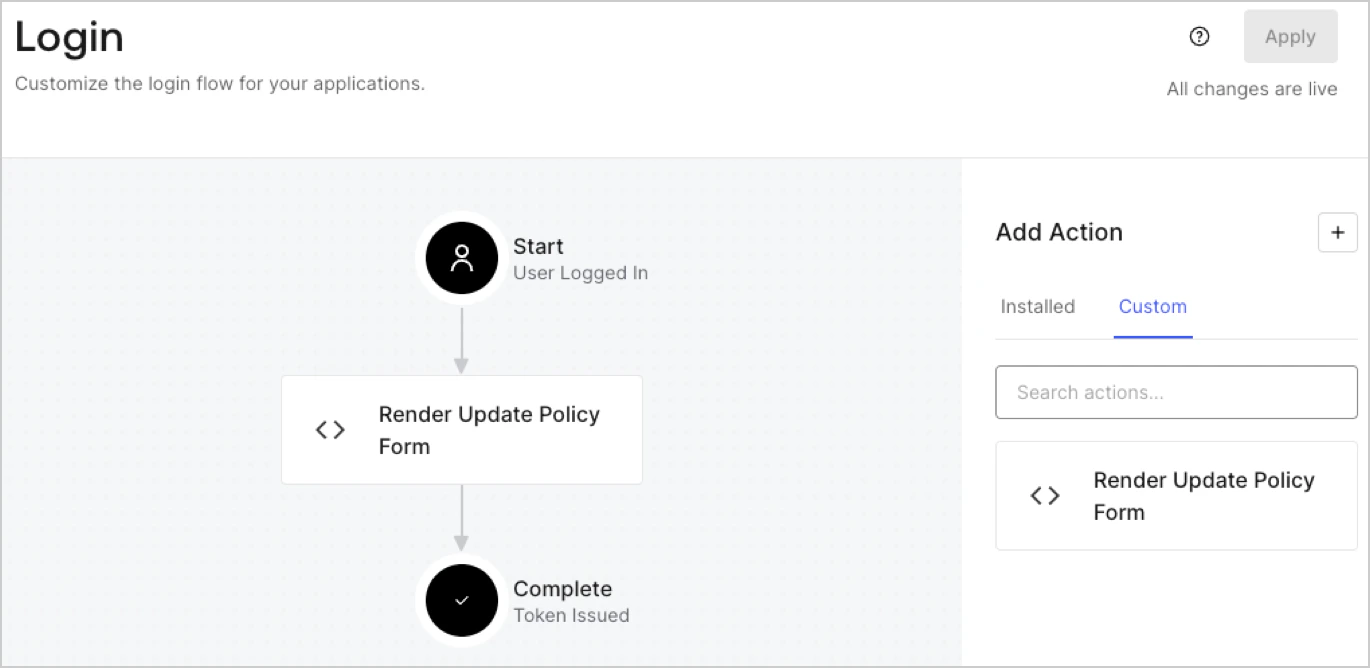
Cree una Action de post-login para mostrar el formulario siguiendo estos pasos:

1. Vaya a **Auth0 Dashboard > Actions > Flows > Login.**
2. Seleccione el icono **+** y luego **Build from scratch**:

   * **Nombre**: Introduzca `Render Update Policy Form`.
   * **Trigger**: Seleccione `Login / Post Login`.
   * **Runtime**: Seleccione la versión recomendada.
3. Seleccione **Create**.

Para configurar la Action de post-login:

1. Elimine el código existente del editor de código.
2. Pegue el código de renderizado del formulario en el editor de código.
3. Edite el código para definir la lógica condicional que mostrará el formulario.

   ```javascript lines theme={null}
   /**
   * @param {Event} event - Detalles sobre el usuario y el contexto en el que está iniciando sesión.
   * @param {PostLoginAPI} api - Interfaz cuyos métodos se pueden usar para cambiar el comportamiento del inicio de sesión.
   */
   exports.onExecutePostLogin = async (event, api) => {
     const FORM_ID = 'REPLACE_WITH_YOUR_FORM_ID';

     if (event.user.app_metadata.privacy_policies !== true) {
       api.prompt.render(FORM_ID);
     }
   }

   exports.onContinuePostLogin = async (event, api) => { }
   ```

   <Callout icon="file-lines" color="#0EA5E9" iconType="regular">
     El código de ejemplo anterior mostrará el formulario cuando al usuario le falte la propiedad `privacy_policies` en los metadatos de la aplicación.
   </Callout>
4. Seleccione **Deploy.**
5. Arrastre y suelte la Action **Render Update Policy Form** en el flujo **Login**.
   <Frame>
     <img src="https://mintcdn.com/translations/MV7tE-x71x8RWRES/docs/images/cdy7uua7fh8z/5TOwDgevZsBqd7yZynUYWU/41ca909dc3007aed4f40ff794a05efa5/postlogin.png?fit=max&auto=format&n=MV7tE-x71x8RWRES&q=85&s=60d2f2d79f9ad381c6bea8a8b0f4be7c" alt="Dashboard > Forms > Use Case > Render update policy form login action" data-og-width="1370" width="1370" data-og-height="668" height="668" data-path="docs/images/cdy7uua7fh8z/5TOwDgevZsBqd7yZynUYWU/41ca909dc3007aed4f40ff794a05efa5/postlogin.png" data-optimize="true" data-opv="3" srcset="https://mintcdn.com/translations/MV7tE-x71x8RWRES/docs/images/cdy7uua7fh8z/5TOwDgevZsBqd7yZynUYWU/41ca909dc3007aed4f40ff794a05efa5/postlogin.png?w=280&fit=max&auto=format&n=MV7tE-x71x8RWRES&q=85&s=d34aff7f9acdec24373d325a46d9fca6 280w, https://mintcdn.com/translations/MV7tE-x71x8RWRES/docs/images/cdy7uua7fh8z/5TOwDgevZsBqd7yZynUYWU/41ca909dc3007aed4f40ff794a05efa5/postlogin.png?w=560&fit=max&auto=format&n=MV7tE-x71x8RWRES&q=85&s=3d5efa17448bc265385432bcbc70bd39 560w, https://mintcdn.com/translations/MV7tE-x71x8RWRES/docs/images/cdy7uua7fh8z/5TOwDgevZsBqd7yZynUYWU/41ca909dc3007aed4f40ff794a05efa5/postlogin.png?w=840&fit=max&auto=format&n=MV7tE-x71x8RWRES&q=85&s=000cd7cc7b12a200fcdc18ea773ac5b7 840w, https://mintcdn.com/translations/MV7tE-x71x8RWRES/docs/images/cdy7uua7fh8z/5TOwDgevZsBqd7yZynUYWU/41ca909dc3007aed4f40ff794a05efa5/postlogin.png?w=1100&fit=max&auto=format&n=MV7tE-x71x8RWRES&q=85&s=3126c2a79abd0aff2e8499746e22872e 1100w, https://mintcdn.com/translations/MV7tE-x71x8RWRES/docs/images/cdy7uua7fh8z/5TOwDgevZsBqd7yZynUYWU/41ca909dc3007aed4f40ff794a05efa5/postlogin.png?w=1650&fit=max&auto=format&n=MV7tE-x71x8RWRES&q=85&s=cf82beb4a074ef33cc7685449f5cdd8a 1650w, https://mintcdn.com/translations/MV7tE-x71x8RWRES/docs/images/cdy7uua7fh8z/5TOwDgevZsBqd7yZynUYWU/41ca909dc3007aed4f40ff794a05efa5/postlogin.png?w=2500&fit=max&auto=format&n=MV7tE-x71x8RWRES&q=85&s=294b1d1cecd2e69ab5d02e69ab84f105 2500w" />
   </Frame>
6. Seleccione **Apply.**

<div id="test-implementation">
  ### Probar la implementación
</div>

Pruebe la implementación siguiendo estos pasos:

1. Inicie sesión con un usuario existente cuyo atributo `app_metadata` `privacy_policies` no tenga ningún valor.
2. La Action de post-login en el flujo de inicio de sesión mostrará el formulario y solicitará su aceptación.
3. Seleccione **Auth0 Dashboard > User Management > Users,** busque al usuario y verifique que el atributo `app_metadata` `privacy_policies` contenga un valor `true` y una marca de tiempo.
