> ## Documentation Index
> Fetch the complete documentation index at: https://translations.mintlify.site/llms.txt
> Use this file to discover all available pages before exploring further.

> Aprende a usar variables en Forms para Actions.

# Variables y funciones auxiliares

Las variables te permiten acceder a los datos contenidos en Forms y Flows para crear lógica de negocio personalizada y automatizaciones.

Algunas consideraciones básicas sobre el uso de variables son:

* Las variables se escriben entre llaves `{{ variable }}`.
* Si una variable no existe o no puede resolverse, tiene el mismo efecto que una variable `undefined`.
* Puedes usar operadores de fusión de nulos para manejar variables `null` o `undefined`; por ejemplo: `{{fields.foo ?? fields.bar}}`.

<div id="available-variables">
  ## Variables disponibles
</div>

Puede usar distintos tipos de variables para hacer referencia a los datos que recopila de los clientes con Forms y Flows, y transformarlos.

| Variable                         | Sintaxis          | Dónde         | Descripción                                                                            |
| -------------------------------- | ----------------- | ------------- | -------------------------------------------------------------------------------------- |
| Contexto                         | `{{context.*}}`   | Forms / Flows | Hace referencia a los datos de contexto de la transacción actual                       |
| Campos del formulario            | `{{fields.*}}`    | Forms / Flows | Hace referencia a los datos de los campos del formulario y los campos ocultos          |
| Variables compartidas            | `{{vars.*}}`      | Forms / Flows | Hace referencia a los datos almacenados como variables compartidas                     |
| Salida de las acciones del flujo | `{{actions.*}}`   | Flows         | Hace referencia a los datos de la respuesta de salida de acciones anteriores del flujo |
| Funciones auxiliares             | `{{functions.*}}` | Forms / Flows | Funciones auxiliares para transformar datos                                            |

<div id="context-variables">
  ### Variables de contexto
</div>

Los Forms y los Flows heredan automáticamente las variables de contexto de la transacción actual. Puede acceder a las siguientes variables de contexto:

* El objeto `user`, con acceso a las siguientes propiedades:

  * `user.user_id`
  * `user.username`
  * `user.name`
  * `user.given_name`
  * `user.family_name`
  * `user.nickname`
  * `user.email`
  * `user.email_verified`
  * `user.phone_number`
  * `user.phone_verified`
  * `user.picture`
  * `user.user_metadata`
  * `user.app_metadata`
  * `user.created_at`
  * `user.updated_at`
  * `user.last_password_reset`
  * `user.identities`
* El objeto `organization`, con acceso a las siguientes propiedades:

  * `organization.id`
  * `organization.name`
  * `organization.display_name`
  * `organization.metadata`
* El objeto `client`, con acceso a las siguientes propiedades:

  * `client.client_id`
  * `client.name`
* El objeto `tenant`, con acceso a la siguiente propiedad:

  * `tenant.name`
* El objeto `transaction`, con acceso a las siguientes propiedades:

  * `transaction.state`
  * `transaction.correlation_id`
* El objeto `custom_domain`, con acceso a las siguientes propiedades:

  * `custome_domain.domain`
  * `custome_domain.domain_metadata`

<Accordion title="Ejemplo de objeto de contexto">
  ```json lines expandable theme={null}
  {
    "user": {
      "user_id": "auth0|658409...",
      "name": "ana@travel0.com",
      "nickname": "ana",
      "email": "ana@travel0.com",
      "email_verified": true,
      "picture": "https://s.gravatar.com/avatar/8eb1b522f6...",
      "user_metadata": {},
      "app_metadata": {},
      "created_at": "2023-12-21T09:46:40.487Z",
      "updated_at": "2024-05-07T10:44:26.271Z",
      "last_password_reset": "2023-12-21T09:49:08.932Z",
      "identities": [
        {
          "user_id": "6584...",
          "isSocial": false,
          "provider": "auth0",
          "connection": "Username-Password-Authentication"
        }
      ]
    },
    "client": {
      "client_id": "xpeg5...",
      "name": "My App"
    },
    "tenant": {
      "name": "tenant-testing"
    },
    "transaction": {
      "state": "hKFo2SBId2M0..."
    },
    "custom_domain": {
      "domain": "example.com",
      "domain_metadata": {
        "key": "value"
      }
    }
  }
  ```
</Accordion>

Por ejemplo: `{{context.user.user_id}}` hace referencia al `user_id` del objeto `user`.

<Frame>
  <img src="https://mintcdn.com/translations/3nS3prIggmJG9TUI/docs/images/cdy7uua7fh8z/3B8DRhXO2wGqeqSFb8KbQv/0a61cdbbb7f1d290950a2ddb9857aac3/Contex-variable.png?fit=max&auto=format&n=3nS3prIggmJG9TUI&q=85&s=e80cd658d3ef49e3b24690d13fd86bf6" alt="Dashboard > Forms > Flows" data-og-width="1141" width="1141" data-og-height="219" height="219" data-path="docs/images/cdy7uua7fh8z/3B8DRhXO2wGqeqSFb8KbQv/0a61cdbbb7f1d290950a2ddb9857aac3/Contex-variable.png" data-optimize="true" data-opv="3" srcset="https://mintcdn.com/translations/3nS3prIggmJG9TUI/docs/images/cdy7uua7fh8z/3B8DRhXO2wGqeqSFb8KbQv/0a61cdbbb7f1d290950a2ddb9857aac3/Contex-variable.png?w=280&fit=max&auto=format&n=3nS3prIggmJG9TUI&q=85&s=f2652302f345197cc909d530dda53798 280w, https://mintcdn.com/translations/3nS3prIggmJG9TUI/docs/images/cdy7uua7fh8z/3B8DRhXO2wGqeqSFb8KbQv/0a61cdbbb7f1d290950a2ddb9857aac3/Contex-variable.png?w=560&fit=max&auto=format&n=3nS3prIggmJG9TUI&q=85&s=3197e74981653c0be27ba5f58094623d 560w, https://mintcdn.com/translations/3nS3prIggmJG9TUI/docs/images/cdy7uua7fh8z/3B8DRhXO2wGqeqSFb8KbQv/0a61cdbbb7f1d290950a2ddb9857aac3/Contex-variable.png?w=840&fit=max&auto=format&n=3nS3prIggmJG9TUI&q=85&s=4fe0fa65ee4c47dc7030b31c20c5384c 840w, https://mintcdn.com/translations/3nS3prIggmJG9TUI/docs/images/cdy7uua7fh8z/3B8DRhXO2wGqeqSFb8KbQv/0a61cdbbb7f1d290950a2ddb9857aac3/Contex-variable.png?w=1100&fit=max&auto=format&n=3nS3prIggmJG9TUI&q=85&s=4113fcdc09945701806d18054239bc9b 1100w, https://mintcdn.com/translations/3nS3prIggmJG9TUI/docs/images/cdy7uua7fh8z/3B8DRhXO2wGqeqSFb8KbQv/0a61cdbbb7f1d290950a2ddb9857aac3/Contex-variable.png?w=1650&fit=max&auto=format&n=3nS3prIggmJG9TUI&q=85&s=425d300ae777c370105a292622de5775 1650w, https://mintcdn.com/translations/3nS3prIggmJG9TUI/docs/images/cdy7uua7fh8z/3B8DRhXO2wGqeqSFb8KbQv/0a61cdbbb7f1d290950a2ddb9857aac3/Contex-variable.png?w=2500&fit=max&auto=format&n=3nS3prIggmJG9TUI&q=85&s=49f492d1e906b41b7849e9e2d43be02d 2500w" />
</Frame>

<div id="form-fields-variables">
  ### Variables de los campos del formulario
</div>

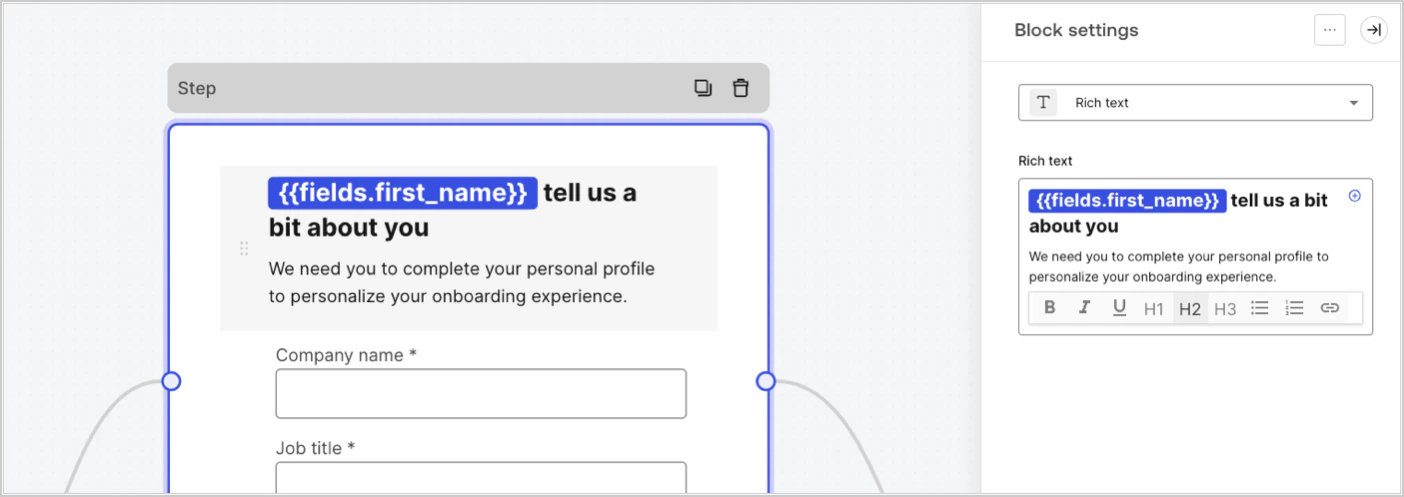
Las variables de campo contienen datos recopilados del usuario a partir de los campos de entrada del formulario y de los campos ocultos. Los datos de cada campo varían según el tipo de campo. Por ejemplo: `{{fields.first_name}}` hace referencia al valor introducido en un campo con el id `first_name`.
<Frame>
  <img src="https://mintcdn.com/translations/pvjQqAy3EB2TK6NP/docs/images/cdy7uua7fh8z/4D42A6ww4XvFxweoxh04Rd/016c2ed9d25bc2267ed3ed31bf8b2bf6/form-fields-variable.png?fit=max&auto=format&n=pvjQqAy3EB2TK6NP&q=85&s=4db948288f9a3982a1287ae7eb3f97f6" alt="Dashboard > Actions > Forms > Form" data-og-width="1404" width="1404" data-og-height="497" height="497" data-path="docs/images/cdy7uua7fh8z/4D42A6ww4XvFxweoxh04Rd/016c2ed9d25bc2267ed3ed31bf8b2bf6/form-fields-variable.png" data-optimize="true" data-opv="3" srcset="https://mintcdn.com/translations/pvjQqAy3EB2TK6NP/docs/images/cdy7uua7fh8z/4D42A6ww4XvFxweoxh04Rd/016c2ed9d25bc2267ed3ed31bf8b2bf6/form-fields-variable.png?w=280&fit=max&auto=format&n=pvjQqAy3EB2TK6NP&q=85&s=749968f77f9168cc53083818b6a81292 280w, https://mintcdn.com/translations/pvjQqAy3EB2TK6NP/docs/images/cdy7uua7fh8z/4D42A6ww4XvFxweoxh04Rd/016c2ed9d25bc2267ed3ed31bf8b2bf6/form-fields-variable.png?w=560&fit=max&auto=format&n=pvjQqAy3EB2TK6NP&q=85&s=49f1001a64dcac22c9757f7b31809203 560w, https://mintcdn.com/translations/pvjQqAy3EB2TK6NP/docs/images/cdy7uua7fh8z/4D42A6ww4XvFxweoxh04Rd/016c2ed9d25bc2267ed3ed31bf8b2bf6/form-fields-variable.png?w=840&fit=max&auto=format&n=pvjQqAy3EB2TK6NP&q=85&s=675820d38333007ffd12a464d032bfc2 840w, https://mintcdn.com/translations/pvjQqAy3EB2TK6NP/docs/images/cdy7uua7fh8z/4D42A6ww4XvFxweoxh04Rd/016c2ed9d25bc2267ed3ed31bf8b2bf6/form-fields-variable.png?w=1100&fit=max&auto=format&n=pvjQqAy3EB2TK6NP&q=85&s=642063495310f8a9d2756e98fb9ad1a4 1100w, https://mintcdn.com/translations/pvjQqAy3EB2TK6NP/docs/images/cdy7uua7fh8z/4D42A6ww4XvFxweoxh04Rd/016c2ed9d25bc2267ed3ed31bf8b2bf6/form-fields-variable.png?w=1650&fit=max&auto=format&n=pvjQqAy3EB2TK6NP&q=85&s=e79262a29f91494dde115d5d7a07f6b2 1650w, https://mintcdn.com/translations/pvjQqAy3EB2TK6NP/docs/images/cdy7uua7fh8z/4D42A6ww4XvFxweoxh04Rd/016c2ed9d25bc2267ed3ed31bf8b2bf6/form-fields-variable.png?w=2500&fit=max&auto=format&n=pvjQqAy3EB2TK6NP&q=85&s=39f69225b5d034ce4860d6adc33b150f 2500w" />
</Frame>

<div id="flow-output-actions-variables">
  ### Variables de salida de las acciones del flujo
</div>

Cuando se ejecuta una acción de flujo, genera un objeto de salida cuya respuesta puede referenciarse en acciones posteriores. Por ejemplo: `{{actions.generate_otp.code}}` hace referencia al code de salida de la acción con ID `generate_otp`.

<Frame>
  <img src="https://mintcdn.com/translations/6GE5Z24GDCZehiJ9/docs/images/cdy7uua7fh8z/6jYtEdYqSGXm3DDv0mxQ0o/2d48012629745e07137bf6ba42f4d829/flow-output-variable.png?fit=max&auto=format&n=6GE5Z24GDCZehiJ9&q=85&s=31ada4c6ab06b407fcb45d522223ad15" alt="Dashboard > Actions > Forms > Flows" data-og-width="1404" width="1404" data-og-height="253" height="253" data-path="docs/images/cdy7uua7fh8z/6jYtEdYqSGXm3DDv0mxQ0o/2d48012629745e07137bf6ba42f4d829/flow-output-variable.png" data-optimize="true" data-opv="3" srcset="https://mintcdn.com/translations/6GE5Z24GDCZehiJ9/docs/images/cdy7uua7fh8z/6jYtEdYqSGXm3DDv0mxQ0o/2d48012629745e07137bf6ba42f4d829/flow-output-variable.png?w=280&fit=max&auto=format&n=6GE5Z24GDCZehiJ9&q=85&s=7194e7f42b8b25f1b8a62a7beccc39e5 280w, https://mintcdn.com/translations/6GE5Z24GDCZehiJ9/docs/images/cdy7uua7fh8z/6jYtEdYqSGXm3DDv0mxQ0o/2d48012629745e07137bf6ba42f4d829/flow-output-variable.png?w=560&fit=max&auto=format&n=6GE5Z24GDCZehiJ9&q=85&s=f3ba6754f5bccbd52dae0685b9755021 560w, https://mintcdn.com/translations/6GE5Z24GDCZehiJ9/docs/images/cdy7uua7fh8z/6jYtEdYqSGXm3DDv0mxQ0o/2d48012629745e07137bf6ba42f4d829/flow-output-variable.png?w=840&fit=max&auto=format&n=6GE5Z24GDCZehiJ9&q=85&s=86302e4b5c81c7c386744ffba1c01071 840w, https://mintcdn.com/translations/6GE5Z24GDCZehiJ9/docs/images/cdy7uua7fh8z/6jYtEdYqSGXm3DDv0mxQ0o/2d48012629745e07137bf6ba42f4d829/flow-output-variable.png?w=1100&fit=max&auto=format&n=6GE5Z24GDCZehiJ9&q=85&s=4e92862337226690de3e94ba9f936234 1100w, https://mintcdn.com/translations/6GE5Z24GDCZehiJ9/docs/images/cdy7uua7fh8z/6jYtEdYqSGXm3DDv0mxQ0o/2d48012629745e07137bf6ba42f4d829/flow-output-variable.png?w=1650&fit=max&auto=format&n=6GE5Z24GDCZehiJ9&q=85&s=07c70fb92a3a745bf502be0372cba767 1650w, https://mintcdn.com/translations/6GE5Z24GDCZehiJ9/docs/images/cdy7uua7fh8z/6jYtEdYqSGXm3DDv0mxQ0o/2d48012629745e07137bf6ba42f4d829/flow-output-variable.png?w=2500&fit=max&auto=format&n=6GE5Z24GDCZehiJ9&q=85&s=87b426ecb8a273e2944910f6586e3494 2500w" />
</Frame>

<div id="shared-variables">
  ### Variables compartidas
</div>

Puede almacenar variables para compartirlas con Flows posteriores o incluso con componentes del formulario dentro de la misma transacción. Las variables compartidas son efímeras y están asociadas a un recorrido específico del formulario. No se puede acceder a sus valores fuera de ese recorrido. Por ejemplo, `{{vars.external_id}}` hace referencia al valor de una variable compartida con el ID `external_id`.

<Frame>
  <img src="https://mintcdn.com/translations/pvjQqAy3EB2TK6NP/docs/images/cdy7uua7fh8z/4571ExRTHL0KZKJKX9pNwj/abb631b8608a6356b0e5b3784cf8b02f/flow-shared-variable.png?fit=max&auto=format&n=pvjQqAy3EB2TK6NP&q=85&s=c3800820997f3f2c68702b337b879b79" alt="Dashboard > Actions > Forms > Flows" data-og-width="1215" width="1215" data-og-height="162" height="162" data-path="docs/images/cdy7uua7fh8z/4571ExRTHL0KZKJKX9pNwj/abb631b8608a6356b0e5b3784cf8b02f/flow-shared-variable.png" data-optimize="true" data-opv="3" srcset="https://mintcdn.com/translations/pvjQqAy3EB2TK6NP/docs/images/cdy7uua7fh8z/4571ExRTHL0KZKJKX9pNwj/abb631b8608a6356b0e5b3784cf8b02f/flow-shared-variable.png?w=280&fit=max&auto=format&n=pvjQqAy3EB2TK6NP&q=85&s=b16c02d636b0cd4db1f596dd57f722f5 280w, https://mintcdn.com/translations/pvjQqAy3EB2TK6NP/docs/images/cdy7uua7fh8z/4571ExRTHL0KZKJKX9pNwj/abb631b8608a6356b0e5b3784cf8b02f/flow-shared-variable.png?w=560&fit=max&auto=format&n=pvjQqAy3EB2TK6NP&q=85&s=cbdebe6a94a56d16a1d1201a86987a4c 560w, https://mintcdn.com/translations/pvjQqAy3EB2TK6NP/docs/images/cdy7uua7fh8z/4571ExRTHL0KZKJKX9pNwj/abb631b8608a6356b0e5b3784cf8b02f/flow-shared-variable.png?w=840&fit=max&auto=format&n=pvjQqAy3EB2TK6NP&q=85&s=9a21b967f39862c7dbfd6efd38596705 840w, https://mintcdn.com/translations/pvjQqAy3EB2TK6NP/docs/images/cdy7uua7fh8z/4571ExRTHL0KZKJKX9pNwj/abb631b8608a6356b0e5b3784cf8b02f/flow-shared-variable.png?w=1100&fit=max&auto=format&n=pvjQqAy3EB2TK6NP&q=85&s=36c410e86e05780673c6e011e646219a 1100w, https://mintcdn.com/translations/pvjQqAy3EB2TK6NP/docs/images/cdy7uua7fh8z/4571ExRTHL0KZKJKX9pNwj/abb631b8608a6356b0e5b3784cf8b02f/flow-shared-variable.png?w=1650&fit=max&auto=format&n=pvjQqAy3EB2TK6NP&q=85&s=e0e658d35da133711d9ff7e2323262eb 1650w, https://mintcdn.com/translations/pvjQqAy3EB2TK6NP/docs/images/cdy7uua7fh8z/4571ExRTHL0KZKJKX9pNwj/abb631b8608a6356b0e5b3784cf8b02f/flow-shared-variable.png?w=2500&fit=max&auto=format&n=pvjQqAy3EB2TK6NP&q=85&s=253e133a52172269912693b398153a7a 2500w" />
</Frame>

<Warning>
  Variables compartidas:

  * son internas (del lado del servidor) y no se exponen al navegador (del lado del cliente).
  * pueden resolverse y exponerse al navegador si hace referencia a una variable compartida en un componente del formulario.
  * pueden contener información confidencial, así que tenga cuidado al acceder a una variable compartida para evitar cualquier exposición innecesaria o no intencionada.
</Warning>

<div id="helper-functions">
  ### Funciones auxiliares
</div>

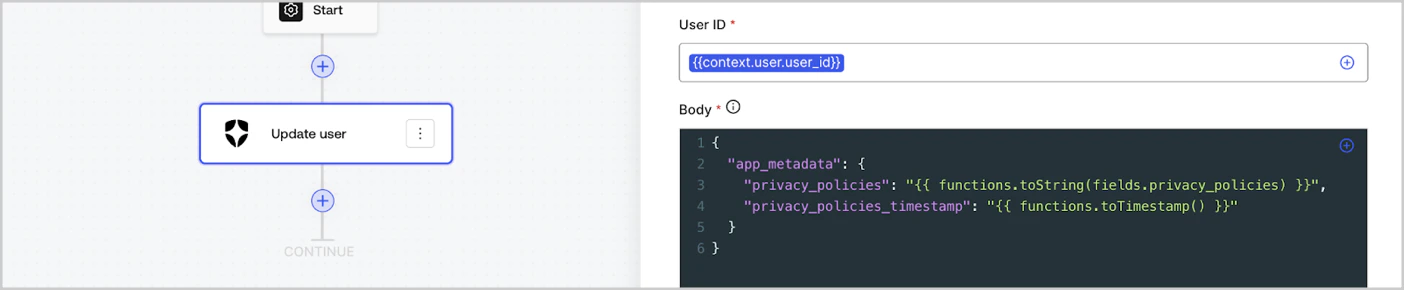
Las funciones auxiliares te permiten transformar datos y realizar operaciones sencillas. Por ejemplo: `{{functions.toString(fields.privacy_policies)}}` transforma el valor del campo con el id `privacy_policies` usando la función `toString()`.
<Frame>
  <img src="https://mintcdn.com/translations/eVsQcTnbClN-oB7d/docs/images/cdy7uua7fh8z/1gyox33XJEtdkT43NppblT/0e878cc5ae2bde11b4207e105bbac6c5/flow-helper-functions.png?fit=max&auto=format&n=eVsQcTnbClN-oB7d&q=85&s=844a6465e7af13922ac164c5172bf24d" alt="Dashboard > Actions > Forms > Flows" data-og-width="1404" width="1404" data-og-height="290" height="290" data-path="docs/images/cdy7uua7fh8z/1gyox33XJEtdkT43NppblT/0e878cc5ae2bde11b4207e105bbac6c5/flow-helper-functions.png" data-optimize="true" data-opv="3" srcset="https://mintcdn.com/translations/eVsQcTnbClN-oB7d/docs/images/cdy7uua7fh8z/1gyox33XJEtdkT43NppblT/0e878cc5ae2bde11b4207e105bbac6c5/flow-helper-functions.png?w=280&fit=max&auto=format&n=eVsQcTnbClN-oB7d&q=85&s=81c91ffc87b08d5eb0c599815eb735a4 280w, https://mintcdn.com/translations/eVsQcTnbClN-oB7d/docs/images/cdy7uua7fh8z/1gyox33XJEtdkT43NppblT/0e878cc5ae2bde11b4207e105bbac6c5/flow-helper-functions.png?w=560&fit=max&auto=format&n=eVsQcTnbClN-oB7d&q=85&s=5ef9181d01b7f396568ad17e8f8ec1a0 560w, https://mintcdn.com/translations/eVsQcTnbClN-oB7d/docs/images/cdy7uua7fh8z/1gyox33XJEtdkT43NppblT/0e878cc5ae2bde11b4207e105bbac6c5/flow-helper-functions.png?w=840&fit=max&auto=format&n=eVsQcTnbClN-oB7d&q=85&s=f2595c0d7689a494d107dc788ae4f9e9 840w, https://mintcdn.com/translations/eVsQcTnbClN-oB7d/docs/images/cdy7uua7fh8z/1gyox33XJEtdkT43NppblT/0e878cc5ae2bde11b4207e105bbac6c5/flow-helper-functions.png?w=1100&fit=max&auto=format&n=eVsQcTnbClN-oB7d&q=85&s=989e55682c42f6e49424d9ba2eebfd0e 1100w, https://mintcdn.com/translations/eVsQcTnbClN-oB7d/docs/images/cdy7uua7fh8z/1gyox33XJEtdkT43NppblT/0e878cc5ae2bde11b4207e105bbac6c5/flow-helper-functions.png?w=1650&fit=max&auto=format&n=eVsQcTnbClN-oB7d&q=85&s=259543f026bf961ac119cedfa58e19c6 1650w, https://mintcdn.com/translations/eVsQcTnbClN-oB7d/docs/images/cdy7uua7fh8z/1gyox33XJEtdkT43NppblT/0e878cc5ae2bde11b4207e105bbac6c5/flow-helper-functions.png?w=2500&fit=max&auto=format&n=eVsQcTnbClN-oB7d&q=85&s=c6e349a5a8f32458c5268a5caa3ff563 2500w" />
</Frame>

Las funciones auxiliares disponibles son:

| Función                                  | Descripción                                                                                                                                                                                                                                                                    | Ejemplo                                                                                                          |
| ---------------------------------------- | ------------------------------------------------------------------------------------------------------------------------------------------------------------------------------------------------------------------------------------------------------------------------------ | ---------------------------------------------------------------------------------------------------------------- |
| `toArray(value)`                         | Convierte el valor en un arreglo.                                                                                                                                                                                                                                              | `{{ functions.toArray('abc') }} // ['abc']`                                                                      |
| `toBoolean(value)`                       | Convierte el valor en un valor booleano.                                                                                                                                                                                                                                       | `{{ functions.toBoolean(1) }} // true&lt;br /&gt;&lt;br /&gt;\{\{ functions.toBoolean(0) }} // false`            |
| `length(value)`                          | Devuelve la longitud del valor del parámetro.                                                                                                                                                                                                                                  | `{{ functions.length('auth0') }} // 5`                                                                           |
| `mask(value)`                            | Enmascara un valor para evitar que se exponga en Executions.                                                                                                                                                                                                                   | `{{ functions.mask('my_awesome_secret') }} // ███`                                                               |
| `toNumber(value)`                        | Convierte el valor a un número.                                                                                                                                                                                                                                                | `{{ functions.toNumber('123') }} // 123`                                                                         |
| `random(min, max, [boolean])`            | Devuelve un número aleatorio entre el mínimo y el máximo, ambos inclusive.                                                                                                                                                                                                     | `{{ functions.random(0, 6) }} // 4 &lt;br /&gt;&lt;br /&gt;\{\{ functions.random(0, 6, true) }} // 3.8523497...` |
| `slice(value, start, end)`               | Devuelve una porción de un arreglo de valores o de una cadena entre los índices de inicio y fin.                                                                                                                                                                               | `{{ functions.slice( 'example', 3, 5) }} // 'mp'`                                                                |
| `toString(value)`                        | Convierte el valor a una cadena.                                                                                                                                                                                                                                               | `{{ functions.toString(123) }} // '123'`                                                                         |
| `substring(value, start, end)`           | Devuelve una parte de un valor entre los índices de inicio y fin. Lea sobre las [diferencias entre las funciones slice y substring](https://developer.mozilla.org/en-US/docs/Web/JavaScript/Reference/Global_Objects/String/substring#differences_between_substring_and_slice) | `{{ functions.substring( 'example’', 3, 5) }} // 'mp'`                                                           |
| `toTimestamp()`                          | Devuelve la marca de tiempo actual de UNIX.                                                                                                                                                                                                                                    | `{{ functions.toTimestamp() }} // 1628761483`                                                                    |
| `toTimestamp(date)`                      | Devuelve la fecha proporcionada como tiempo UNIX.                                                                                                                                                                                                                              | `{{ functions.toTimestamp('2021-04-30T10:02:50.876Z') }} // 1619776970`                                          |
| `toTimestamp(date)`                      | Devuelve la fecha proporcionada como tiempo UNIX.                                                                                                                                                                                                                              | `{{ functions.toTimestamp('2021-04-30T10:02:50.876Z') }} // 1619776970`                                          |
| `toLowerCase(value)`                     | Devuelve una nueva cadena convertida a minúsculas.                                                                                                                                                                                                                             | `{{ functions.toLowerCase('JohnDoe 1234') }} // johndoe 1234`                                                    |
| `toUpperCase(value)`                     | Devuelve una nueva cadena convertida a mayúsculas.                                                                                                                                                                                                                             | `{{ functions.toUpperCase('JohnDoe 1234') }} // JOHNDOE 1234`                                                    |
| `replaceAll(value, string, replacement)` | Devuelve una nueva cadena con todas las coincidencias de un patrón sustituidas por un valor de reemplazo.                                                                                                                                                                      | `{{ functions.replaceAll('2021-04-30', '-', '/') }} // 2021/04/30`                                               |
| `replace(value, string, replacement)`    | Devuelve una nueva cadena con todas las coincidencias de un patrón sustituidas por un valor de reemplazo. Si pattern es una cadena, solo se sustituirá la primera coincidencia.                                                                                                | `{{ functions.replace('2021-04-30', '-', '/') }} // 2021/04-30`                                                  |
| `split(value, separator, limit?)`        | Devuelve una lista ordenada de subcadenas separadas por el separador.                                                                                                                                                                                                          | `{{ functions.split('2021-04-30', '-') }} // ['2021', '04', '30']`                                               |
| `now()`                                  | Devuelve la fecha actual en formato ISO 8601.                                                                                                                                                                                                                                  | `{{ functions.now() }} // 2021-04-30T10:31:28.576Z`                                                              |
| `includes(collection, item, fromIndex?)` | Indica si una matriz incluye un valor determinado entre sus elementos.                                                                                                                                                                                                         | `{{ functions.includes(['auth0', 'identity', 'authentication'], 'identity') }} // true`                          |
| `indexOf(collection, item, fromIndex?)`  | Devuelve el primer índice en el que se puede encontrar un elemento dado en la matriz, o -1 si no está presente.                                                                                                                                                                | `{{ functions.indexOf(['auth0', 'identity', 'authentication'], 'identity') }} // 1`                              |
| `merge(base, value)`                     | Devuelve una matriz u objeto combinados, o concatena una cadena, según el tipo de datos base.                                                                                                                                                                                  | `{{ functions.merge(['auth0', 'identity'], ['authentication']) }} // ['auth0', 'identity', 'authentication']`    |
| `md5(value)`                             | Devuelve un valor con hash MD5.                                                                                                                                                                                                                                                | `{{ functions.md5('auth0') }} // 7bbb597...`                                                                     |
| `sha1(value)`                            | Devuelve un valor con hash SHA1.                                                                                                                                                                                                                                               | `{{ functions.sha1('auth0') }} // b4ec5339...`                                                                   |
| `sha256(value)`                          | Devuelve un valor con hash SHA256.                                                                                                                                                                                                                                             | `{{ functions.sha256('auth0') }} // d9082bdc...`                                                                 |
| `sha512(value)`                          | Devuelve un valor con hash SHA512.                                                                                                                                                                                                                                             | `{{ functions.sha512('auth0') }} // c0d588069d...`                                                               |
| `uuid()`                                 | Devuelve un UUID v4 aleatorio.                                                                                                                                                                                                                                                 | `{{ functions.uuid() }} // 36b8f84d-df4e-4d49-b662-bcde71a8764`                                                  |

<div id="variables-best-practices">
  ## Prácticas recomendadas para variables
</div>

<div id="use-meaningful-ids">
  ### Usa ID descriptivos
</div>

Cuando agregas un campo de Form o una acción de Flow, el ID se genera automáticamente.

Actualiza el ID con un valor más descriptivo para que puedas identificar la información que contiene. Por ejemplo, si creas un campo de Form que almacena el nombre del usuario, actualiza el ID a `first_name`.

<div id="be-mindful-when-updating-existing-ids">
  ### Tenga cuidado al actualizar IDs existentes
</div>

Si una variable ya está en uso y necesita modificar el ID, identifique dónde se ha hecho referencia a ella y actualice el ID según corresponda para evitar valores no definidos o vacíos.

<div id="check-flow-executions">
  ### Verificar ejecuciones de Flow
</div>

Si observa un valor inesperado en una variable, use la vista [**Executions**](/es/docs/customize/forms/flows/flow-execution-and-debugger) para depurarla.

<div id="use-the-autocomplete-menu">
  ### Use el menú de autocompletado
</div>

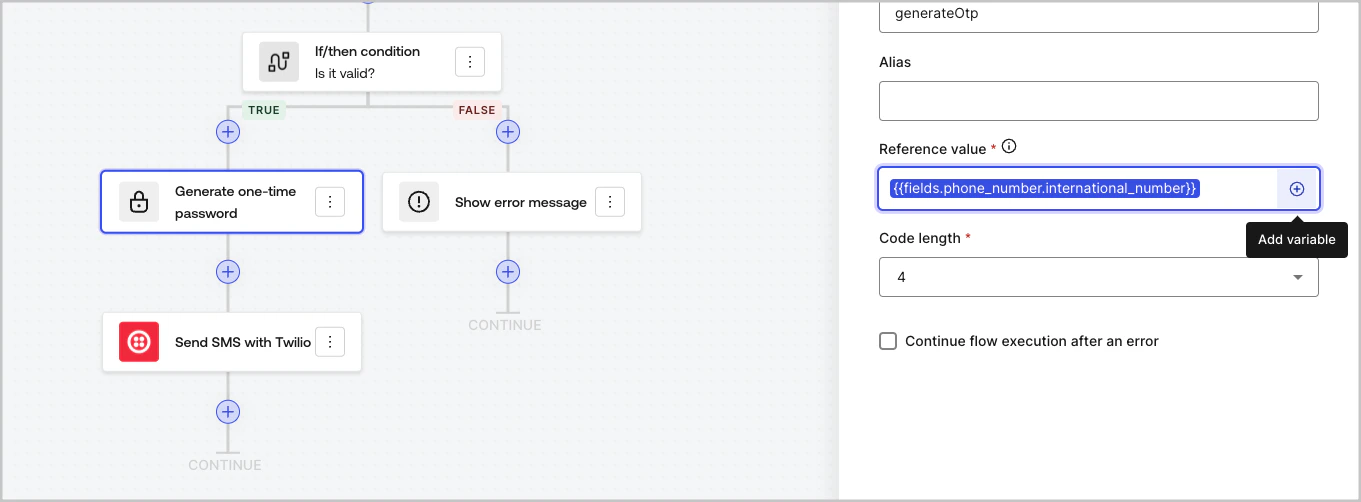
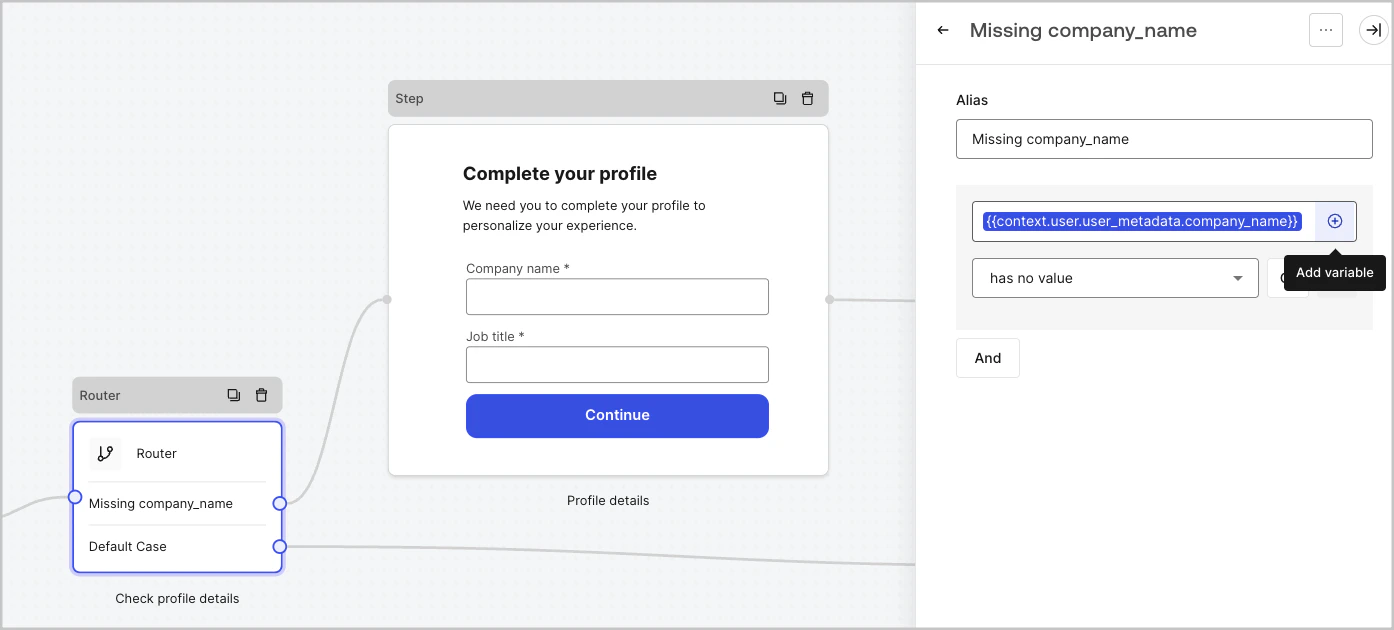
El menú de autocompletado le ayuda a localizar y referenciar correctamente las variables existentes.
<Frame>
  <img src="https://mintcdn.com/translations/3nS3prIggmJG9TUI/docs/images/cdy7uua7fh8z/3SKnDuaMzSImxZtDDAoZaz/9ea800fad29ef71d1ded3c72b87660a4/Autocomplete-flows.png?fit=max&auto=format&n=3nS3prIggmJG9TUI&q=85&s=c0b31bd289dbe02e967429a89cc875ba" alt="Dashboard > Actions > Forms > Flows" data-og-width="1361" width="1361" data-og-height="502" height="502" data-path="docs/images/cdy7uua7fh8z/3SKnDuaMzSImxZtDDAoZaz/9ea800fad29ef71d1ded3c72b87660a4/Autocomplete-flows.png" data-optimize="true" data-opv="3" srcset="https://mintcdn.com/translations/3nS3prIggmJG9TUI/docs/images/cdy7uua7fh8z/3SKnDuaMzSImxZtDDAoZaz/9ea800fad29ef71d1ded3c72b87660a4/Autocomplete-flows.png?w=280&fit=max&auto=format&n=3nS3prIggmJG9TUI&q=85&s=2da5136f2cf142758f6e33d3d5b4c68d 280w, https://mintcdn.com/translations/3nS3prIggmJG9TUI/docs/images/cdy7uua7fh8z/3SKnDuaMzSImxZtDDAoZaz/9ea800fad29ef71d1ded3c72b87660a4/Autocomplete-flows.png?w=560&fit=max&auto=format&n=3nS3prIggmJG9TUI&q=85&s=ed9ef91a1ba0accd12f0b88eb172d3f8 560w, https://mintcdn.com/translations/3nS3prIggmJG9TUI/docs/images/cdy7uua7fh8z/3SKnDuaMzSImxZtDDAoZaz/9ea800fad29ef71d1ded3c72b87660a4/Autocomplete-flows.png?w=840&fit=max&auto=format&n=3nS3prIggmJG9TUI&q=85&s=f7fe2cf44b584282af00bfe75beb873a 840w, https://mintcdn.com/translations/3nS3prIggmJG9TUI/docs/images/cdy7uua7fh8z/3SKnDuaMzSImxZtDDAoZaz/9ea800fad29ef71d1ded3c72b87660a4/Autocomplete-flows.png?w=1100&fit=max&auto=format&n=3nS3prIggmJG9TUI&q=85&s=ee50fd7bfdbee53ad58310799fe27b1d 1100w, https://mintcdn.com/translations/3nS3prIggmJG9TUI/docs/images/cdy7uua7fh8z/3SKnDuaMzSImxZtDDAoZaz/9ea800fad29ef71d1ded3c72b87660a4/Autocomplete-flows.png?w=1650&fit=max&auto=format&n=3nS3prIggmJG9TUI&q=85&s=3ac1c9b641f77d3e442676b83a20a8aa 1650w, https://mintcdn.com/translations/3nS3prIggmJG9TUI/docs/images/cdy7uua7fh8z/3SKnDuaMzSImxZtDDAoZaz/9ea800fad29ef71d1ded3c72b87660a4/Autocomplete-flows.png?w=2500&fit=max&auto=format&n=3nS3prIggmJG9TUI&q=85&s=8e1f5883e0460ef26b2a5c3e764febca 2500w" />
</Frame>

<Frame>
  <img src="https://mintcdn.com/translations/Dcx0M11uuptU53TX/docs/images/cdy7uua7fh8z/2kjRKozVgrd2a7UJXOANaN/ee5452d7210cd2f13b0e97763f11c82a/Autocomplete-forms.png?fit=max&auto=format&n=Dcx0M11uuptU53TX&q=85&s=22a3bdc81cd74c96cdef8470e60ee20b" alt="Dashboard > Actions > Forms > Form" data-og-width="1394" width="1394" data-og-height="630" height="630" data-path="docs/images/cdy7uua7fh8z/2kjRKozVgrd2a7UJXOANaN/ee5452d7210cd2f13b0e97763f11c82a/Autocomplete-forms.png" data-optimize="true" data-opv="3" srcset="https://mintcdn.com/translations/Dcx0M11uuptU53TX/docs/images/cdy7uua7fh8z/2kjRKozVgrd2a7UJXOANaN/ee5452d7210cd2f13b0e97763f11c82a/Autocomplete-forms.png?w=280&fit=max&auto=format&n=Dcx0M11uuptU53TX&q=85&s=34e352877f8f4e3e0b0454d12697b7f2 280w, https://mintcdn.com/translations/Dcx0M11uuptU53TX/docs/images/cdy7uua7fh8z/2kjRKozVgrd2a7UJXOANaN/ee5452d7210cd2f13b0e97763f11c82a/Autocomplete-forms.png?w=560&fit=max&auto=format&n=Dcx0M11uuptU53TX&q=85&s=daea0970636a77da3620fd80acfb35c6 560w, https://mintcdn.com/translations/Dcx0M11uuptU53TX/docs/images/cdy7uua7fh8z/2kjRKozVgrd2a7UJXOANaN/ee5452d7210cd2f13b0e97763f11c82a/Autocomplete-forms.png?w=840&fit=max&auto=format&n=Dcx0M11uuptU53TX&q=85&s=8a7f6ed4ceedc0bdcd347e6b5a3155e9 840w, https://mintcdn.com/translations/Dcx0M11uuptU53TX/docs/images/cdy7uua7fh8z/2kjRKozVgrd2a7UJXOANaN/ee5452d7210cd2f13b0e97763f11c82a/Autocomplete-forms.png?w=1100&fit=max&auto=format&n=Dcx0M11uuptU53TX&q=85&s=1318d218d5feb9177cf1d3af0677b6c1 1100w, https://mintcdn.com/translations/Dcx0M11uuptU53TX/docs/images/cdy7uua7fh8z/2kjRKozVgrd2a7UJXOANaN/ee5452d7210cd2f13b0e97763f11c82a/Autocomplete-forms.png?w=1650&fit=max&auto=format&n=Dcx0M11uuptU53TX&q=85&s=d912e2acdda53eb4c072f01967f16875 1650w, https://mintcdn.com/translations/Dcx0M11uuptU53TX/docs/images/cdy7uua7fh8z/2kjRKozVgrd2a7UJXOANaN/ee5452d7210cd2f13b0e97763f11c82a/Autocomplete-forms.png?w=2500&fit=max&auto=format&n=Dcx0M11uuptU53TX&q=85&s=e5c331a474cc8add10e642c4b6781fcb 2500w" />
</Frame>
