> ## Documentation Index
> Fetch the complete documentation index at: https://translations.mintlify.site/llms.txt
> Use this file to discover all available pages before exploring further.
# MfaWebauthnChangeKeyNickname
> Describe los hooks y métodos disponibles para personalizar la pantalla `mfa-webauthn-change-key-nickname` de Universal Login.
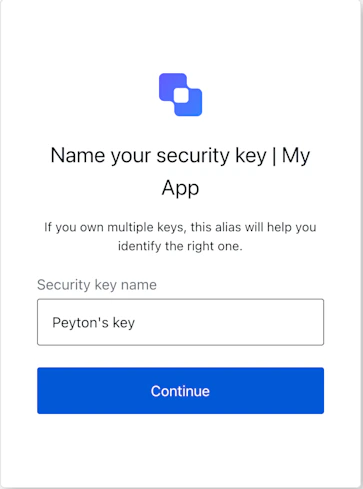
La pantalla `mfa-webauthn-change-key-nickname` permite al usuario establecer o actualizar el nombre para mostrar de una clave de seguridad de WebAuthn inscrita.
## Importación
Cada pantalla tiene su propio conjunto de hooks y métodos. El SDK admite **importación parcial** e **importación desde la raíz** para cada pantalla.
* La importación parcial le permite incluir solo el código que necesita para su caso de uso.
* La importación desde la raíz le permite cargar todas las pantallas desde un único paquete, lo que resulta útil cuando desea una compilación unificada para gestionar todas las pantallas posibles.
```jsx Import Example theme={null}
// importación desde la raíz
import { useMfaWebAuthnChangeKeyNickname } from '@auth0/auth0-acul-react';
// importación parcial
import {
useMfaWebAuthnChangeKeyNickname,
// Hooks de contexto
useUser,
useTenant,
useBranding,
useClient,
useOrganization,
usePrompt,
useScreen,
useTransaction,
useUntrustedData,
// Hooks comunes
useCurrentScreen,
useAuth0Themes,
useErrors,
// Hooks de utilidad
useChangeLanguage,
// Métodos
continueWithNewNickname,
} from "@auth0/auth0-acul-react/mfa-webauthn-change-key-nickname";
function MfaWebAuthnChangeKeyNicknameScreen() {
const { continueWithNewNickname } = useMfaWebAuthnChangeKeyNickname();
return (
);
}
```
## Hooks de contexto
Hooks con ámbito de pantalla que proporcionan acceso de solo lectura a los datos de contexto de Auth0 en la pantalla `mfa-webauthn-change-key-nickname`. Impórtelos desde `@auth0/auth0-acul-react/mfa-webauthn-change-key-nickname`.
() => BrandingMembers}>
Este hook proporciona la configuración de marca, como el logotipo, los colores y los ajustes del tema que se muestran en la pantalla `mfa-webauthn-change-key-nickname`.
```jsx Example theme={null}
import { useBranding } from '@auth0/auth0-acul-react/mfa-webauthn-change-key-nickname';
function CustomTheme() {
const branding = useBranding();
}
```
() => ClientMembers}>
Este hook proporciona la configuración relacionada con el cliente, como `id`, `name` y `logoUrl`, para la pantalla `mfa-webauthn-change-key-nickname`.
```jsx Example theme={null}
import { useClient } from '@auth0/auth0-acul-react/mfa-webauthn-change-key-nickname';
function AppInfo() {
const client = useClient();
}
```
() => OrganizationMembers}>
Este hook proporciona información sobre la Organización del usuario si el flujo de MFA está asociado a una Organización. Devuelve `null` cuando no hay contexto de Organización.
```jsx Example theme={null}
import { useOrganization } from '@auth0/auth0-acul-react/mfa-webauthn-change-key-nickname';
function OrgSelector() {
const organization = useOrganization();
if (!organization) {
return
No organization context
;
}
}
```
() => PromptMembers}>
Este hook contiene datos sobre la pantalla actual del flujo de autenticación.
```jsx Example theme={null}
import { usePrompt } from '@auth0/auth0-acul-react/mfa-webauthn-change-key-nickname';
function FlowInfo() {
const prompt = usePrompt();
}
```
() => ScreenMembersOnMfaWebAuthnChangeKeyNickname}>
Este hook contiene detalles específicos de la pantalla `mfa-webauthn-change-key-nickname`, incluida su configuración y contexto.
```jsx Example theme={null}
import { useScreen } from '@auth0/auth0-acul-react/mfa-webauthn-change-key-nickname';
function ScreenDebug() {
const screen = useScreen();
}
```
() => TenantMembers}>
Este hook contiene datos relacionados con el inquilino, como `id` y los metadatos asociados.
```jsx Example theme={null}
import { useTenant } from '@auth0/auth0-acul-react/mfa-webauthn-change-key-nickname';
function TenantInfo() {
const tenant = useTenant();
}
```
() => TransactionMembers}>
Este hook proporciona datos específicos de la transacción para la pantalla `mfa-webauthn-change-key-nickname`, como el estado actual del flujo de MFA.
```jsx Example theme={null}
import { useTransaction } from '@auth0/auth0-acul-react/mfa-webauthn-change-key-nickname';
function TransactionInfo() {
const transaction = useTransaction();
}
```
() => UntrustedDataMembers}>
Este hook gestiona los datos no confiables que se pasan a la pantalla, como los valores rellenados previamente a partir de parámetros de URL.
```jsx Example theme={null}
import { useUntrustedData } from '@auth0/auth0-acul-react/mfa-webauthn-change-key-nickname';
function PrefilledForm() {
const untrustedData = useUntrustedData();
}
```
() => UserMembers}>
Este hook proporciona información del usuario activo, incluidos `username`, `email` y los métodos de autenticación disponibles.
```jsx Example theme={null}
import { useUser } from '@auth0/auth0-acul-react/mfa-webauthn-change-key-nickname';
function UserProfile() {
const user = useUser();
}
```
MfaWebAuthnChangeKeyNicknameMembers}>
Este hook devuelve todos los métodos y el contexto disponibles en la pantalla `mfa-webauthn-change-key-nickname`.
## Métodos
Este método envía el nuevo alias de la clave de seguridad de WebAuthn inscrita.
```jsx Example theme={null}
import { useMfaWebAuthnChangeKeyNickname } from '@auth0/auth0-acul-react/mfa-webauthn-change-key-nickname';
function SaveNicknameForm() {
const { continueWithNewNickname } = useMfaWebAuthnChangeKeyNickname();
return (
);
}
```
**Parámetros del método**
[MfaWebAuthnChangeKeyNicknameContinueOptions](/es/docs/libraries/acul/react-sdk/API-Reference/Types/interfaces/MfaWebAuthnChangeKeyNicknameContinueOptions).
El nuevo alias de la clave de seguridad de WebAuthn.
## Hooks comunes y de utilidad
useAuth0Themes} type="Hooks">
Este hook obtiene las opciones del tema actual con la configuración plana del contexto de marca.
useChangeLanguage} type="Hooks">
Este hook devuelve una función para cambiar el idioma que se muestra en la pantalla actual de ACUL.
useCurrentScreen} type="Hooks">
Este hook obtiene el contexto y el estado de la pantalla actual.
useErrors} type="Hooks">
Este hook lee y administra los errores del servidor, del cliente y del desarrollador en la pantalla.