> ## Documentation Index
> Fetch the complete documentation index at: https://translations.mintlify.site/llms.txt
> Use this file to discover all available pages before exploring further.
# ResetPasswordMfaWebauthnRoamingChallenge
> Describe todos los hooks y métodos disponibles para personalizar la pantalla `reset-password-mfa-webauthn-roaming-challenge` de Universal Login.
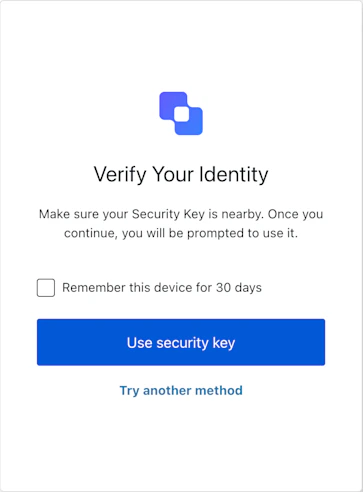
La pantalla `reset-password-mfa-webauthn-roaming-challenge` se muestra durante el flujo de restablecimiento de contraseña cuando se requiere autenticación multifactor mediante una clave de seguridad. Indica al usuario que se autentique con su clave de seguridad de hardware externa para continuar con el proceso de restablecimiento.
## Importación
Cada pantalla tiene su propio conjunto de hooks y métodos. El SDK admite la **importación parcial** y la **importación desde la raíz** para cada pantalla.
* Usar la importación parcial te permite incluir solo el código que necesitas para tu caso de uso específico.
* Usar la importación desde la raíz te permite cargar todas las pantallas desde un único bundle, lo que resulta útil cuando quieres una compilación unificada para gestionar todas las pantallas posibles.
```jsx Import Example theme={null}
// importación desde la raíz
import { useResetPasswordMfaWebAuthnRoamingChallenge } from '@auth0/auth0-acul-react';
// importación parcial
import {
useResetPasswordMfaWebAuthnRoamingChallenge,
// Hooks de contexto
useUser,
useTenant,
useBranding,
useClient,
useOrganization,
usePrompt,
useScreen,
useTransaction,
useUntrustedData,
// Hooks comunes
useCurrentScreen,
useAuth0Themes,
useErrors,
// Hooks de utilidad
useChangeLanguage,
// Métodos
showError,
tryAnotherMethod,
useSecurityKey,
} from '@auth0/auth0-acul-react/reset-password-mfa-webauthn-roaming-challenge';
function ResetPasswordMfaWebAuthnRoamingChallengeScreen() {
const { useSecurityKey } = useResetPasswordMfaWebAuthnRoamingChallenge();
return (
);
}
```
## Hooks de contexto
Hooks asociados a la pantalla que proporcionan acceso de solo lectura a los datos de contexto de Auth0 en la pantalla `reset-password-mfa-webauthn-roaming-challenge`. Impórtalos desde `@auth0/auth0-acul-react/reset-password-mfa-webauthn-roaming-challenge`.
() => BrandingMembers}>
Este hook proporciona la configuración de marca, como el logotipo, los colores y los ajustes del tema que se muestran en la pantalla `reset-password-mfa-webauthn-roaming-challenge`.
```jsx Example theme={null}
import { useBranding } from '@auth0/auth0-acul-react/reset-password-mfa-webauthn-roaming-challenge';
function CustomTheme() {
const branding = useBranding();
}
```
() => ClientMembers}>
Este hook proporciona configuraciones relacionadas con el cliente, como `id`, `name` y `logoUrl`, para la pantalla `reset-password-mfa-webauthn-roaming-challenge`.
```jsx Example theme={null}
import { useClient } from '@auth0/auth0-acul-react/reset-password-mfa-webauthn-roaming-challenge';
function AppInfo() {
const client = useClient();
}
```
() => OrganizationMembers}>
Este hook proporciona información sobre la Organización del usuario si el restablecimiento de contraseña está asociado a una Organización. Devuelve `null` cuando no hay contexto de Organización.
```jsx Example theme={null}
import { useOrganization } from '@auth0/auth0-acul-react/reset-password-mfa-webauthn-roaming-challenge';
function OrgSelector() {
const organization = useOrganization();
if (!organization) {
return
No Organization context
;
}
}
```
() => PromptMembers}>
Este hook contiene datos sobre la pantalla actual en el flujo de autenticación.
```jsx Example theme={null}
import { usePrompt } from '@auth0/auth0-acul-react/reset-password-mfa-webauthn-roaming-challenge';
function FlowInfo() {
const prompt = usePrompt();
}
```
() => ScreenMembersOnResetPasswordMfaWebAuthnRoamingChallenge}>
Este hook contiene detalles específicos de la pantalla `reset-password-mfa-webauthn-roaming-challenge`, incluida su configuración y contexto.
```jsx Example theme={null}
import { useScreen } from '@auth0/auth0-acul-react/reset-password-mfa-webauthn-roaming-challenge';
function ScreenDebug() {
const screen = useScreen();
}
```
() => TenantMembers}>
Este hook contiene datos relacionados con el inquilino, como `id` y los metadatos asociados.
```jsx Example theme={null}
import { useTenant } from '@auth0/auth0-acul-react/reset-password-mfa-webauthn-roaming-challenge';
function TenantInfo() {
const tenant = useTenant();
}
```
() => TransactionMembers}>
Este hook proporciona datos específicos de la transacción para la pantalla `reset-password-mfa-webauthn-roaming-challenge`, como las conexiones activas y el estado actual del flujo.
```jsx Example theme={null}
import { useTransaction } from '@auth0/auth0-acul-react/reset-password-mfa-webauthn-roaming-challenge';
function TransactionInfo() {
const transaction = useTransaction();
}
```
() => UntrustedDataMembers}>
Este hook gestiona los datos no confiables que se pasan a la pantalla, como un correo electrónico o un nombre de usuario precargados desde parámetros de la URL.
```jsx Example theme={null}
import { useUntrustedData } from '@auth0/auth0-acul-react/reset-password-mfa-webauthn-roaming-challenge';
function PrefilledForm() {
const untrustedData = useUntrustedData();
}
```
() => UserMembers}>
Este hook proporciona información del usuario activo, incluidos `username`, `email` y los métodos de autenticación disponibles.
```jsx Example theme={null}
import { useUser } from '@auth0/auth0-acul-react/reset-password-mfa-webauthn-roaming-challenge';
function UserProfile() {
const user = useUser();
}
```
ResetPasswordMfaWebAuthnRoamingChallengeMembers}>
Este hook devuelve todos los métodos y el contexto disponibles en la pantalla `reset-password-mfa-webauthn-roaming-challenge`.
## Métodos
Este método informa a Auth0 sobre un error del navegador relacionado con WebAuthn cuando falla el desafío de la clave de seguridad en el dispositivo del usuario.
```jsx Example theme={null}
import { useResetPasswordMfaWebAuthnRoamingChallenge } from '@auth0/auth0-acul-react/reset-password-mfa-webauthn-roaming-challenge';
function HandleSecurityKeyError() {
const { showError } = useResetPasswordMfaWebAuthnRoamingChallenge();
return (
);
}
```
**Parámetros del método**
[ResetPasswordMfaWebAuthnRoamingChallengeShowErrorOptions](/es/docs/libraries/acul/react-sdk/API-Reference/Types/interfaces/ResetPasswordMfaWebAuthnRoamingChallengeShowErrorOptions).
Si es `true` y `screen.showRememberDevice` también es `true`, omite MFA en inicios de sesión posteriores desde el navegador actual.
WebAuthnErrorDetails} required>
El objeto de error de la API de WebAuthn (`navigator.credentials.get()`) que se va a informar.
El nombre del error (por ejemplo, `'NotAllowedError'`).
El mensaje de error que describe qué salió mal.
Este método dirige al usuario a seleccionar un método de MFA diferente.
```jsx Example theme={null}
import { useResetPasswordMfaWebAuthnRoamingChallenge } from '@auth0/auth0-acul-react/reset-password-mfa-webauthn-roaming-challenge';
function TryAnotherMethodButton() {
const { tryAnotherMethod } = useResetPasswordMfaWebAuthnRoamingChallenge();
return (
);
}
```
**Parámetros del método**
[ResetPasswordMfaWebAuthnRoamingChallengeTryAnotherMethodOptions](/es/docs/libraries/acul/react-sdk/API-Reference/Types/interfaces/ResetPasswordMfaWebAuthnRoamingChallengeTryAnotherMethodOptions).
Si es `true` y `screen.showRememberDevice` también es `true`, omite MFA en inicios de sesión posteriores desde el navegador actual.
Este método inicia el desafío de la clave de seguridad para continuar el paso de MFA en el flujo de restablecimiento de contraseña.
```jsx Example theme={null}
import { useResetPasswordMfaWebAuthnRoamingChallenge } from '@auth0/auth0-acul-react/reset-password-mfa-webauthn-roaming-challenge';
function UseSecurityKeyButton() {
const { useSecurityKey } = useResetPasswordMfaWebAuthnRoamingChallenge();
return (
);
}
```
**Parámetros del método**
[ResetPasswordMfaWebAuthnRoamingChallengeUseSecurityKeyOptions](/es/docs/libraries/acul/react-sdk/API-Reference/Types/interfaces/ResetPasswordMfaWebAuthnRoamingChallengeUseSecurityKeyOptions).
Si es `true` y `screen.showRememberDevice` también es `true`, omite MFA en inicios de sesión posteriores desde el navegador actual.
## Hooks comunes/de utilidad
useAuth0Themes} type="Hooks">
Este hook obtiene las opciones del tema actual con la configuración en formato plano del contexto de marca.
useChangeLanguage} type="Hooks">
Este hook devuelve una función para cambiar el idioma mostrado en la pantalla actual de ACUL.
useCurrentScreen} type="Hooks">
Este hook obtiene el contexto y el estado de la pantalla actual.
useErrors} type="Hooks">
Este hook permite leer y gestionar los errores del servidor, del cliente y del desarrollador en la pantalla.