> ## Documentation Index
> Fetch the complete documentation index at: https://translations.mintlify.site/llms.txt
> Use this file to discover all available pages before exploring further.
> Découvrez comment configurer vos actions de flux JSON pour créer des objets JSON, analyser du JSON et convertir du JSON en chaîne de caractères.
# JSON
Cette liste d’actions JSON vous permet de créer, d’analyser et de convertir du JSON en chaînes de caractères.
## Créer un objet JSON
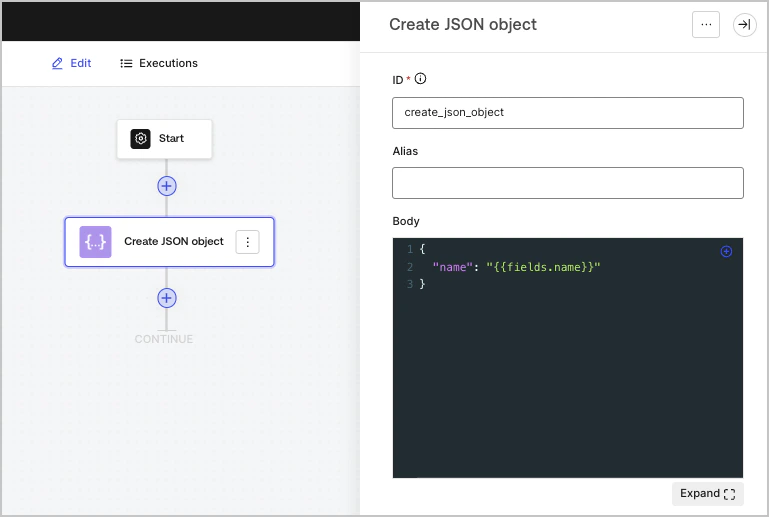
Crée un objet JSON. C’est particulièrement utile pour réutiliser son contenu dans d’autres actions du flux.
### Paramètres d’entrée
| Paramètre | Description |
| --------- | ------------- |
| Corps | L’objet JSON. |
### Objet de sortie
| Propriété | Type | Description |
| --------- | ----- | ------------- |
| `result` | Objet | L’objet JSON. |
### Exemple d’objet de sortie
```json lines theme={null}
{
"result": {
"name": "John Doe"
}
}
```
## Analyser du JSON
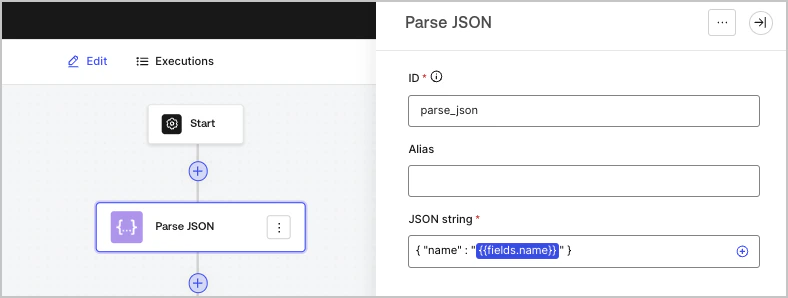
Analyse une chaîne de texte contenant un objet JSON et la convertit en objet JSON.
### Paramètres d’entrée
| Paramètre | Description |
| --------------------------------------- | ----------------------------- |
| Chaîne de caractères JSON (obligatoire) | La chaîne de caractères JSON. |
### Objet de sortie
| Propriété | Type | Description |
| --------- | ----- | ------------------- |
| `object` | Objet | L’objet JSON parsé. |
### Exemple d’objet de sortie
```json lines theme={null}
{
"object": {
"name": "John Doe"
}
}
```
## Convertir JSON en chaîne de caractères
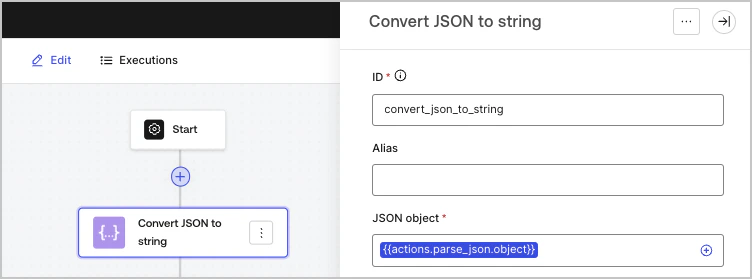
Convertit un objet JSON en chaîne de caractères.
### Paramètres d’entrée
| Paramètre | Description |
| ------------------------ | -------------------------------------------------------- |
| objet JSON (obligatoire) | L’objet JSON qui sera sérialisé en chaîne de caractères. |
### Objet de sortie
| Propriété | Type | Description |
| --------- | ------ | -------------------------------- |
| `json` | String | L’objet JSON converti en chaîne. |
### Exemple d'objet de sortie
```json lines theme={null}
{
"json": "{\"name\":\"John Doe\"}"
}
```