> ## Documentation Index
> Fetch the complete documentation index at: https://translations.mintlify.site/llms.txt
> Use this file to discover all available pages before exploring further.
# ResetPasswordMfaWebauthnPlatformChallenge
> Décrit tous les hooks et méthodes disponibles pour personnaliser l’écran `reset-password-mfa-webauthn-platform-challenge` de Universal Login.
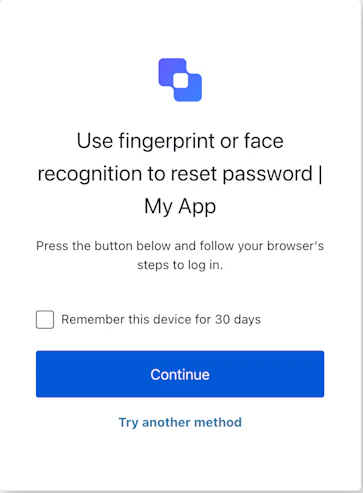
L’écran `reset-password-mfa-webauthn-platform-challenge` s’affiche pendant le flux de réinitialisation du mot de passe lorsqu’une authentification multifacteur est requise via une clé d’accès de plateforme. Il demande à l’utilisateur de s’authentifier à l’aide de la clé d’accès enregistrée sur son appareil afin de poursuivre la réinitialisation.
## Importation
Chaque écran possède son propre ensemble de hooks et de méthodes. Le SDK prend en charge l’**import partiel** et l’**import racine** pour chaque écran.
* L’**import partiel** vous permet d’inclure uniquement le code nécessaire à votre cas d’utilisation.
* L’**import racine** vous permet de charger tous les écrans à partir d’un seul bundle, ce qui est utile si vous souhaitez utiliser une compilation unifiée pour prendre en charge tous les écrans possibles.
```jsx Import Example theme={null}
// import racine
import { useResetPasswordMfaWebAuthnPlatformChallenge } from '@auth0/auth0-acul-react';
// import partiel
import {
useResetPasswordMfaWebAuthnPlatformChallenge,
// Hooks de contexte
useUser,
useTenant,
useBranding,
useClient,
useOrganization,
usePrompt,
useScreen,
useTransaction,
useUntrustedData,
// Hooks communs
useCurrentScreen,
useAuth0Themes,
useErrors,
// Hooks utilitaires
useChangeLanguage,
// Méthodes
continueWithPasskey,
reportBrowserError,
tryAnotherMethod,
} from '@auth0/auth0-acul-react/reset-password-mfa-webauthn-platform-challenge';
function ResetPasswordMfaWebAuthnPlatformChallengeScreen() {
const { continueWithPasskey } = useResetPasswordMfaWebAuthnPlatformChallenge();
return (
);
}
```
## Hooks de contexte
Hooks à portée d’écran qui fournissent un accès en lecture seule aux données de contexte d’Auth0 pour l’écran `reset-password-mfa-webauthn-platform-challenge`. Importez-les depuis `@auth0/auth0-acul-react/reset-password-mfa-webauthn-platform-challenge`.
() => BrandingMembers}>
Ce hook fournit les paramètres d’image de marque, comme le logo, les couleurs et les paramètres de thème affichés sur l’écran `reset-password-mfa-webauthn-platform-challenge`.
```jsx Example theme={null}
import { useBranding } from '@auth0/auth0-acul-react/reset-password-mfa-webauthn-platform-challenge';
function CustomTheme() {
const branding = useBranding();
}
```
() => ClientMembers}>
Ce hook fournit les configurations liées à l’application, comme `id`, `name` et `logoUrl`, pour l’écran `reset-password-mfa-webauthn-platform-challenge`.
```jsx Example theme={null}
import { useClient } from '@auth0/auth0-acul-react/reset-password-mfa-webauthn-platform-challenge';
function AppInfo() {
const client = useClient();
}
```
() => OrganizationMembers}>
Ce hook fournit des informations sur l’organisation de l’utilisateur si la réinitialisation du mot de passe est limitée à une organisation. Renvoie `null` lorsqu’aucun contexte d’organisation n’est présent.
```jsx Example theme={null}
import { useOrganization } from '@auth0/auth0-acul-react/reset-password-mfa-webauthn-platform-challenge';
function OrgSelector() {
const organization = useOrganization();
if (!organization) {
return
No Organization context
;
}
}
```
() => PromptMembers}>
Ce hook contient des données sur l’invite actuelle dans le flux d’authentification.
```jsx Example theme={null}
import { usePrompt } from '@auth0/auth0-acul-react/reset-password-mfa-webauthn-platform-challenge';
function FlowInfo() {
const prompt = usePrompt();
}
```
() => ScreenMembersOnResetPasswordMfaWebAuthnPlatformChallenge}>
Ce hook contient des détails propres à l’écran `reset-password-mfa-webauthn-platform-challenge`, y compris sa configuration et son contexte.
```jsx Example theme={null}
import { useScreen } from '@auth0/auth0-acul-react/reset-password-mfa-webauthn-platform-challenge';
function ScreenDebug() {
const screen = useScreen();
}
```
() => TenantMembers}>
Ce hook contient des données liées au locataire, comme `id` et les métadonnées associées.
```jsx Example theme={null}
import { useTenant } from '@auth0/auth0-acul-react/reset-password-mfa-webauthn-platform-challenge';
function TenantInfo() {
const tenant = useTenant();
}
```
() => TransactionMembers}>
Ce hook fournit des données propres à la transaction pour l’écran `reset-password-mfa-webauthn-platform-challenge`, comme les connexions actives et l’état actuel du flux.
```jsx Example theme={null}
import { useTransaction } from '@auth0/auth0-acul-react/reset-password-mfa-webauthn-platform-challenge';
function TransactionInfo() {
const transaction = useTransaction();
}
```
() => UntrustedDataMembers}>
Ce hook gère les données non fiables transmises à l’écran, comme un courriel ou un nom d’utilisateur préremplis à partir des paramètres d’URL.
```jsx Example theme={null}
import { useUntrustedData } from '@auth0/auth0-acul-react/reset-password-mfa-webauthn-platform-challenge';
function PrefilledForm() {
const untrustedData = useUntrustedData();
}
```
() => UserMembers}>
Ce hook fournit des renseignements sur l’utilisateur actif, y compris `username`, `email` et les méthodes d’authentification disponibles.
```jsx Example theme={null}
import { useUser } from '@auth0/auth0-acul-react/reset-password-mfa-webauthn-platform-challenge';
function UserProfile() {
const user = useUser();
}
```
ResetPasswordMfaWebAuthnPlatformChallengeMembers}>
Ce hook renvoie toutes les méthodes et tout le contexte disponibles pour l’écran `reset-password-mfa-webauthn-platform-challenge`.
## Méthodes
Cette méthode lance le défi de la clé d’accès de la plateforme pour poursuivre l’étape MFA dans le flux de réinitialisation du mot de passe.
```jsx Example theme={null}
import { useResetPasswordMfaWebAuthnPlatformChallenge } from '@auth0/auth0-acul-react/reset-password-mfa-webauthn-platform-challenge';
function ContinueWithPasskeyButton() {
const { continueWithPasskey } = useResetPasswordMfaWebAuthnPlatformChallenge();
return (
);
}
```
**Paramètres de la méthode**
[ResetPasswordMfaWebAuthnPlatformChallengeContinueOptions](/fr-CA/docs/libraries/acul/react-sdk/API-Reference/Types/interfaces/ResetPasswordMfaWebAuthnPlatformChallengeContinueOptions).
Si `true` et que `screen.showRememberDevice` est également `true`, ignore la MFA lors des connexions ultérieures à partir du navigateur actuel.
Cette méthode signale à Auth0 une erreur du navigateur liée à WebAuthn lorsque le défi de la clé d’accès échoue sur l’appareil de l’utilisateur.
```jsx Example theme={null}
import { useResetPasswordMfaWebAuthnPlatformChallenge } from '@auth0/auth0-acul-react/reset-password-mfa-webauthn-platform-challenge';
function HandlePasskeyError() {
const { reportBrowserError } = useResetPasswordMfaWebAuthnPlatformChallenge();
return (
);
}
```
**Paramètres de la méthode**
[ResetPasswordMfaWebAuthnPlatformChallengeReportErrorOptions](/fr-CA/docs/libraries/acul/react-sdk/API-Reference/Types/interfaces/ResetPasswordMfaWebAuthnPlatformChallengeReportErrorOptions).
WebAuthnErrorDetails} required>
L’objet d’erreur provenant de l’API WebAuthn (`navigator.credentials.get()`) à signaler.
Le nom de l’erreur (par ex. `'NotAllowedError'`).
Le message d’erreur décrivant le problème.
Cette méthode redirige l’utilisateur pour qu’il sélectionne une autre méthode MFA.
```jsx Example theme={null}
import { useResetPasswordMfaWebAuthnPlatformChallenge } from '@auth0/auth0-acul-react/reset-password-mfa-webauthn-platform-challenge';
function TryAnotherMethodButton() {
const { tryAnotherMethod } = useResetPasswordMfaWebAuthnPlatformChallenge();
return (
);
}
```
## Hooks communs/utilitaires
useAuth0Themes} type="Hooks">
Ce hook récupère les options du thème actuel avec une configuration mise à plat à partir du contexte d’image de marque.
useChangeLanguage} type="Hooks">
Ce hook renvoie une fonction qui permet de changer la langue d’affichage de l’écran ACUL actuel.
useCurrentScreen} type="Hooks">
Ce hook récupère le contexte et l’état de l’écran actuel.
useErrors} type="Hooks">
Ce hook lit et gère les erreurs du serveur, côté client et du développeur sur l’écran.