> ## Documentation Index
> Fetch the complete documentation index at: https://translations.mintlify.site/llms.txt
> Use this file to discover all available pages before exploring further.
> エンタープライズ接続を使用して、SAML IDプロバイダーに接続する方法を説明します。
# アプリをSAML IDプロバイダーに接続する
export const AuthCodeGroup = ({children, dropdown}) => {
const [processedChildren, setProcessedChildren] = useState(children);
useEffect(() => {
let unsubscribe = null;
function init() {
unsubscribe = window.autorun(() => {
const processChildren = node => {
if (typeof node === "string") {
let processedNode = node;
for (const [key, value] of window.rootStore.variableStore.values.entries()) {
const escapedKey = key.replaceAll(/[.*+?^${}()|[\]\\]/g, (String.raw)`\$&`);
processedNode = processedNode.replaceAll(new RegExp(escapedKey, "g"), value);
}
return processedNode;
} else if (Array.isArray(node)) {
return node.map(processChildren);
} else if (node && node.props && node.props.children) {
return {
...node,
props: {
...node.props,
children: processChildren(node.props.children)
}
};
}
return node;
};
setProcessedChildren(processChildren(children));
});
}
if (window.rootStore) {
init();
} else {
window.addEventListener("adu:storeReady", init);
}
return () => {
window.removeEventListener("adu:storeReady", init);
unsubscribe?.();
};
}, [children]);
return {processedChildren};
};
export const AuthCodeBlock = ({filename, icon, language, highlight, children}) => {
const [displayText, setDisplayText] = useState(children);
const [copyText, setCopyText] = useState(children);
const wrapperRef = React.useRef(null);
useEffect(() => {
let unsubscribe = null;
function init() {
if (!window.autorun || !window.rootStore) {
return;
}
unsubscribe = window.autorun(() => {
let processedChildrenForDisplay = children;
let processedChildrenForCopy = children;
for (const [key, value] of window.rootStore.variableStore.values.entries()) {
const escapedKey = key.replaceAll(/[.*+?^${}()|[\]\\]/g, (String.raw)`\$&`);
let displayValue = value;
if (key === "{yourClientSecret}" && value !== "{yourClientSecret}") {
displayValue = value.substring(0, 3) + "*****マスク済み*****";
}
processedChildrenForDisplay = processedChildrenForDisplay.replaceAll(new RegExp(escapedKey, "g"), displayValue);
processedChildrenForCopy = processedChildrenForCopy.replaceAll(new RegExp(escapedKey, "g"), value);
}
setDisplayText(processedChildrenForDisplay);
setCopyText(processedChildrenForCopy);
});
}
if (window.rootStore) {
init();
} else {
window.addEventListener("adu:storeReady", init);
}
return () => {
window.removeEventListener("adu:storeReady", init);
unsubscribe?.();
};
}, [children]);
useEffect(() => {
if (!wrapperRef.current) return;
const originalWriteText = navigator.clipboard.writeText.bind(navigator.clipboard);
let isOverriding = false;
const handleClick = e => {
const button = e.target.closest('[data-testid="copy-code-button"]');
if (!button || !wrapperRef.current.contains(button)) return;
isOverriding = true;
navigator.clipboard.writeText = text => {
if (isOverriding) {
isOverriding = false;
navigator.clipboard.writeText = originalWriteText;
return originalWriteText(copyText);
}
return originalWriteText(text);
};
setTimeout(() => {
if (isOverriding) {
isOverriding = false;
navigator.clipboard.writeText = originalWriteText;
}
}, 100);
};
const wrapper = wrapperRef.current;
wrapper.addEventListener('click', handleClick, true);
return () => {
wrapper.removeEventListener('click', handleClick, true);
if (navigator.clipboard.writeText !== originalWriteText) {
navigator.clipboard.writeText = originalWriteText;
}
};
}, [copyText]);
return
{displayText}
;
};
Auth0 では、SAML IDプロバイダー (IdP) 接続を作成できます。
## 前提条件
開始する前に、以下を行ってください。
* [Auth0 にアプリケーションを登録します](/ja/docs/get-started/auth0-overview/create-applications)。
* 適切な **Application Type** を選択します。
* **Allowed Callback URL** に **`{https://yourApp/callback}`** を追加します。
* アプリケーションの [Grant Types](/ja/docs/get-started/applications/update-grant-types) に適切なフローが含まれていることを確認します。
* このエンタープライズ接続の名前を決めます
* Post-back URL (Assertion Consumer Service URL とも呼ばれます) は次のようになります: `https://{yourDomain}/login/callback?connection={yourConnectionName}`
* Entity ID は次のようになります: `urn:auth0:{yourTenant}:{yourConnectionName}`
## 手順
アプリケーションを SAML IDプロバイダーに接続するには、次の手順を実行する必要があります。
1. IdP で Post-back URL と Entity ID を入力します (手順については、[SAML IDプロバイダー設定](/ja/docs/authenticate/protocols/saml/saml-identity-provider-configuration-settings)を参照してください) 。
2. [IdP から署名証明書を取得](#get-the-signing-certificate-from-the-idp)し、[Base64 に変換](#convert-signing-certificate-to-base64)します。
3. [Auth0 でエンタープライズ接続を作成](#create-an-enterprise-connection-in-auth0)します。
4. [Auth0 アプリケーションのエンタープライズ接続を有効に](#enable-the-enterprise-connection-for-your-auth0-application)します。
5. [マッピングを設定](#set-up-mappings)します (ほとんどの場合は不要です) 。
6. [接続をテスト](#test-the-connection)します。
## IdPから署名証明書を取得する
SAML Login では、Auth0 はサービスプロバイダーとして機能するため、SAML IdP から X.509 署名証明書 (PEM または CER 形式) を取得する必要があります。これは後で Auth0 にアップロードします。この証明書の取得方法はさまざまなため、さらにサポートが必要な場合は、IdP のドキュメントを参照してください。
### 署名証明書をBase64に変換する
X.509 署名証明書をアップロードするには、Management APIまたはAuth0 Dashboardを使用できます。Management API を使用する場合は、ファイルを Base64 に変換する必要があります。そのためには、[シンプルなオンラインツール](https://www.base64decode.org/)を使用するか、Bash で次のコマンドを実行します: `cat signing-cert.crt | base64`。
## アサーションの暗号化
SAML アサーションが暗号化されている場合は、Auth0 が復号をどのように処理するかを認識できるように、接続に対して[追加の値を設定](/ja/docs/authenticate/protocols/saml/saml-sso-integrations/algorithm-profiles)する必要があります。
## Auth0 でエンタープライズ接続を作成する
次に、Auth0 で SAML エンタープライズ接続を作成して設定し、X.509 署名証明書をアップロードする必要があります。この作業は、Auth0 のAuth0 Dashboardまたは Management API のいずれかを使用して実行できます。
### Auth0 Dashboard を使用してエンタープライズ接続を作成する
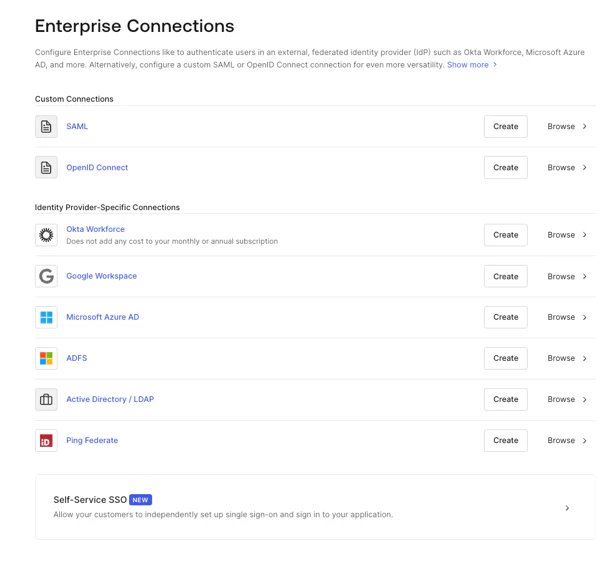
1. [Auth0 Dashboard > Authentication > Enterprise](https://manage.auth0.com/#/connections/enterprise) に移動し、**SAML** を見つけて `+` を選択します。
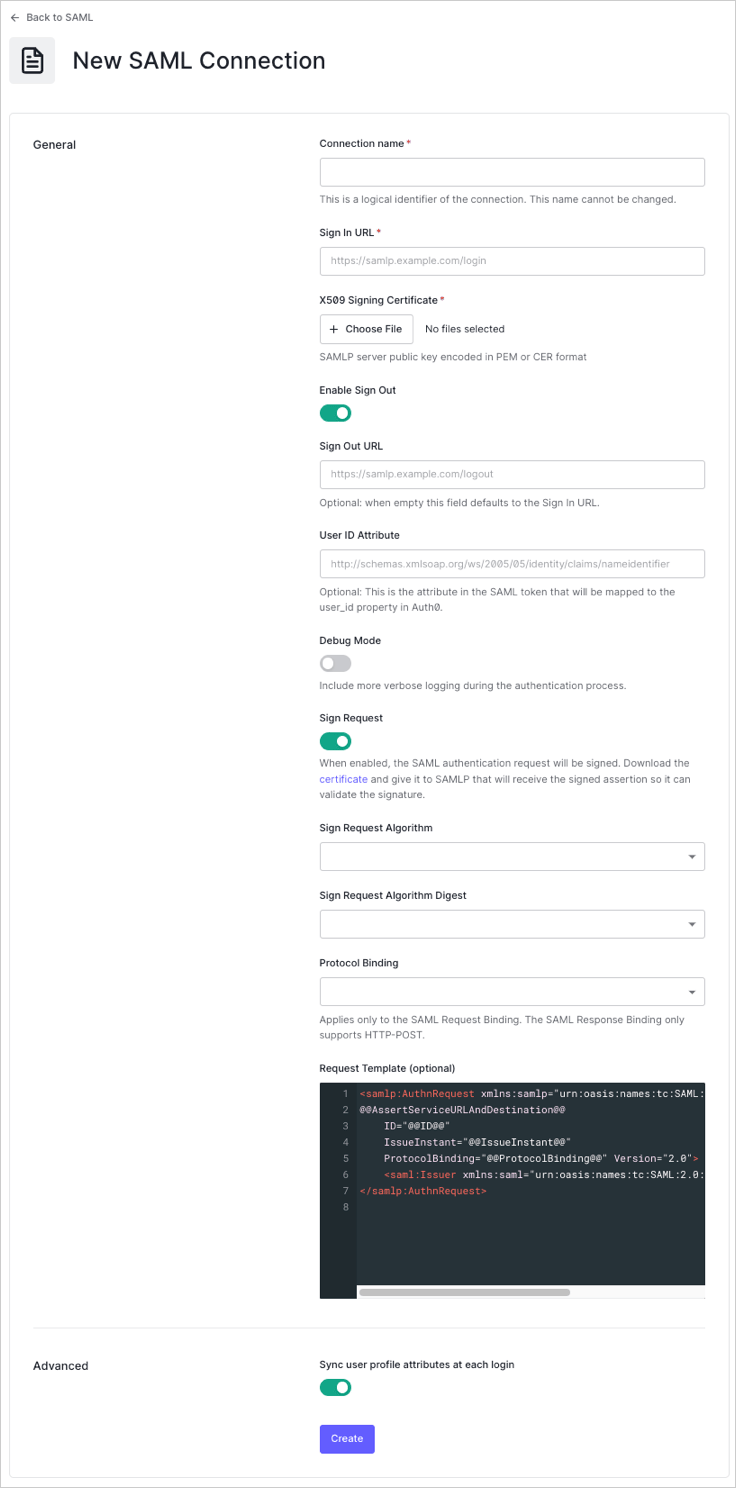
 2. 接続の詳細を入力し、**Create:** を選択します。
| Field | Description |
| --------------------------------- | --------------------------------------------------------------------------------------------------------- |
| **Connection name** | 接続の論理識別子です。テナント内で一意である必要があり、IdP で Post-back URL と Entity ID を設定する際に使用する名前と一致している必要があります。この名前は設定後に変更できません。 |
| **Sign In URL** | SAML のシングルログイン URL。 |
| **X.509 Signing Certificate** | この手順の前半で IdP から取得した署名証明書 (PEM または CER 形式でエンコードされたもの) 。 |
| **Enable Sign Out** | 有効にすると、専用の Sign Out URL を設定できます。無効な場合は、既定で Sign In URL が使用されます。 |
| **Sign Out URL** (optional) | SAML のシングルログアウト URL。 |
| **User ID Attribute** (optional) | Auth0 の `user_id` プロパティにマッピングされる SAML トークン内の属性。 |
| **Debug Mode** | 有効にすると、認証プロセス中により詳細なログが出力されます。 |
| **Sign Request** | 有効にすると、SAML 認証リクエストに署名されます。 (SAML IdP がアサーションの署名を検証できるよう、対応する証明書を必ずダウンロードして提供してください。) |
| **Sign Request Algorithm** | Auth0 が SAML アサーションの署名に使用するアルゴリズム。 |
| **Sign Request Digest Algorithm** | Auth0 が署名リクエストのダイジェストに使用するアルゴリズム。 |
| **Protocol Binding** | IdP がサポートする HTTP バインディング。 |
| **Request Template** (optional) | SAML リクエストの形式を指定するテンプレート。 |
2. 接続の詳細を入力し、**Create:** を選択します。
| Field | Description |
| --------------------------------- | --------------------------------------------------------------------------------------------------------- |
| **Connection name** | 接続の論理識別子です。テナント内で一意である必要があり、IdP で Post-back URL と Entity ID を設定する際に使用する名前と一致している必要があります。この名前は設定後に変更できません。 |
| **Sign In URL** | SAML のシングルログイン URL。 |
| **X.509 Signing Certificate** | この手順の前半で IdP から取得した署名証明書 (PEM または CER 形式でエンコードされたもの) 。 |
| **Enable Sign Out** | 有効にすると、専用の Sign Out URL を設定できます。無効な場合は、既定で Sign In URL が使用されます。 |
| **Sign Out URL** (optional) | SAML のシングルログアウト URL。 |
| **User ID Attribute** (optional) | Auth0 の `user_id` プロパティにマッピングされる SAML トークン内の属性。 |
| **Debug Mode** | 有効にすると、認証プロセス中により詳細なログが出力されます。 |
| **Sign Request** | 有効にすると、SAML 認証リクエストに署名されます。 (SAML IdP がアサーションの署名を検証できるよう、対応する証明書を必ずダウンロードして提供してください。) |
| **Sign Request Algorithm** | Auth0 が SAML アサーションの署名に使用するアルゴリズム。 |
| **Sign Request Digest Algorithm** | Auth0 が署名リクエストのダイジェストに使用するアルゴリズム。 |
| **Protocol Binding** | IdP がサポートする HTTP バインディング。 |
| **Request Template** (optional) | SAML リクエストの形式を指定するテンプレート。 |
 3\. **Provisioning** ビューで、Auth0 内でユーザープロファイルを作成および更新する方法を設定します。
| Field | Description |
| ---------------------------------------------- | -------------------------------------------------------------------------------------------------------------------------------------------------------- |
| **Sync user profile attributes at each login** | 有効にすると、Auth0 はユーザーがログインするたびにユーザープロファイルデータを自動的に同期し、接続元での変更が Auth0 にも自動的に反映されます。 |
| **Sync user profiles using SCIM** | 有効にすると、Auth0 は SCIM を使用したユーザープロファイルデータの同期を許可します。詳細については、[Configure Inbound SCIM](/ja/docs/authenticate/protocols/scim/configure-inbound-scim) を参照してください。 |
4. **Login Experience** ビューで、この接続を使用したユーザーのログイン方法を設定します。
| Field | Description |
| ---------------------------------- | ------------------------------------------------------------------------------------------------------------------------------------------------------------------------------- |
| **Home Realm Discovery** | ユーザーのメールアドレスのドメインを、指定された IDプロバイダーのドメインと照合します。詳細については、[Configure Identifier First Authentication](/ja/docs/authenticate/login/auth0-universal-login/identifier-first) を参照してください。 |
| **Display connection button** | このオプションでは、アプリケーションの接続ボタンをカスタマイズするための以下の設定を表示します。 |
| **Button display name** (Optional) | Universal Login のログインボタンをカスタマイズするためのテキストです。設定すると、ボタンには「\{Button display name} で続行」と表示されます。 |
| **Button logo URL** (Optional) | Universal Login のログインボタンをカスタマイズするために使用する画像の URL です。設定すると、Universal Login のログインボタンに 20px x 20px の正方形画像が表示されます。 |
オプションのフィールドは Universal Login でのみ使用できます。Classic Login を使用している場合、Add ボタン、Button display name、Button logo URL は表示されません。
5. 統合を完了するための適切な管理者権限がある場合は、**Continue** をクリックして、IdP の設定に必要なカスタムパラメーターを確認します。権限がない場合は、必要な設定を管理者が調整できるよう、表示された URL を管理者に共有してください。
3\. **Provisioning** ビューで、Auth0 内でユーザープロファイルを作成および更新する方法を設定します。
| Field | Description |
| ---------------------------------------------- | -------------------------------------------------------------------------------------------------------------------------------------------------------- |
| **Sync user profile attributes at each login** | 有効にすると、Auth0 はユーザーがログインするたびにユーザープロファイルデータを自動的に同期し、接続元での変更が Auth0 にも自動的に反映されます。 |
| **Sync user profiles using SCIM** | 有効にすると、Auth0 は SCIM を使用したユーザープロファイルデータの同期を許可します。詳細については、[Configure Inbound SCIM](/ja/docs/authenticate/protocols/scim/configure-inbound-scim) を参照してください。 |
4. **Login Experience** ビューで、この接続を使用したユーザーのログイン方法を設定します。
| Field | Description |
| ---------------------------------- | ------------------------------------------------------------------------------------------------------------------------------------------------------------------------------- |
| **Home Realm Discovery** | ユーザーのメールアドレスのドメインを、指定された IDプロバイダーのドメインと照合します。詳細については、[Configure Identifier First Authentication](/ja/docs/authenticate/login/auth0-universal-login/identifier-first) を参照してください。 |
| **Display connection button** | このオプションでは、アプリケーションの接続ボタンをカスタマイズするための以下の設定を表示します。 |
| **Button display name** (Optional) | Universal Login のログインボタンをカスタマイズするためのテキストです。設定すると、ボタンには「\{Button display name} で続行」と表示されます。 |
| **Button logo URL** (Optional) | Universal Login のログインボタンをカスタマイズするために使用する画像の URL です。設定すると、Universal Login のログインボタンに 20px x 20px の正方形画像が表示されます。 |
オプションのフィールドは Universal Login でのみ使用できます。Classic Login を使用している場合、Add ボタン、Button display name、Button logo URL は表示されません。
5. 統合を完了するための適切な管理者権限がある場合は、**Continue** をクリックして、IdP の設定に必要なカスタムパラメーターを確認します。権限がない場合は、必要な設定を管理者が調整できるよう、表示された URL を管理者に共有してください。
### Management API を使用してエンタープライズ接続を作成する
[Management API](https://auth0.com/docs/api/management/v2) を使用して SAML 接続を作成することもできます。この場合は、各 SAML 設定フィールドを手動で指定することも、設定値を含む SAML メタデータドキュメントを指定することもできます。
#### 指定した値を使用して接続を作成する
[Create a Connection endpoint](https://auth0.com/docs/api/management/v2#!/Connections/patch_connections_by_id) に対して `POST` リクエストを実行します。`MGMT_API_ACCESS_TOKEN`、`CONNECTION_NAME`、`SIGN_IN_ENDPOINT_URL`、`SIGN_OUT_ENDPOINT_URL`、`BASE64_SIGNING_CERT` の各プレースホルダー値は、それぞれ Management API の アクセストークン、接続名、サインイン URL、サインアウト URL、Base64 エンコードされた署名証明書 (PEM または CER 形式) に必ず置き換えてください。
```bash cURL theme={null}
curl --request POST \
--url 'https://{yourDomain}/api/v2/connections' \
--header 'authorization: Bearer MGMT_API_ACCESS_TOKEN' \
--header 'cache-control: no-cache' \
--header 'content-type: application/json' \
--data '{ "strategy": "samlp", "name": "CONNECTION_NAME", "options": { "signInEndpoint": "SIGN_IN_ENDPOINT_URL", "signOutEndpoint": "SIGN_OUT_ENDPOINT_URL", "signatureAlgorithm": "rsa-sha256", "digestAlgorithm": "sha256", "fieldsMap": {}, "signingCert": "BASE64_SIGNING_CERT" } }'
```
```csharp C# theme={null}
var client = new RestClient("https://{yourDomain}/api/v2/connections");
var request = new RestRequest(Method.POST);
request.AddHeader("content-type", "application/json");
request.AddHeader("authorization", "Bearer MGMT_API_ACCESS_TOKEN");
request.AddHeader("cache-control", "no-cache");
request.AddParameter("application/json", "{ "strategy": "samlp", "name": "CONNECTION_NAME", "options": { "signInEndpoint": "SIGN_IN_ENDPOINT_URL", "signOutEndpoint": "SIGN_OUT_ENDPOINT_URL", "signatureAlgorithm": "rsa-sha256", "digestAlgorithm": "sha256", "fieldsMap": {}, "signingCert": "BASE64_SIGNING_CERT" } }", ParameterType.RequestBody);
IRestResponse response = client.Execute(request);
```
```go Go theme={null}
package main
import (
"fmt"
"strings"
"net/http"
"io/ioutil"
)
func main() {
url := "https://{yourDomain}/api/v2/connections"
payload := strings.NewReader("{ "strategy": "samlp", "name": "CONNECTION_NAME", "options": { "signInEndpoint": "SIGN_IN_ENDPOINT_URL", "signOutEndpoint": "SIGN_OUT_ENDPOINT_URL", "signatureAlgorithm": "rsa-sha256", "digestAlgorithm": "sha256", "fieldsMap": {}, "signingCert": "BASE64_SIGNING_CERT" } }")
req, _ := http.NewRequest("POST", url, payload)
req.Header.Add("content-type", "application/json")
req.Header.Add("authorization", "Bearer MGMT_API_ACCESS_TOKEN")
req.Header.Add("cache-control", "no-cache")
res, _ := http.DefaultClient.Do(req)
defer res.Body.Close()
body, _ := ioutil.ReadAll(res.Body)
fmt.Println(res)
fmt.Println(string(body))
}
```
```java Java theme={null}
HttpResponse response = Unirest.post("https://{yourDomain}/api/v2/connections")
.header("content-type", "application/json")
.header("authorization", "Bearer MGMT_API_ACCESS_TOKEN")
.header("cache-control", "no-cache")
.body("{ "strategy": "samlp", "name": "CONNECTION_NAME", "options": { "signInEndpoint": "SIGN_IN_ENDPOINT_URL", "signOutEndpoint": "SIGN_OUT_ENDPOINT_URL", "signatureAlgorithm": "rsa-sha256", "digestAlgorithm": "sha256", "fieldsMap": {}, "signingCert": "BASE64_SIGNING_CERT" } }")
.asString();
```
```javascript Node.JS theme={null}
var axios = require("axios").default;
var options = {
method: 'POST',
url: 'https://{yourDomain}/api/v2/connections',
headers: {
'content-type': 'application/json',
authorization: 'Bearer MGMT_API_ACCESS_TOKEN',
'cache-control': 'no-cache'
},
data: {
strategy: 'samlp',
name: 'CONNECTION_NAME',
options: {
signInEndpoint: 'SIGN_IN_ENDPOINT_URL',
signOutEndpoint: 'SIGN_OUT_ENDPOINT_URL',
signatureAlgorithm: 'rsa-sha256',
digestAlgorithm: 'sha256',
fieldsMap: {},
signingCert: 'BASE64_SIGNING_CERT'
}
}
};
axios.request(options).then(function (response) {
console.log(response.data);
}).catch(function (error) {
console.error(error);
});
```
```php PHP theme={null}
$curl = curl_init();
curl_setopt_array($curl, [
CURLOPT_URL => "https://{yourDomain}/api/v2/connections",
CURLOPT_RETURNTRANSFER => true,
CURLOPT_ENCODING => "",
CURLOPT_MAXREDIRS => 10,
CURLOPT_TIMEOUT => 30,
CURLOPT_HTTP_VERSION => CURL_HTTP_VERSION_1_1,
CURLOPT_CUSTOMREQUEST => "POST",
CURLOPT_POSTFIELDS => "{ "strategy": "samlp", "name": "CONNECTION_NAME", "options": { "signInEndpoint": "SIGN_IN_ENDPOINT_URL", "signOutEndpoint": "SIGN_OUT_ENDPOINT_URL", "signatureAlgorithm": "rsa-sha256", "digestAlgorithm": "sha256", "fieldsMap": {}, "signingCert": "BASE64_SIGNING_CERT" } }",
CURLOPT_HTTPHEADER => [
"authorization: Bearer MGMT_API_ACCESS_TOKEN",
"cache-control: no-cache",
"content-type: application/json"
],
]);
$response = curl_exec($curl);
$err = curl_error($curl);
curl_close($curl);
if ($err) {
echo "cURL Error #:" . $err;
} else {
echo $response;
}
```
```python Python theme={null}
import http.client
conn = http.client.HTTPSConnection("")
payload = "{ "strategy": "samlp", "name": "CONNECTION_NAME", "options": { "signInEndpoint": "SIGN_IN_ENDPOINT_URL", "signOutEndpoint": "SIGN_OUT_ENDPOINT_URL", "signatureAlgorithm": "rsa-sha256", "digestAlgorithm": "sha256", "fieldsMap": {}, "signingCert": "BASE64_SIGNING_CERT" } }"
headers = {
'content-type': "application/json",
'authorization': "Bearer MGMT_API_ACCESS_TOKEN",
'cache-control': "no-cache"
}
conn.request("POST", "/{yourDomain}/api/v2/connections", payload, headers)
res = conn.getresponse()
data = res.read()
print(data.decode("utf-8"))
```
```ruby Ruby theme={null}
require 'uri'
require 'net/http'
require 'openssl'
url = URI("https://{yourDomain}/api/v2/connections")
http = Net::HTTP.new(url.host, url.port)
http.use_ssl = true
http.verify_mode = OpenSSL::SSL::VERIFY_NONE
request = Net::HTTP::Post.new(url)
request["content-type"] = 'application/json'
request["authorization"] = 'Bearer MGMT_API_ACCESS_TOKEN'
request["cache-control"] = 'no-cache'
request.body = "{ "strategy": "samlp", "name": "CONNECTION_NAME", "options": { "signInEndpoint": "SIGN_IN_ENDPOINT_URL", "signOutEndpoint": "SIGN_OUT_ENDPOINT_URL", "signatureAlgorithm": "rsa-sha256", "digestAlgorithm": "sha256", "fieldsMap": {}, "signingCert": "BASE64_SIGNING_CERT" } }"
response = http.request(request)
puts response.read_body
```
| Value | 説明 |
| ----------------------- | ---------------------------------------------------------------------------------------------------------- |
| `MGMT_API_ACCESS_TOKEN` | スコープ `create:connections` を持つ [Management API のアクセストークン](https://auth0.com/docs/api/management/v2/tokens)。 |
| `CONNECTION_NAME` | 作成する接続の名前。 |
| `SIGN_IN_ENDPONT_URL` | 作成する接続の SAML シングルログイン URL。 |
| `SIGN_OUT_ENDPOINT_URL` | 作成する接続の SAML シングルログアウト URL。 |
| `BASE64_SIGNING_CERT` | IdP から取得した X.509 署名証明書 (PEM または CER でエンコードされたもの) 。 |
または、JSON 形式では次のとおりです。
```json lines theme={null}
{
"strategy": "samlp",
"name": "CONNECTION_NAME",
"options": {
"signInEndpoint": "SIGN_IN_ENDPOINT_URL",
"signOutEndpoint": "SIGN_OUT_ENDPOINT_URL",
"signatureAlgorithm": "rsa-sha256",
"digestAlgorithm": "sha256",
"fieldsMap": {
...
},
"signingCert": "BASE64_SIGNING_CERT"
}
}
```
#### SAML メタデータを使用して接続を作成する
各 SAML 設定フィールドを個別に指定する代わりに、設定値を含む SAML メタデータドキュメントを指定できます。SAML メタデータドキュメントを指定する場合は、ドキュメントの XML コンテンツ (`metadataXml`) またはドキュメントの URL (`metadataUrl`) のいずれかを指定できます。URL を指定した場合、コンテンツは 1 回だけダウンロードされます。今後 URL の内容が変更されても、接続が自動的に再構成されることはありません。
##### メタデータドキュメントの内容を指定する
`metadataXml` オプションを使用して、メタデータドキュメントの内容を指定します。
```bash cURL theme={null}
curl --request POST \
--url 'https://{yourDomain}/api/v2/connections' \
--header 'authorization: Bearer MGMT_API_ACCESS_TOKEN' \
--header 'cache-control: no-cache' \
--header 'content-type: application/json' \
--data '{ "strategy": "samlp", "name": "CONNECTION_NAME", "options": { "metadataXml": "..." } }'
```
```csharp C# theme={null}
var client = new RestClient("https://{yourDomain}/api/v2/connections");
var request = new RestRequest(Method.POST);
request.AddHeader("content-type", "application/json");
request.AddHeader("authorization", "Bearer MGMT_API_ACCESS_TOKEN");
request.AddHeader("cache-control", "no-cache");
request.AddParameter("application/json", "{ "strategy": "samlp", "name": "CONNECTION_NAME", "options": { "metadataXml": "..." } }", ParameterType.RequestBody);
IRestResponse response = client.Execute(request);
```
```go Go theme={null}
package main
import (
"fmt"
"strings"
"net/http"
"io/ioutil"
)
func main() {
url := "https://{yourDomain}/api/v2/connections"
payload := strings.NewReader("{ "strategy": "samlp", "name": "CONNECTION_NAME", "options": { "metadataXml": "..." } }")
req, _ := http.NewRequest("POST", url, payload)
req.Header.Add("content-type", "application/json")
req.Header.Add("authorization", "Bearer MGMT_API_ACCESS_TOKEN")
req.Header.Add("cache-control", "no-cache")
res, _ := http.DefaultClient.Do(req)
defer res.Body.Close()
body, _ := ioutil.ReadAll(res.Body)
fmt.Println(res)
fmt.Println(string(body))
}
```
```java Java theme={null}
HttpResponse response = Unirest.post("https://{yourDomain}/api/v2/connections")
.header("content-type", "application/json")
.header("authorization", "Bearer MGMT_API_ACCESS_TOKEN")
.header("cache-control", "no-cache")
.body("{ "strategy": "samlp", "name": "CONNECTION_NAME", "options": { "metadataXml": "..." } }")
.asString();
```
```javascript Node.JS theme={null}
var axios = require("axios").default;
var options = {
method: 'POST',
url: 'https://{yourDomain}/api/v2/connections',
headers: {
'content-type': 'application/json',
authorization: 'Bearer MGMT_API_ACCESS_TOKEN',
'cache-control': 'no-cache'
},
data: {
strategy: 'samlp',
name: 'CONNECTION_NAME',
options: {
metadataXml: '...'
}
}
};
axios.request(options).then(function (response) {
console.log(response.data);
}).catch(function (error) {
console.error(error);
});
```
```php PHP theme={null}
$curl = curl_init();
curl_setopt_array($curl, [
CURLOPT_URL => "https://{yourDomain}/api/v2/connections",
CURLOPT_RETURNTRANSFER => true,
CURLOPT_ENCODING => "",
CURLOPT_MAXREDIRS => 10,
CURLOPT_TIMEOUT => 30,
CURLOPT_HTTP_VERSION => CURL_HTTP_VERSION_1_1,
CURLOPT_CUSTOMREQUEST => "POST",
CURLOPT_POSTFIELDS => "{ "strategy": "samlp", "name": "CONNECTION_NAME", "options": { "metadataXml": "..." } }",
CURLOPT_HTTPHEADER => [
"authorization: Bearer MGMT_API_ACCESS_TOKEN",
"cache-control: no-cache",
"content-type: application/json"
],
]);
$response = curl_exec($curl);
$err = curl_error($curl);
curl_close($curl);
if ($err) {
echo "cURL Error #:" . $err;
} else {
echo $response;
}
```
```python Python theme={null}
iimport http.client
conn = http.client.HTTPSConnection("")
payload = "{ "strategy": "samlp", "name": "CONNECTION_NAME", "options": { "metadataXml": "..." } }"
headers = {
'content-type': "application/json",
'authorization': "Bearer MGMT_API_ACCESS_TOKEN",
'cache-control': "no-cache"
}
conn.request("POST", "/{yourDomain}/api/v2/connections", payload, headers)
res = conn.getresponse()
data = res.read()
print(data.decode("utf-8"))
```
```ruby Ruby theme={null}
require 'uri'
require 'net/http'
require 'openssl'
url = URI("https://{yourDomain}/api/v2/connections")
http = Net::HTTP.new(url.host, url.port)
http.use_ssl = true
http.verify_mode = OpenSSL::SSL::VERIFY_NONE
request = Net::HTTP::Post.new(url)
request["content-type"] = 'application/json'
request["authorization"] = 'Bearer MGMT_API_ACCESS_TOKEN'
request["cache-control"] = 'no-cache'
request.body = "{ "strategy": "samlp", "name": "CONNECTION_NAME", "options": { "metadataXml": "..." } }"
response = http.request(request)
puts response.read_body
```
##### メタデータドキュメントの URL を指定する
ドキュメントの URL を指定するには、`metadataUrl` オプションを使用します。
```bash cURL theme={null}
curl --request POST \
--url 'https://{yourDomain}/api/v2/connections' \
--header 'authorization: Bearer MGMT_API_ACCESS_TOKEN' \
--header 'cache-control: no-cache' \
--header 'content-type: application/json' \
--data '{ "strategy": "samlp", "name": "CONNECTION_NAME", "options": { "metadataUrl": "https://saml-idp/samlp/metadata/uarlU13n63e0feZNJxOCNZ1To3a9H7jX" } }'
```
```csharp C# theme={null}
var client = new RestClient("https://{yourDomain}/api/v2/connections");
var request = new RestRequest(Method.POST);
request.AddHeader("content-type", "application/json");
request.AddHeader("authorization", "Bearer MGMT_API_ACCESS_TOKEN");
request.AddHeader("cache-control", "no-cache");
request.AddParameter("application/json", "{ "strategy": "samlp", "name": "CONNECTION_NAME", "options": { "metadataUrl": "https://saml-idp/samlp/metadata/uarlU13n63e0feZNJxOCNZ1To3a9H7jX" } }", ParameterType.RequestBody);
IRestResponse response = client.Execute(request);
```
```go Go theme={null}
package main
import (
"fmt"
"strings"
"net/http"
"io/ioutil"
)
func main() {
url := "https://{yourDomain}/api/v2/connections"
payload := strings.NewReader("{ "strategy": "samlp", "name": "CONNECTION_NAME", "options": { "metadataUrl": "https://saml-idp/samlp/metadata/uarlU13n63e0feZNJxOCNZ1To3a9H7jX" } }")
req, _ := http.NewRequest("POST", url, payload)
req.Header.Add("content-type", "application/json")
req.Header.Add("authorization", "Bearer MGMT_API_ACCESS_TOKEN")
req.Header.Add("cache-control", "no-cache")
res, _ := http.DefaultClient.Do(req)
defer res.Body.Close()
body, _ := ioutil.ReadAll(res.Body)
fmt.Println(res)
fmt.Println(string(body))
}
```
```java Java theme={null}
HttpResponse response = Unirest.post("https://{yourDomain}/api/v2/connections")
.header("content-type", "application/json")
.header("authorization", "Bearer MGMT_API_ACCESS_TOKEN")
.header("cache-control", "no-cache")
.body("{ "strategy": "samlp", "name": "CONNECTION_NAME", "options": { "metadataUrl": "https://saml-idp/samlp/metadata/uarlU13n63e0feZNJxOCNZ1To3a9H7jX" } }")
.asString();
```
```javascript Node.JS theme={null}
var axios = require("axios").default;
var options = {
method: 'POST',
url: 'https://{yourDomain}/api/v2/connections',
headers: {
'content-type': 'application/json',
authorization: 'Bearer MGMT_API_ACCESS_TOKEN',
'cache-control': 'no-cache'
},
data: {
strategy: 'samlp',
name: 'CONNECTION_NAME',
options: {
metadataUrl: 'https://saml-idp/samlp/metadata/uarlU13n63e0feZNJxOCNZ1To3a9H7jX'
}
}
};
axios.request(options).then(function (response) {
console.log(response.data);
}).catch(function (error) {
console.error(error);
});
```
```php PHP theme={null}
$curl = curl_init();
curl_setopt_array($curl, [
CURLOPT_URL => "https://{yourDomain}/api/v2/connections",
CURLOPT_RETURNTRANSFER => true,
CURLOPT_ENCODING => "",
CURLOPT_MAXREDIRS => 10,
CURLOPT_TIMEOUT => 30,
CURLOPT_HTTP_VERSION => CURL_HTTP_VERSION_1_1,
CURLOPT_CUSTOMREQUEST => "POST",
CURLOPT_POSTFIELDS => "{ "strategy": "samlp", "name": "CONNECTION_NAME", "options": { "metadataUrl": "https://saml-idp/samlp/metadata/uarlU13n63e0feZNJxOCNZ1To3a9H7jX" } }",
CURLOPT_HTTPHEADER => [
"authorization: Bearer MGMT_API_ACCESS_TOKEN",
"cache-control: no-cache",
"content-type: application/json"
],
]);
$response = curl_exec($curl);
$err = curl_error($curl);
curl_close($curl);
if ($err) {
echo "cURL Error #:" . $err;
} else {
echo $response;
}
```
```python Python theme={null}
import http.client
conn = http.client.HTTPSConnection("")
payload = "{ "strategy": "samlp", "name": "CONNECTION_NAME", "options": { "metadataUrl": "https://saml-idp/samlp/metadata/uarlU13n63e0feZNJxOCNZ1To3a9H7jX" } }"
headers = {
'content-type': "application/json",
'authorization': "Bearer MGMT_API_ACCESS_TOKEN",
'cache-control': "no-cache"
}
conn.request("POST", "/{yourDomain}/api/v2/connections", payload, headers)
res = conn.getresponse()
data = res.read()
print(data.decode("utf-8"))
```
```ruby Ruby theme={null}
require 'uri'
require 'net/http'
require 'openssl'
url = URI("https://{yourDomain}/api/v2/connections")
http = Net::HTTP.new(url.host, url.port)
http.use_ssl = true
http.verify_mode = OpenSSL::SSL::VERIFY_NONE
request = Net::HTTP::Post.new(url)
request["content-type"] = 'application/json'
request["authorization"] = 'Bearer MGMT_API_ACCESS_TOKEN'
request["cache-control"] = 'no-cache'
request.body = "{ "strategy": "samlp", "name": "CONNECTION_NAME", "options": { "metadataUrl": "https://saml-idp/samlp/metadata/uarlU13n63e0feZNJxOCNZ1To3a9H7jX" } }"
response = http.request(request)
puts response.read_body
```
URL を指定すると、コンテンツは一度だけダウンロードされます。今後 URL の内容が変更されても、接続が自動的に再構成されることはありません。
##### メタデータ URL を使用して既存の接続情報を更新する
この手順が機能するのは、接続を `metadataUrl` を使って手動で作成した場合のみです。
B2B 実装で、独自の SAML IDプロバイダーを使用して Auth0 とフェデレーションしている場合は、署名証明書の変更、エンドポイント URL の変更、新しいアサーションフィールドの追加などに応じて、Auth0 に保存されている接続情報を更新する必要が生じることがあります。Auth0 は ADFS 接続ではこれを自動で行いますが、SAML 接続では行いません。
定期的に更新するためのバッチ処理 (cron ジョブ) を作成できます。この処理は数週間ごとに実行し、`/api/v2/connections/CONNECTION_ID` エンドポイントに PATCH リクエストを送って、`{options: {metadataUrl: '$URL'}}` を含むボディを渡します。ここで `$URL` は、接続の作成時に使用したものと同じメタデータ URL です。メタデータ URL を使って新しい一時的な接続を作成し、古い接続と新しい接続のプロパティを比較します。差分があれば、新しい接続を更新してから一時接続を削除します。
1. `options.metadataUrl` を使用して SAML 接続を作成します。接続オブジェクトには、メタデータの情報が設定されます。
2. URL 先のメタデータの内容を更新します。
3. `/api/v2/connections/CONNECTION_ID` エンドポイントに `{options: {metadataUrl: '$URL'}}` を指定して PATCH リクエストを送信します。これで、接続オブジェクトが新しいメタデータの内容で更新されます。
`options` パラメーターを使用すると、`options` オブジェクト全体が上書きされます。必ずすべてのパラメーターを含めてください。
## カスタム Entity ID を指定する
カスタム Entity ID を指定するには、Management API を使用してデフォルトの `urn:auth0:YOUR_TENANT:YOUR_CONNECTION_NAME` を上書きします。接続の作成時、または既存の接続を更新するときに、`connection.options.entityID` プロパティを設定します。
以下の JSON 例では、SAML IdP のメタデータ URL を使用して新しい SAML 接続を作成すると同時に、カスタム Entity ID も指定できます。Entity ID は接続の名前を使って作成されるため、一意性は維持されます。
```json lines theme={null}
{
"strategy": "samlp",
"name": "{yourConnectionName}",
"options": {
"metadataUrl": "https://saml-idp/samlp/metadata/uarlU13n63e0feZNJxOCNZ1To3a9H7jX",
"entityId": "urn:your-custom-sp-name:{yourConnectionName}"
}
}
```
## Auth0 アプリケーションでエンタープライズ接続を有効にする
新しい SAML エンタープライズ接続を使用するには、まず Auth0 アプリケーションで[その接続を有効にする](/ja/docs/authenticate/identity-providers/enterprise-identity-providers/enable-enterprise-connections)必要があります。
## マッピングを設定する
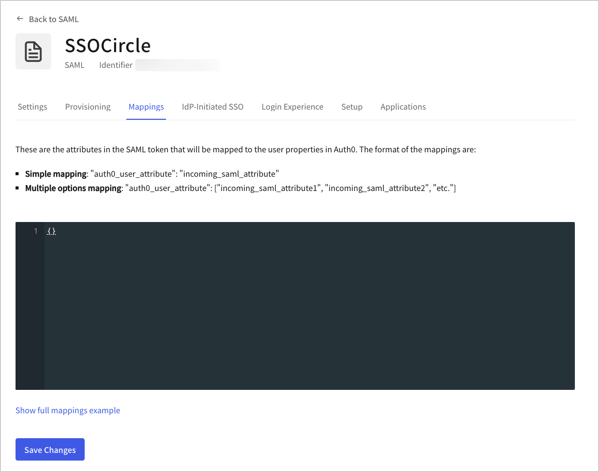
非標準の PingFederate Server に対する SAML エンタープライズ接続を設定している場合は、属性マッピングを**必ず**更新してください。
**Mappings** ビューを選択し、`{}` 内にマッピングを入力して、**Save** を選択します。
 **非標準の PingFederate Server のマッピング:**
```json lines theme={null}
{
"user_id": "http://schemas.xmlsoap.org/ws/2005/05/identity/claims/nameidentifier",
"email": "http://schemas.xmlsoap.org/ws/2005/05/identity/claims/nameidentifier"
}
```
**SSO Circle のマッピング**
```json lines theme={null}
{
"email": "EmailAddress",
"given_name": "FirstName",
"family_name": "LastName"
}
```
**2 つのクレームのいずれかを 1 つのユーザー属性にマッピングする**
```json lines theme={null}
{
"given_name": [
"http://schemas.xmlsoap.org/ws/2005/05/identity/claims/givenname",
"http://schemas.xmlsoap.org/ws/2005/05/identity/claims/name"
]
}
```
**NameID をユーザー属性にマッピングする方法**
```json lines theme={null}
{
"user_id": [
"http://schemas.xmlsoap.org/ws/2005/05/identity/claims/nameidentifier",
"http://schemas.xmlsoap.org/ws/2005/05/identity/claims/upn",
"http://schemas.xmlsoap.org/ws/2005/05/identity/claims/name"
]
}
```
**非標準の PingFederate Server のマッピング:**
```json lines theme={null}
{
"user_id": "http://schemas.xmlsoap.org/ws/2005/05/identity/claims/nameidentifier",
"email": "http://schemas.xmlsoap.org/ws/2005/05/identity/claims/nameidentifier"
}
```
**SSO Circle のマッピング**
```json lines theme={null}
{
"email": "EmailAddress",
"given_name": "FirstName",
"family_name": "LastName"
}
```
**2 つのクレームのいずれかを 1 つのユーザー属性にマッピングする**
```json lines theme={null}
{
"given_name": [
"http://schemas.xmlsoap.org/ws/2005/05/identity/claims/givenname",
"http://schemas.xmlsoap.org/ws/2005/05/identity/claims/name"
]
}
```
**NameID をユーザー属性にマッピングする方法**
```json lines theme={null}
{
"user_id": [
"http://schemas.xmlsoap.org/ws/2005/05/identity/claims/nameidentifier",
"http://schemas.xmlsoap.org/ws/2005/05/identity/claims/upn",
"http://schemas.xmlsoap.org/ws/2005/05/identity/claims/name"
]
}
```
## 接続をテストする
これで、[接続をテストする](/ja/docs/authenticate/identity-providers/enterprise-identity-providers/test-enterprise-connections)準備が整いました。
## Global Token Revocation を設定する
この接続タイプは Global Token Revocation エンドポイントをサポートしており、対応するIDプロバイダーが Auth0 のユーザーセッションを失効させ、リフレッシュトークンを失効させ、セキュアなバックチャネルを使用するアプリケーションに対してバックチャネルログアウトをトリガーできるようにします。
この機能は、Okta Workforce Identity の Universal Logout と併用できます。
詳細および設定手順については、[Universal Logout](/ja/docs/authenticate/login/logout/universal-logout) を参照してください。
## 詳しくはこちら
* [Universal Logout](/ja/docs/authenticate/login/logout/universal-logout)