> ## Documentation Index
> Fetch the complete documentation index at: https://translations.mintlify.site/llms.txt
> Use this file to discover all available pages before exploring further.
> Auth0 を SAML シングルサインオン(SSO)の IDプロバイダーとして使用するために、SAML2 Web App アドオンを有効にする方法を説明します。
# SAML2 Web App アドオン を有効にする
アプリケーションで使用する SAML2 Web Application アドオンを設定できます。
1. [Dashboard > Applications > Applications](https://manage.auth0.com/#/applications) に移動します。
2. SAML2 Web Application を使用するアプリケーションを見つけ、アプリケーション名をクリックして設定画面を開きます。
3. **Addons** タブに移動します。
4. **SAML2 Web App** ボックスで、スライダーをクリックしてアドオンを有効にします。
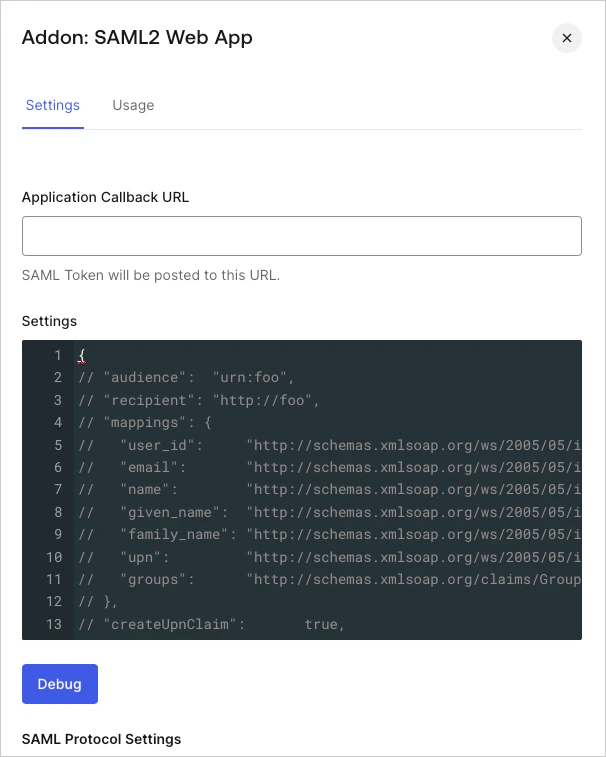 5. **Settings** タブに移動し、SAML レスポンスを受信する **Application Callback URL** と **Settings** を指定します。**Settings** タブには、どの設定を有効にするかを判断する際に使用できるサンプルオブジェクトが表示されます。
6. 指定したパラメーターが有効かどうかをテストするには、**Debug** をクリックします。
7. 完了したら **Save** をクリックします。
5. **Settings** タブに移動し、SAML レスポンスを受信する **Application Callback URL** と **Settings** を指定します。**Settings** タブには、どの設定を有効にするかを判断する際に使用できるサンプルオブジェクトが表示されます。
6. 指定したパラメーターが有効かどうかをテストするには、**Debug** をクリックします。
7. 完了したら **Save** をクリックします。
## アプリケーションの詳細を入力する
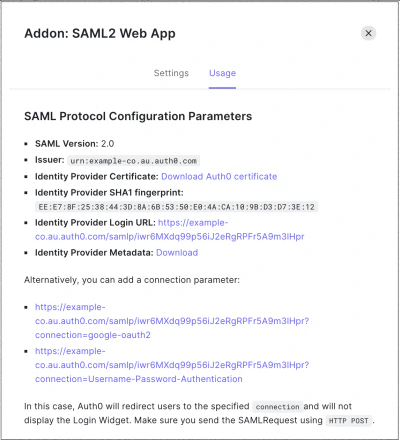
SAML2 Web App にアプリケーションの詳細を入力する具体的な手順は環境によって異なりますが、必要な設定情報は、アドオンを設定した後に **Usage** タブで確認できます。
## 連携
以下の連携から選択できます。
* [Amazon Web Services](/ja/docs/authenticate/single-sign-on/outbound-single-sign-on/configure-auth0-saml-identity-provider/configure-saml2-web-app-addon-for-aws)
* [GitHub Enterprise Cloud](/ja/docs/authenticate/single-sign-on/outbound-single-sign-on/configure-auth0-saml-identity-provider/configure-saml2-web-app-addon-for-github-enterprise-cloud)
* [GitHub Enterprise Server](/ja/docs/authenticate/single-sign-on/outbound-single-sign-on/configure-auth0-saml-identity-provider/configure-saml2-web-app-addon-for-github-enterprise-server)
* [Heroku](/ja/docs/authenticate/single-sign-on/outbound-single-sign-on/configure-auth0-saml-identity-provider/configure-saml2-web-app-addon-for-heroku)
* [Oracle Eloqua Marketing Cloud](/ja/docs/authenticate/single-sign-on/outbound-single-sign-on/configure-auth0-saml-identity-provider/configure-saml2-addon-eloqua)
## 制限事項
SAML2 Web App アドオンは、パッシブ SAML リクエスト (例: `isPassive=true` の場合) をサポートしていません。
## 詳細はこちら
* [Amazon Web Services を SAMLサービスプロバイダーとして設定する](/ja/docs/authenticate/single-sign-on/outbound-single-sign-on/configure-auth0-saml-identity-provider/configure-saml2-web-app-addon-for-aws)
* [GitHub Enterprise Cloud を SAMLサービスプロバイダーとして設定する](/ja/docs/authenticate/single-sign-on/outbound-single-sign-on/configure-auth0-saml-identity-provider/configure-saml2-web-app-addon-for-github-enterprise-cloud)
* [GitHub Enterprise Server を SAMLサービスプロバイダーとして設定する](/ja/docs/authenticate/single-sign-on/outbound-single-sign-on/configure-auth0-saml-identity-provider/configure-saml2-web-app-addon-for-github-enterprise-server)
* [Heroku を SAMLサービスプロバイダーとして設定する](/ja/docs/authenticate/single-sign-on/outbound-single-sign-on/configure-auth0-saml-identity-provider/configure-saml2-web-app-addon-for-heroku)
* [Oracle Eloqua Marketing Cloud を SAMLサービスプロバイダーとして設定する](/ja/docs/authenticate/single-sign-on/outbound-single-sign-on/configure-auth0-saml-identity-provider/configure-saml2-addon-eloqua)
* [CVE-2017-16897: passport-wsfed-saml2 Passport Strategy Library のセキュリティアップデート](/ja/docs/secure/security-guidance/security-bulletins/cve-2017-16897)