> ## Documentation Index
> Fetch the complete documentation index at: https://translations.mintlify.site/llms.txt
> Use this file to discover all available pages before exploring further.
> Actions の Machine to Machine Flow と、その一部として実行される credentials-exchange Action トリガーについて説明します。
# Machine to Machine トリガー
Machine to Machine トリガーは、[Client Credentials Flow](/ja/docs/get-started/authentication-and-authorization-flow/client-credentials-flow) を通じて アクセストークン が発行される際に実行されます。
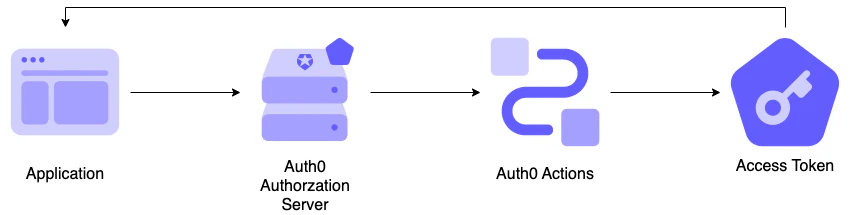 このフロー内の Actions はブロッキング (同期) で実行されます。つまり、トリガーの処理の一部として実行され、Action が完了するまで Auth0 パイプラインの残りの処理は実行されません。
## トリガー
### M2M / クライアントクレデンシャル
`credentials-exchange` トリガーは、アクセストークンが返却される前に実行される関数です。
#### 参考資料
* [Event object](/ja/docs/customize/actions/explore-triggers/machine-to-machine-trigger/credentials-exchange-event-object): クライアントクレデンシャル交換のリクエストに関するコンテキスト情報を提供します。
* [API object](/ja/docs/customize/actions/explore-triggers/machine-to-machine-trigger/credentials-exchange-api-object): フローの動作を変更するためのメソッドを提供します。
## 主なユースケース
### アクセス制御
credentials-exchange Action を使用すると、カスタムロジックに基づいてアクセストークンを拒否できます。
```javascript lines theme={null}
/**
* @param {Event} event - クライアントクレデンシャルグラントリクエストの詳細。
* @param {CredentialsExchangeAPI} api - クライアントクレデンシャルグラントの動作を変更するために使用できるメソッドを持つインターフェース。
*/
exports.onExecuteCredentialsExchange = async (event, api) => {
if (event.request.geoip.continentCode === "NA") {
api.access.deny('invalid_request', "Access from North America is not allowed.");
}
};
```
### アクセストークンにカスタムクレームを追加する
credentials-exchange Action を使用すると、アクセストークンにカスタムクレームを追加できます。
```javascript lines theme={null}
/**
* @param {Event} event - クライアントクレデンシャルグラントリクエストの詳細。
* @param {CredentialsExchangeAPI} api - クライアントクレデンシャルグラントの動作を変更するために使用できるメソッドのインターフェース。
*/
exports.onExecuteCredentialsExchange = async (event, api) => {
api.accessToken.setCustomClaim("https://my-api.exampleco.com/request-ip", event.request.ip);
};
```
URI 形式の名前空間付きカスタムクレームを使用することを強く推奨します。名前空間付きカスタムクレームと名前空間なしのカスタムクレームの詳細については、[カスタムクレームを作成する](/ja/docs/secure/tokens/json-web-tokens/create-custom-claims) を参照してください。