> ## Documentation Index
> Fetch the complete documentation index at: https://translations.mintlify.site/llms.txt
> Use this file to discover all available pages before exploring further.
> ユーザーが最初のチャレンジを完了した後、新しいパスワードを設定する前に実行される Actions Password Reset Flow について説明します。
# パスワードリセットトリガー
パスワードリセット トリガーは、パスワードリセットのプロセス中に、ユーザーが最初のチャレンジ (通常は[ユーザーのメールアドレス](/ja/docs/secure/multi-factor-authentication/authenticate-using-ropg-flow-with-mfa/enroll-and-challenge-email-authenticators)に送信されたリンク) を完了した後、新しいパスワードを設定する前に実行されます。これを使用すると、追加の 多要素認証 (MFA) 認証要素でユーザーに追加のチャレンジを要求したり、サードパーティの検証サービスなどの外部サイトにユーザーをリダイレクトしたりできます。
検証後、ユーザーはアカウントの新しいパスワードを入力できます。
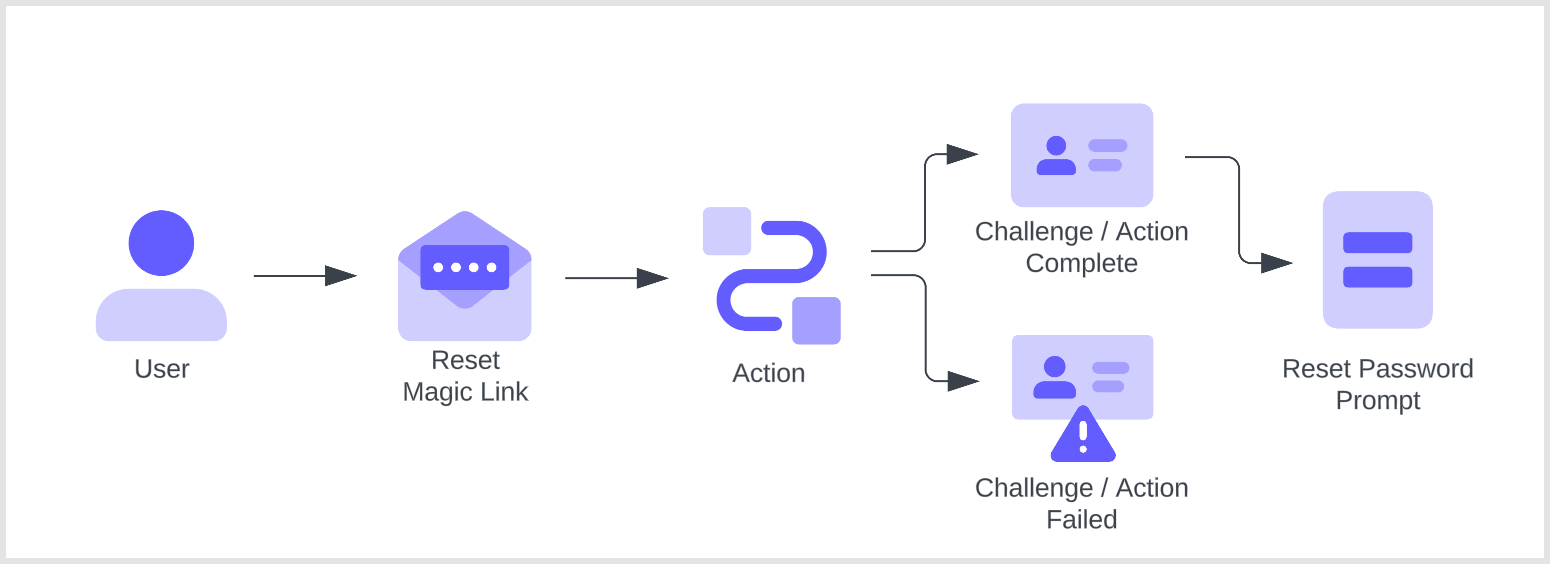 このフロー内の Actions はブロッキング (同期) であるため、トリガー処理の一部として実行され、Action が完了するまで Auth0 パイプラインの残りの処理は実行されません。
これらの Actions を正しく実行するには、Universal Login を有効にする必要があります。Classic Login を使用している場合、これらの Actions はトリガーされません。
このフロー内の Actions はブロッキング (同期) であるため、トリガー処理の一部として実行され、Action が完了するまで Auth0 パイプラインの残りの処理は実行されません。
これらの Actions を正しく実行するには、Universal Login を有効にする必要があります。Classic Login を使用している場合、これらの Actions はトリガーされません。
## トリガー
### PostChallenge
`post-challenge` トリガーは、ユーザーが最初のパスワードリセット チャレンジ (通常はメールアドレスのマジックリンク) を完了した後に実行される関数です。テナントでは、`post-challenge` トリガーを利用する Actions を最大4つまで作成できます。
#### 参考資料
* [Event object](/ja/docs/customize/actions/explore-triggers/password-reset-triggers/post-challenge-trigger/post-challenge-event-object): Auth0 経由でログインする個々のユーザーに関するコンテキスト情報を提供します。
* [API object](/ja/docs/customize/actions/explore-triggers/password-reset-triggers/post-challenge-trigger/post-challenge-api-object): フローの動作を変更するためのメソッドを提供します。
## 制限事項
パスワードリセット トリガーでは、[Active Directory/LDAP 接続](/ja/docs/authenticate/identity-providers/enterprise-identity-providers/active-directory-ldap)はサポートされていません。
## 一般的なユースケース
### 追加の MFA 認証要素による安全なパスワードリセット
`password-reset` / `post-challenge` Actions では、ユーザーが最初のチャレンジを完了した後に MFA チャレンジを要求できます。たとえば、テナントで WebAuthn が認証要素として有効になっている場合は、第 2 要素として WebAuthn ベースのチャレンジを要求できます。
```javascript lines theme={null}
/**@type {PasswordResetPostChallengeAction}**/
module.exports.onExecutePostChallenge = async (event, api) => {
const enrolledFactors = event.user.enrolledFactors.map((x) => ({
type: x.type
}));
api.authentication.challengeWith({ type: 'webauthn-roaming' }, { additionalFactors: enrolledFactors });
};
```
### ユーザーをサードパーティ製アプリケーションにリダイレクトする
MFA チャレンジに加えて、カスタム Action にリダイレクトを追加することもできます。たとえば、サードパーティの検証サービスやリスク評価サービスにリダイレクトできます。
```javascript lines theme={null}
/** @type {PasswordResetPostChallengeAction}
* このサンプルActionはユーザーをサンプルアプリにリダイレクトし、
* リダイレクト後にActionを続行してユーザーに
* MFA要素でチャレンジします
*/
module.exports.onExecutePostChallenge = async (event, api) => {
// ユーザーを https://my-app.example.com に送信する
api.redirect.sendUserTo('https://my-app.example.com');
};
module.exports.onContinuePostChallenge = async (event, api) => {
const enrolledFactors = event.user.enrolledFactors.map((x) => ({
type: x.type
}));
// メールアドレスOTPまたは他の登録済み要素でユーザーにチャレンジする
api.authentication.challengeWith({ type: 'email' }, { additionalFactors: enrolledFactors });
// 複数のオプションでユーザーにチャレンジする例
// この場合、メールアドレスOTPまたはSMS OTP
// api.authentication.challengeWithAny([{ type: 'email' }, { type: 'sms' }]);
};
```
Auth0 がユーザーをリダイレクトしている間、Actions パイプラインはアクティブになりません。ユーザーが Auth0 のログインプロセスを続行すると、Actions パイプラインは再開されます。リダイレクト前に実行された Actions は再実行されません。詳しくは、[Actions でのリダイレクト](/ja/docs/customize/actions/explore-triggers/signup-and-login-triggers/login-trigger/redirect-with-actions)を参照してください。