> ## Documentation Index
> Fetch the complete documentation index at: https://translations.mintlify.site/llms.txt
> Use this file to discover all available pages before exploring further.
> Forms は、追加のステップやビジネスロジックでアイデンティティフローを拡張できる、カスタマイズ可能なフォームを作成するためのビジュアルエディターです。
# Forms
Forms は、追加のステップやビジネスロジックでアイデンティティフローを拡張できる、カスタマイズ可能なフォームを作成するためのビジュアルエディターです。
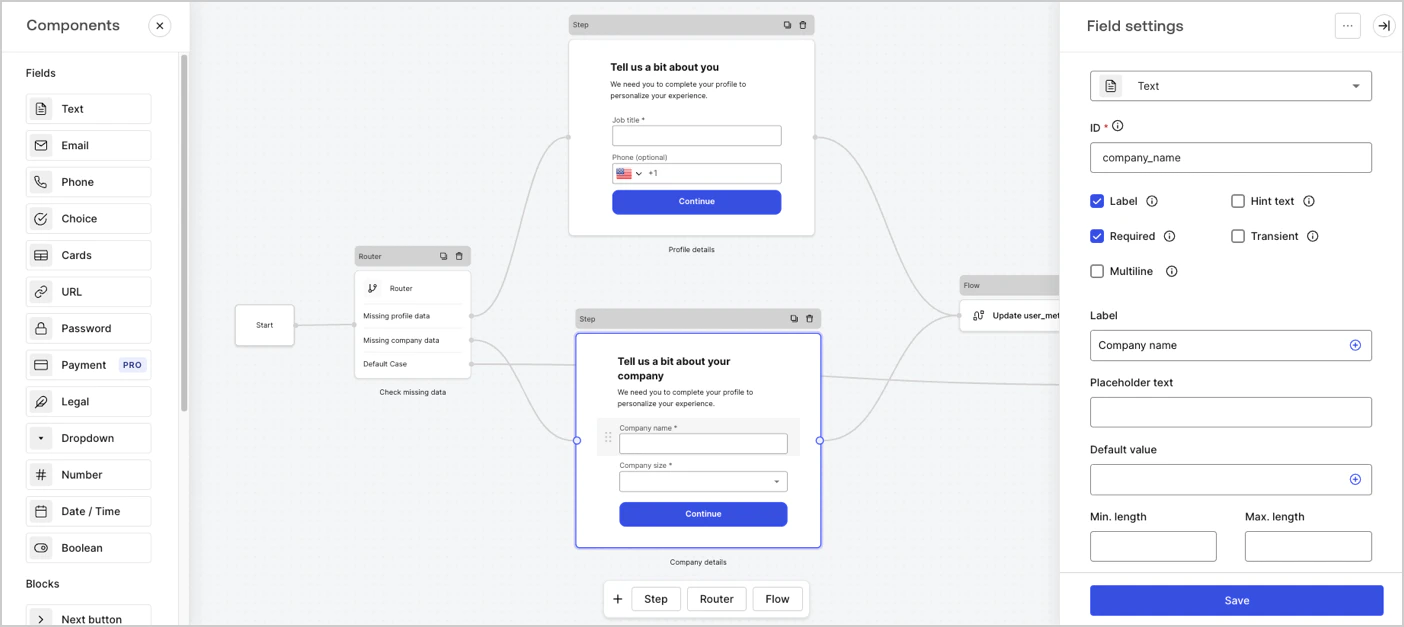 Forms の主な機能は次のとおりです。
* テナントのドメイン内で完結する、安全で管理されたエクスペリエンス。[Redirect](/ja/docs/customize/actions/explore-triggers/signup-and-login-triggers/login-trigger/redirect-with-actions) を使用してユーザーを外部サイトにリダイレクトする必要はありません。
* フロントエンドとバックエンドのバリデーションを備えた、あらかじめ用意されたコンポーネント。
* すぐに利用できるサードパーティ統合によるカスタムビジネスロジック。
* Universal Login と一貫したブランディング。
Forms を使用すると、次のようなユースケースを実現できます。
* **プログレッシブプロファイリング:** ユーザーが製品を利用する中で追加情報の入力を必須にするための条件セットを定義します。たとえば、3 回目のログイン時にユーザープロファイルの入力完了を求めることができます。
* **カスタムポリシーへの同意:** ポリシーを更新する必要がある場合は、ユーザーが最新のポリシーに同意しているかどうかを確認するロジックを定義し、その結果に応じて同意を求めるカスタムフォームを表示できます。
* **カスタムのサインアップまたはログインステップ:** 追加のステップとカスタムロジックでフローを拡張およびカスタマイズします。たとえば、OTP やアカウントリンクを使用してメールアドレスや電話番号を確認したり、Stripe で支払い情報を確認したりできます。
| 詳しく読む | 学べる内容 |
| ----------------------------------------------------------------------------------------------- | ----------------------------------------------- |
| [Nodes and components](/ja/docs/customize/forms/nodes-and-components) | Forms とそのコンポーネントについて。 |
| [Flows](/ja/docs/customize/forms/flows) | Flows とそのコンポーネントについて。 |
| [Variables](/ja/docs/customize/forms/variables) | Forms と Flows におけるさまざまな種類の変数について。 |
| [Routers: Add conditional logic to Forms](/ja/docs/customize/forms/routers) | Forms で条件付きロジックのルーティングを実装する方法。 |
| [Custom Field Component for Forms](/ja/docs/customize/forms/custom-field-components) | Forms でカスタムフィールドを作成する方法。 |
| [Render forms using Actions](/ja/docs/customize/forms/render) | Actions を使用してフォームをレンダリングする方法。 |
| [Using the Vault](/ja/docs/customize/forms/vault) | Forms で API credentials を安全に保存する方法。 |
| [Custom Messages and Translation](/ja/docs/customize/forms/custom-messages-and-translation) | Forms でカスタムメッセージと翻訳を作成する方法。 |
| [Resources: Templates](https://developer.auth0.com/resources/templates/forms) | Auth0 のフォームテンプレートについて。 |
| [Use Cases: Progressive profiling](/ja/docs/customize/forms/configure-progressive-profile-form) | プログレッシブプロファイリングフォームを実装する方法。Login Action で使用します。 |
| [Use Cases: Custom policies](/ja/docs/customize/forms/configure-update-policy-form) | カスタムポリシーフォームを実装する方法。Login Action で使用します。 |
| [Use Cases: Custom signup steps](/ja/docs/customize/forms/configure-additional-signup-steps) | カスタムサインアップステップを実装する方法。Login Action で使用します。 |
Forms の主な機能は次のとおりです。
* テナントのドメイン内で完結する、安全で管理されたエクスペリエンス。[Redirect](/ja/docs/customize/actions/explore-triggers/signup-and-login-triggers/login-trigger/redirect-with-actions) を使用してユーザーを外部サイトにリダイレクトする必要はありません。
* フロントエンドとバックエンドのバリデーションを備えた、あらかじめ用意されたコンポーネント。
* すぐに利用できるサードパーティ統合によるカスタムビジネスロジック。
* Universal Login と一貫したブランディング。
Forms を使用すると、次のようなユースケースを実現できます。
* **プログレッシブプロファイリング:** ユーザーが製品を利用する中で追加情報の入力を必須にするための条件セットを定義します。たとえば、3 回目のログイン時にユーザープロファイルの入力完了を求めることができます。
* **カスタムポリシーへの同意:** ポリシーを更新する必要がある場合は、ユーザーが最新のポリシーに同意しているかどうかを確認するロジックを定義し、その結果に応じて同意を求めるカスタムフォームを表示できます。
* **カスタムのサインアップまたはログインステップ:** 追加のステップとカスタムロジックでフローを拡張およびカスタマイズします。たとえば、OTP やアカウントリンクを使用してメールアドレスや電話番号を確認したり、Stripe で支払い情報を確認したりできます。
| 詳しく読む | 学べる内容 |
| ----------------------------------------------------------------------------------------------- | ----------------------------------------------- |
| [Nodes and components](/ja/docs/customize/forms/nodes-and-components) | Forms とそのコンポーネントについて。 |
| [Flows](/ja/docs/customize/forms/flows) | Flows とそのコンポーネントについて。 |
| [Variables](/ja/docs/customize/forms/variables) | Forms と Flows におけるさまざまな種類の変数について。 |
| [Routers: Add conditional logic to Forms](/ja/docs/customize/forms/routers) | Forms で条件付きロジックのルーティングを実装する方法。 |
| [Custom Field Component for Forms](/ja/docs/customize/forms/custom-field-components) | Forms でカスタムフィールドを作成する方法。 |
| [Render forms using Actions](/ja/docs/customize/forms/render) | Actions を使用してフォームをレンダリングする方法。 |
| [Using the Vault](/ja/docs/customize/forms/vault) | Forms で API credentials を安全に保存する方法。 |
| [Custom Messages and Translation](/ja/docs/customize/forms/custom-messages-and-translation) | Forms でカスタムメッセージと翻訳を作成する方法。 |
| [Resources: Templates](https://developer.auth0.com/resources/templates/forms) | Auth0 のフォームテンプレートについて。 |
| [Use Cases: Progressive profiling](/ja/docs/customize/forms/configure-progressive-profile-form) | プログレッシブプロファイリングフォームを実装する方法。Login Action で使用します。 |
| [Use Cases: Custom policies](/ja/docs/customize/forms/configure-update-policy-form) | カスタムポリシーフォームを実装する方法。Login Action で使用します。 |
| [Use Cases: Custom signup steps](/ja/docs/customize/forms/configure-additional-signup-steps) | カスタムサインアップステップを実装する方法。Login Action で使用します。 |