> ## Documentation Index
> Fetch the complete documentation index at: https://translations.mintlify.site/llms.txt
> Use this file to discover all available pages before exploring further.
> Auth0 を使用して Google Cloud Endpoints API を保護する方法。
# Auth0 を使用して Google Cloud Endpoints を保護する
export const AuthCodeGroup = ({children, dropdown}) => {
const [processedChildren, setProcessedChildren] = useState(children);
useEffect(() => {
let unsubscribe = null;
function init() {
unsubscribe = window.autorun(() => {
const processChildren = node => {
if (typeof node === "string") {
let processedNode = node;
for (const [key, value] of window.rootStore.variableStore.values.entries()) {
const escapedKey = key.replaceAll(/[.*+?^${}()|[\]\\]/g, (String.raw)`\$&`);
processedNode = processedNode.replaceAll(new RegExp(escapedKey, "g"), value);
}
return processedNode;
} else if (Array.isArray(node)) {
return node.map(processChildren);
} else if (node && node.props && node.props.children) {
return {
...node,
props: {
...node.props,
children: processChildren(node.props.children)
}
};
}
return node;
};
setProcessedChildren(processChildren(children));
});
}
if (window.rootStore) {
init();
} else {
window.addEventListener("adu:storeReady", init);
}
return () => {
window.removeEventListener("adu:storeReady", init);
unsubscribe?.();
};
}, [children]);
return {processedChildren};
};
export const AuthCodeBlock = ({filename, icon, language, highlight, children}) => {
const [displayText, setDisplayText] = useState(children);
const [copyText, setCopyText] = useState(children);
const wrapperRef = React.useRef(null);
useEffect(() => {
let unsubscribe = null;
function init() {
if (!window.autorun || !window.rootStore) {
return;
}
unsubscribe = window.autorun(() => {
let processedChildrenForDisplay = children;
let processedChildrenForCopy = children;
for (const [key, value] of window.rootStore.variableStore.values.entries()) {
const escapedKey = key.replaceAll(/[.*+?^${}()|[\]\\]/g, (String.raw)`\$&`);
let displayValue = value;
if (key === "{yourClientSecret}" && value !== "{yourClientSecret}") {
displayValue = value.substring(0, 3) + "*****マスク済み*****";
}
processedChildrenForDisplay = processedChildrenForDisplay.replaceAll(new RegExp(escapedKey, "g"), displayValue);
processedChildrenForCopy = processedChildrenForCopy.replaceAll(new RegExp(escapedKey, "g"), value);
}
setDisplayText(processedChildrenForDisplay);
setCopyText(processedChildrenForCopy);
});
}
if (window.rootStore) {
init();
} else {
window.addEventListener("adu:storeReady", init);
}
return () => {
window.removeEventListener("adu:storeReady", init);
unsubscribe?.();
};
}, [children]);
useEffect(() => {
if (!wrapperRef.current) return;
const originalWriteText = navigator.clipboard.writeText.bind(navigator.clipboard);
let isOverriding = false;
const handleClick = e => {
const button = e.target.closest('[data-testid="copy-code-button"]');
if (!button || !wrapperRef.current.contains(button)) return;
isOverriding = true;
navigator.clipboard.writeText = text => {
if (isOverriding) {
isOverriding = false;
navigator.clipboard.writeText = originalWriteText;
return originalWriteText(copyText);
}
return originalWriteText(text);
};
setTimeout(() => {
if (isOverriding) {
isOverriding = false;
navigator.clipboard.writeText = originalWriteText;
}
}, 100);
};
const wrapper = wrapperRef.current;
wrapper.addEventListener('click', handleClick, true);
return () => {
wrapper.removeEventListener('click', handleClick, true);
if (navigator.clipboard.writeText !== originalWriteText) {
navigator.clipboard.writeText = originalWriteText;
}
};
}, [copyText]);
return
{displayText}
;
};
[Google Cloud Endpoints (GCE)](https://cloud.google.com/endpoints/) は API 管理システムで、API の作成、保守、保護に役立つ機能を提供します。GCE は [OpenAPI](https://www.openapis.org/) を使用して、API のエンドポイント、入力と出力、エラー、セキュリティに関する説明を定義します。
OpenAPI 仕様の詳細については、GitHub 上の [OpenAPI Specification](https://github.com/OAI/OpenAPI-Specification) リポジトリを参照してください。
このチュートリアルでは、Auth0 を使用して Google Cloud Endpoints を保護する方法について説明します。
## 前提条件
開始する前に、デプロイ済みの GCE API が必要です。まだ API を作成していない場合は、Google ドキュメントの [Cloud Endpoints クイックスタート](https://cloud.google.com/endpoints/docs/quickstart-endpoints) を完了してください。
この quickstart では、`/airportName` という単一のエンドポイントを持つシンプルな GCE API を作成します。このエンドポイントは、空港の 3 文字の [IATA code](https://en.wikipedia.org/wiki/IATA_airport_code) から空港の名前を返します。
```bash cURL lines theme={null}
curl --request GET \
--url 'https://%7ByourGceProject%7D.appspot.com/airportName?iataCode=SFO'
```
```csharp C# lines theme={null}
var client = new RestClient("https://%7ByourGceProject%7D.appspot.com/airportName?iataCode=SFO");
var request = new RestRequest(Method.GET);
IRestResponse response = client.Execute(request);
```
```go Go lines theme={null}
package main
import (
"fmt"
"net/http"
"io/ioutil"
)
func main() {
url := "https://%7ByourGceProject%7D.appspot.com/airportName?iataCode=SFO"
req, _ := http.NewRequest("GET", url, nil)
res, _ := http.DefaultClient.Do(req)
defer res.Body.Close()
body, _ := ioutil.ReadAll(res.Body)
fmt.Println(res)
fmt.Println(string(body))
}
```
```java Java lines theme={null}
HttpResponse response = Unirest.get("https://%7ByourGceProject%7D.appspot.com/airportName?iataCode=SFO")
.asString();
```
```javascript Node.JS lines theme={null}
var axios = require("axios").default;
var options = {
method: 'GET',
url: 'https://%7ByourGceProject%7D.appspot.com/airportName',
params: {iataCode: 'SFO'}
};
axios.request(options).then(function (response) {
console.log(response.data);
}).catch(function (error) {
console.error(error);
});
```
```php PHP lines theme={null}
$curl = curl_init();
curl_setopt_array($curl, [
CURLOPT_URL => "https://%7ByourGceProject%7D.appspot.com/airportName?iataCode=SFO",
CURLOPT_RETURNTRANSFER => true,
CURLOPT_ENCODING => "",
CURLOPT_MAXREDIRS => 10,
CURLOPT_TIMEOUT => 30,
CURLOPT_HTTP_VERSION => CURL_HTTP_VERSION_1_1,
CURLOPT_CUSTOMREQUEST => "GET",
]);
$response = curl_exec($curl);
$err = curl_error($curl);
curl_close($curl);
if ($err) {
echo "cURL Error #:" . $err;
} else {
echo $response;
}
```
```python Python lines theme={null}
import http.client
conn = http.client.HTTPSConnection("")
conn.request("GET", "%7ByourGceProject%7D.appspot.com/airportName?iataCode=SFO")
res = conn.getresponse()
data = res.read()
print(data.decode("utf-8"))
```
```ruby Ruby lines theme={null}
require 'uri'
require 'net/http'
require 'openssl'
url = URI("https://%7ByourGceProject%7D.appspot.com/airportName?iataCode=SFO")
http = Net::HTTP.new(url.host, url.port)
http.use_ssl = true
http.verify_mode = OpenSSL::SSL::VERIFY_NONE
request = Net::HTTP::Get.new(url)
response = http.request(request)
puts response.read_body
```
## Auth0 で API を定義する
[Auth0 Dashboard > Applications > APIs](https://manage.auth0.com/#/apis) に移動し、新しい API を作成します。
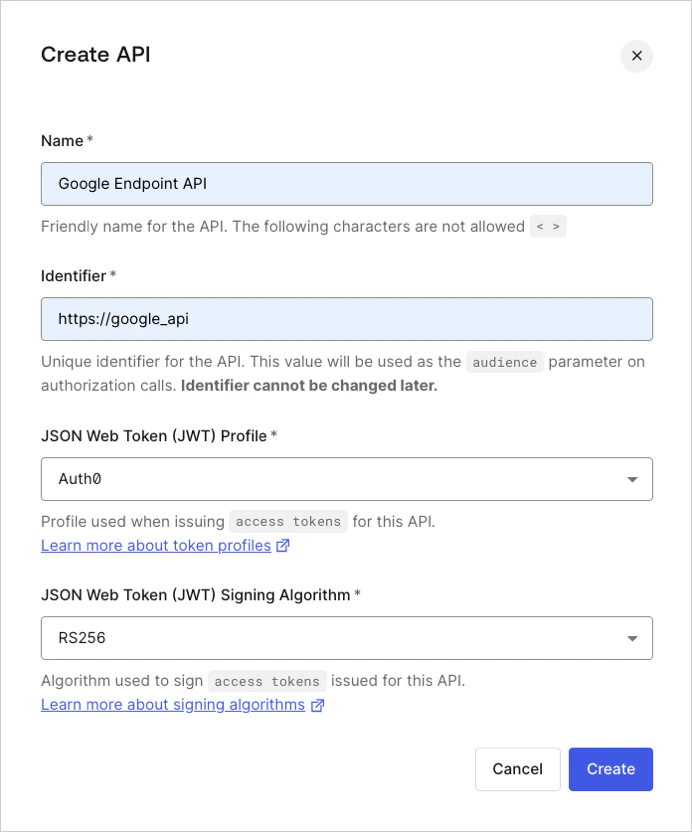 次の手順で使用するため、\*\*API の対象者\*\*識別子 (上のスクリーンショットでは `http://google_api`) を控えておきます。
## API Configuration を更新する
次に、GCE API の OpenAPI 設定ファイルを更新します。quickstart で作成したサンプル API では、このファイルは `openapi.yaml` になります。
### セキュリティ定義を追加する
設定ファイルを開き、新しい `securityDefinitions` セクションを追加します。このセクションに、次のフィールドを含む新しい定義 (`auth0_jwt`) を追加します。
| Field | Description |
| -------------------- | -------------------------------------------------------------------------------------------------------------------------------------------------------- |
| `authorizationUrl` | 認可 URL です。`"https://{yourDomain}/authorize"` に設定します |
| `flow` | OAuth2 セキュリティスキームで使用するフローです。有効な値は `"implicit"`、`"password"`、`"application"`、`"accessCode"` です。 |
| `type` | セキュリティスキームのタイプです。有効な値は `"basic"`、`"apiKey"`、`"oauth2"` です |
| `x-google-issuer` | クレデンシャルの発行元です。`"https://{yourDomain}/"` に設定します |
| `x-google-jwks_uri` | [JSON Web Token (JWT)](/ja/docs/glossary?term=JSON+Web+Token+%28JWT%29) の署名を検証するための公開鍵セットの URI です。`"https://\{yourDomain}/.well-known/jwks.json"` に設定します |
| `x-google-audiences` | API の識別子です。この値が、API に対して Auth0 Dashboard で定義した値と一致していることを確認してください。 |
export const codeExample1 = `securityDefinitions:
auth0_jwt:
authorizationUrl: "https://{yourDomain}/authorize"
flow: "implicit"
type: "oauth2"
x-google-issuer: "https://{yourDomain}/"
x-google-jwks_uri: "https://{yourDomain}/.well-known/jwks.json"
x-google-audiences: "{yourApiIdentifier}"`;
### エンドポイントを更新する
次に、前の手順で作成した `securityDefinition` を指定した `security` フィールドを追加して、エンドポイントを更新します。
```yaml lines theme={null}
paths:
"/airportName":
get:
description: "Get the airport name for a given IATA code."
operationId: "airportName"
parameters:
-
name: iataCode
in: query
required: true
type: string
responses:
200:
description: "Success."
schema:
type: string
400:
description: "The IATA code is invalid or missing."
security:
- auth0_jwt: []
```
上記の例では、`security` フィールドにより、`/airportName` パスが `auth0-jwt` 定義で保護されることを GCE プロキシに伝えています。
OpenAPI の設定を更新すると、次のようになります。
export const codeExample2 = `---
swagger: "2.0"
info:
title: "空港コード"
description: "3文字の IATA コードから空港名を取得します。"
version: "1.0.0"
host: "{yourGceProject}.appspot.com"
schemes:
- "https"
paths:
"/airportName":
get:
description: "指定した IATA コードに対応する空港名を取得します。"
operationId: "airportName"
parameters:
-
name: iataCode
in: query
required: true
type: string
responses:
200:
description: "成功。"
schema:
type: string
400:
description: "IATA コードが無効であるか、指定されていません。"
security:
- auth0_jwt: []
securityDefinitions:
auth0_jwt:
authorizationUrl: "https://{yourDomain}/authorize"
flow: "implicit"
type: "oauth2"
x-google-issuer: "https://{yourDomain}/"
x-google-jwks_uri: "https://{yourDomain}/.well-known/jwks.json"
x-google-audiences: "{yourApiIdentifier}"`;
### API を再デプロイする
次に、設定変更を反映するため、GCE API を再デプロイします。[Cloud Endpoints クイックスタート](https://cloud.google.com/endpoints/docs/quickstart-endpoints) の手順に沿って進めている場合は、Google の Cloud Shell で次のコマンドを入力して再デプロイできます。
```bash lines theme={null}
cd endpoints-quickstart/scripts
./deploy_api.sh
```
## API をテストする
再デプロイしたら、セキュリティなしで API を再度呼び出します。
```bash cURL lines theme={null}
curl --request GET \
--url 'https://%7ByourGceProject%7D.appspot.com/airportName?iataCode=SFO'
```
```csharp C# lines theme={null}
var client = new RestClient("https://%7ByourGceProject%7D.appspot.com/airportName?iataCode=SFO");
var request = new RestRequest(Method.GET);
IRestResponse response = client.Execute(request);
```
```go Go lines theme={null}
package main
import (
"fmt"
"net/http"
"io/ioutil"
)
func main() {
url := "https://%7ByourGceProject%7D.appspot.com/airportName?iataCode=SFO"
req, _ := http.NewRequest("GET", url, nil)
res, _ := http.DefaultClient.Do(req)
defer res.Body.Close()
body, _ := ioutil.ReadAll(res.Body)
fmt.Println(res)
fmt.Println(string(body))
}
```
```java Java lines theme={null}
HttpResponse response = Unirest.get("https://%7ByourGceProject%7D.appspot.com/airportName?iataCode=SFO")
.asString();
```
```javascript Node.JS lines theme={null}
var axios = require("axios").default;
var options = {
method: 'GET',
url: 'https://%7ByourGceProject%7D.appspot.com/airportName',
params: {iataCode: 'SFO'}
};
axios.request(options).then(function (response) {
console.log(response.data);
}).catch(function (error) {
console.error(error);
});
```
```php PHP lines theme={null}
$curl = curl_init();
curl_setopt_array($curl, [
CURLOPT_URL => "https://%7ByourGceProject%7D.appspot.com/airportName?iataCode=SFO",
CURLOPT_RETURNTRANSFER => true,
CURLOPT_ENCODING => "",
CURLOPT_MAXREDIRS => 10,
CURLOPT_TIMEOUT => 30,
CURLOPT_HTTP_VERSION => CURL_HTTP_VERSION_1_1,
CURLOPT_CUSTOMREQUEST => "GET",
]);
$response = curl_exec($curl);
$err = curl_error($curl);
curl_close($curl);
if ($err) {
echo "cURL Error #:" . $err;
} else {
echo $response;
}
```
```python Python lines theme={null}
import http.client
conn = http.client.HTTPSConnection("")
conn.request("GET", "%7ByourGceProject%7D.appspot.com/airportName?iataCode=SFO")
res = conn.getresponse()
data = res.read()
print(data.decode("utf-8"))
```
```ruby Ruby lines theme={null}
require 'uri'
require 'net/http'
require 'openssl'
url = URI("https://%7ByourGceProject%7D.appspot.com/airportName?iataCode=SFO")
http = Net::HTTP.new(url.host, url.port)
http.use_ssl = true
http.verify_mode = OpenSSL::SSL::VERIFY_NONE
request = Net::HTTP::Get.new(url)
response = http.request(request)
puts response.read_body
```
次のレスポンスが返されます。
```json lines theme={null}
{
"code": 16,
"message": "JWT validation failed: Missing or invalid credentials",
"details": [
{
"@type": "type.googleapis.com/google.rpc.DebugInfo",
"stackEntries": [],
"detail": "auth"
}
]
}
```
これがまさに期待どおりの結果です!
次に、[Auth0 Dashboard](https://manage.auth0.com/#/apis) で Google Endpoints API 定義の **Test** ページに移動し、Response の下にある アクセストークン をコピーします。
認可された状態でアクセスするには、`Bearer {ACCESS_TOKEN}` を指定した Authorization ヘッダーを付けて、API に `GET` リクエストを送信します。
```bash cURL lines theme={null}
curl --request GET \
--url 'https://%7ByourGceProject%7D.appspot.com/airportName?iataCode=SFO' \
--header 'authorization: Bearer {accessToken}'
```
```csharp C# lines theme={null}
var client = new RestClient("https://%7ByourGceProject%7D.appspot.com/airportName?iataCode=SFO");
var request = new RestRequest(Method.GET);
request.AddHeader("authorization", "Bearer {accessToken}");
IRestResponse response = client.Execute(request);
```
```go Go lines theme={null}
package main
import (
"fmt"
"net/http"
"io/ioutil"
)
func main() {
url := "https://%7ByourGceProject%7D.appspot.com/airportName?iataCode=SFO"
req, _ := http.NewRequest("GET", url, nil)
req.Header.Add("authorization", "Bearer {accessToken}")
res, _ := http.DefaultClient.Do(req)
defer res.Body.Close()
body, _ := ioutil.ReadAll(res.Body)
fmt.Println(res)
fmt.Println(string(body))
}
```
```java Java lines theme={null}
HttpResponse response = Unirest.get("https://%7ByourGceProject%7D.appspot.com/airportName?iataCode=SFO")
.header("authorization", "Bearer {accessToken}")
.asString();
```
```javascript Node.JS lines theme={null}
var axios = require("axios").default;
var options = {
method: 'GET',
url: 'https://%7ByourGceProject%7D.appspot.com/airportName',
params: {iataCode: 'SFO'},
headers: {authorization: 'Bearer {accessToken}'}
};
axios.request(options).then(function (response) {
console.log(response.data);
}).catch(function (error) {
console.error(error);
});
```
```php PHP lines theme={null}
$curl = curl_init();
curl_setopt_array($curl, [
CURLOPT_URL => "https://%7ByourGceProject%7D.appspot.com/airportName?iataCode=SFO",
CURLOPT_RETURNTRANSFER => true,
CURLOPT_ENCODING => "",
CURLOPT_MAXREDIRS => 10,
CURLOPT_TIMEOUT => 30,
CURLOPT_HTTP_VERSION => CURL_HTTP_VERSION_1_1,
CURLOPT_CUSTOMREQUEST => "GET",
CURLOPT_HTTPHEADER => [
"authorization: Bearer {accessToken}"
],
]);
$response = curl_exec($curl);
$err = curl_error($curl);
curl_close($curl);
if ($err) {
echo "cURL Error #:" . $err;
} else {
echo $response;
}
```
```python Python lines theme={null}
import http.client
conn = http.client.HTTPSConnection("")
headers = { 'authorization': "Bearer {accessToken}" }
conn.request("GET", "%7ByourGceProject%7D.appspot.com/airportName?iataCode=SFO", headers=headers)
res = conn.getresponse()
data = res.read()
print(data.decode("utf-8"))
```
```ruby Ruby lines theme={null}
require 'uri'
require 'net/http'
require 'openssl'
url = URI("https://%7ByourGceProject%7D.appspot.com/airportName?iataCode=SFO")
http = Net::HTTP.new(url.host, url.port)
http.use_ssl = true
http.verify_mode = OpenSSL::SSL::VERIFY_NONE
request = Net::HTTP::Get.new(url)
request["authorization"] = 'Bearer {accessToken}'
response = http.request(request)
puts response.read_body
```
これで完了です。