> ## Documentation Index
> Fetch the complete documentation index at: https://translations.mintlify.site/llms.txt
> Use this file to discover all available pages before exploring further.
> よく使用する値を保存するための Rules のグローバル `configuration` オブジェクトについて説明します。
# Rule の設定を保存する
Rules と Hooks の End of Life (EOL) 日は **2026 年 11 月 18 日** です。また、**2023 年 10 月 16 日** 以降に作成された新しいテナントでは、これらは利用できません。Hooks が有効な既存のテナントでは、EOL まで Hooks へのアクセスが維持されます。
Auth0 を拡張するには、Actions の使用を強くお勧めします。Actions では、豊富な型情報、インラインドキュメント、公開 `npm` パッケージを利用できるほか、全体的な拡張機能の実装体験を向上させる外部統合とも連携できます。Actions の詳細については、[Understand How Auth0 Actions Work](/ja/docs/customize/actions/actions-overview) を参照してください。
移行を支援するために、[Rules から Actions への移行](/ja/docs/customize/actions/migrate/migrate-from-rules-to-actions) と [Hooks から Actions への移行](/ja/docs/customize/actions/migrate/migrate-from-hooks-to-actions) のガイドを用意しています。また、機能比較、[Actions のデモ](https://www.youtube.com/watch?v=UesFSY1klrI)、および移行を支援するその他のリソースを紹介する専用ページ [Move to Actions](https://auth0.com/extensibility/movetoactions) もあります。
Rules と Hooks の廃止予定の詳細については、ブログ記事 [Preparing for Rules and Hooks End of Life](https://auth0.com/blog/preparing-for-rules-and-hooks-end-of-life/) を参照してください。
グローバル `configuration` オブジェクトは、URL などのよく使用する値を保存するために Rules で利用できます。資格情報や API キーなどの機密情報は、`configuration` オブジェクトに保存し、Rules のコードには含めないようにしてください。
## 値を設定する
Dashboard の [Rules Settings](https://manage.auth0.com/#/rules/) で設定値を設定できます。
設定キーの値を変更するには、既存の設定を削除してから、更新後の値に置き換えます。設定領域を表示するには、少なくとも 1 つの Rule を作成している必要があります。作成していない場合は、代わりに Rules のデモが表示されます。
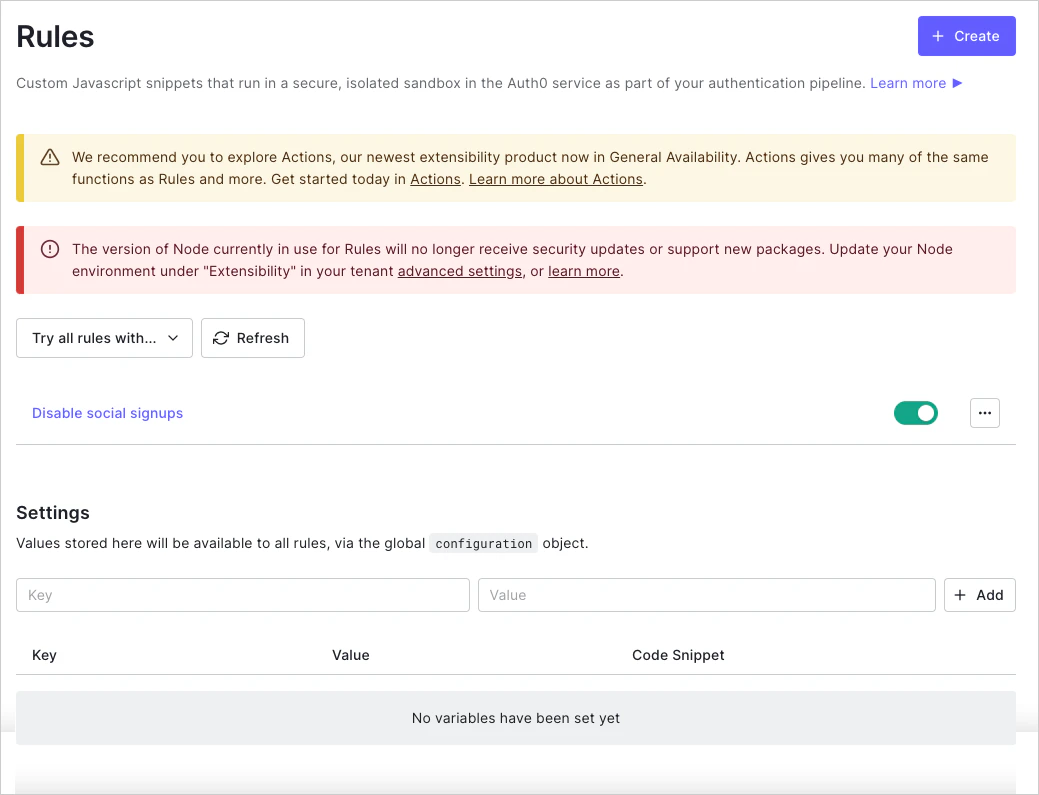
## configuration オブジェクトを使用する
設定した任意の設定値には、Rules コード内で `configuration` オブジェクトを使ってキーを指定してアクセスできます。
```javascript lines theme={null}
var MY_API_KEY = configuration.MY_API_KEY;
```
次の例は、新規ユーザーがサインアップした際に Slack にメッセージを送信するための Rule です。[Slack Webhook](https://api.slack.com/incoming-webhooks) は、`SLACK_HOOK_URL` キーに設定する `configuration` の値です。
```javascript lines theme={null}
function (user, context, callback) {
// ユーザーがすでにサインアップ済み、またはリフレッシュトークンを使用している場合はスキップ
if (context.stats.loginsCount > 1 || context.protocol === 'oauth2-refresh-token') {
return callback(null, user, context);
}
// SlackのフックURLを取得する: https://slack.com/services/10525858050
const SLACK_HOOK = configuration.SLACK_HOOK_URL;
const slack = require('slack-notify')(SLACK_HOOK);
const message = 'New User: ' + (user.name || user.email) + ' (' + user.email + ')';
const channel = '#some_channel';
slack.success({
text: message,
channel: channel
});
// Slack API呼び出しの完了を待たずにすぐに返す(リクエストはサンドボックス上で継続される)`
callback(null, user, context);
}
```