> ## Documentation Index
> Fetch the complete documentation index at: https://translations.mintlify.site/llms.txt
> Use this file to discover all available pages before exploring further.
> Auth Dashboard または Management API を使用して Rules を作成する方法を説明します。
# Rules の作成
export const AuthCodeGroup = ({children, dropdown}) => {
const [processedChildren, setProcessedChildren] = useState(children);
useEffect(() => {
let unsubscribe = null;
function init() {
unsubscribe = window.autorun(() => {
const processChildren = node => {
if (typeof node === "string") {
let processedNode = node;
for (const [key, value] of window.rootStore.variableStore.values.entries()) {
const escapedKey = key.replaceAll(/[.*+?^${}()|[\]\\]/g, (String.raw)`\$&`);
processedNode = processedNode.replaceAll(new RegExp(escapedKey, "g"), value);
}
return processedNode;
} else if (Array.isArray(node)) {
return node.map(processChildren);
} else if (node && node.props && node.props.children) {
return {
...node,
props: {
...node.props,
children: processChildren(node.props.children)
}
};
}
return node;
};
setProcessedChildren(processChildren(children));
});
}
if (window.rootStore) {
init();
} else {
window.addEventListener("adu:storeReady", init);
}
return () => {
window.removeEventListener("adu:storeReady", init);
unsubscribe?.();
};
}, [children]);
return {processedChildren};
};
export const AuthCodeBlock = ({filename, icon, language, highlight, children}) => {
const [displayText, setDisplayText] = useState(children);
const [copyText, setCopyText] = useState(children);
const wrapperRef = React.useRef(null);
useEffect(() => {
let unsubscribe = null;
function init() {
if (!window.autorun || !window.rootStore) {
return;
}
unsubscribe = window.autorun(() => {
let processedChildrenForDisplay = children;
let processedChildrenForCopy = children;
for (const [key, value] of window.rootStore.variableStore.values.entries()) {
const escapedKey = key.replaceAll(/[.*+?^${}()|[\]\\]/g, (String.raw)`\$&`);
let displayValue = value;
if (key === "{yourClientSecret}" && value !== "{yourClientSecret}") {
displayValue = value.substring(0, 3) + "*****マスク済み*****";
}
processedChildrenForDisplay = processedChildrenForDisplay.replaceAll(new RegExp(escapedKey, "g"), displayValue);
processedChildrenForCopy = processedChildrenForCopy.replaceAll(new RegExp(escapedKey, "g"), value);
}
setDisplayText(processedChildrenForDisplay);
setCopyText(processedChildrenForCopy);
});
}
if (window.rootStore) {
init();
} else {
window.addEventListener("adu:storeReady", init);
}
return () => {
window.removeEventListener("adu:storeReady", init);
unsubscribe?.();
};
}, [children]);
useEffect(() => {
if (!wrapperRef.current) return;
const originalWriteText = navigator.clipboard.writeText.bind(navigator.clipboard);
let isOverriding = false;
const handleClick = e => {
const button = e.target.closest('[data-testid="copy-code-button"]');
if (!button || !wrapperRef.current.contains(button)) return;
isOverriding = true;
navigator.clipboard.writeText = text => {
if (isOverriding) {
isOverriding = false;
navigator.clipboard.writeText = originalWriteText;
return originalWriteText(copyText);
}
return originalWriteText(text);
};
setTimeout(() => {
if (isOverriding) {
isOverriding = false;
navigator.clipboard.writeText = originalWriteText;
}
}, 100);
};
const wrapper = wrapperRef.current;
wrapper.addEventListener('click', handleClick, true);
return () => {
wrapper.removeEventListener('click', handleClick, true);
if (navigator.clipboard.writeText !== originalWriteText) {
navigator.clipboard.writeText = originalWriteText;
}
};
}, [copyText]);
return
{displayText}
;
};
Rules と Hooks のサポート終了日 (EOL) は **2026 年 11 月 18 日** で、**2023 年 10 月 16 日** 以降に作成された新規テナントでは、すでに利用できません。アクティブな Hooks を持つ既存のテナントでは、サポート終了日まで Hooks へのアクセスが維持されます。
Auth0 を拡張するには、Actions の使用を強く推奨します。Actions では、豊富な型情報、インラインドキュメント、公開 `npm` パッケージを利用できるほか、外部統合に接続して拡張機能の利用体験全体を向上させることもできます。Actions で提供される機能の詳細については、[Understand How Auth0 Actions Work](/ja/docs/customize/actions/actions-overview) をご覧ください。
移行を支援するために、[Rules から Actions への移行](/ja/docs/customize/actions/migrate/migrate-from-rules-to-actions) および [Hooks から Actions への移行](/ja/docs/customize/actions/migrate/migrate-from-hooks-to-actions) のガイドを用意しています。さらに、機能比較、[Actions のデモ](https://www.youtube.com/watch?v=UesFSY1klrI)、および移行を進めるうえで役立つその他のリソースを紹介した専用の [Move to Actions](https://auth0.com/platform/extensibility/movetoactions) ページもあります。
Rules と Hooks の非推奨化について詳しくは、ブログ記事 [Preparing for Rules and Hooks End of Life](https://auth0.com/blog/preparing-for-rules-and-hooks-end-of-life/) をご覧ください。
Rules と Hooks は 2026 年に削除予定のため、新しい Rules または Hooks を作成するのは Development 環境でのみとし、Actions への移行をテストする目的に限ってください。
Rules を Actions に移行する方法については、[Migrate from Rules to Actions](/ja/docs/customize/actions/migrate/migrate-from-rules-to-actions) をご覧ください。Hooks を Actions に移行する方法については、[Migrate from Hooks to Actions](/ja/docs/customize/actions/migrate/migrate-from-hooks-to-actions) をご覧ください。
特定の機能要件に対応するために、独自の Rule を作成できます。既存の Rule テンプレートを編集することも、サンプルのいずれかを使って一から作成することもできます。Auth0 には、目的の達成に役立つ既存の Rules と Rule テンプレートが多数用意されています。一覧については、[GitHub 上の rules リポジトリ](https://github.com/auth0/rules) をご覧ください。
## Rules の仕組み
Rules は、ユーザーがアプリケーションに対して認証を行う際に実行される JavaScript 関数です。認証プロセスが完了すると実行され、Auth0 の機能をカスタマイズおよび拡張するために使用できます。セキュリティ上の理由から、Rules のコードはサンドボックス内で、他の Auth0 テナントのコードから分離して実行されます。Rules は、トークン更新フロー中にも実行されます。詳細については、[リフレッシュトークン](/ja/docs/secure/tokens/refresh-tokens) を参照してください。
Auth0 で Rules を使用する場合、認証トランザクションのフローは次のようになります。
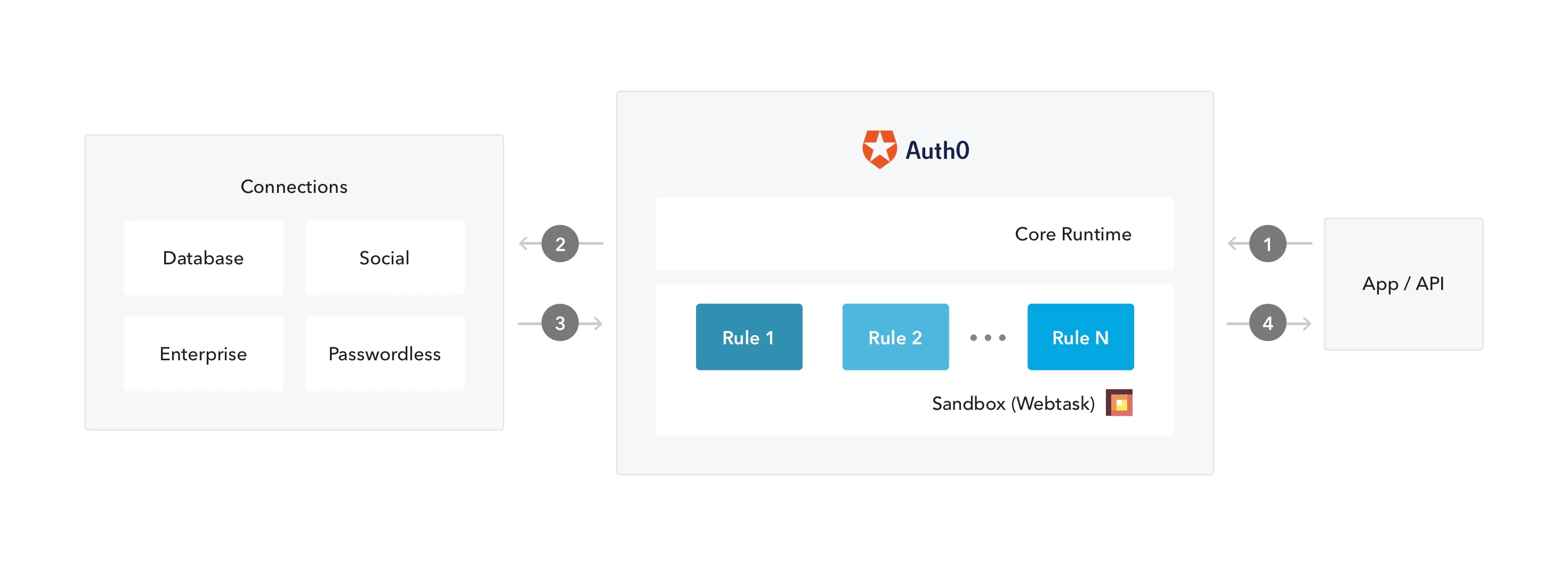 1. アプリが Auth0 に認証リクエストを送信します。
2. Auth0 は、設定された接続を通じてリクエストをIDプロバイダーにルーティングします。
3. ユーザーの認証が正常に完了します。
4. IDトークンおよび/またはアクセストークンは Rules パイプラインを通過した後、アプリケーションに送信されます。
1. アプリが Auth0 に認証リクエストを送信します。
2. Auth0 は、設定された接続を通じてリクエストをIDプロバイダーにルーティングします。
3. ユーザーの認証が正常に完了します。
4. IDトークンおよび/またはアクセストークンは Rules パイプラインを通過した後、アプリケーションに送信されます。
## 前提条件
Rule でグローバル変数を使用する場合は、先に Rules の変数を設定してください。詳細については、[Rules のグローバル変数を設定する](/ja/docs/customize/rules/configure-global-variables-for-rules)を参照してください。
## Dashboard を使用する
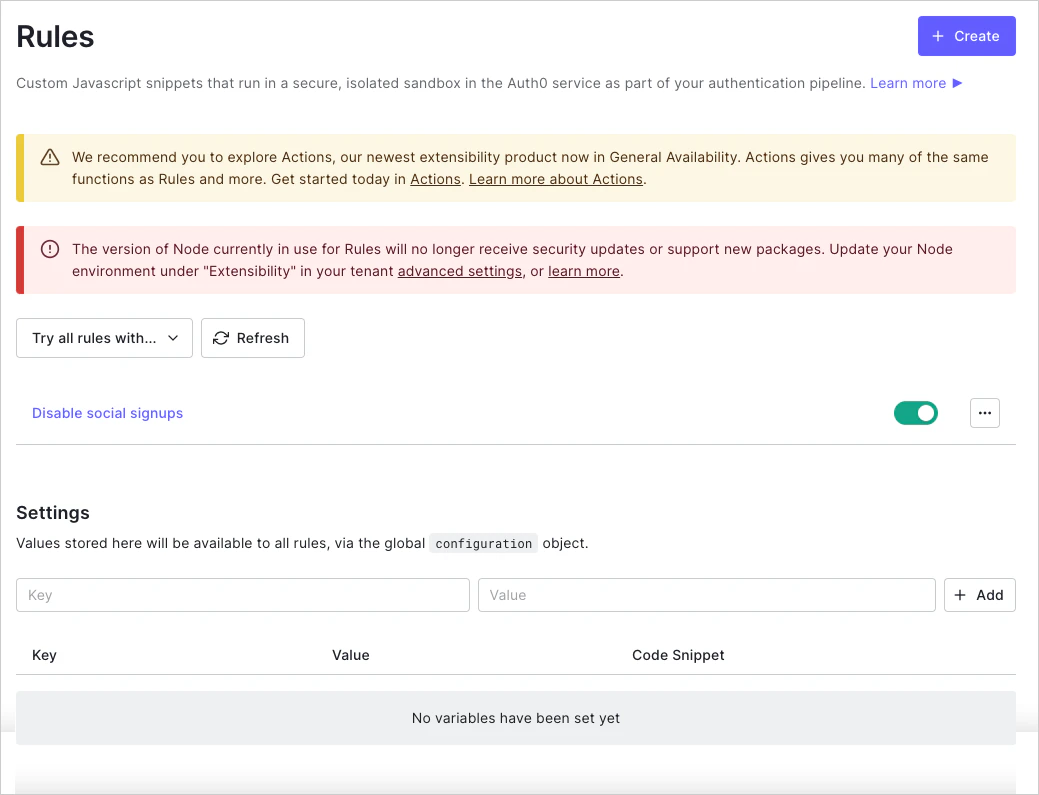
1. [Dashboard > Auth Pipeline > Rules](https://manage.auth0.com/#/rules) に移動し、**Create** をクリックします。
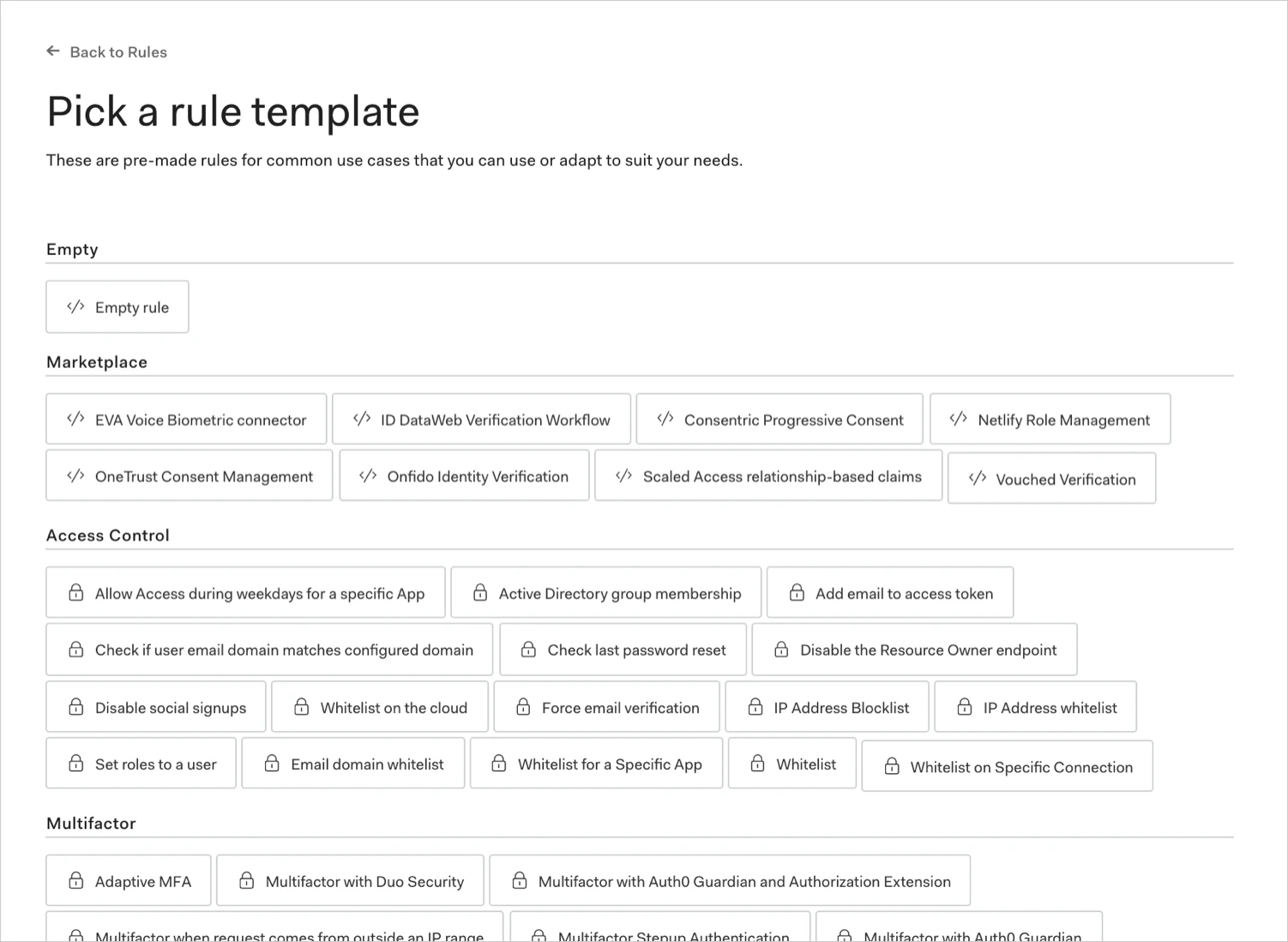
 2. Rule テンプレートを選択します。
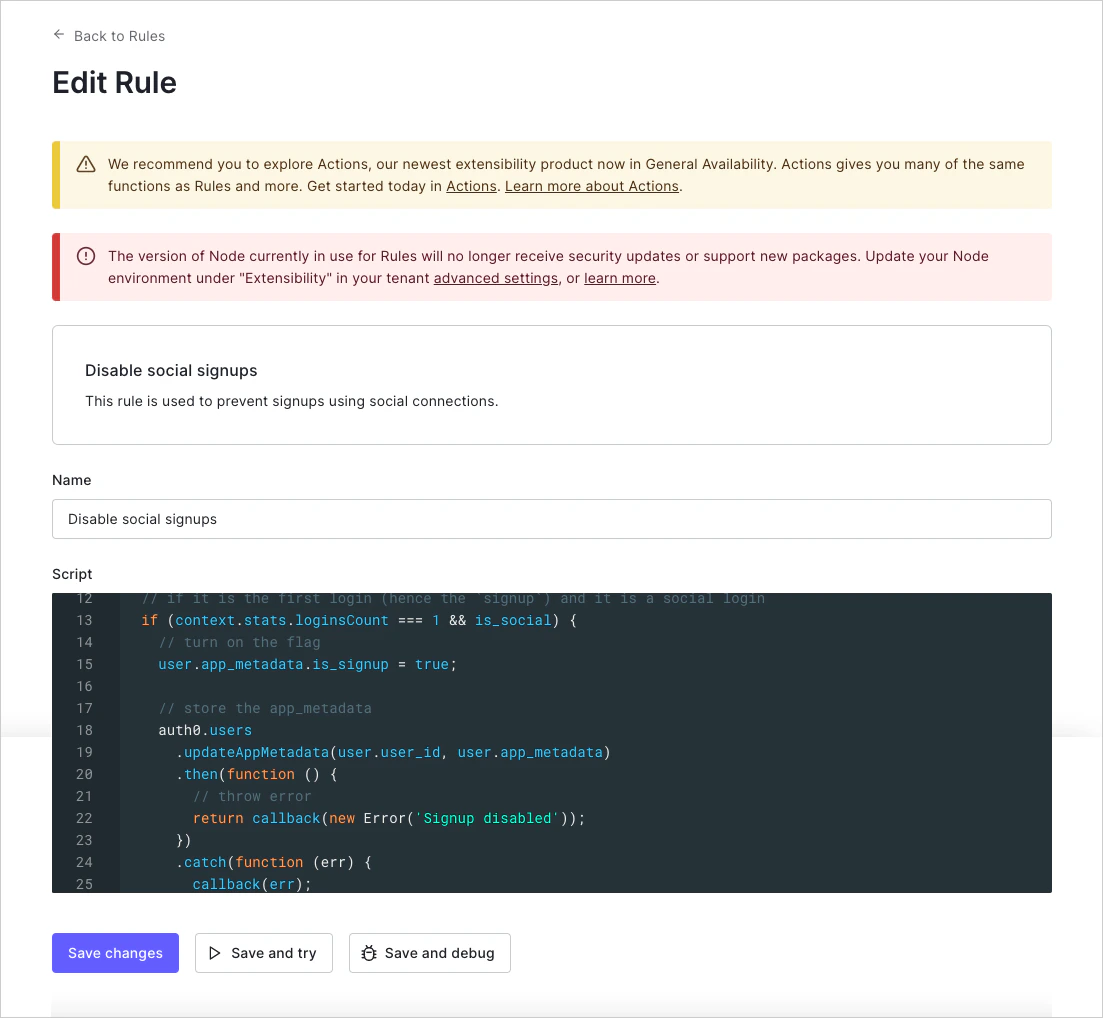
 3. Rule に名前を付け、必要に応じてスクリプトを編集し、**Save changes** をクリックします。
## Management API を使用する
[Create Rule endpoint](https://auth0.com/docs/api/management/v2#!/Rules/post_rules) に `POST` リクエストを送信します。`MGMT_API_ACCESS_TOKEN`、`RULE_NAME`、`RULE_SCRIPT`、`RULE_ORDER`、`RULE_ENABLED` のプレースホルダー値は、それぞれ実際の Management API アクセストークン、Rule 名、Rule スクリプト、Rule の順序番号、および Rule の有効化設定に置き換えてください。
```bash cURL theme={null}
curl --request POST \
--url 'https://{yourDomain}/api/v2/rules' \
--header 'authorization: Bearer MGMT_API_ACCESS_TOKEN' \
--header 'cache-control: no-cache' \
--header 'content-type: application/json' \
--data '{ "name": "RULE_NAME", "script": "RULE_SCRIPT" }'
```
```csharp C# theme={null}
var client = new RestClient("https://{yourDomain}/api/v2/rules");
var request = new RestRequest(Method.POST);
request.AddHeader("content-type", "application/json");
request.AddHeader("authorization", "Bearer MGMT_API_ACCESS_TOKEN");
request.AddHeader("cache-control", "no-cache");
request.AddParameter("application/json", "{ "name": "RULE_NAME", "script": "RULE_SCRIPT" }", ParameterType.RequestBody);
IRestResponse response = client.Execute(request);
```
```go Go theme={null}
package main
import (
"fmt"
"strings"
"net/http"
"io/ioutil"
)
func main() {
url := "https://{yourDomain}/api/v2/rules"
payload := strings.NewReader("{ "name": "RULE_NAME", "script": "RULE_SCRIPT" }")
req, _ := http.NewRequest("POST", url, payload)
req.Header.Add("content-type", "application/json")
req.Header.Add("authorization", "Bearer MGMT_API_ACCESS_TOKEN")
req.Header.Add("cache-control", "no-cache")
res, _ := http.DefaultClient.Do(req)
defer res.Body.Close()
body, _ := ioutil.ReadAll(res.Body)
fmt.Println(res)
fmt.Println(string(body))
}
```
```java Java theme={null}
HttpResponse response = Unirest.post("https://{yourDomain}/api/v2/rules")
.header("content-type", "application/json")
.header("authorization", "Bearer MGMT_API_ACCESS_TOKEN")
.header("cache-control", "no-cache")
.body("{ "name": "RULE_NAME", "script": "RULE_SCRIPT" }")
.asString();
```
```javascript Node.JS theme={null}
var axios = require("axios").default;
var options = {
method: 'POST',
url: 'https://{yourDomain}/api/v2/rules',
headers: {
'content-type': 'application/json',
authorization: 'Bearer MGMT_API_ACCESS_TOKEN',
'cache-control': 'no-cache'
},
data: {name: 'RULE_NAME', script: 'RULE_SCRIPT'}
};
axios.request(options).then(function (response) {
console.log(response.data);
}).catch(function (error) {
console.error(error);
});
```
```php PHP theme={null}
$curl = curl_init();
curl_setopt_array($curl, [
CURLOPT_URL => "https://{yourDomain}/api/v2/rules",
CURLOPT_RETURNTRANSFER => true,
CURLOPT_ENCODING => "",
CURLOPT_MAXREDIRS => 10,
CURLOPT_TIMEOUT => 30,
CURLOPT_HTTP_VERSION => CURL_HTTP_VERSION_1_1,
CURLOPT_CUSTOMREQUEST => "POST",
CURLOPT_POSTFIELDS => "{ "name": "RULE_NAME", "script": "RULE_SCRIPT" }",
CURLOPT_HTTPHEADER => [
"authorization: Bearer MGMT_API_ACCESS_TOKEN",
"cache-control: no-cache",
"content-type: application/json"
],
]);
$response = curl_exec($curl);
$err = curl_error($curl);
curl_close($curl);
if ($err) {
echo "cURL Error #:" . $err;
} else {
echo $response;
}
```
```python Python theme={null}
import http.client
conn = http.client.HTTPSConnection("")
payload = "{ "name": "RULE_NAME", "script": "RULE_SCRIPT" }"
headers = {
'content-type': "application/json",
'authorization': "Bearer MGMT_API_ACCESS_TOKEN",
'cache-control': "no-cache"
}
conn.request("POST", "/{yourDomain}/api/v2/rules", payload, headers)
res = conn.getresponse()
data = res.read()
print(data.decode("utf-8"))
```
```ruby Ruby theme={null}
require 'uri'
require 'net/http'
require 'openssl'
url = URI("https://{yourDomain}/api/v2/rules")
http = Net::HTTP.new(url.host, url.port)
http.use_ssl = true
http.verify_mode = OpenSSL::SSL::VERIFY_NONE
request = Net::HTTP::Post.new(url)
request["content-type"] = 'application/json'
request["authorization"] = 'Bearer MGMT_API_ACCESS_TOKEN'
request["cache-control"] = 'no-cache'
request.body = "{ "name": "RULE_NAME", "script": "RULE_SCRIPT" }"
response = http.request(request)
puts response.read_body
```
| 値 | 説明 |
| ------------------------- | ------------------------------------------------------------------------------------------------ |
| `MGMT_API_ACCESS_TOKEN` | スコープ `create:rules` を持つ Management API のアクセストークン。 |
| `RULE_NAME` | 作成する Rule の名前。Rule の名前に使用できるのは英数字、スペース、ハイフンのみで、先頭または末尾にスペースやハイフンを付けることはできません。 |
| `RULE_SCRIPT` | Rule の code を含むスクリプト。Dashboard で新しい Rule を作成する場合に入力する内容と一致している必要があります。 |
| `RULE_ORDER` (optional) | 他の Rules との関係における、その Rule の実行順序を表す整数。数値が小さい Rules ほど先に実行されます。順序番号が指定されていない場合、その Rule は最後に実行されます。 |
| `RULE_ENABLED` (optional) | その Rule が有効 (`true`) か無効 (`false`) かを表すブール値。 |
公開エンドポイント (例: `travel0.us.auth0.com`) では IPv6 アドレスを使用しています。IPv6 をサポートするマシンからリクエストが送信されると、`context.request.ip` プロパティには IPv6 アドレスが含まれます。IP アドレスを手動で処理する場合は、[ipaddr.js@1.9.0 ライブラリ](https://www.npmjs.com/package/ipaddr.js/v/1.9.0) を使用することをお勧めします。
## レート制限を管理する
Auth0 API を呼び出す Rule では、`X-RateLimit-Remaining` ヘッダーを確認し、返された値が 0 に近づいた場合に適切に対応して、常にレート制限を処理する必要があります。また、設定されたレート制限を超過して HTTP ステータスコード 429 (Too Many Requests) を受け取った場合に備えたロジックも追加する必要があります。この場合、再試行が必要であれば、無限再試行ループを避けるためにバックオフを設けることをおすすめします。レート制限の詳細については、[Auth0 API のレート制限ポリシー](/ja/docs/troubleshoot/customer-support/operational-policies/rate-limit-policy) を参照してください。
## 利用可能なモジュール
Rules は、特定の Node.js バージョン向けに構成された JavaScript サンドボックス内で実行されます。
このサンドボックスは、構成された Node.js バージョンでサポートされる JavaScript のすべてのバージョン (および関連する構文) と、多数の Node.js モジュールをサポートしています。サポートされているサンドボックスモジュールの一覧については、[Can I require: Auth0 Extensibility](https://auth0-extensions.github.io/canirequire/) を参照してください。
## 詳しく見る
* [Rules のグローバル変数を設定する](/ja/docs/customize/rules/configure-global-variables-for-rules)