> ## Documentation Index
> Fetch the complete documentation index at: https://translations.mintlify.site/llms.txt
> Use this file to discover all available pages before exploring further.
# ユーザーの同意とサードパーティアプリケーション
> アプリケーションがユーザーに代わって API へのアクセスを要求する際に、Auth0 がユーザーの同意をどのように扱うかについて説明します。
export const AuthCodeGroup = ({children, dropdown}) => {
const [processedChildren, setProcessedChildren] = useState(children);
useEffect(() => {
let unsubscribe = null;
function init() {
unsubscribe = window.autorun(() => {
const processChildren = node => {
if (typeof node === "string") {
let processedNode = node;
for (const [key, value] of window.rootStore.variableStore.values.entries()) {
const escapedKey = key.replaceAll(/[.*+?^${}()|[\]\\]/g, (String.raw)`\$&`);
processedNode = processedNode.replaceAll(new RegExp(escapedKey, "g"), value);
}
return processedNode;
} else if (Array.isArray(node)) {
return node.map(processChildren);
} else if (node && node.props && node.props.children) {
return {
...node,
props: {
...node.props,
children: processChildren(node.props.children)
}
};
}
return node;
};
setProcessedChildren(processChildren(children));
});
}
if (window.rootStore) {
init();
} else {
window.addEventListener("adu:storeReady", init);
}
return () => {
window.removeEventListener("adu:storeReady", init);
unsubscribe?.();
};
}, [children]);
return {processedChildren};
};
export const AuthCodeBlock = ({filename, icon, language, highlight, children}) => {
const [displayText, setDisplayText] = useState(children);
const [copyText, setCopyText] = useState(children);
const wrapperRef = React.useRef(null);
useEffect(() => {
let unsubscribe = null;
function init() {
if (!window.autorun || !window.rootStore) {
return;
}
unsubscribe = window.autorun(() => {
let processedChildrenForDisplay = children;
let processedChildrenForCopy = children;
for (const [key, value] of window.rootStore.variableStore.values.entries()) {
const escapedKey = key.replaceAll(/[.*+?^${}()|[\]\\]/g, (String.raw)`\$&`);
let displayValue = value;
if (key === "{yourClientSecret}" && value !== "{yourClientSecret}") {
displayValue = value.substring(0, 3) + "*****マスク済み*****";
}
processedChildrenForDisplay = processedChildrenForDisplay.replaceAll(new RegExp(escapedKey, "g"), displayValue);
processedChildrenForCopy = processedChildrenForCopy.replaceAll(new RegExp(escapedKey, "g"), value);
}
setDisplayText(processedChildrenForDisplay);
setCopyText(processedChildrenForCopy);
});
}
if (window.rootStore) {
init();
} else {
window.addEventListener("adu:storeReady", init);
}
return () => {
window.removeEventListener("adu:storeReady", init);
unsubscribe?.();
};
}, [children]);
useEffect(() => {
if (!wrapperRef.current) return;
const originalWriteText = navigator.clipboard.writeText.bind(navigator.clipboard);
let isOverriding = false;
const handleClick = e => {
const button = e.target.closest('[data-testid="copy-code-button"]');
if (!button || !wrapperRef.current.contains(button)) return;
isOverriding = true;
navigator.clipboard.writeText = text => {
if (isOverriding) {
isOverriding = false;
navigator.clipboard.writeText = originalWriteText;
return originalWriteText(copyText);
}
return originalWriteText(text);
};
setTimeout(() => {
if (isOverriding) {
isOverriding = false;
navigator.clipboard.writeText = originalWriteText;
}
}, 100);
};
const wrapper = wrapperRef.current;
wrapper.addEventListener('click', handleClick, true);
return () => {
wrapper.removeEventListener('click', handleClick, true);
if (navigator.clipboard.writeText !== originalWriteText) {
navigator.clipboard.writeText = originalWriteText;
}
};
}, [copyText]);
return
{displayText}
;
};
OAuth では、アプリケーションがユーザーに代わって API にアクセスできます。アプリケーションがユーザーに代わって操作するには、まず、要求された権限をユーザーが明示的に承認する必要があります。この承認の手順をユーザーの同意と呼びます。
[サードパーティアプリケーション](/ja/docs/get-started/applications/third-party-applications)では、ユーザーの同意が常に必要です。ユーザーは、認可リクエストのたびに承認しなければなりません。[ファーストパーティアプリケーション](/ja/docs/get-started/applications/first-party-and-third-party-applications)では、アプリケーションを管理しており、適切に動作することを信頼できるため、設定によっては同意を省略できます。
## 同意ダイアログ
サードパーティアプリケーションがユーザーを `/authorize` エンドポイントにリダイレクトして API へのアクセスを要求すると、Auth0 はそのアプリケーションが要求している権限を一覧表示した同意ダイアログを表示します。
次の認可リクエストでは、ユーザーに API の `read:posts` 権限と `write:posts` 権限を承認するよう求める同意ダイアログが表示されます。
```http wrap lines theme={null}
GET /authorize?
client_id=tpc_THIRD_PARTY_CLIENT_ID
&redirect_uri=https://partner.example.com/callback
&response_type=code
&scope=read:posts write:posts
&audience=https://social.example.com
&code_challenge=CODE_CHALLENGE
&code_challenge_method=S256
&state=STATE_VALUE
```
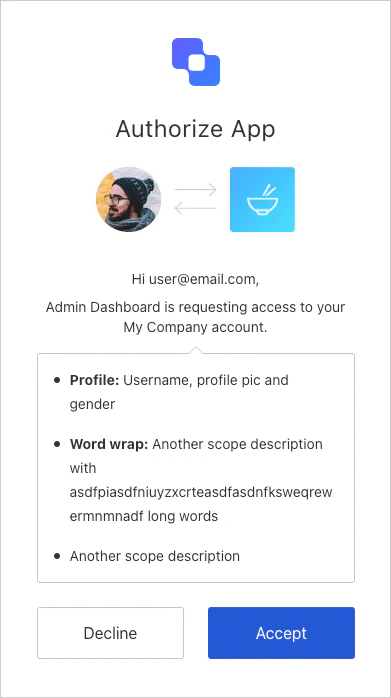 ユーザーが承認すると、Auth0 は、このアプリケーション、API、要求されたスコープの組み合わせに対するユーザーの同意を表すユーザーグラントを作成します。アプリケーションは通常どおり認可コードを受け取ります。
一度同意すると、明示的に同意を取り消さない限り、以降のログイン時に同意ダイアログは表示されません。
セキュリティ制御が強化されたサードパーティアプリケーションは、このリリースでは OIDC スコープ (`openid`、`profile`、`email`) をサポートしていません。同意ダイアログには API スコープのみが表示されます。サードパーティアプリケーションの OIDC サポートは、今後のリリースで提供される予定です。
ユーザーが承認すると、Auth0 は、このアプリケーション、API、要求されたスコープの組み合わせに対するユーザーの同意を表すユーザーグラントを作成します。アプリケーションは通常どおり認可コードを受け取ります。
一度同意すると、明示的に同意を取り消さない限り、以降のログイン時に同意ダイアログは表示されません。
セキュリティ制御が強化されたサードパーティアプリケーションは、このリリースでは OIDC スコープ (`openid`、`profile`、`email`) をサポートしていません。同意ダイアログには API スコープのみが表示されます。サードパーティアプリケーションの OIDC サポートは、今後のリリースで提供される予定です。
## スコープの説明
デフォルトでは、同意ページではスコープ名を使ってユーザーに同意を求めます。以下のように、わかりやすく表示されるよう `action:resource_name` 形式でスコープを定義します。
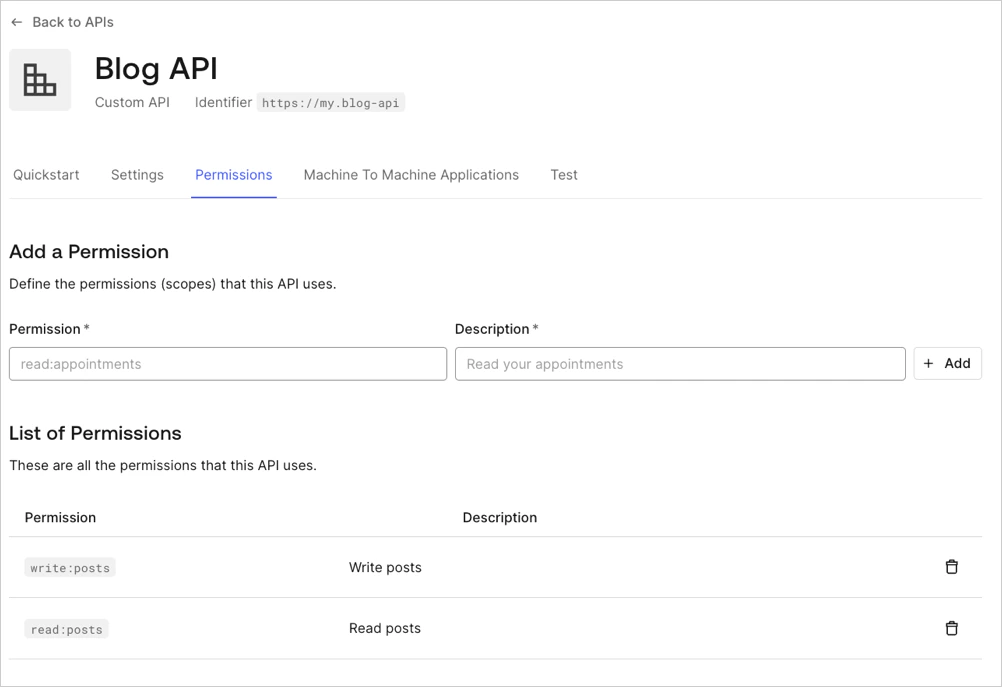 同意ページでは、同じ API のスコープがグループ化され、すべてのアクションが 1 行に表示されます。たとえば、上記の設定では **Posts: read and write your posts** と表示されます。
スコープ名ではなく **Description** フィールドを表示するには、テナントの `use_scope_descriptions_for_consent` フラグを `true` に設定します。
```bash cURL wrap lines theme={null}
curl --request PATCH \
--url 'https://YOUR_DOMAIN/api/v2/tenants/settings' \
--header 'Authorization: Bearer YOUR_MANAGEMENT_API_TOKEN' \
--header 'Content-Type: application/json' \
--data '{ "flags": { "use_scope_descriptions_for_consent": true } }'
```
この設定は、テナント内のすべての API の同意プロンプトに影響します。
同意ページでは、同じ API のスコープがグループ化され、すべてのアクションが 1 行に表示されます。たとえば、上記の設定では **Posts: read and write your posts** と表示されます。
スコープ名ではなく **Description** フィールドを表示するには、テナントの `use_scope_descriptions_for_consent` フラグを `true` に設定します。
```bash cURL wrap lines theme={null}
curl --request PATCH \
--url 'https://YOUR_DOMAIN/api/v2/tenants/settings' \
--header 'Authorization: Bearer YOUR_MANAGEMENT_API_TOKEN' \
--header 'Content-Type: application/json' \
--data '{ "flags": { "use_scope_descriptions_for_consent": true } }'
```
この設定は、テナント内のすべての API の同意プロンプトに影響します。
## 拒否された権限の処理
ユーザーが同意を拒否した場合の動作は、アプリケーションの[リダイレクトポリシー](/ja/docs/get-started/applications/third-party-applications/security-controls#redirect-protection)によって異なります。
* **`open_redirect_protection`** (サードパーティアプリのデフォルト) : Auth0 はリダイレクトせず、代わりにエラーページを表示します。これにより、オープンリダイレクト攻撃を防止できます。
* **`allow_always`**: Auth0 は `access_denied` エラーを付けて `redirect_uri` にリダイレクトします。
```http wrap lines theme={null}
HTTP/1.1 302 Found
Location: https://partner.example.com/callback?
error=access_denied
&state=STATE_VALUE
```
## ファーストパーティアプリケーションの同意をスキップする
API で **Allow Skipping User Consent** オプションが有効になっている場合、ファーストパーティアプリケーションでは同意ダイアログをスキップできます。
**Allow Skipping User Consent** トグルに移動するには、**Applications > APIs > (API を選択) > Settings > Access Settings** を選択します。
サードパーティアプリケーションでは常に同意が必要なため、同意ダイアログをスキップすることはできません。
ファーストパーティアプリケーションで同意をスキップした場合でも、アプリケーションが検証できないコールバック URI (`localhost` やカスタム URI スキームなど) を使用していると、ログイン確認のプロンプトが表示されることがあります。これは、同じデバイス上でのアプリケーションのなりすましからユーザーを保護するためです。詳しくは、[Measures Against Application Impersonation](/ja/docs/secure/security-guidance/measures-against-app-impersonation) を参照してください。
## 同意を取り消す
特定のアプリケーションに対するユーザーの同意を取り消すには、次の手順を実行します。
1. **Auth0 Dashboard > User Management > Users** に移動します。
2. ユーザーを選択します。
3. **Authorized Applications** タブを選択します。
4. アプリケーションの横にある **Revoke** を選択します。
## パスワードベースのフロー
[Resource Owner Password Flow](/ja/docs/get-started/authentication-and-authorization-flow/resource-owner-password-flow) を使用する場合、同意ダイアログは表示されません。これは、ユーザーがアプリケーションに直接パスワードを入力することが、アプリケーションにユーザーのアカウントへの完全なアクセスを許可するのと同じ意味を持つためです。
## 同意を毎回求める
ユーザーにログインのたびに同意を求めるには (既存のグラントがある場合でも) 、`/authorize` リクエストに `prompt=consent` を含めます。
```http wrap lines theme={null}
GET /authorize?
client_id=tpc_THIRD_PARTY_CLIENT_ID
&redirect_uri=https://partner.example.com/callback
&response_type=code
&scope=read:posts write:posts
&audience=https://social.example.com
&prompt=consent
&code_challenge=CODE_CHALLENGE
&code_challenge_method=S256
&state=STATE_VALUE
```
## 詳しくはこちら
* [サードパーティアプリケーション](/ja/docs/get-started/applications/third-party-applications)
* [ファーストパーティアプリケーションとサードパーティアプリケーション](/ja/docs/get-started/applications/first-party-and-third-party-applications)
* [サードパーティアプリケーション向けのセキュリティ対策](/ja/docs/get-started/applications/third-party-applications/security-controls)
* [アプリケーションのグラントタイプ](/ja/docs/get-started/applications/application-grant-types)
* [アプリケーションのなりすまし対策](/ja/docs/secure/security-guidance/measures-against-app-impersonation)