> ## Documentation Index
> Fetch the complete documentation index at: https://translations.mintlify.site/llms.txt
> Use this file to discover all available pages before exploring further.

# MfaCountryCodes

> Universal Login の `mfa-country-codes` 画面をカスタマイズするために利用できる、すべてのプロパティとメソッドについて説明します。

MfaCountryCodes クラスは、`mfa-country-codes` 画面の機能を提供します。この画面では、ユーザーが MFA の電話番号認証に使用する国コードを選択できます。
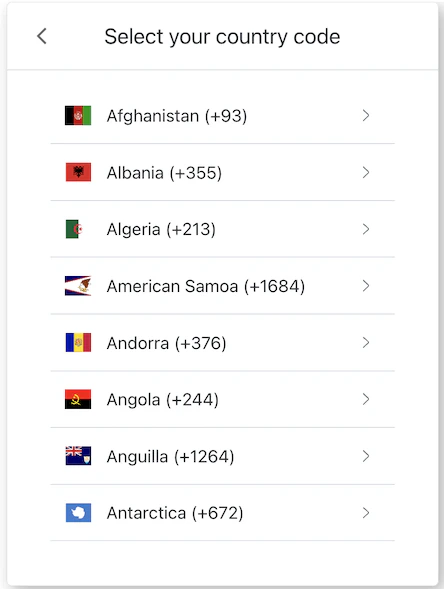
<Frame>
  <img style={{maxHeight:"400px"}} src="https://mintcdn.com/translations/c0RQ9V0YAcT0-8l5/docs/images/cdy7uua7fh8z/7hp8LeL9cbS3nbxw8wTuqK/3c862b1c47ae18fb43f22f55ea4d695a/Screenshot_2025-02-19_at_13.23.44.png?fit=max&auto=format&n=c0RQ9V0YAcT0-8l5&q=85&s=b5dfc5e3ff13a2800b847f06cb53bc91" alt="ACUL MFA 国コード" width="444" height="589" data-path="docs/images/cdy7uua7fh8z/7hp8LeL9cbS3nbxw8wTuqK/3c862b1c47ae18fb43f22f55ea4d695a/Screenshot_2025-02-19_at_13.23.44.png" />
</Frame>

<div id="constructors">
  ## コンストラクター
</div>

MFA Country Codes 画面マネージャーのインスタンスを作成します。

```typescript Example theme={null}
import MfaCountryCodes from '@auth0/auth0-acul-js/mfa-country-codes';

const mfaCountryCodes = new MfaCountryCodes();
await mfaCountryCodes.selectCountryCode({
  country_code: 'US',
  phone_prefix: '+1',
});
```

<div id="properties">
  ## プロパティ
</div>

<ParamField body="branding" type={<span><a href="/ja/docs/libraries/acul/js-sdk/Screens/interfaces/BrandingMembers">BrandingMembers</a></span>}>
  ブランディングテーマや設定など、ブランディング関連の構成情報を提供します。
</ParamField>

<ParamField body="client" type={<span><a href="/ja/docs/libraries/acul/js-sdk/Screens/interfaces/ClientMembers">ClientMembers</a></span>}>
  `mfa-country-codes` 画面の `id`、`name`、`logoUrl` など、クライアント関連の構成情報を提供します。
</ParamField>

<ParamField body="organization" type={<span><a href="/ja/docs/libraries/acul/js-sdk/Screens/interfaces/OrganizationMembers">OrganizationMembers</a></span>}>
  `id` や `name` など、ユーザーの組織に関する情報を提供します。
</ParamField>

<ParamField body="prompt" type={<span><a href="/ja/docs/libraries/acul/js-sdk/Screens/interfaces/PromptMembers">PromptMembers</a></span>}>
  認証フロー内の現在のプロンプトに関するデータが含まれます。
</ParamField>

<ParamField body="screen" type={<span><a href="/ja/docs/libraries/acul/js-sdk/Screens/interfaces/ScreenMembersOnMfaCountryCodes">ScreenMembersOnMfaCountryCodes</a></span>}>
  構成やコンテキストなど、`mfa-country-codes` 画面固有の詳細が含まれます。
</ParamField>

<ParamField body="tenant" type={<span><a href="/ja/docs/libraries/acul/js-sdk/Screens/interfaces/TenantMembers">TenantMembers</a></span>}>
  `id` や関連するメタデータなど、テナントに関するデータが含まれます。
</ParamField>

<ParamField body="transaction" type={<span><a href="/ja/docs/libraries/acul/js-sdk/Screens/interfaces/TransactionMembers">TransactionMembers</a></span>}>
  アクティブな識別子やフローの状態など、`mfa-country-codes` 画面に関連するトランザクション固有のデータを提供します。
</ParamField>

<ParamField body="untrustedData" type={<span><a href="/ja/docs/libraries/acul/js-sdk/Screens/interfaces/UntrustedDataMembers">UntrustedDataMembers</a></span>}>
  MFA の国コード選択時のユーザー入力など、SDK に渡される信頼できないデータを扱います。
</ParamField>

<ParamField body="user" type={<span><a href="/ja/docs/libraries/acul/js-sdk/Screens/interfaces/UserMembers">UserMembers</a></span>}>
  `username`、`email`、`roles` など、現在のユーザーの詳細が含まれます。
</ParamField>

<div id="methods">
  ## メソッド
</div>

<ParamField body="changeLanguage" type="Promise<void>">
  このメソッドは、Universal Login ページの表示言語を変更します。

  ```typescript Example theme={null}
  import MfaCountryCodes from '@auth0/auth0-acul-js/mfa-country-codes';
  const mfaCountryCodes = new MfaCountryCodes();
  mfaCountryCodes.changeLanguage({
    language: 'fr',
  });
  ```

  **メソッドのパラメーター**

  <Expandable title="パラメーター">
    <ParamField body="options">
      [LanguageChangeOptions](/ja/docs/libraries/acul/js-sdk/Screens/interfaces/LanguageChangeOptions)。
    </ParamField>

    <ParamField body="language" type="string" required>
      使用する言語のロケールコードです (例: `'en'`、`'fr'`、`'es'`) 。
    </ParamField>

    <ParamField body="persist?" type="&#x22;session&#x22;">
      `'session'` に設定すると、選択した言語はセッション中保持されます。
    </ParamField>
  </Expandable>
</ParamField>

<ParamField body="getErrors" type={<span><a href="/ja/docs/libraries/acul/js-sdk/Screens/interfaces/Error">Error</a>[]</span>}>
  このメソッドは、コンテキストからトランザクションエラーの配列を取得します。エラーがない場合は空の配列を返します。
</ParamField>

<ParamField body="goBack" type="Promise<void>">
  このメソッドは、前の画面に戻ります。

  ```typescript Example theme={null}
  import MfaCountryCodes from '@auth0/auth0-acul-js/mfa-country-codes';
  const mfaCountryCodes = new MfaCountryCodes();
  await mfaCountryCodes.goBack();
  ```
</ParamField>

<ParamField body="selectCountryCode" type="Promise<void>">
  このメソッドは、利用可能なオプションから国コードを選択します。

  ```typescript Example theme={null}
  import MfaCountryCodes from '@auth0/auth0-acul-js/mfa-country-codes';

  const mfaCountryCodes = new MfaCountryCodes();
  await mfaCountryCodes.selectCountryCode({
    country_code: 'US',
    phone_prefix: '+1',
  });
  ```

  **メソッドのパラメーター**

  <Expandable title="パラメーター">
    <ParamField body="options">
      [SelectCountryCodeOptions](/ja/docs/libraries/acul/js-sdk/Screens/interfaces/SelectCountryCodeOptions)。
    </ParamField>

    <ParamField body="country_code" type="string" required>
      国コードです (例: `'US'`、`'GB'`) 。
    </ParamField>

    <ParamField body="phone_prefix" type="string" required>
      電話番号のプレフィックスです (例: `'+1'`、`'+44'`) 。
    </ParamField>
  </Expandable>
</ParamField>
