> ## Documentation Index
> Fetch the complete documentation index at: https://translations.mintlify.site/llms.txt
> Use this file to discover all available pages before exploring further.
# MfaPhoneEnrollment
> Universal Login の `mfa-phone-enrollment` 画面をカスタマイズするために使用できるすべてのフックとメソッドについて説明します。
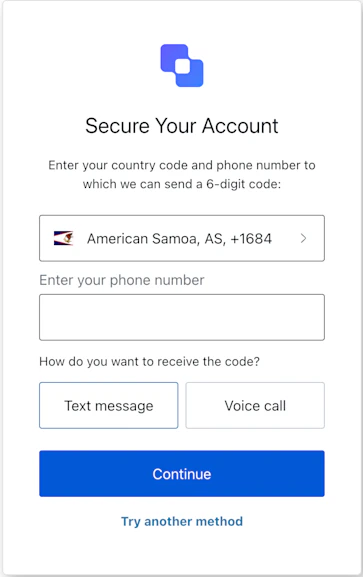
`mfa-phone-enrollment` 画面では、ユーザーは電話番号を入力し、受信方法を選択して、SMS または音声による MFA 用の電話番号を登録できます。
## インポート
各画面には、それぞれ固有のフックとメソッドがあります。SDK は、各画面について**部分インポート**と**ルートインポート**をサポートしています。
* 部分インポートを使用すると、特定のユースケースに必要なコードのみを含めることができます。
* ルートインポートを使用すると、単一のバンドルからすべての画面を読み込めます。これは、考えられるすべての画面に対応する単一のビルドを使用したい場合に便利です。
```jsx Import Example theme={null}
// ルートインポート
import { useMfaPhoneEnrollment } from '@auth0/auth0-acul-react';
// 部分インポート
import {
useMfaPhoneEnrollment,
// コンテキストフック
useUser,
useTenant,
useBranding,
useClient,
useOrganization,
usePrompt,
useScreen,
useTransaction,
useUntrustedData,
// 共通フック
useCurrentScreen,
useAuth0Themes,
useErrors,
// ユーティリティフック
useChangeLanguage,
// メソッド
continueEnrollment,
pickCountryCode,
tryAnotherMethod,
} from "@auth0/auth0-acul-react/mfa-phone-enrollment";
function MfaPhoneEnrollmentScreen() {
const { continueEnrollment } = useMfaPhoneEnrollment();
return (
continueEnrollment({ phone: '+15551234567', type: 'sms' })}>
Enroll Phone
);
}
```
## コンテキスト Hooks
`mfa-phone-enrollment` 画面で Auth0 のコンテキストデータに読み取り専用でアクセスできる、画面スコープの フック です。`@auth0/auth0-acul-react/mfa-phone-enrollment` からインポートします。
() => BrandingMembers }>
この フック は、`mfa-phone-enrollment` 画面に表示されるロゴ、色、テーマ設定などのブランディング設定を提供します。
```jsx Example theme={null}
import { useBranding } from '@auth0/auth0-acul-react/mfa-phone-enrollment';
function CustomTheme() {
const branding = useBranding();
}
```
() => ClientMembers }>
この フック は、`id`、`name`、`logoUrl` など、`mfa-phone-enrollment` 画面のクライアント関連設定を提供します。
```jsx Example theme={null}
import { useClient } from '@auth0/auth0-acul-react/mfa-phone-enrollment';
function AppInfo() {
const client = useClient();
}
```
() => OrganizationMembers }>
この フック は、MFA フローが組織スコープの場合に、ユーザーの組織に関する情報を提供します。組織コンテキストが存在しない場合は `null` を返します。
```jsx Example theme={null}
import { useOrganization } from '@auth0/auth0-acul-react/mfa-phone-enrollment';
function OrgSelector() {
const organization = useOrganization();
if (!organization) {
return No organization context
;
}
}
```
() => PromptMembers }>
この フック は、認証フロー内の現在のプロンプトに関するデータを提供します。
```jsx Example theme={null}
import { usePrompt } from '@auth0/auth0-acul-react/mfa-phone-enrollment';
function FlowInfo() {
const prompt = usePrompt();
}
```
() => ScreenMembers }>
この フック は、設定やコンテキストなど、`mfa-phone-enrollment` 画面に固有の詳細を提供します。
```jsx Example theme={null}
import { useScreen } from '@auth0/auth0-acul-react/mfa-phone-enrollment';
function ScreenDebug() {
const screen = useScreen();
}
```
() => TenantMembers }>
この フック は、`id` や関連メタデータなど、テナントに関連するデータを提供します。
```jsx Example theme={null}
import { useTenant } from '@auth0/auth0-acul-react/mfa-phone-enrollment';
function TenantInfo() {
const tenant = useTenant();
}
```
() => TransactionMembers }>
この フック は、現在の MFA フローの状態など、`mfa-phone-enrollment` 画面のトランザクション固有のデータを提供します。
```jsx Example theme={null}
import { useTransaction } from '@auth0/auth0-acul-react/mfa-phone-enrollment';
function TransactionInfo() {
const transaction = useTransaction();
}
```
() => UntrustedDataMembers }>
この フック は、URL パラメーターから事前入力された値など、画面に渡される信頼できないデータを提供します。
```jsx Example theme={null}
import { useUntrustedData } from '@auth0/auth0-acul-react/mfa-phone-enrollment';
function PrefilledForm() {
const untrustedData = useUntrustedData();
}
```
() => UserMembers }>
このフックは、`username`、`email`、利用可能な認証方法など、現在のユーザーの詳細を返します。
```jsx Example theme={null}
import { useUser } from '@auth0/auth0-acul-react/mfa-phone-enrollment';
function UserProfile() {
const user = useUser();
}
```
MfaPhoneEnrollmentMembers}>
このフックは、`mfa-phone-enrollment` 画面で利用可能なすべてのメソッドとコンテキストを返します。
## メソッド
このメソッドは、ユーザーの電話番号と選択した送信方法を送信して、MFA 用の電話番号を登録します。
```jsx Example theme={null}
import { useMfaPhoneEnrollment } from '@auth0/auth0-acul-react/mfa-phone-enrollment';
function PhoneEnrollmentForm() {
const { continueEnrollment } = useMfaPhoneEnrollment();
return (
continueEnrollment({ phone: '+15551234567', type: 'sms' })}>
Enroll Phone
);
}
```
**メソッドパラメーター**
[MfaPhoneEnrollmentContinueOptions](/ja/docs/libraries/acul/react-sdk/API-Reference/Types/interfaces/MfaPhoneEnrollmentContinueOptions).
MFA に登録する電話番号。
確認用 code の送信方法。
* `sms`: code をテキストメッセージで送信します。
* `voice`: code を音声通話で送信します。
このメソッドは国番号の選択画面に移動し、ユーザーが自分の電話番号の国番号を選択できるようにします。
```jsx Example theme={null}
import { useMfaPhoneEnrollment } from '@auth0/auth0-acul-react/mfa-phone-enrollment';
function PickCountryCodeButton() {
const { pickCountryCode } = useMfaPhoneEnrollment();
return (
pickCountryCode()}>
Select Country Code
);
}
```
このメソッドは MFA 方法の選択画面に移動し、ユーザーが別の認証要素を選択できるようにします。
```jsx Example theme={null}
import { useMfaPhoneEnrollment } from '@auth0/auth0-acul-react/mfa-phone-enrollment';
function TryAnotherMethodButton() {
const { tryAnotherMethod } = useMfaPhoneEnrollment();
return (
tryAnotherMethod()}>
Try Another Method
);
}
```
## 共通/ユーティリティ フック
useAuth0Themes} type="Hooks">
このフックは、ブランディングコンテキストからフラット化された構成を含む現在のテーマオプションを取得します。
useChangeLanguage} type="Hooks">
このフックは、現在の ACUL 画面の表示言語を変更する関数を返します。
useCurrentScreen} type="Hooks">
このフックは、現在の画面のコンテキストと状態を取得します。
useErrors} type="Hooks">
このフックは、画面上のサーバー、クライアント、開発者のエラーを参照および管理します。