> ## Documentation Index
> Fetch the complete documentation index at: https://translations.mintlify.site/llms.txt
> Use this file to discover all available pages before exploring further.

> Auth0 Dashboard を使用して、ユーザーに割り当てられたデバイスの関連付けを解除する方法を説明します。

# ユーザーからデバイスの関連付けを解除する

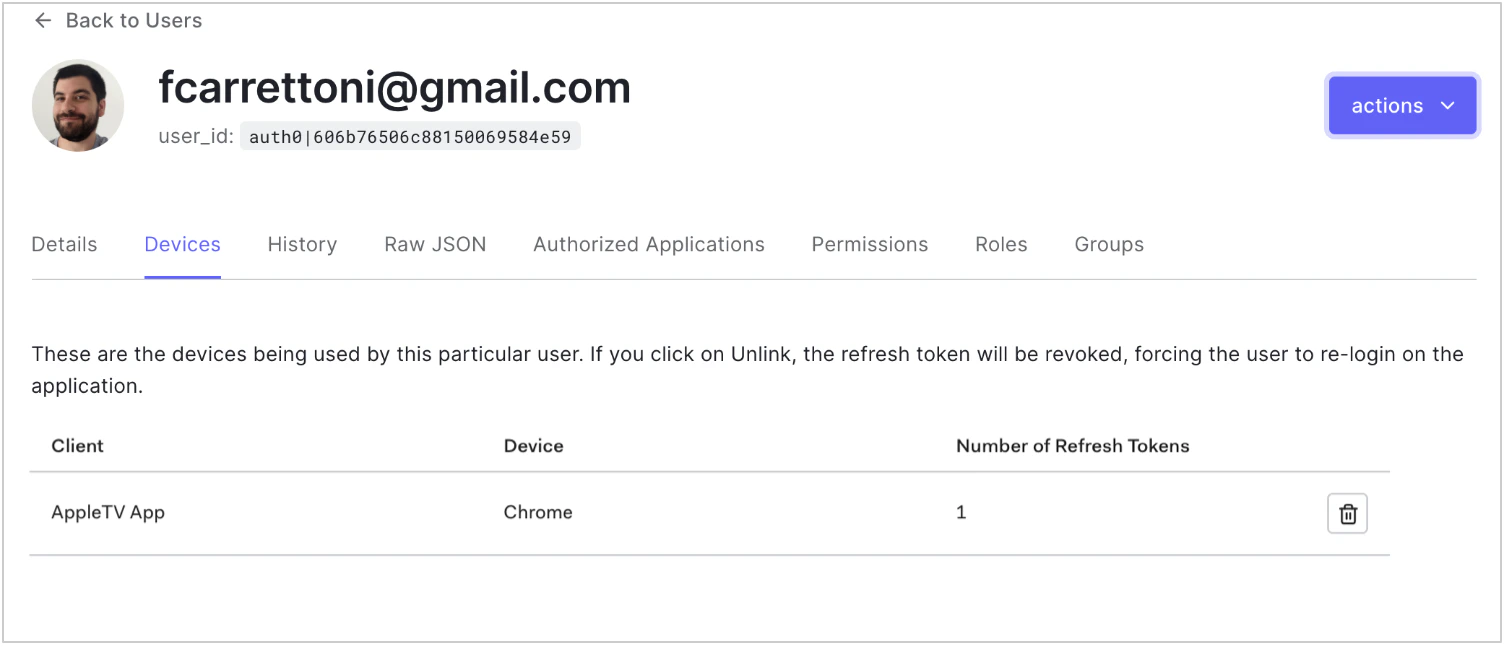
<Tooltip tip="Auth0 のサービスを設定するための主要な製品である Auth0 Dashboard。" cta="用語集を見る" href="/ja/docs/glossary?term=Auth0+Dashboard">Auth0 Dashboard</Tooltip> を使用して、ユーザーに割り当てられたデバイスの関連付けを解除できます。これにより、選択したデバイスの <Tooltip tip="Auth0 のサービスを設定するための主要な製品である Auth0 Dashboard。" cta="用語集を見る" href="/ja/docs/glossary?term=refresh+token">リフレッシュトークン</Tooltip> が失効します。

1. [Dashboard > User Management > Users](https://manage.auth0.com/#/users) に移動し、ユーザーの名前をクリックします。
2. **Devices** ビューをクリックし、関連付けを解除するデバイスの横にあるごみ箱アイコンをクリックして確認します。
   <Frame>
     <img src="https://mintcdn.com/translations/mMSz-RNYLuOm2GmQ/docs/images/cdy7uua7fh8z/SvkfrGgmpTBLisUq0tViL/ba091efbcc897870d59810b84c753682/Screen_Shot_2021-05-18_at_9.59.16_PM.png?fit=max&auto=format&n=mMSz-RNYLuOm2GmQ&q=85&s=a146b7f1c001611b448a29a971c91d01" alt="Dashboard - ユーザーとロール - ユーザー - デバイスビュー" width="1504" height="647" data-path="docs/images/cdy7uua7fh8z/SvkfrGgmpTBLisUq0tViL/ba091efbcc897870d59810b84c753682/Screen_Shot_2021-05-18_at_9.59.16_PM.png" />
   </Frame>

<div id="learn-more">
  ## 詳細情報
</div>

* [デバイスのユーザーコード設定を構成](/ja/docs/get-started/tenant-settings/configure-device-user-code-settings)
* [デバイス認可フロー](/ja/docs/get-started/authentication-and-authorization-flow/device-authorization-flow)
