> ## Documentation Index
> Fetch the complete documentation index at: https://translations.mintlify.site/llms.txt
> Use this file to discover all available pages before exploring further.
# Auth0のサブスクリプションプランを管理する
> Auth0のサブスクリプションプランをアップグレード、ダウングレード、または解約する方法について説明します。
セルフサービスプラン (Free、Essentials、Professional) は、いつでもアップグレードまたはダウングレードできます。Enterpriseプランをご利用の場合は、詳細についてAuth0との契約内容を参照してください。
## セルフサービスプランのアップグレードまたはダウングレード
[Auth0 Teams](/ja/docs/get-started/auth0-teams) では、プランとテナントを管理できます。ご利用のプランが複数のテナントをサポートしている場合は、[既存のテナントをチームに関連付ける](/ja/docs/get-started/auth0-teams/tenant-management)こともできます。
別のプランを契約するには、次の手順に従います。
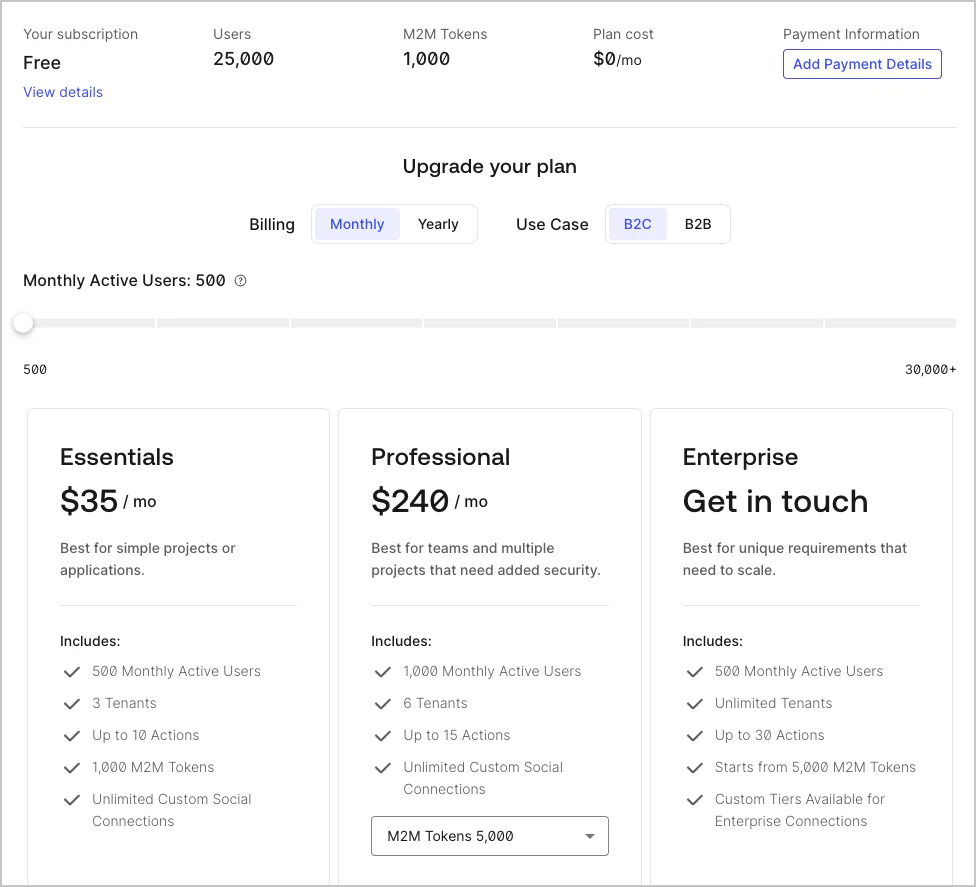
1. **[Teams Dashboard](https://accounts.auth0.com) > Settings > Subscription** に移動します。
2. 変更先のプランを選択し、**Upgrade** または **Downgrade** を選択します。**Free** プランを選択すると、有料サブスクリプションは解約されます。
3. **Review and Purchase Plan** ページで、**Monthly billing** または **Annual billing** を選択します。請求先情報が Auth0 に保存されていない場合は、入力が必要になることがあります。
4. **Purchase And Start Plan** を選択して、プラン変更を確定します。
Auth0 プランをダウングレードすると、次回の請求サイクルでクレジットが適用される場合や、返金を受けられる場合があります。詳しくは、[Billing Policy](/ja/docs/troubleshoot/customer-support/operational-policies/billing-policy) を参照してください。
### レガシーなテナントベースのサブスクリプションを管理する
2023 年 12 月 1 日以降、レガシーなテナントベースのサブスクリプションの更新は、**Free** へのダウングレードを除き、すべて自動的にチームベースのサブスクリプションに切り替わります。
レガシーなテナントベースのサブスクリプションをご利用で別のプランに加入するには、次の手順を実行します。
1. [Dashboard > Settings](https://manage.auth0.com/#/tenant/general) に移動します。
2. **Subscription** タブを選択します。
3. 変更先のプランを選択し、**Upgrade** または **Downgrade** を選択します。サブスクリプションをキャンセルするには、**Free** プランを選択します。請求情報が Auth0 に保存されていない場合は、入力が必要になることがあります。
4. サブスクリプションの変更を確定するには、**Subscribe Now** をクリックします。
## Enterprise プランを管理する
Enterprise プランにアップグレードするには、[Auth0 Sales にお問い合わせください](https://auth0.com/get-started?place=header\&type=button\&text=talk%20to%20sales)。
Enterprise プランをご契約中の場合、Enterprise の契約期間が終了すると、システムによってアカウントは自動的にフリープランにダウングレードされます。この移行中にサポートが必要な場合は、担当のアカウントチームに連絡するか、[Auth0 Support にサポートチケットを送信してください](/ja/docs/troubleshoot/customer-support/open-and-manage-support-tickets)。
## 詳細情報
* [テナントの削除またはリセット](/ja/docs/troubleshoot/customer-support/manage-subscriptions/delete-or-reset-tenant)
* [1 つのサブスクリプションに複数のテナントをリンクする](/ja/docs/get-started/auth0-overview/create-tenants/child-tenants)
* [テナントメンバーを削除する](/ja/docs/get-started/manage-dashboard-access/remove-dashboard-users)
* [テナント設定](/ja/docs/get-started/tenant-settings)
* [アカウントのパスワードをリセットする](/ja/docs/troubleshoot/customer-support/reset-account-passwords)