> ## Documentation Index
> Fetch the complete documentation index at: https://translations.mintlify.site/llms.txt
> Use this file to discover all available pages before exploring further.
> エンタープライズ接続を使用して、OpenID Connect(OIDC)IDプロバイダーに接続する方法を説明します。
# OpenID Connect IDプロバイダーに接続する
export const AuthCodeGroup = ({children, dropdown}) => {
const [processedChildren, setProcessedChildren] = useState(children);
useEffect(() => {
let unsubscribe = null;
function init() {
unsubscribe = window.autorun(() => {
const processChildren = node => {
if (typeof node === "string") {
let processedNode = node;
for (const [key, value] of window.rootStore.variableStore.values.entries()) {
const escapedKey = key.replaceAll(/[.*+?^${}()|[\]\\]/g, (String.raw)`\$&`);
processedNode = processedNode.replaceAll(new RegExp(escapedKey, "g"), value);
}
return processedNode;
} else if (Array.isArray(node)) {
return node.map(processChildren);
} else if (node && node.props && node.props.children) {
return {
...node,
props: {
...node.props,
children: processChildren(node.props.children)
}
};
}
return node;
};
setProcessedChildren(processChildren(children));
});
}
if (window.rootStore) {
init();
} else {
window.addEventListener("adu:storeReady", init);
}
return () => {
window.removeEventListener("adu:storeReady", init);
unsubscribe?.();
};
}, [children]);
return {processedChildren};
};
export const AuthCodeBlock = ({filename, icon, language, highlight, children}) => {
const [displayText, setDisplayText] = useState(children);
const [copyText, setCopyText] = useState(children);
const wrapperRef = React.useRef(null);
useEffect(() => {
let unsubscribe = null;
function init() {
if (!window.autorun || !window.rootStore) {
return;
}
unsubscribe = window.autorun(() => {
let processedChildrenForDisplay = children;
let processedChildrenForCopy = children;
for (const [key, value] of window.rootStore.variableStore.values.entries()) {
const escapedKey = key.replaceAll(/[.*+?^${}()|[\]\\]/g, (String.raw)`\$&`);
let displayValue = value;
if (key === "{yourClientSecret}" && value !== "{yourClientSecret}") {
displayValue = value.substring(0, 3) + "*****MASKED*****";
}
processedChildrenForDisplay = processedChildrenForDisplay.replaceAll(new RegExp(escapedKey, "g"), displayValue);
processedChildrenForCopy = processedChildrenForCopy.replaceAll(new RegExp(escapedKey, "g"), value);
}
setDisplayText(processedChildrenForDisplay);
setCopyText(processedChildrenForCopy);
});
}
if (window.rootStore) {
init();
} else {
window.addEventListener("adu:storeReady", init);
}
return () => {
window.removeEventListener("adu:storeReady", init);
unsubscribe?.();
};
}, [children]);
useEffect(() => {
if (!wrapperRef.current) return;
const originalWriteText = navigator.clipboard.writeText.bind(navigator.clipboard);
let isOverriding = false;
const handleClick = e => {
const button = e.target.closest('[data-testid="copy-code-button"]');
if (!button || !wrapperRef.current.contains(button)) return;
isOverriding = true;
navigator.clipboard.writeText = text => {
if (isOverriding) {
isOverriding = false;
navigator.clipboard.writeText = originalWriteText;
return originalWriteText(copyText);
}
return originalWriteText(text);
};
setTimeout(() => {
if (isOverriding) {
isOverriding = false;
navigator.clipboard.writeText = originalWriteText;
}
}, 100);
};
const wrapper = wrapperRef.current;
wrapper.addEventListener('click', handleClick, true);
return () => {
wrapper.removeEventListener('click', handleClick, true);
if (navigator.clipboard.writeText !== originalWriteText) {
navigator.clipboard.writeText = originalWriteText;
}
};
}, [copyText]);
return
{displayText}
;
};
## 前提条件
* [Auth0 にアプリケーションを登録する](/docs/ja-jp/get-started/auth0-overview/create-applications).
* 適切な **アプリケーションの種類** を選択します。
* **Allowed Callback URL** に **`{https://yourApp/callback}`** を追加します。
* アプリケーションの [グラントタイプ](/docs/ja-jp/get-started/applications/update-grant-types) に適切なフローが含まれていることを確認します。
## 手順
アプリケーションを OIDC IDプロバイダー に接続するには、次の手順を実行します。
1. [OpenID Connect IDプロバイダーでアプリを設定する](#set-up-your-app-in-the-openid-connect-identity-provider)
2. [Auth0 でエンタープライズ接続を作成する](#create-an-enterprise-connection-in-auth0)
3. [Auth0 アプリケーションでエンタープライズ接続を有効にする](#enable-the-enterprise-connection-for-your-auth0-application)
4. [接続をテストする](#test-the-connection)
## OpenID Connect IDプロバイダーでアプリを設定する
ユーザーが OIDC IDプロバイダーを使ってログインできるようにするには、その IdP にアプリケーションを登録する必要があります。この手順は OIDC IDプロバイダーによって異なるため、作業を完了するには利用している IdP のドキュメントに従ってください。
通常は、どこかの時点で次のコールバック URL を入力する必要があります。`https://{YOUR_AUTH0_DOMAIN}/login/callback`
上記に Auth0 ドメイン名が表示されておらず、[カスタムドメイン](/docs/ja-jp/customize/custom-domains)機能を使用していない場合、ドメイン名はテナント名、リージョンのサブドメイン、`auth0.com` をドット (`.`) でつないだものになります。
たとえば、テナント名が `exampleco-enterprises` で、テナントが US リージョンにある場合、Auth0 ドメイン名は `exampleco-enterprises.us.auth0.com` になり、**Redirect URI** は `https://exampleco-enterprises.us.auth0.com/login/callback` になります。
ただし、テナントが US リージョンにあり、2020 年 6 月より前に作成されている場合、Auth0 ドメイン名は `exampleco-enterprises.auth0.com` になり、**Redirect URI** は `https://exampleco-enterprises.auth0.com/login/callback` になります。
[カスタムドメイン](/docs/ja-jp/customize/custom-domains)を使用している場合、**Redirect URI** は `https:///login/callback` になります。
このプロセスの中で、OIDC IDプロバイダーは登録された API に一意の識別子を発行します。通常、これは **Client ID** または **Application ID** と呼ばれます。後で必要になるので、この値は控えておいてください。
## Auth0 でエンタープライズ接続を作成する
Auth0 で OIDC エンタープライズ接続を設定する前に、OIDC プロバイダーでアプリを設定した際に生成された **Application (Client) ID** と **Client Secret** を用意しておいてください。
### Auth0 Dashboard を使用してエンタープライズ接続を作成する
Auth0 Dashboard で設定できるようにするには、OpenID Connect (OIDC) IDプロバイダー (IdP) が [OIDC ディスカバリー](https://openid.net/specs/openid-connect-discovery-1_0.html) をサポートしている必要があります。サポートしていない場合は、[Management API を使用して接続を設定](#configure-the-connection-using-the-management-api)できます。
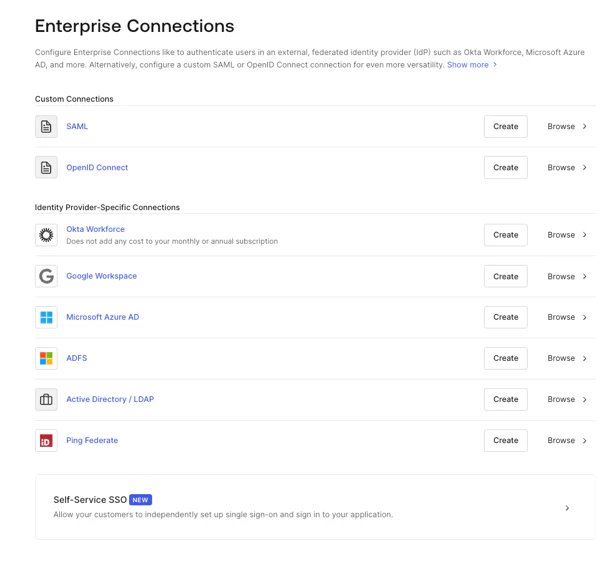
1. [Auth0 Dashboard > Authentication > Enterprise](https://manage.auth0.com/#/connections/enterprise) に移動し、**Open ID Connect** を見つけて **Create** を選択します。
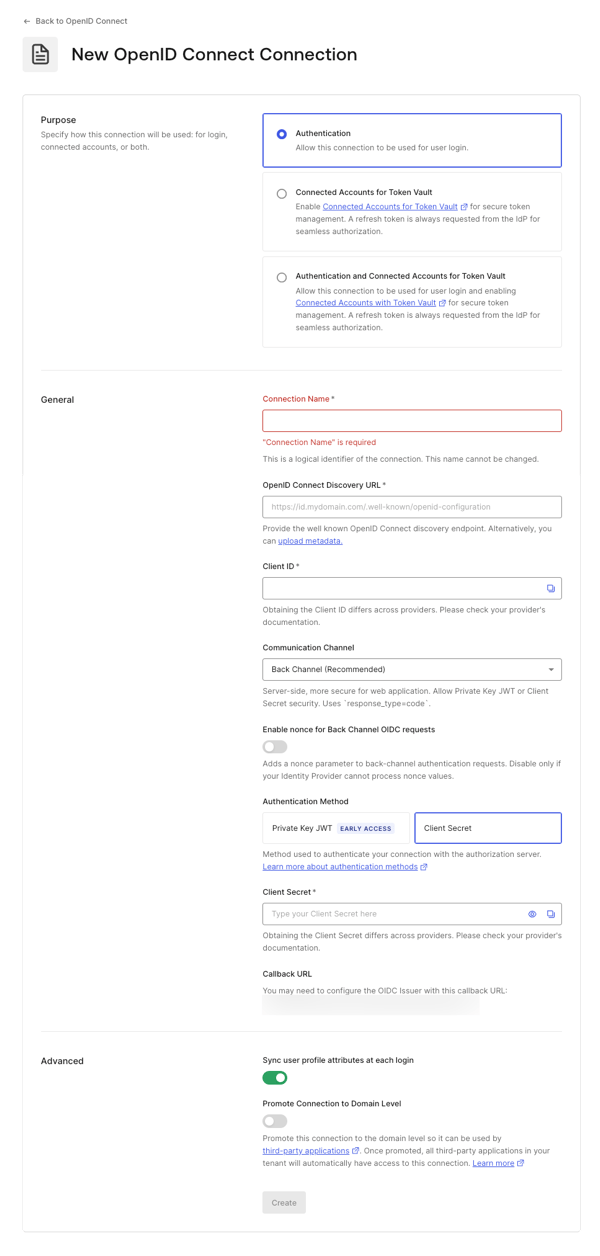
 2. 接続の詳細を入力し、**Create:** を選択します。
 | **フィールド** | **説明** |
| ---------------------------------------------- | --------------------------------------------------------------------------------------------------------------------------------------------------------------------------------------------------------------------------------------------------------------------------------------------------------------------------------------------------------------------------------------------------------------------------------------------------------------------------------------- |
| **Purpose** | 接続の用途を指定します。ユーザー認証、外部アカウントを Auth0 に接続するため、またはその両方に使用できます。詳しくは、[ユーザー認証と Connected Accounts の比較](/docs/ja-jp/secure/tokens/token-vault/connected-accounts-for-token-vault#user-authentication-vs-connected-accounts) をご覧ください。 |
| **Connection name** | 接続の論理識別子です。テナント内で一意である必要があります。いったん設定すると、この名前は変更できません。 |
| **OpenID Connect Discovery URL** | Auth0 が well-known OpenID Connect discovery endpoint を見つけるための URL です。通常は
| **フィールド** | **説明** |
| ---------------------------------------------- | --------------------------------------------------------------------------------------------------------------------------------------------------------------------------------------------------------------------------------------------------------------------------------------------------------------------------------------------------------------------------------------------------------------------------------------------------------------------------------------- |
| **Purpose** | 接続の用途を指定します。ユーザー認証、外部アカウントを Auth0 に接続するため、またはその両方に使用できます。詳しくは、[ユーザー認証と Connected Accounts の比較](/docs/ja-jp/secure/tokens/token-vault/connected-accounts-for-token-vault#user-authentication-vs-connected-accounts) をご覧ください。 |
| **Connection name** | 接続の論理識別子です。テナント内で一意である必要があります。いったん設定すると、この名前は変更できません。 |
| **OpenID Connect Discovery URL** | Auth0 が well-known OpenID Connect discovery endpoint を見つけるための URL です。通常は /.well-known/openid-configuration エンドポイントで利用できます。ベース URL または完全な URL を入力できます。その場所で見つかった場合は緑色のチェックマーク、見つからなかった場合は赤色のマーク、ファイルは見つかったものの設定ファイルに必要な情報が含まれていない場合はエラーメッセージが表示されます。詳しくは、[OIDC ディスカバリーを使用したアプリケーションの設定](/docs/ja-jp/get-started/applications/configure-applications-with-oidc-discovery) をご覧ください。 |
| **Client ID** | プロバイダーから提供される識別子です。登録済みアプリケーションを一意に識別します。OIDC IDプロバイダーに登録したアプリの Client ID として保存した値を入力します。この手順の管理方法はプロバイダーごとに異なります。 |
| **Communication Channel** | Front Channel または Back Channel に設定します。Front Channel では、response\_mode=form\_post と response\_type=id\_token を使用する OIDC プロトコルを利用します。Back Channel では response\_type=code を使用します。 |
| **Authentication Method** | アプリケーションが Auth0 で認証を行う方法を選択します。 |
| **Client Secret** | 前の手順で Back Channel を選択した場合に利用できます。これはプロバイダーから提供されるシークレットで、この手順の管理方法はプロバイダーごとに異なります。 |
| **Callback URL** | ユーザーの認証後に Auth0 がリダイレクトする URL です。この値が、OIDC IDプロバイダーに登録したアプリに設定されていることを確認してください。 |
| **Sync user profile attributes at each login** | 選択すると、ユーザーがログインするたびに、テナントで関連する name、nickname、given\_name、family\_name、または picture のルート属性が更新されます。 |
| **Promote Connection to Domain Level** | サードパーティアプリケーションがこの接続にアクセスできるようにします。 |
3. **設定** ビューで、必要に応じて追加の設定調整を行います。
| **Field** | **Description** |
| -------------------------------------- | -------------------------------------------------------------------------------------------------------------------------------------------------------------------------------------------------------------------------------------------------- |
| **Connection Name** | この接続の作成時に指定した名前です。変更はできません。 |
| **Connection Metadata** | 前の画面で指定した Well-Known Endpoint URL に基づいて自動生成されますが、新しいメタデータファイルをアップロードして上書きできます。 |
| **Authentication** | **Front Channel** または **Back Channel** に設定します。Front Channel では、`response_mode=form_post` と `response_type=id_token` を使用する OIDC プロトコルを利用します。Back Channel では `response_type=code` を使用します。更新するには **Manage Authentication** を選択し、Credentials タブで設定します。 |
| **Scopes** | アイデンティティプロバイダーへの接続時に要求する Auth0 スコープのカンマ区切りリストです。これはユーザープロファイルに保存されるデータに影響します。少なくとも `openid` スコープを含める必要があります。なお、この接続では `/userinfo` エンドポイントは呼び出されず、ユーザーのクレームが `id_token` に含まれていることを前提としています。 |
| **Callback URL** | 一部のプロバイダーでは、OIDC 接続を完了するためにこの URL が必要です。 |
| **User Mapping** | 特定のユーザー属性を接続変数にマッピングするためのテンプレートを提供します。 |
| **Connection Profile** | 接続プロファイルの変更方法については、[Configure PKCE and Claim Mapping for OIDC Connections](/docs/ja-jp/authenticate/identity-providers/enterprise-identity-providers/configure-pkce-claim-mapping-for-oidc) を参照してください。 |
| **Purpose** | この接続の用途を指定します。ユーザー認証、外部アカウントの Auth0 への接続、またはその両方に使用できます。詳しくは、[User authentication vs Connected Accounts](/docs/ja-jp/secure/tokens/token-vault/connected-accounts-for-token-vault#user-authentication-vs-connected-accounts) を参照してください |
| **グローバルトークン失効** | 提供されたエンドポイントを使用して、リフレッシュトークンを取り消すことでユーザーの Auth0 セッションを終了します。Universal Logout および Okta Workforce Identity Cloud と併用できます。 |
| **Promote Connection to Domain Level** | サードパーティアプリケーションがこの接続にアクセスできるようにします。 |
4. **Provisioning** ビューで、Auth0 でユーザープロファイルを作成および更新する方法を設定します。
| **Field** | **Description** |
| ---------------------------------------------- | ----------------------------------------------------------------------------------------------------------------------------------------------------------------------- |
| **Sync user profile attributes at each login** | 有効にすると、Auth0 はユーザーがログインするたびにユーザープロファイルデータを自動的に同期し、接続元で行われた変更が Auth0 に自動的に反映されるようにします。 |
| **Sync Frequency** | ユーザープロファイルを更新する頻度を指定します。 |
| **Sync user profiles using SCIM** | 有効にすると、Auth0 は SCIM を使用してユーザープロファイルデータを同期できるようになります。詳しくは、Configure Inbound SCIM を参照してください。 |
5. **Login Experience** ビューで、この接続を使用したユーザーのログイン方法を設定します。
| Field | Description |
| ----------------------------- | ------------------------------------------------------------------------------------------------------------------------------------------------------------------------- |
| **Home Realm Discovery** | ユーザーのメールドメインを、指定された IDプロバイダーのドメインと照合します。詳しくは、[Configure Identifier First Authentication](/docs/ja-jp/authenticate/login/auth0-universal-login/identifier-first) を参照してください |
| **Display connection button** | このオプションでは、アプリケーションの接続ボタンをカスタマイズするための以下の設定項目が表示されます。 |
オプション項目は Universal Login でのみ使用できます。クラシックログインを使用している場合、Add ボタン、Button display name、Button logo URL は表示されません。
6. **変更を保存** を選択します。
### Management API を使用してエンタープライズ接続を作成する
以下の例では、Auth0 の Management API を使用して接続を作成するさまざまな方法を紹介します。メタデータ URI を指定する方法と、OIDC URL を明示的に設定する方法があります。
OIDC 接続では、Auth0 はメタデータディスカバリードキュメントに 128 KB のサイズ制限を適用し、この制限を超えると `Discovery document exceeds the maximum allowed size of 128 KB` エラーが発生します。
詳しくは、[IDプロバイダー](/docs/ja-jp/authenticate/identity-providers) を参照してください。
#### ディスカバリーエンドポイントでフロントチャネルを使用する
```bash cURL theme={null}
curl --request POST \
--url 'https://{yourDomain}/api/v2/connections' \
--header 'authorization: Bearer MGMT_API_ACCESS_TOKEN' \
--data '{ "strategy": "oidc", "name": "CONNECTION_NAME", "options": { "type": "front_channel", "discovery_url": "https://IDP_DOMAIN/.well-known/openid-configuration", "client_id" : "IDP_CLIENT_ID", "scopes": "openid profile" } }'
```
```csharp C# theme={null}
var client = new RestClient("https://{yourDomain}/api/v2/connections");
var request = new RestRequest(Method.POST);
request.AddHeader("authorization", "Bearer MGMT_API_ACCESS_TOKEN");
request.AddParameter("undefined", "{ "strategy": "oidc", "name": "CONNECTION_NAME", "options": { "type": "front_channel", "discovery_url": "https://IDP_DOMAIN/.well-known/openid-configuration", "client_id" : "IDP_CLIENT_ID", "scopes": "openid profile" } }", ParameterType.RequestBody);
IRestResponse response = client.Execute(request);
```
```go Go theme={null}
package main
import (
"fmt"
"strings"
"net/http"
"io/ioutil"
)
func main() {
url := "https://{yourDomain}/api/v2/connections"
payload := strings.NewReader("{ "strategy": "oidc", "name": "CONNECTION_NAME", "options": { "type": "front_channel", "discovery_url": "https://IDP_DOMAIN/.well-known/openid-configuration", "client_id" : "IDP_CLIENT_ID", "scopes": "openid profile" } }")
req, _ := http.NewRequest("POST", url, payload)
req.Header.Add("authorization", "Bearer MGMT_API_ACCESS_TOKEN")
res, _ := http.DefaultClient.Do(req)
defer res.Body.Close()
body, _ := ioutil.ReadAll(res.Body)
fmt.Println(res)
fmt.Println(string(body))
}
```
```java Java theme={null}
HttpResponse response = Unirest.post("https://{yourDomain}/api/v2/connections")
.header("authorization", "Bearer MGMT_API_ACCESS_TOKEN")
.body("{ "strategy": "oidc", "name": "CONNECTION_NAME", "options": { "type": "front_channel", "discovery_url": "https://IDP_DOMAIN/.well-known/openid-configuration", "client_id" : "IDP_CLIENT_ID", "scopes": "openid profile" } }")
.asString();
```
```javascript Node.JS theme={null}
var axios = require("axios").default;
var options = {
method: 'POST',
url: 'https://{yourDomain}/api/v2/connections',
headers: {authorization: 'Bearer MGMT_API_ACCESS_TOKEN'},
data: {
strategy: 'oidc',
name: 'CONNECTION_NAME',
options: {
type: 'front_channel',
discovery_url: 'https://IDP_DOMAIN/.well-known/openid-configuration',
client_id: 'IDP_CLIENT_ID',
scopes: 'openid profile'
}
}
};
axios.request(options).then(function (response) {
console.log(response.data);
}).catch(function (error) {
console.error(error);
});
```
```php PHP theme={null}
$curl = curl_init();
curl_setopt_array($curl, [
CURLOPT_URL => "https://{yourDomain}/api/v2/connections",
CURLOPT_RETURNTRANSFER => true,
CURLOPT_ENCODING => "",
CURLOPT_MAXREDIRS => 10,
CURLOPT_TIMEOUT => 30,
CURLOPT_HTTP_VERSION => CURL_HTTP_VERSION_1_1,
CURLOPT_CUSTOMREQUEST => "POST",
CURLOPT_POSTFIELDS => "{ "strategy": "oidc", "name": "CONNECTION_NAME", "options": { "type": "front_channel", "discovery_url": "https://IDP_DOMAIN/.well-known/openid-configuration", "client_id" : "IDP_CLIENT_ID", "scopes": "openid profile" } }",
CURLOPT_HTTPHEADER => [
"authorization: Bearer MGMT_API_ACCESS_TOKEN"
],
]);
$response = curl_exec($curl);
$err = curl_error($curl);
curl_close($curl);
if ($err) {
echo "cURL Error #:" . $err;
} else {
echo $response;
}
```
```python Python theme={null}
import http.client
conn = http.client.HTTPSConnection("")
payload = "{ "strategy": "oidc", "name": "CONNECTION_NAME", "options": { "type": "front_channel", "discovery_url": "https://IDP_DOMAIN/.well-known/openid-configuration", "client_id" : "IDP_CLIENT_ID", "scopes": "openid profile" } }"
headers = { 'authorization': "Bearer MGMT_API_ACCESS_TOKEN" }
conn.request("POST", "/{yourDomain}/api/v2/connections", payload, headers)
res = conn.getresponse()
data = res.read()
print(data.decode("utf-8"))
```
```ruby Ruby theme={null}
require 'uri'
require 'net/http'
require 'openssl'
url = URI("https://{yourDomain}/api/v2/connections")
http = Net::HTTP.new(url.host, url.port)
http.use_ssl = true
http.verify_mode = OpenSSL::SSL::VERIFY_PEER
request = Net::HTTP::Post.new(url)
request["authorization"] = 'Bearer MGMT_API_ACCESS_TOKEN'
request.body = "{ "strategy": "oidc", "name": "CONNECTION_NAME", "options": { "type": "front_channel", "discovery_url": "https://IDP_DOMAIN/.well-known/openid-configuration", "client_id" : "IDP_CLIENT_ID", "scopes": "openid profile" } }"
response = http.request(request)
puts response.read_body
```
#### ディスカバリーエンドポイントでバックチャネルを利用する
```bash cURL theme={null}
curl --request POST \
--url 'https://{yourDomain}/api/v2/connections' \
--header 'authorization: Bearer MGMT_API_ACCESS_TOKEN' \
--data '{ "strategy": "oidc", "name": "CONNECTION_NAME", "options": { "type": "back_channel", "discovery_url": "https://IDP_DOMAIN/.well-known/openid-configuration", "client_id" : "IDP_CLIENT_ID", "client_secret" : "IDP_CLIENT_SECRET", "scopes": "openid profile" } }'
```
```csharp C# theme={null}
var client = new RestClient("https://{yourDomain}/api/v2/connections");
var request = new RestRequest(Method.POST);
request.AddHeader("authorization", "Bearer MGMT_API_ACCESS_TOKEN");
request.AddParameter("undefined", "{ "strategy": "oidc", "name": "CONNECTION_NAME", "options": { "type": "back_channel", "discovery_url": "https://IDP_DOMAIN/.well-known/openid-configuration", "client_id" : "IDP_CLIENT_ID", "client_secret" : "IDP_CLIENT_SECRET", "scopes": "openid profile" } }", ParameterType.RequestBody);
IRestResponse response = client.Execute(request);
```
```go Go theme={null}
package main
import (
"fmt"
"strings"
"net/http"
"io/ioutil"
)
func main() {
url := "https://{yourDomain}/api/v2/connections"
payload := strings.NewReader("{ "strategy": "oidc", "name": "CONNECTION_NAME", "options": { "type": "back_channel", "discovery_url": "https://IDP_DOMAIN/.well-known/openid-configuration", "client_id" : "IDP_CLIENT_ID", "client_secret" : "IDP_CLIENT_SECRET", "scopes": "openid profile" } }")
req, _ := http.NewRequest("POST", url, payload)
req.Header.Add("authorization", "Bearer MGMT_API_ACCESS_TOKEN")
res, _ := http.DefaultClient.Do(req)
defer res.Body.Close()
body, _ := ioutil.ReadAll(res.Body)
fmt.Println(res)
fmt.Println(string(body))
}
```
```java Java theme={null}
HttpResponse response = Unirest.post("https://{yourDomain}/api/v2/connections")
.header("authorization", "Bearer MGMT_API_ACCESS_TOKEN")
.body("{ "strategy": "oidc", "name": "CONNECTION_NAME", "options": { "type": "back_channel", "discovery_url": "https://IDP_DOMAIN/.well-known/openid-configuration", "client_id" : "IDP_CLIENT_ID", "client_secret" : "IDP_CLIENT_SECRET", "scopes": "openid profile" } }")
.asString();
```
```javascript Node.JS theme={null}
var axios = require("axios").default;
var options = {
method: 'POST',
url: 'https://{yourDomain}/api/v2/connections',
headers: {authorization: 'Bearer MGMT_API_ACCESS_TOKEN'},
data: {
strategy: 'oidc',
name: 'CONNECTION_NAME',
options: {
type: 'back_channel',
discovery_url: 'https://IDP_DOMAIN/.well-known/openid-configuration',
client_id: 'IDP_CLIENT_ID',
client_secret: 'IDP_CLIENT_SECRET',
scopes: 'openid profile'
}
}
};
axios.request(options).then(function (response) {
console.log(response.data);
}).catch(function (error) {
console.error(error);
});
```
```php PHP theme={null}
$curl = curl_init();
curl_setopt_array($curl, [
CURLOPT_URL => "https://{yourDomain}/api/v2/connections",
CURLOPT_RETURNTRANSFER => true,
CURLOPT_ENCODING => "",
CURLOPT_MAXREDIRS => 10,
CURLOPT_TIMEOUT => 30,
CURLOPT_HTTP_VERSION => CURL_HTTP_VERSION_1_1,
CURLOPT_CUSTOMREQUEST => "POST",
CURLOPT_POSTFIELDS => "{ "strategy": "oidc", "name": "CONNECTION_NAME", "options": { "type": "back_channel", "discovery_url": "https://IDP_DOMAIN/.well-known/openid-configuration", "client_id" : "IDP_CLIENT_ID", "client_secret" : "IDP_CLIENT_SECRET", "scopes": "openid profile" } }",
CURLOPT_HTTPHEADER => [
"authorization: Bearer MGMT_API_ACCESS_TOKEN"
],
]);
$response = curl_exec($curl);
$err = curl_error($curl);
curl_close($curl);
if ($err) {
echo "cURL Error #:" . $err;
} else {
echo $response;
}
```
```python Python theme={null}
import http.client
conn = http.client.HTTPSConnection("")
payload = "{ "strategy": "oidc", "name": "CONNECTION_NAME", "options": { "type": "back_channel", "discovery_url": "https://IDP_DOMAIN/.well-known/openid-configuration", "client_id" : "IDP_CLIENT_ID", "client_secret" : "IDP_CLIENT_SECRET", "scopes": "openid profile" } }"
headers = { 'authorization': "Bearer MGMT_API_ACCESS_TOKEN" }
conn.request("POST", "/{yourDomain}/api/v2/connections", payload, headers)
res = conn.getresponse()
data = res.read()
print(data.decode("utf-8"))
```
```ruby Ruby theme={null}
require 'uri'
require 'net/http'
require 'openssl'
url = URI("https://{yourDomain}/api/v2/connections")
http = Net::HTTP.new(url.host, url.port)
http.use_ssl = true
http.verify_mode = OpenSSL::SSL::VERIFY_PEER
request = Net::HTTP::Post.new(url)
request["authorization"] = 'Bearer MGMT_API_ACCESS_TOKEN'
request.body = "{ "strategy": "oidc", "name": "CONNECTION_NAME", "options": { "type": "back_channel", "discovery_url": "https://IDP_DOMAIN/.well-known/openid-configuration", "client_id" : "IDP_CLIENT_ID", "client_secret" : "IDP_CLIENT_SECRET", "scopes": "openid profile" } }"
response = http.request(request)
puts response.read_body
```
#### 発行者設定を指定してバックチャネルを使用する
```bash cURL theme={null}
curl --request POST \
--url 'https://{yourDomain}/api/v2/connections' \
--header 'authorization: Bearer MGMT_API_ACCESS_TOKEN' \
--data '{ "strategy": "oidc", "name": "CONNECTION_NAME", "options": { "type": "back_channel", "issuer": "https://IDP_DOMAIN", "authorization_endpoint": "https://IDP_DOMAIN/authorize", "client_secret" : "IDP_CLIENT_SECRET", "client_id" : "IDP_CLIENT_ID", "scopes": "openid profile" } }'
```
```csharp C# theme={null}
var client = new RestClient("https://{yourDomain}/api/v2/connections");
var request = new RestRequest(Method.POST);
request.AddHeader("authorization", "Bearer MGMT_API_ACCESS_TOKEN");
request.AddParameter("undefined", "{ "strategy": "oidc", "name": "CONNECTION_NAME", "options": { "type": "back_channel", "issuer": "https://IDP_DOMAIN", "authorization_endpoint": "https://IDP_DOMAIN/authorize", "client_secret" : "IDP_CLIENT_SECRET", "client_id" : "IDP_CLIENT_ID", "scopes": "openid profile" } }", ParameterType.RequestBody);
IRestResponse response = client.Execute(request);
```
```go Go theme={null}
package main
import (
"fmt"
"strings"
"net/http"
"io/ioutil"
)
func main() {
url := "https://{yourDomain}/api/v2/connections"
payload := strings.NewReader("{ "strategy": "oidc", "name": "CONNECTION_NAME", "options": { "type": "back_channel", "issuer": "https://IDP_DOMAIN", "authorization_endpoint": "https://IDP_DOMAIN/authorize", "client_secret" : "IDP_CLIENT_SECRET", "client_id" : "IDP_CLIENT_ID", "scopes": "openid profile" } }")
req, _ := http.NewRequest("POST", url, payload)
req.Header.Add("authorization", "Bearer MGMT_API_ACCESS_TOKEN")
res, _ := http.DefaultClient.Do(req)
defer res.Body.Close()
body, _ := ioutil.ReadAll(res.Body)
fmt.Println(res)
fmt.Println(string(body))
}
```
```java Java theme={null}
HttpResponse response = Unirest.post("https://{yourDomain}/api/v2/connections")
.header("authorization", "Bearer MGMT_API_ACCESS_TOKEN")
.body("{ "strategy": "oidc", "name": "CONNECTION_NAME", "options": { "type": "back_channel", "issuer": "https://IDP_DOMAIN", "authorization_endpoint": "https://IDP_DOMAIN/authorize", "client_secret" : "IDP_CLIENT_SECRET", "client_id" : "IDP_CLIENT_ID", "scopes": "openid profile" } }")
.asString();
```
```javascript Node.JS theme={null}
var axios = require("axios").default;
var options = {
method: 'POST',
url: 'https://{yourDomain}/api/v2/connections',
headers: {authorization: 'Bearer MGMT_API_ACCESS_TOKEN'},
data: {
strategy: 'oidc',
name: 'CONNECTION_NAME',
options: {
type: 'back_channel',
issuer: 'https://IDP_DOMAIN',
authorization_endpoint: 'https://IDP_DOMAIN/authorize',
client_secret: 'IDP_CLIENT_SECRET',
client_id: 'IDP_CLIENT_ID',
scopes: 'openid profile'
}
}
};
axios.request(options).then(function (response) {
console.log(response.data);
}).catch(function (error) {
console.error(error);
});
```
```php PHP theme={null}
$curl = curl_init();
curl_setopt_array($curl, [
CURLOPT_URL => "https://{yourDomain}/api/v2/connections",
CURLOPT_RETURNTRANSFER => true,
CURLOPT_ENCODING => "",
CURLOPT_MAXREDIRS => 10,
CURLOPT_TIMEOUT => 30,
CURLOPT_HTTP_VERSION => CURL_HTTP_VERSION_1_1,
CURLOPT_CUSTOMREQUEST => "POST",
CURLOPT_POSTFIELDS => "{ "strategy": "oidc", "name": "CONNECTION_NAME", "options": { "type": "back_channel", "issuer": "https://IDP_DOMAIN", "authorization_endpoint": "https://IDP_DOMAIN/authorize", "client_secret" : "IDP_CLIENT_SECRET", "client_id" : "IDP_CLIENT_ID", "scopes": "openid profile" } }",
CURLOPT_HTTPHEADER => [
"authorization: Bearer MGMT_API_ACCESS_TOKEN"
],
]);
$response = curl_exec($curl);
$err = curl_error($curl);
curl_close($curl);
if ($err) {
echo "cURL Error #:" . $err;
} else {
echo $response;
}
```
```python Python theme={null}
import http.client
conn = http.client.HTTPSConnection("")
payload = "{ "strategy": "oidc", "name": "CONNECTION_NAME", "options": { "type": "back_channel", "issuer": "https://IDP_DOMAIN", "authorization_endpoint": "https://IDP_DOMAIN/authorize", "client_secret" : "IDP_CLIENT_SECRET", "client_id" : "IDP_CLIENT_ID", "scopes": "openid profile" } }"
headers = { 'authorization': "Bearer MGMT_API_ACCESS_TOKEN" }
conn.request("POST", "/{yourDomain}/api/v2/connections", payload, headers)
res = conn.getresponse()
data = res.read()
print(data.decode("utf-8"))
```
```ruby Ruby theme={null}
require 'uri'
require 'net/http'
require 'openssl'
url = URI("https://{yourDomain}/api/v2/connections")
http = Net::HTTP.new(url.host, url.port)
http.use_ssl = true
http.verify_mode = OpenSSL::SSL::VERIFY_PEER
request = Net::HTTP::Post.new(url)
request["authorization"] = 'Bearer MGMT_API_ACCESS_TOKEN'
request.body = "{ "strategy": "oidc", "name": "CONNECTION_NAME", "options": { "type": "back_channel", "issuer": "https://IDP_DOMAIN", "authorization_endpoint": "https://IDP_DOMAIN/authorize", "client_secret" : "IDP_CLIENT_SECRET", "client_id" : "IDP_CLIENT_ID", "scopes": "openid profile" } }"
response = http.request(request)
puts response.read_body
```
#### 発行者設定を指定してフロントチャネル方式を使用する
```bash cURL theme={null}
curl --request POST \
--url 'https://{yourDomain}/api/v2/connections' \
--header 'authorization: Bearer MGMT_API_ACCESS_TOKEN' \
--data '{ "strategy": "oidc", "name": "CONNECTION_NAME", "options": { "type": "front_channel", "issuer": "https://IDP_DOMAIN", "authorization_endpoint": "https://IDP_DOMAIN/authorize", "token_endpoint": "https://IDP_DOMAIN/oauth/token", "client_id" : "IDP_CLIENT_ID", "scopes": "openid profile" } }'
```
```csharp C# theme={null}
var client = new RestClient("https://{yourDomain}/api/v2/connections");
var request = new RestRequest(Method.POST);
request.AddHeader("authorization", "Bearer MGMT_API_ACCESS_TOKEN");
request.AddParameter("undefined", "{ "strategy": "oidc", "name": "CONNECTION_NAME", "options": { "type": "front_channel", "issuer": "https://IDP_DOMAIN", "authorization_endpoint": "https://IDP_DOMAIN/authorize", "token_endpoint": "https://IDP_DOMAIN/oauth/token", "client_id" : "IDP_CLIENT_ID", "scopes": "openid profile" } }", ParameterType.RequestBody);
IRestResponse response = client.Execute(request);
```
```go Go theme={null}
package main
import (
"fmt"
"strings"
"net/http"
"io/ioutil"
)
func main() {
url := "https://{yourDomain}/api/v2/connections"
payload := strings.NewReader("{ "strategy": "oidc", "name": "CONNECTION_NAME", "options": { "type": "front_channel", "issuer": "https://IDP_DOMAIN", "authorization_endpoint": "https://IDP_DOMAIN/authorize", "token_endpoint": "https://IDP_DOMAIN/oauth/token", "client_id" : "IDP_CLIENT_ID", "scopes": "openid profile" } }")
req, _ := http.NewRequest("POST", url, payload)
req.Header.Add("authorization", "Bearer MGMT_API_ACCESS_TOKEN")
res, _ := http.DefaultClient.Do(req)
defer res.Body.Close()
body, _ := ioutil.ReadAll(res.Body)
fmt.Println(res)
fmt.Println(string(body))
}
```
```java Java theme={null}
HttpResponse response = Unirest.post("https://{yourDomain}/api/v2/connections")
.header("authorization", "Bearer MGMT_API_ACCESS_TOKEN")
.body("{ "strategy": "oidc", "name": "CONNECTION_NAME", "options": { "type": "front_channel", "issuer": "https://IDP_DOMAIN", "authorization_endpoint": "https://IDP_DOMAIN/authorize", "token_endpoint": "https://IDP_DOMAIN/oauth/token", "client_id" : "IDP_CLIENT_ID", "scopes": "openid profile" } }")
.asString();
```
```javascript Node.JS theme={null}
var axios = require("axios").default;
var options = {
method: 'POST',
url: 'https://{yourDomain}/api/v2/connections',
headers: {authorization: 'Bearer MGMT_API_ACCESS_TOKEN'},
data: {
strategy: 'oidc',
name: 'CONNECTION_NAME',
options: {
type: 'front_channel',
issuer: 'https://IDP_DOMAIN',
authorization_endpoint: 'https://IDP_DOMAIN/authorize',
token_endpoint: 'https://IDP_DOMAIN/oauth/token',
client_id: 'IDP_CLIENT_ID',
scopes: 'openid profile'
}
}
};
axios.request(options).then(function (response) {
console.log(response.data);
}).catch(function (error) {
console.error(error);
});
```
```php PHP theme={null}
$curl = curl_init();
curl_setopt_array($curl, [
CURLOPT_URL => "https://{yourDomain}/api/v2/connections",
CURLOPT_RETURNTRANSFER => true,
CURLOPT_ENCODING => "",
CURLOPT_MAXREDIRS => 10,
CURLOPT_TIMEOUT => 30,
CURLOPT_HTTP_VERSION => CURL_HTTP_VERSION_1_1,
CURLOPT_CUSTOMREQUEST => "POST",
CURLOPT_POSTFIELDS => "{ "strategy": "oidc", "name": "CONNECTION_NAME", "options": { "type": "front_channel", "issuer": "https://IDP_DOMAIN", "authorization_endpoint": "https://IDP_DOMAIN/authorize", "token_endpoint": "https://IDP_DOMAIN/oauth/token", "client_id" : "IDP_CLIENT_ID", "scopes": "openid profile" } }",
CURLOPT_HTTPHEADER => [
"authorization: Bearer MGMT_API_ACCESS_TOKEN"
],
]);
$response = curl_exec($curl);
$err = curl_error($curl);
curl_close($curl);
if ($err) {
echo "cURL Error #:" . $err;
} else {
echo $response;
}
```
```python Python theme={null}
import http.client
conn = http.client.HTTPSConnection("")
payload = "{ "strategy": "oidc", "name": "CONNECTION_NAME", "options": { "type": "front_channel", "issuer": "https://IDP_DOMAIN", "authorization_endpoint": "https://IDP_DOMAIN/authorize", "token_endpoint": "https://IDP_DOMAIN/oauth/token", "client_id" : "IDP_CLIENT_ID", "scopes": "openid profile" } }"
headers = { 'authorization': "Bearer MGMT_API_ACCESS_TOKEN" }
conn.request("POST", "/{yourDomain}/api/v2/connections", payload, headers)
res = conn.getresponse()
data = res.read()
print(data.decode("utf-8"))
```
```ruby Ruby theme={null}
require 'uri'
require 'net/http'
require 'openssl'
url = URI("https://{yourDomain}/api/v2/connections")
http = Net::HTTP.new(url.host, url.port)
http.use_ssl = true
http.verify_mode = OpenSSL::SSL::VERIFY_PEER
request = Net::HTTP::Post.new(url)
request["authorization"] = 'Bearer MGMT_API_ACCESS_TOKEN'
request.body = "{ "strategy": "oidc", "name": "CONNECTION_NAME", "options": { "type": "front_channel", "issuer": "https://IDP_DOMAIN", "authorization_endpoint": "https://IDP_DOMAIN/authorize", "token_endpoint": "https://IDP_DOMAIN/oauth/token", "client_id" : "IDP_CLIENT_ID", "scopes": "openid profile" } }"
response = http.request(request)
puts response.read_body
```
## PKCE とクレームマッピングを設定する
このエンタープライズ接続では、Proof Key for Code Exchange (PKCE) に加え、属性とトークンのマッピングもサポートできます。詳しくは、[OIDC 接続向けの PKCE とクレームマッピングを設定する](/docs/ja-jp/authenticate/identity-providers/enterprise-identity-providers/configure-pkce-claim-mapping-for-oidc)を参照してください。
## Auth0アプリケーションのエンタープライズ接続を有効にする
新しいエンタープライズ接続を使用するには、まず Auth0アプリケーションで[この接続を有効にする](/docs/ja-jp/authenticate/identity-providers/enterprise-identity-providers/enable-enterprise-connections)必要があります。
## 接続をテストする
これで、[接続をテストする](/docs/ja-jp/authenticate/identity-providers/enterprise-identity-providers/test-enterprise-connections)準備が整いました。
## 発行者メタデータを手動で設定する
Issuer URL エンドポイントの **発行者の詳細を表示** をクリックすると、データを確認し、必要に応じて調整できます。
## Auth0 とフェデレーションを行う
OpenID Connect エンタープライズ接続は、別の Auth0 テナントにフェデレーションする場合に便利です。**発行者** フィールドに Auth0 テナントの URL (例: `https://.us.auth0.com`) を入力し、**Client ID** フィールドに、フェデレーション先のテナント内にある任意のアプリケーションの Client ID を入力します。
新しいテナントの URL には `us` が含まれます。リージョン付きドメインが追加される前に作成されたテナントも、引き続き利用できます。たとえば、`https://{YOUR ACCOUNT}.auth0.com` です。
## グローバルトークン失効を設定する
この接続タイプはグローバルトークン失効エンドポイントをサポートしており、これにより、準拠したアイデンティティプロバイダーは Auth0 のユーザーセッションを失効させ、リフレッシュトークンを取り消し、安全なバックチャネルを使用するアプリケーションに対してバックチャネルログアウトを開始できます。
この機能は、Okta Workforce Identity の Universal Logout と組み合わせて使用できます。
詳細と設定手順については、[Universal Logout](/docs/ja-jp/authenticate/login/logout/universal-logout) を参照してください。