> ## Documentation Index
> Fetch the complete documentation index at: https://translations.mintlify.site/llms.txt
> Use this file to discover all available pages before exploring further.
# Login
> Universal Login の `login` 画面をカスタマイズするために利用できる、すべてのフックとメソッドについて説明します。
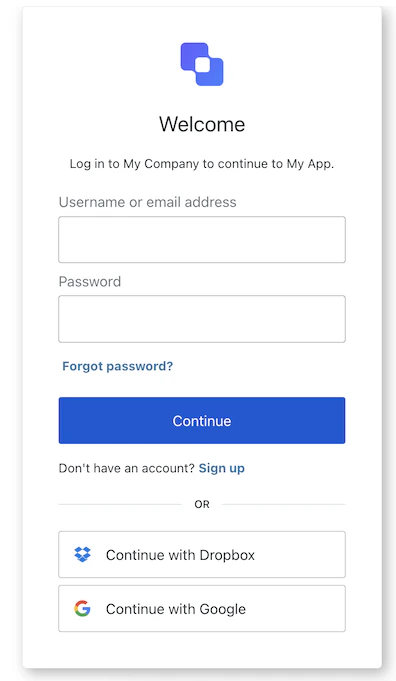
`login` 画面では、ユーザーの識別子とパスワードを入力します。テナントの設定によっては、この識別子としてメールアドレス、電話番号、またはユーザー名を使用できます。また、フェデレーテッド ID プロバイダー経由の認証と Google One Tap にも対応しています。
## インポート
各画面には、それぞれ固有のフックとメソッドのセットがあります。SDK は、各画面で **部分インポート** と **ルートインポート** をサポートしています。
* 部分インポート を使うと、特定のユースケースに必要なコードだけを含めることができます。
* ルートインポート を使うと、単一のバンドルからすべての画面を読み込めるため、想定されるあらゆる画面に対応する統一ビルドが必要な場合に便利です。
```jsx Import Example theme={null}
// ルートインポート
import { useLogin } from '@auth0/auth0-acul-react';
// 部分インポート
import {
useLogin,
// コンテキストフック
useUser,
useTenant,
useBranding,
useClient,
useOrganization,
usePrompt,
useScreen,
useTransaction,
useUntrustedData,
// 共通フック
useCurrentScreen,
useAuth0Themes,
useErrors,
// ユーティリティフック
useLoginIdentifiers,
useChangeLanguage,
// メソッド
login,
federatedLogin,
googleOneTap,
pickCountryCode,
} from "@auth0/auth0-acul-react/login";
function LoginForm() {
const { login, federatedLogin } = useLogin();
return (
login({ username: "user@example.com", password: "secret" })}>
Sign In
);
}
```
## コンテキストフック
`login` 画面で Auth0 のコンテキストデータへの読み取り専用アクセスを提供する、画面スコープのフックです。`@auth0/auth0-acul-react/login` からインポートします。
() => BrandingMembers }>
このフックは、`login` 画面に表示されるロゴ、色、テーマ設定などのブランディング設定を提供します。
```jsx Example theme={null}
import { useBranding } from '@auth0/auth0-acul-react/login';
function CustomTheme() {
const branding = useBranding();
}
```
() => ClientMembers }>
このフックは、`login` 画面用の `id`、`name`、`logoUrl` など、クライアント関連の設定を提供します。
```jsx Example theme={null}
import { useClient } from '@auth0/auth0-acul-react/login';
function AppInfo() {
const client = useClient();
}
```
() => OrganizationMembers }>
ログインが 組織 スコープの場合、このフックはユーザーの組織に関する情報を提供します。組織コンテキストが存在しない場合は `null` を返します。
```jsx Example theme={null}
import { useOrganization } from '@auth0/auth0-acul-react/login';
function OrgSelector() {
const organization = useOrganization();
if (!organization) {
return No organization context
;
}
}
```
() => PromptMembers }>
このフックには、認証フロー内の現在の prompt に関するデータが含まれます。
```jsx Example theme={null}
import { usePrompt } from '@auth0/auth0-acul-react/login';
function FlowInfo() {
const prompt = usePrompt();
}
```
() => ScreenMembersOnLogin }>
このフックには、設定やコンテキストを含む、`login` 画面固有の詳細が含まれます。
```jsx Example theme={null}
import { useScreen } from '@auth0/auth0-acul-react/login';
function ScreenDebug() {
const screen = useScreen();
}
```
() => TenantMembers }>
このフックには、`id` や関連するメタデータなど、テナント に関するデータが含まれます。
```jsx Example theme={null}
import { useTenant } from '@auth0/auth0-acul-react/login';
function TenantInfo() {
const tenant = useTenant();
}
```
() => TransactionMembersOnLogin }>
このフックは、アクティブな接続、利用可能なログイン方法、現在のフローの状態など、`login` 画面向けの transaction 固有のデータを提供します。
```jsx Example theme={null}
import { useTransaction } from '@auth0/auth0-acul-react/login';
function TransactionInfo() {
const transaction = useTransaction();
}
```
() => UntrustedDataMembers }>
このフックは、URLパラメーターから事前入力されたユーザー名など、画面に渡された信頼できないデータを扱います。
```jsx Example theme={null}
import { useUntrustedData } from '@auth0/auth0-acul-react/login';
function PrefilledForm() {
const untrustedData = useUntrustedData();
}
```
() => UserMembers }>
このフックは、`username`、`email`、利用可能な認証方法など、現在のユーザーの詳細を提供します。
```jsx Example theme={null}
import { useUser } from '@auth0/auth0-acul-react/login';
function UserProfile() {
const user = useUser();
}
```
LoginMembers}>
このフックは、`login` 画面で利用可能なすべてのメソッドとコンテキストを返します。
## メソッド
このメソッドは、Google One Tap の資格情報を使用してユーザーを認証し、別のログインページへのリダイレクトなしでワンクリックサインインを可能にします。
```jsx Example theme={null}
import { useLogin } from '@auth0/auth0-acul-react/login';
function GoogleOneTapHandler({ credential }) {
const { googleOneTap } = useLogin();
return googleOneTap({ one_tap_credential: credential });
}
```
**メソッドパラメーター**
Google Identity Services のプロンプトから返される Google One Tap 資格情報トークン。
このメソッドは、認証のためにユーザーを [Social](/docs/ja-jp/authenticate/identity-providers/social-identity-providers) または [Enterprise Identity Provider](/docs/ja-jp/authenticate/identity-providers/enterprise-identity-providers) (IdP) にリダイレクトします。
```jsx Example theme={null}
import { useLogin } from '@auth0/auth0-acul-react/login';
function SocialButton() {
const { federatedLogin } = useLogin();
return (
federatedLogin({ connection: 'google-oauth2' })}>
Sign in with Google
);
}
```
**メソッドパラメーター**
Social または Enterprise Identity Provider の接続名。
このメソッドは、ユーザーの資格情報を送信して `login` 画面での認証を完了します。
```jsx Example theme={null}
import { useLogin } from '@auth0/auth0-acul-react/login';
function LoginForm() {
const { login } = useLogin();
return (
login({ username: 'user@example.com', password: 'secret' })}>
Sign In
);
}
```
**メソッドパラメーター**
[LoginPayloadOptions](/docs/ja-jp/libraries/acul/react-sdk/API-Reference/Types/interfaces/LoginPayloadOptions)。
認証に使用するユーザー名またはメールアドレス。
認証に使用するパスワード。
テナントでボット検出が有効になっている場合に必要な CAPTCHA 値。
`ulp-` で始まる追加のカスタムフィールド (例: `'ulp-custom-field'`) 。
このメソッドは、電話番号を使ったログインフローの国番号選択画面に移動します。
```jsx Example theme={null}
import { useLogin } from '@auth0/auth0-acul-react/login';
function PhoneLogin() {
const { pickCountryCode } = useLogin();
return (
pickCountryCode()}>
Select Country Code
);
}
```
## 共通/ユーティリティ Hooks
useAuth0Themes} type="Hooks">
このフックは、branding コンテキストからフラット化された設定を含む現在のテーマオプションを取得します。
useChangeLanguage} type="Hooks">
このフックは、現在の ACUL 画面で表示言語を変更するための関数を返します。
useCurrentScreen} type="Hooks">
このフックは、現在の画面のコンテキストと状態を取得します。
useErrors} type="Hooks">
このフックは、画面上のサーバー、クライアント、開発者のエラーを読み取り、管理します。
useLoginIdentifiers} type="Hooks">
このフックは、現在のフローで有効な 識別子 types (`email`、`phone`、`username`) の一覧を返します。