> ## Documentation Index
> Fetch the complete documentation index at: https://translations.mintlify.site/llms.txt
> Use this file to discover all available pages before exploring further.
# ResetPasswordMfaPhoneChallenge
> Universal Login の `reset-password-mfa-phone-challenge` 画面をカスタマイズするために使用できるすべてのフックとメソッドについて説明します。
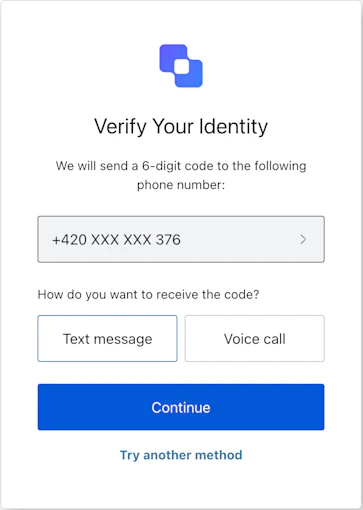
`reset-password-mfa-phone-challenge` 画面は、電話による多要素認証が必要な場合に、パスワードリセットフロー中に表示されます。この画面では、リセット処理を続行するための確認コードを受け取る配信方法 (SMS または音声通話) をユーザーに選択してもらいます。
## インポート
各画面には、それぞれ固有のフックとメソッドがあります。SDK は、各画面で**部分インポート**と**ルートインポート**をサポートしています。
* 部分インポートを使うと、特定のユースケースに必要なコードだけを含めることができます。
* ルートインポートを使うと、1 つのバンドルからすべての画面を読み込めるため、想定されるあらゆる画面に対応する単一のビルドが必要な場合に便利です。
```jsx Import Example theme={null}
// ルートインポート
import { useResetPasswordMfaPhoneChallenge } from '@auth0/auth0-acul-react';
// 部分インポート
import {
useResetPasswordMfaPhoneChallenge,
// コンテキストフック
useUser,
useTenant,
useBranding,
useClient,
useOrganization,
usePrompt,
useScreen,
useTransaction,
useUntrustedData,
// 共通フック
useCurrentScreen,
useAuth0Themes,
useErrors,
// ユーティリティフック
useChangeLanguage,
// メソッド
continueMethod,
tryAnotherMethod,
} from '@auth0/auth0-acul-react/reset-password-mfa-phone-challenge';
function ResetPasswordMfaPhoneChallengeScreen() {
const { continueMethod } = useResetPasswordMfaPhoneChallenge();
return (
continueMethod({ type: 'sms' })}>
Send Code via SMS
);
}
```
## コンテキストHooks
`reset-password-mfa-phone-challenge` 画面で Auth0 のコンテキストデータへの読み取り専用アクセスを提供する画面スコープのHooksです。`@auth0/auth0-acul-react/reset-password-mfa-phone-challenge` からインポートします。
() => BrandingMembers }>
このフックは、`reset-password-mfa-phone-challenge` 画面に表示されるロゴ、色、テーマ設定などのブランディング設定を提供します。
```jsx Example theme={null}
import { useBranding } from '@auth0/auth0-acul-react/reset-password-mfa-phone-challenge';
function CustomTheme() {
const branding = useBranding();
}
```
() => ClientMembers }>
このフックは、`reset-password-mfa-phone-challenge` 画面用の `id`、`name`、`logoUrl` など、クライアント関連の設定を提供します。
```jsx Example theme={null}
import { useClient } from '@auth0/auth0-acul-react/reset-password-mfa-phone-challenge';
function AppInfo() {
const client = useClient();
}
```
() => OrganizationMembers }>
このフックは、パスワードリセットが組織にスコープされている場合に、ユーザーの組織に関する情報を提供します。組織コンテキストが存在しない場合は `null` を返します。
```jsx Example theme={null}
import { useOrganization } from '@auth0/auth0-acul-react/reset-password-mfa-phone-challenge';
function OrgSelector() {
const organization = useOrganization();
if (!organization) {
return No Organization context
;
}
}
```
() => PromptMembers }>
このフックには、認証フローにおける現在の prompt に関するデータが含まれます。
```jsx Example theme={null}
import { usePrompt } from '@auth0/auth0-acul-react/reset-password-mfa-phone-challenge';
function FlowInfo() {
const prompt = usePrompt();
}
```
() => ScreenMembersOnResetPasswordMfaPhoneChallenge }>
このフックには、設定やコンテキストなど、`reset-password-mfa-phone-challenge` 画面に固有の詳細が含まれます。
```jsx Example theme={null}
import { useScreen } from '@auth0/auth0-acul-react/reset-password-mfa-phone-challenge';
function ScreenDebug() {
const screen = useScreen();
}
```
() => TenantMembers }>
このフックには、`id` や関連するメタデータなど、テナントに関するデータが含まれます。
```jsx Example theme={null}
import { useTenant } from '@auth0/auth0-acul-react/reset-password-mfa-phone-challenge';
function TenantInfo() {
const tenant = useTenant();
}
```
() => TransactionMembers }>
このフックは、アクティブな接続や現在のフローの状態など、`reset-password-mfa-phone-challenge` 画面に関するトランザクション固有のデータを提供します。
```jsx Example theme={null}
import { useTransaction } from '@auth0/auth0-acul-react/reset-password-mfa-phone-challenge';
function TransactionInfo() {
const transaction = useTransaction();
}
```
() => UntrustedDataMembers }>
このフックは、事前入力されたメールアドレスや、URLパラメーターから渡されたユーザー名など、画面に渡される信頼されていないデータを扱います。
```jsx Example theme={null}
import { useUntrustedData } from '@auth0/auth0-acul-react/reset-password-mfa-phone-challenge';
function PrefilledForm() {
const untrustedData = useUntrustedData();
}
```
() => UserMembers }>
このフックは、`username`、`email`、利用可能な認証方法など、現在のユーザーの詳細を提供します。
```jsx Example theme={null}
import { useUser } from '@auth0/auth0-acul-react/reset-password-mfa-phone-challenge';
function UserProfile() {
const user = useUser();
}
```
ResetPasswordMfaPhoneChallengeMembers}>
このフックは、`reset-password-mfa-phone-challenge` 画面で利用できるすべてのメソッドとコンテキストを返します。
## メソッド
このメソッドは、ユーザーが選択した配信方法を送信し、確認コードを送信して、パスワードリセットフローの MFA ステップを続行します。
```jsx Example theme={null}
import { useResetPasswordMfaPhoneChallenge } from '@auth0/auth0-acul-react/reset-password-mfa-phone-challenge';
function SendCodeForm() {
const { continueMethod } = useResetPasswordMfaPhoneChallenge();
return (
continueMethod({ type: 'sms' })}>
Send Code via SMS
);
}
```
**メソッドのパラメータ**
[ResetPasswordMfaPhoneChallengeContinueOptions](/docs/ja-jp/libraries/acul/react-sdk/API-Reference/Types/interfaces/ResetPasswordMfaPhoneChallengeContinueOptions)。
確認コードの受信に使用する、ユーザーが選択した配信方法。
* `sms`: テキストメッセージでコードを送信します。
* `voice`: 音声通話でコードを送信します。
このメソッドは、ユーザーが別の MFA方式 を選択できるようにします。
```jsx Example theme={null}
import { useResetPasswordMfaPhoneChallenge } from '@auth0/auth0-acul-react/reset-password-mfa-phone-challenge';
function TryAnotherMethodButton() {
const { tryAnotherMethod } = useResetPasswordMfaPhoneChallenge();
return (
tryAnotherMethod({ type: 'sms' })}>
Try Another Method
);
}
```
**メソッドのパラメータ**
[ResetPasswordMfaPhoneChallengeTryAnotherMethodOptions](/docs/ja-jp/libraries/acul/react-sdk/API-Reference/Types/interfaces/ResetPasswordMfaPhoneChallengeTryAnotherMethodOptions)。
現在の画面で最初に提示された、または選択された配信方法。
これは、API endpoint が `pick-authenticator` アクションを正しく処理するために必要です。
* `sms`: 現在の画面が SMS challenge 用であることを示します。
* `voice`: 現在の画面が Voice challenge 用であることを示します。
## 共通/ユーティリティ Hooks
useAuth0Themes} type="Hooks">
このフックは、ブランディングのコンテキストからフラット化された設定を含む現在のテーマオプションを取得します。
useChangeLanguage} type="Hooks">
このフックは、現在のACUL画面の表示言語を変更するための関数を返します。
useCurrentScreen} type="Hooks">
このフックは、現在の画面のコンテキストと状態を取得します。
useErrors} type="Hooks">
このフックは、画面上のサーバー、クライアント、開発者に関するエラーを取得して管理します。