Passer au contenu principal
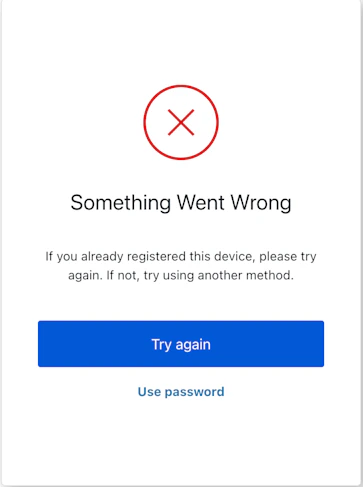
L’écran mfa-webauthn-error affiche une erreur survenue lors d’une tentative d’authentification WebAuthn et propose à l’utilisateur des options pour corriger la situation ou essayer une autre méthode.
MFAWebauthnError

Import

Chaque écran a son propre ensemble de hooks et de méthodes. Le SDK prend en charge l’import partiel et l’import racine pour chaque écran.
  • L’import partiel vous permet d’inclure uniquement le code nécessaire à votre cas d’usage.
  • L’import racine vous permet de charger tous les écrans à partir d’un seul bundle, ce qui est utile si vous voulez qu’une version unifiée gère tous les écrans possibles.
Import Example
// import racine
import { useMfaWebAuthnError } from '@auth0/auth0-acul-react';

// import partiel
import {
  useMfaWebAuthnError,
  // Hooks de contexte
  useUser,
  useTenant,
  useBranding,
  useClient,
  useOrganization,
  usePrompt,
  useScreen,
  useTransaction,
  useUntrustedData,
  // Hooks communs
  useCurrentScreen,
  useAuth0Themes,
  useErrors,
  // Hooks utilitaires
  useChangeLanguage,
  // Méthodes
  noThanks,
  tryAgain,
  tryAnotherMethod,
  usePassword,
} from "@auth0/auth0-acul-react/mfa-webauthn-error";

function MfaWebAuthnErrorScreen() {
  const { tryAgain } = useMfaWebAuthnError();
  return (
    <button onClick={() => tryAgain()}>
      Try Again
    </button>
  );
}

Hooks de contexte

Des hooks propres à l’écran qui fournissent un accès en lecture seule aux données de contexte Auth0 sur l’écran mfa-webauthn-error. Importez-les depuis @auth0/auth0-acul-react/mfa-webauthn-error.
useBranding
Ce hook fournit les paramètres d’image de marque, comme le logo, les couleurs et les réglages de thème affichés sur l’écran mfa-webauthn-error.
Example
import { useBranding } from '@auth0/auth0-acul-react/mfa-webauthn-error';
function CustomTheme() {
  const branding = useBranding();
}
useClient
Ce hook fournit les paramètres liés au client, comme id, name et logoUrl, pour l’écran mfa-webauthn-error.
Example
import { useClient } from '@auth0/auth0-acul-react/mfa-webauthn-error';
function AppInfo() {
  const client = useClient();
}
useOrganization
Ce hook fournit des renseignements sur l’organisation de l’utilisateur si le flux MFA est associé à une organisation. Retourne null lorsqu’aucun contexte d’organisation n’est présent.
Example
import { useOrganization } from '@auth0/auth0-acul-react/mfa-webauthn-error';
function OrgSelector() {
  const organization = useOrganization();
  if (!organization) {
    return <p>No organization context</p>;
  }
}
usePrompt
Ce hook contient des données sur l’invite actuelle dans le flux d’authentification.
Example
import { usePrompt } from '@auth0/auth0-acul-react/mfa-webauthn-error';
function FlowInfo() {
  const prompt = usePrompt();
}
Ce hook contient des détails propres à l’écran mfa-webauthn-error, notamment sa configuration et son contexte.
Example
import { useScreen } from '@auth0/auth0-acul-react/mfa-webauthn-error';
function ScreenDebug() {
  const screen = useScreen();
}
useTenant
Ce hook contient des données liées au tenant, comme id et les métadonnées associées.
Example
import { useTenant } from '@auth0/auth0-acul-react/mfa-webauthn-error';
function TenantInfo() {
  const tenant = useTenant();
}
useTransaction
Ce hook fournit des données propres à la transaction pour l’écran mfa-webauthn-error, comme l’état actuel du flux MFA.
Example
import { useTransaction } from '@auth0/auth0-acul-react/mfa-webauthn-error';
function TransactionInfo() {
  const transaction = useTransaction();
}
useUntrustedData
Ce hook gère les données non fiables transmises à l’écran, comme les valeurs préremplies provenant des paramètres d’URL.
Example
import { useUntrustedData } from '@auth0/auth0-acul-react/mfa-webauthn-error';
function PrefilledForm() {
  const untrustedData = useUntrustedData();
}
useUser
Ce hook fournit des renseignements sur l’utilisateur actif, notamment username, email et les méthodes d’authentification disponibles.
Example
import { useUser } from '@auth0/auth0-acul-react/mfa-webauthn-error';
function UserProfile() {
  const user = useUser();
}
useMfaWebAuthnError
Ce hook renvoie toutes les méthodes et tout le contexte disponibles dans l’écran mfa-webauthn-error.

Méthodes

noThanks
Promise<void>
Cette méthode ferme le message d’erreur WebAuthn et annule le flux MFA en cours.
Example
import { useMfaWebAuthnError } from '@auth0/auth0-acul-react/mfa-webauthn-error';

function NoThanksButton() {
  const { noThanks } = useMfaWebAuthnError();
  return (
    <button onClick={() => noThanks()}>
      No Thanks
    </button>
  );
}
tryAgain
Promise<void>
Cette méthode relance l’authentification WebAuthn après une erreur.
Example
import { useMfaWebAuthnError } from '@auth0/auth0-acul-react/mfa-webauthn-error';

function TryAgainButton() {
  const { tryAgain } = useMfaWebAuthnError();
  return (
    <button onClick={() => tryAgain()}>
      Try Again
    </button>
  );
}
tryAnotherMethod
Promise<void>
Cette méthode redirige vers l’écran de sélection de la méthode MFA afin que l’utilisateur puisse choisir un autre facteur d’authentification.
Example
import { useMfaWebAuthnError } from '@auth0/auth0-acul-react/mfa-webauthn-error';

function TryAnotherMethodButton() {
  const { tryAnotherMethod } = useMfaWebAuthnError();
  return (
    <button onClick={() => tryAnotherMethod()}>
      Try Another Method
    </button>
  );
}
usePassword
Promise<void>
Cette méthode fait basculer le processus d’authentification vers l’utilisation d’un mot de passe plutôt que de WebAuthn.
Example
import { useMfaWebAuthnError } from '@auth0/auth0-acul-react/mfa-webauthn-error';

function UsePasswordButton() {
  const { usePassword } = useMfaWebAuthnError();
  return (
    <button onClick={() => usePassword()}>
      Use Password Instead
    </button>
  );
}

Hooks communs et utilitaires

Ce hook récupère les options du thème actuel avec la configuration aplatie du contexte d’image de marque.
Ce hook renvoie une fonction permettant de changer la langue d’affichage sur l’écran ACUL actuel.
Ce hook récupère le contexte et l’état de l’écran actuel.
Ce hook lit et gère les erreurs côté serveur, côté client et de développement affichées à l’écran.