メインコンテンツへスキップ
アプリケーションで Custom Token Exchange を設定するには、次の作業が必要です。

前提条件

Custom Token Exchange を設定する前に、アプリケーションが次の前提条件を満たしていることを確認してください。
  • ファーストパーティ クライアントである
  • OIDC 準拠である
アプリケーションを設定するには、Auth0 Dashboard で Applications > Advanced Settings > OAuth に移動します。

アプリケーションで Custom Token Exchange を有効にする

Custom Token Exchange を有効にするには、新しいアプリケーションを作成するか、Auth0 Dashboard または Management API を使用して既存のアプリケーションを更新します。Custom Token Exchange で使用するアプリケーションは複数作成できます。 新しいアプリケーションを作成する場合:
  1. デフォルトでは、Custom Token Exchange は無効になっています。Custom Token Exchange を有効にするには、Management API を使用して Create a ClientPOST リクエストを送信するか、Update a ClientPATCH リクエストを送信します。token_exchangeallow_any_profile_of_type 属性を ["custom_authentication"] に設定します:
{
  "token_exchange": {
    "allow_any_profile_of_type": ["custom_authentication"]
  }
}
  1. アプリケーションで、Custom Token Exchange に使用する接続を有効にします。
  2. アプリケーションが ファーストパーティ として設定されており、Dashboard > Applications > Advanced Settings > OAuth で OIDC 準拠 として構成されていることを確認します。
インポートモードが ON の Custom DB でサポートされるのは、setUserById() 操作のみです。
アプリケーションを作成したら、後で /oauth/token エンドポイントを呼び出すときに使用する client_idclient_secret を控えておきます。

Custom Token Exchange Profile を設定する

各 Custom Token Exchange Profile は、subject_token_type と Action を 1 対 1 で対応付けます。Action には、特定のユースケース向けのロジックが含まれます。 特定の subject_token_type 値を指定して /oauth/token エンドポイントに送信された Custom Token Exchange リクエストは、対応する Custom Token Exchange Profile にマッピングされ、処理のために関連付けられた Action にルーティングされます。 Custom Token Exchange Profile を作成するには、次の手順を実行します。
  1. プロファイル用の Action を作成する
  2. Custom Token Exchange Profile を作成する
  3. Custom Token Exchange Profile を管理する

プロファイル用の Action を作成する

Custom Token Exchange の Event オブジェクトと API オブジェクトを使用して、次の処理を行う Action を作成します。
  • subject_token_type に基づいて subject_token をデコードおよび検証します。これにより、このトランザクションにおけるユーザーに関する情報を取得できます。
  • トランザクションに必要な認可ポリシーを適用します。
トランザクションを続行できることを確認したら、ユーザーを設定します。すると Auth0 は、ユーザー認証の一環として、このユーザーに対するアクセストークン、ID トークン、リフレッシュトークンを発行します。 Custom Token Exchange の Action の例については、ユースケースの例とコードサンプルを参照してください。 Action を作成したら、Auth0 Dashboard で追加してデプロイします。
  1. Actions > Library に移動します。
  2. Create Action > Build from Scratch を選択します。
  3. Create Action ダイアログで、名前を入力し、ドロップダウンから Custom Token Exchange トリガーを選択します。
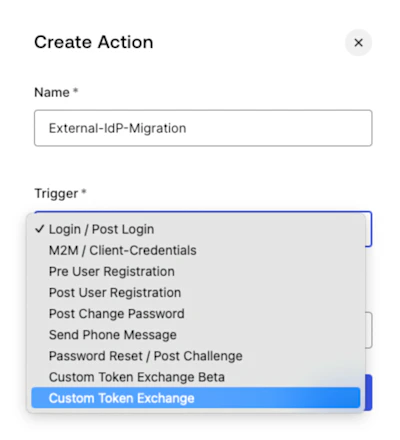
  1. Create を選択します。
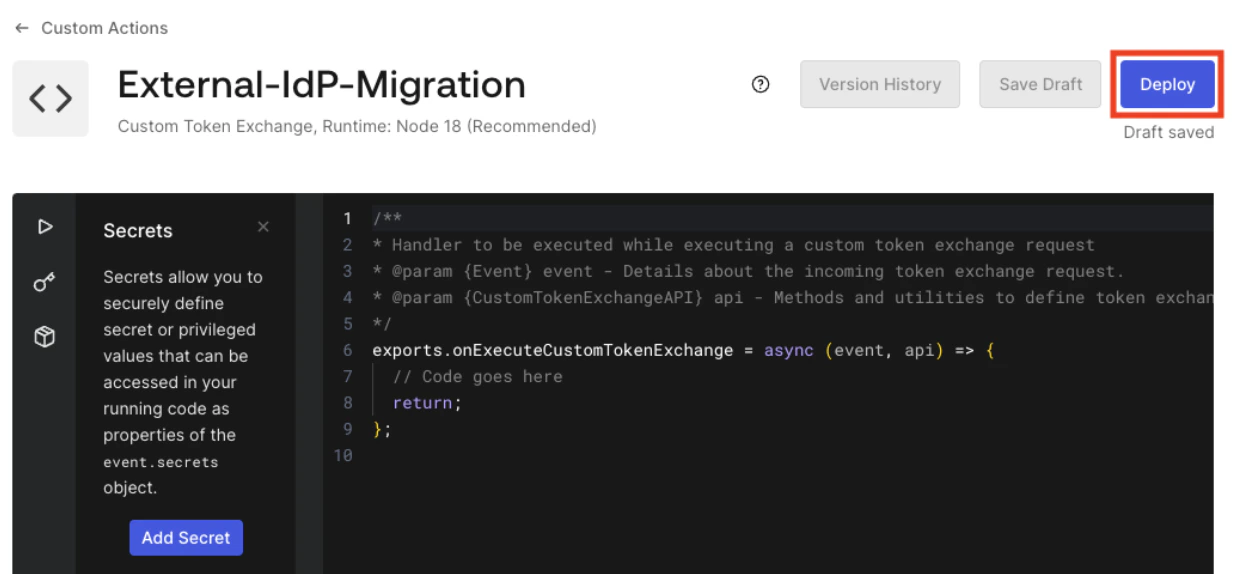
  2. Action を Deploy します。
Action をデプロイしたら、Auth0 によって割り当てられた Action ID をコピーします。Action にはまだ独自のロジックを追加する必要があります。まず、Custom Token Exchange Profile を作成するために Action ID を取得します。
  1. Auth0 Dashboard で Action ID を取得するには、ブラウザーウィンドウの URL を確認します。次の画像に示すように、Action ID は URL の最後の部分です。
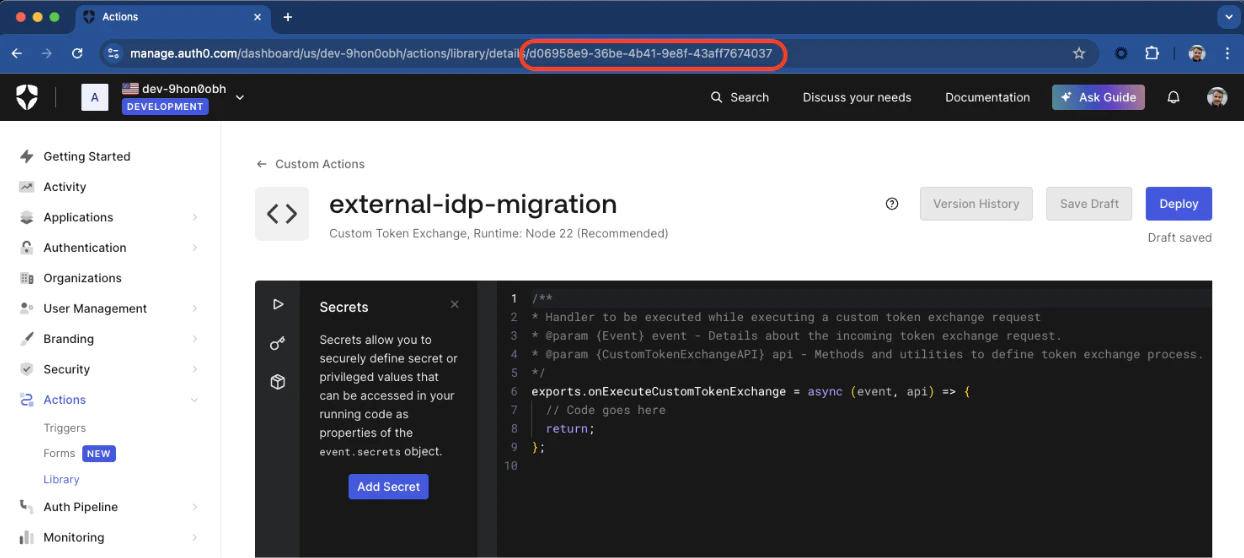
Management API を使用して Action ID を取得することもできます。まず、API を利用するための Management API トークンを取得します。次に、/actions エンドポイントに対して次の GET リクエストを実行します。
curl --location 'https://{yourDomain}/api/v2/actions/actions?actionName={yourActionName}' \
--header 'Authorization: Bearer <YOUR_MANAGEMENT_API_TOKEN>' \
レスポンス本文の actions[0].id. に Action ID が返されます。Custom Token Exchange Profile を作成するには、この Action ID が必要です。

Custom Token Exchange Profile を作成する

Custom Token Exchange Profile を作成するには、Management API を使用して /token-exchange-profiles エンドポイントに対し、次のパラメーターを指定した POST リクエストを送信します。
curl --location 'https://{yourDomain}/api/v2/token-exchange-profiles' \
--header 'Content-Type: application/json' \
--header 'Authorization: Bearer <YOUR_MANAGEMENT_API_TOKEN>' \
--data '{
    "name": "<YOUR_PROFILE_NAME>",
    "subject_token_type": "<YOUR_UNIQUE_PROFILE_TOKEN_TYPE_URI>",
    "action_id": "<YOUR_ACTION_ID>",
    "type": "custom_authentication"
}'
パラメーター説明
subject_token_typehttps:// または urn で始まる一意のプロファイルトークンタイプ URI

次の名前空間は予約されているため、使用できません。

  • http://auth0.com
  • https://auth0.com
  • http://okta.com
  • https://okta.com
  • urn:ietf
  • urn:auth0
  • urn:okta
action_idCustom Token Profile に関連付けられた Action の ID。
typecustom_authentication に設定する必要があります。
Custom Token Exchange Profile の作成に成功すると、次のようなレスポンスが返されます。
{
  "id":"tep_9xqewuejpa2RTltf",
  "name":"<YOUR_PROFILE_NAME>",
  "type":"custom_authentication",
  "subject_token_type":"<YOUR_UNIQUE_PROFILE_TOKEN_TYPE_URI>",
  "action_id":"<YOUR_ACTION_ID>",
  "created_at":"2025-01-30T13:19:00.616Z",
  "updated_at":"2025-01-30T13:19:00.616Z"
}

Custom Token Exchange Profile を管理する

Custom Token Exchange Profile を管理するには、Management API を使用して /token-exchange-profiles エンドポイントにリクエストを送信します。 すべての Custom Token Exchange Profile を取得するには、/token-exchange-profiles エンドポイントに対して次の GET リクエストを送信します。複数のプロファイルがある場合、/token-exchange-profiles エンドポイントではチェックポイントページネーションを使用できます。
curl --location 'https://{yourDomain}/api/v2/token-exchange-profiles' \
--header 'Authorization: Bearer <YOUR_MANAGEMENT_API_TOKEN>' \
既存のプロファイルの名前または subject_token_type を更新するには、/token-exchange-profiles エンドポイントに対して次の PATCH リクエストを送信します。
Action を作成した後は、Action ID を変更できません。
curl --location --request PATCH 'https://{yourDomain}/api/v2/token-exchange-profiles/{yourProfileId}' \
--header 'Content-Type: application/json' \
--header 'Authorization: Bearer <YOUR_MANAGEMENT_API_TOKEN>' \
--data '{
    "name": "external-idp-migration",
    "subject_token_type": "urn:partner0:external-idp-migration"
}'
Custom Token Exchange Profile を削除するには、/token-exchange-profiles エンドポイントに対して次の DELETE リクエストを送信します。
curl --location --request DELETE 'https://{yourDomain}/api/v2/token-exchange-profiles/{yourProfileId}' \
--header 'Authorization: Bearer <YOUR_MANAGEMENT_API_TOKEN>' \
--data ''