メインコンテンツへスキップ
reset-password-mfa-phone-challenge 画面は、電話による多要素認証が必要な場合に、パスワードリセットフロー中に表示されます。この画面では、リセット処理を続行するための確認コードの受信方法 (SMS または音声通話) をユーザーが選択します。
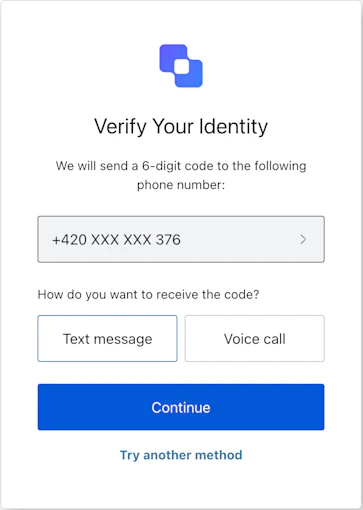
ACUL パスワードリセット MFA 電話チャレンジ

インポート

各画面には、それぞれ固有のフックとメソッドが用意されています。SDK は各画面について、部分インポートルートインポートをサポートしています。
  • 部分インポートを使用すると、特定のユースケースに必要なコードだけを含めることができます。
  • ルートインポートを使用すると、単一のバンドルからすべての画面を読み込めます。これは、想定されるすべての画面に対応する統一ビルドが必要な場合に便利です。
Import Example
// ルートインポート
import { useResetPasswordMfaPhoneChallenge } from '@auth0/auth0-acul-react';

// 部分インポート
import {
  useResetPasswordMfaPhoneChallenge,
  // コンテキストフック
  useUser,
  useTenant,
  useBranding,
  useClient,
  useOrganization,
  usePrompt,
  useScreen,
  useTransaction,
  useUntrustedData,
  // 共通フック
  useCurrentScreen,
  useAuth0Themes,
  useErrors,
  // ユーティリティフック
  useChangeLanguage,
  // メソッド
  continueMethod,
  tryAnotherMethod,
} from '@auth0/auth0-acul-react/reset-password-mfa-phone-challenge';

function ResetPasswordMfaPhoneChallengeScreen() {
  const { continueMethod } = useResetPasswordMfaPhoneChallenge();
  return (
    <button onClick={() => continueMethod({ type: 'sms' })}>
      Send Code via SMS
    </button>
  );
}

コンテキストフック

reset-password-mfa-phone-challenge 画面で Auth0 のコンテキストデータへの読み取り専用アクセスを提供する、画面スコープのフックです。@auth0/auth0-acul-react/reset-password-mfa-phone-challenge からインポートします。
useBranding
このフックは、reset-password-mfa-phone-challenge 画面に表示されるロゴ、色、テーマ設定などのブランディング設定を提供します。
Example
import { useBranding } from '@auth0/auth0-acul-react/reset-password-mfa-phone-challenge';
function CustomTheme() {
  const branding = useBranding();
}
useClient
このフックは、reset-password-mfa-phone-challenge 画面で使用される idnamelogoUrl などのクライアント関連の設定を提供します。
Example
import { useClient } from '@auth0/auth0-acul-react/reset-password-mfa-phone-challenge';
function AppInfo() {
  const client = useClient();
}
useOrganization
このフックは、パスワードリセットが組織スコープの場合に、ユーザーの組織に関する情報を提供します。組織コンテキストが存在しない場合は null を返します。
Example
import { useOrganization } from '@auth0/auth0-acul-react/reset-password-mfa-phone-challenge';
function OrgSelector() {
  const organization = useOrganization();
  if (!organization) {
    return <p>No Organization context</p>;
  }
}
usePrompt
このフックには、認証フロー内の現在のプロンプトに関するデータが含まれています。
Example
import { usePrompt } from '@auth0/auth0-acul-react/reset-password-mfa-phone-challenge';
function FlowInfo() {
  const prompt = usePrompt();
}
このフックには、設定やコンテキストなど、reset-password-mfa-phone-challenge 画面に固有の詳細が含まれています。
Example
import { useScreen } from '@auth0/auth0-acul-react/reset-password-mfa-phone-challenge';
function ScreenDebug() {
  const screen = useScreen();
}
useTenant
このフックには、id や関連するメタデータなど、テナントに関するデータが含まれています。
Example
import { useTenant } from '@auth0/auth0-acul-react/reset-password-mfa-phone-challenge';
function TenantInfo() {
  const tenant = useTenant();
}
useTransaction
このフックは、アクティブな接続や現在のフロー状態など、reset-password-mfa-phone-challenge 画面に関するトランザクション固有のデータを提供します。
Example
import { useTransaction } from '@auth0/auth0-acul-react/reset-password-mfa-phone-challenge';
function TransactionInfo() {
  const transaction = useTransaction();
}
useUntrustedData
このフックは、URL パラメーターから事前入力されたメールアドレスや username など、画面に渡される信頼できないデータを扱います。
Example
import { useUntrustedData } from '@auth0/auth0-acul-react/reset-password-mfa-phone-challenge';
function PrefilledForm() {
  const untrustedData = useUntrustedData();
}
useUser
このフックは、usernameemail、利用可能な認証方法など、現在アクティブなユーザーの詳細を提供します。
Example
import { useUser } from '@auth0/auth0-acul-react/reset-password-mfa-phone-challenge';
function UserProfile() {
  const user = useUser();
}
useResetPasswordMfaPhoneChallenge
このフックは、reset-password-mfa-phone-challenge 画面で利用可能なすべてのメソッドとコンテキストを返します。

メソッド

continueMethod
Promise<void>
このメソッドは、ユーザーが選択した受信方法を送信し、確認コードを送信して、パスワードリセットフローの MFA ステップを続行します。
Example
import { useResetPasswordMfaPhoneChallenge } from '@auth0/auth0-acul-react/reset-password-mfa-phone-challenge';

function SendCodeForm() {
  const { continueMethod } = useResetPasswordMfaPhoneChallenge();
  return (
    <button onClick={() => continueMethod({ type: 'sms' })}>
      SMS でコードを送信
    </button>
  );
}
メソッドのパラメーター
tryAnotherMethod
Promise<void>
このメソッドは、ユーザーを別の MFA方式 を選択する画面に移動させます。
Example
import { useResetPasswordMfaPhoneChallenge } from '@auth0/auth0-acul-react/reset-password-mfa-phone-challenge';

function TryAnotherMethodButton() {
  const { tryAnotherMethod } = useResetPasswordMfaPhoneChallenge();
  return (
    <button onClick={() => tryAnotherMethod({ type: 'sms' })}>
      別の方法を試す
    </button>
  );
}
メソッドのパラメーター

共通/ユーティリティフック

このフックは、ブランディングコンテキストに基づくフラット化された設定を含む現在のテーマオプションを取得します。
このフックは、現在のACUL画面の表示言語を変更するための関数を返します。
このフックは、現在の画面のコンテキストと状態を取得します。
このフックは、画面上のサーバー、クライアント、開発者のエラーを読み取り、管理します。