mfa-push-welcome 画面では、ユーザーにプッシュ通知 MFA を案内し、登録するか別の認証方法を選択するよう求めます。
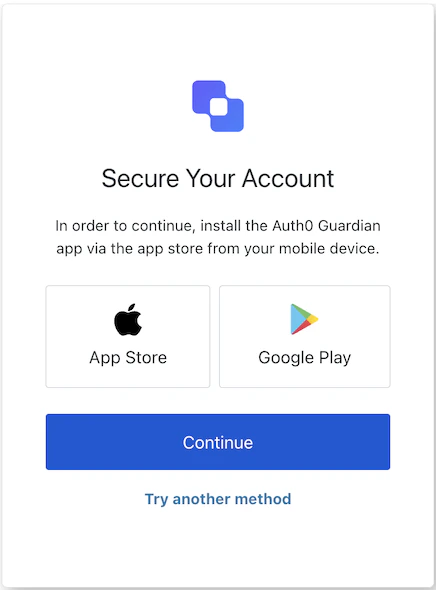
各画面には、それぞれ固有のフックとメソッドが用意されています。SDK は、各画面で部分インポートとルートインポートをサポートしています。
- 部分インポートを使用すると、特定のユースケースに必要なコードのみを含めることができます。
- ルートインポートを使用すると、単一のバンドルからすべての画面を読み込めるため、想定されるすべての画面に対応する統一ビルドが必要な場合に便利です。
// ルートインポート
import { useMfaPushWelcome } from '@auth0/auth0-acul-react';
// 部分インポート
import {
useMfaPushWelcome,
// コンテキストフック
useUser,
useTenant,
useBranding,
useClient,
useOrganization,
usePrompt,
useScreen,
useTransaction,
useUntrustedData,
// 共通フック
useCurrentScreen,
useAuth0Themes,
useErrors,
// ユーティリティフック
useChangeLanguage,
// メソッド
enroll,
pickAuthenticator,
} from "@auth0/auth0-acul-react/mfa-push-welcome";
function MfaPushWelcomeScreen() {
const { enroll } = useMfaPushWelcome();
return (
<button onClick={() => enroll()}>
Set Up Push Notifications
</button>
);
}
mfa-push-welcome 画面で Auth0 のコンテキストデータへの読み取り専用アクセスを提供する、画面スコープのフックです。@auth0/auth0-acul-react/mfa-push-welcome からインポートします。
このフックは、mfa-push-welcome 画面に表示されるロゴ、色、テーマ設定などのブランディング設定を提供します。import { useBranding } from '@auth0/auth0-acul-react/mfa-push-welcome';
function CustomTheme() {
const branding = useBranding();
}
このフックは、mfa-push-welcome 画面向けの id、name、logoUrl などのクライアント関連設定を提供します。import { useClient } from '@auth0/auth0-acul-react/mfa-push-welcome';
function AppInfo() {
const client = useClient();
}
このフックは、MFA フローが組織スコープの場合に、ユーザーの組織に関する情報を提供します。組織コンテキストが存在しない場合は null を返します。import { useOrganization } from '@auth0/auth0-acul-react/mfa-push-welcome';
function OrgSelector() {
const organization = useOrganization();
if (!organization) {
return <p>No organization context</p>;
}
}
このフックには、認証フロー内の現在のプロンプトに関するデータが含まれます。import { usePrompt } from '@auth0/auth0-acul-react/mfa-push-welcome';
function FlowInfo() {
const prompt = usePrompt();
}
このフックには、設定やコンテキストなど、mfa-push-welcome 画面に固有の詳細が含まれます。import { useScreen } from '@auth0/auth0-acul-react/mfa-push-welcome';
function ScreenDebug() {
const screen = useScreen();
}
このフックには、id や関連するメタデータなど、テナントに関するデータが含まれます。import { useTenant } from '@auth0/auth0-acul-react/mfa-push-welcome';
function TenantInfo() {
const tenant = useTenant();
}
このフックは、現在の MFA フローの state など、mfa-push-welcome 画面に関連するトランザクション固有のデータを提供します。import { useTransaction } from '@auth0/auth0-acul-react/mfa-push-welcome';
function TransactionInfo() {
const transaction = useTransaction();
}
このフックは、URL パラメーターから事前入力された値など、画面に渡される信頼できないデータを扱います。import { useUntrustedData } from '@auth0/auth0-acul-react/mfa-push-welcome';
function PrefilledForm() {
const untrustedData = useUntrustedData();
}
このフックは、username、email、利用可能な認証方法など、現在アクティブなユーザーの詳細を提供します。import { useUser } from '@auth0/auth0-acul-react/mfa-push-welcome';
function UserProfile() {
const user = useUser();
}
このフックは、mfa-push-welcome 画面で利用できるすべてのメソッドとコンテキストを返します。
このメソッドは、ユーザーのプッシュ通知の登録フローを開始します。import { useMfaPushWelcome } from '@auth0/auth0-acul-react/mfa-push-welcome';
function EnrollButton() {
const { enroll } = useMfaPushWelcome();
return (
<button onClick={() => enroll()}>
Set Up Push Notifications
</button>
);
}
このメソッドは認証方法の選択画面に移動し、ユーザーが別の MFA 方法を選択できるようにします。import { useMfaPushWelcome } from '@auth0/auth0-acul-react/mfa-push-welcome';
function PickAuthenticatorButton() {
const { pickAuthenticator } = useMfaPushWelcome();
return (
<button onClick={() => pickAuthenticator()}>
Pick Authenticator
</button>
);
}
このフックは、ブランディングコンテキストからフラット化された設定を含む現在のテーマオプションを取得します。
このフックは、現在の ACUL 画面の表示言語を変更する関数を返します。
このフックは、現在の画面のコンテキストと state を取得します。
このフックは、画面上のサーバー、クライアント、開発者のエラーを読み取り、管理します。