メインコンテンツへスキップ
mfa-webauthn-platform-enrollment 画面では、Touch ID や Windows Hello などのプラットフォーム認証器を、MFA の認証要素として登録するようユーザーに求めます。
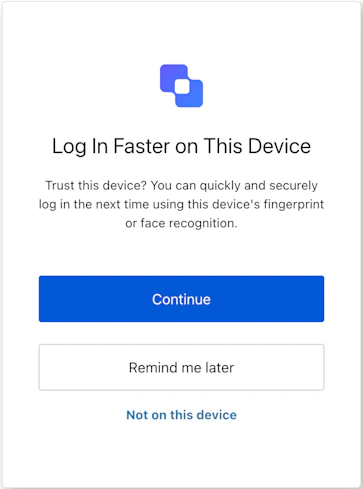
MfaWebAuthnPlatformEnrollment

インポート

各画面には、それぞれ固有のフックとメソッドがあります。SDK は、各画面について 部分インポートルートインポート をサポートしています。
  • 部分インポートを使用すると、特定のユースケースに必要なコードだけを含めることができます。
  • ルートインポートを使用すると、単一のバンドルからすべての画面を読み込めます。これは、想定されるすべての画面を 1 つの統一されたビルドで処理したい場合に便利です。
Import Example
// ルートインポート
import { useMfaWebAuthnPlatformEnrollment } from '@auth0/auth0-acul-react';

// 部分インポート
import {
  useMfaWebAuthnPlatformEnrollment,
  // コンテキストフック
  useUser,
  useTenant,
  useBranding,
  useClient,
  useOrganization,
  usePrompt,
  useScreen,
  useTransaction,
  useUntrustedData,
  // 共通フック
  useCurrentScreen,
  useAuth0Themes,
  useErrors,
  // ユーティリティフック
  useChangeLanguage,
  // メソッド
  refuseEnrollmentOnThisDevice,
  reportBrowserError,
  snoozeEnrollment,
  submitPasskeyCredential,
} from "@auth0/auth0-acul-react/mfa-webauthn-platform-enrollment";

function MfaWebAuthnPlatformEnrollmentScreen() {
  const { submitPasskeyCredential } = useMfaWebAuthnPlatformEnrollment();
  return (
    <button onClick={() => submitPasskeyCredential()}>
      Enroll Platform Authenticator
    </button>
  );
}

コンテキストフック

mfa-webauthn-platform-enrollment 画面で Auth0 のコンテキストデータへの読み取り専用アクセスを提供する画面スコープのフックです。@auth0/auth0-acul-react/mfa-webauthn-platform-enrollment からインポートします。
useBranding
このフックは、mfa-webauthn-platform-enrollment 画面に表示されるロゴ、色、テーマ設定などのブランディング設定を提供します。
Example
import { useBranding } from '@auth0/auth0-acul-react/mfa-webauthn-platform-enrollment';
function CustomTheme() {
  const branding = useBranding();
}
useClient
このフックは、mfa-webauthn-platform-enrollment 画面で使用する idnamelogoUrl などのクライアント関連の設定を提供します。
Example
import { useClient } from '@auth0/auth0-acul-react/mfa-webauthn-platform-enrollment';
function AppInfo() {
  const client = useClient();
}
useOrganization
MFA フローが組織スコープの場合、このフックはユーザーの組織に関する情報を提供します。組織コンテキストが存在しない場合は null を返します。
Example
import { useOrganization } from '@auth0/auth0-acul-react/mfa-webauthn-platform-enrollment';
function OrgSelector() {
  const organization = useOrganization();
  if (!organization) {
    return <p>No organization context</p>;
  }
}
usePrompt
このフックには、認証フロー内の現在のプロンプトに関するデータが含まれます。
Example
import { usePrompt } from '@auth0/auth0-acul-react/mfa-webauthn-platform-enrollment';
function FlowInfo() {
  const prompt = usePrompt();
}
このフックには、設定やコンテキストなど、mfa-webauthn-platform-enrollment 画面に固有の詳細情報が含まれます。
Example
import { useScreen } from '@auth0/auth0-acul-react/mfa-webauthn-platform-enrollment';
function ScreenDebug() {
  const screen = useScreen();
}
useTenant
このフックには、id や関連するメタデータなど、テナントに関するデータが含まれます。
Example
import { useTenant } from '@auth0/auth0-acul-react/mfa-webauthn-platform-enrollment';
function TenantInfo() {
  const tenant = useTenant();
}
useTransaction
このフックは、現在の MFA フローの状態など、mfa-webauthn-platform-enrollment 画面におけるトランザクション固有のデータを提供します。
Example
import { useTransaction } from '@auth0/auth0-acul-react/mfa-webauthn-platform-enrollment';
function TransactionInfo() {
  const transaction = useTransaction();
}
useUntrustedData
このフックは、URL パラメーターから事前入力された値など、画面に渡される信頼できないデータを扱います。
Example
import { useUntrustedData } from '@auth0/auth0-acul-react/mfa-webauthn-platform-enrollment';
function PrefilledForm() {
  const untrustedData = useUntrustedData();
}
useUser
このフックは、usernameemail、利用可能な認証方法など、現在アクティブなユーザーの詳細を提供します。
Example
import { useUser } from '@auth0/auth0-acul-react/mfa-webauthn-platform-enrollment';
function UserProfile() {
  const user = useUser();
}
useMfaWebAuthnPlatformEnrollment
このフックは、mfa-webauthn-platform-enrollment 画面で使用できるすべてのメソッドとコンテキストを返します。

メソッド

refuseEnrollmentOnThisDevice
Promise<void>
このメソッドは、現在のデバイスでのプラットフォーム認証器の登録を拒否します。
Example
import { useMfaWebAuthnPlatformEnrollment } from '@auth0/auth0-acul-react/mfa-webauthn-platform-enrollment';

function RefuseEnrollmentButton() {
  const { refuseEnrollmentOnThisDevice } = useMfaWebAuthnPlatformEnrollment();
  return (
    <button onClick={() => refuseEnrollmentOnThisDevice()}>
      Not on This Device
    </button>
  );
}
reportBrowserError
Promise<void>
このメソッドは、プラットフォーム認証器の登録中に発生したブラウザーレベルの WebAuthn エラーを報告します。
Example
import { useMfaWebAuthnPlatformEnrollment } from '@auth0/auth0-acul-react/mfa-webauthn-platform-enrollment';

function HandleWebAuthnError({ error }) {
  const { reportBrowserError } = useMfaWebAuthnPlatformEnrollment();
  return (
    <button onClick={() => reportBrowserError({ error })}>
      Report Error
    </button>
  );
}
メソッド パラメーター
snoozeEnrollment
Promise<void>
このメソッドは、プラットフォーム認証器の登録を後で行うように延期します。
Example
import { useMfaWebAuthnPlatformEnrollment } from '@auth0/auth0-acul-react/mfa-webauthn-platform-enrollment';

function SnoozeButton() {
  const { snoozeEnrollment } = useMfaWebAuthnPlatformEnrollment();
  return (
    <button onClick={() => snoozeEnrollment()}>
      Remind Me Later
    </button>
  );
}
submitPasskeyCredential
Promise<void>
このメソッドは、登録を完了するために、プラットフォーム認証器が作成した passkey の認証情報を送信します。
Example
import { useMfaWebAuthnPlatformEnrollment } from '@auth0/auth0-acul-react/mfa-webauthn-platform-enrollment';

function EnrollButton() {
  const { submitPasskeyCredential } = useMfaWebAuthnPlatformEnrollment();
  return (
    <button onClick={() => submitPasskeyCredential()}>
      Enroll Platform Authenticator
    </button>
  );
}

共通/ユーティリティ フック

このフックは、ブランディングコンテキストのフラット化された設定を含む現在のテーマオプションを取得します。
このフックは、現在の ACUL 画面の表示言語を変更するための関数を返します。
このフックは、現在の画面のコンテキストと state を取得します。
このフックは、画面上のサーバー、クライアント、開発者のエラーを取得して管理します。