メインコンテンツへスキップ
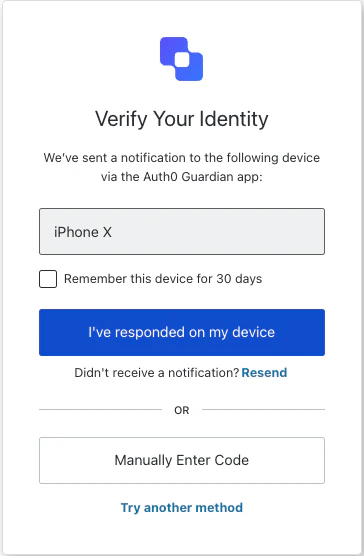
ResetPasswordMfaPushChallengePush クラスは、reset-password-mfa-push-challenge-push 画面の機能を実装します。この画面は、パスワードリセットフロー中の MFA ステップの一部として、ユーザーのデバイスにプッシュ通知が送信された際に表示されます。
コンストラクター

ResetPasswordMfaPushChallengePush 画面マネージャーのインスタンスを生成します:
Example
import ResetPasswordMfaPushChallengePush from '@auth0/auth0-acul-js/reset-password-mfa-push-challenge-push';
const resetPasswordMfaPushChallengePushManager = new ResetPasswordMfaPushChallengePush();
await resetPasswordMfaPushChallengePushManager.continue();

プロパティ

ブランディングテーマや設定など、ブランディング関連の構成情報を提供します。
reset-password-mfa-push-challenge-push 画面に対して、idnamelogoUrl などのクライアント関連の構成情報を提供します。
idname など、ユーザーの組織に関する情報を提供します。
認証フローにおける現在のプロンプトに関するデータを含みます。
構成やコンテキストを含む、reset-password-mfa-push-challenge-push 画面固有の詳細を含みます。
id や関連メタデータなど、テナントに関するデータを含みます。
アクティブな識別子やフローの状態など、reset-password-mfa-push-challenge-push 画面に関するトランザクション固有のデータを提供します。
MFA チャレンジフロー中のユーザー入力など、SDK に渡される信頼できないデータを扱います。
usernameemailroles などを含む、現在のユーザーの詳細です。

メソッド

changeLanguage
Promise<void>
このメソッドは、Universal Login ページの表示言語を変更します。
Example
import ResetPasswordMfaPushChallengePush from '@auth0/auth0-acul-js/reset-password-mfa-push-challenge-push';
const resetPasswordMfaPushChallengePushManager = new ResetPasswordMfaPushChallengePush();
resetPasswordMfaPushChallengePushManager.changeLanguage({
  language: 'fr',
});
メソッドパラメーター
continue
Promise<void>
このメソッドは、パスワードリセットフロー中の MFA ステップを続行するために、プッシュ通知のチャレンジを確認します。
Example
import ResetPasswordMfaPushChallengePush from '@auth0/auth0-acul-js/reset-password-mfa-push-challenge-push';
const resetPasswordMfaPushChallengePushManager = new ResetPasswordMfaPushChallengePush();
await resetPasswordMfaPushChallengePushManager.continue();
enterCodeManually
Promise<void>
このメソッドは、プッシュ通知の承認を待つ代わりに、ユーザーが code を手動で入力する画面に切り替えます。
Example
import ResetPasswordMfaPushChallengePush from '@auth0/auth0-acul-js/reset-password-mfa-push-challenge-push';
const resetPasswordMfaPushChallengePushManager = new ResetPasswordMfaPushChallengePush();
await resetPasswordMfaPushChallengePushManager.enterCodeManually();
getErrors
このメソッドは、コンテキストからトランザクションエラーの配列を取得します。エラーがない場合は空の配列を返します。
このメソッドは、MFA push チャレンジの polling を開始して管理します。指定した間隔でプッシュ通知が承認されたかどうかを繰り返し確認し、承認が検出されると onCompleted コールバックを呼び出します。HTTP 429 の rate limit レスポンスは内部で処理され、polling は rate limit がリセットされるまで待機してから再試行します。返される MfaPushPollingControl では、polling のライフサイクルを管理するために startPolling()stopPolling()isRunning() を利用できます。
Example
import ResetPasswordMfaPushChallengePush from '@auth0/auth0-acul-js/reset-password-mfa-push-challenge-push';
const resetPasswordMfaPushChallengePushManager = new ResetPasswordMfaPushChallengePush();
const control = resetPasswordMfaPushChallengePushManager.pollingManager({
  intervalMs: 5000,
  onCompleted: () => resetPasswordMfaPushChallengePushManager.continue(),
  onError: (error) => console.error('Polling error:', error),
});

control.startPolling();

// 必要に応じて polling を停止
control.stopPolling();
メソッドパラメーター
resendPushNotification
Promise<void>
このメソッドは、ユーザーのデバイスにプッシュ通知を再送します。
Example
import ResetPasswordMfaPushChallengePush from '@auth0/auth0-acul-js/reset-password-mfa-push-challenge-push';
const resetPasswordMfaPushChallengePushManager = new ResetPasswordMfaPushChallengePush();
await resetPasswordMfaPushChallengePushManager.resendPushNotification();
tryAnotherMethod
Promise<void>
このメソッドを使用すると、ユーザーはチャレンジを完了するために別の MFA 方法を選択できます。
Example
import ResetPasswordMfaPushChallengePush from '@auth0/auth0-acul-js/reset-password-mfa-push-challenge-push';
const resetPasswordMfaPushChallengePushManager = new ResetPasswordMfaPushChallengePush();
await resetPasswordMfaPushChallengePushManager.tryAnotherMethod();