ResetPasswordMfaWebAuthnRoamingChallenge クラスは、reset-password-mfa-webauthn-roaming-challenge 画面の機能を実装します。この画面では、パスワードリセットフロー中の MFA ステップの一環として、ローミングセキュリティキー (FIDO2 USB キーなど) を使用して本人確認を行うようユーザーに求めます。
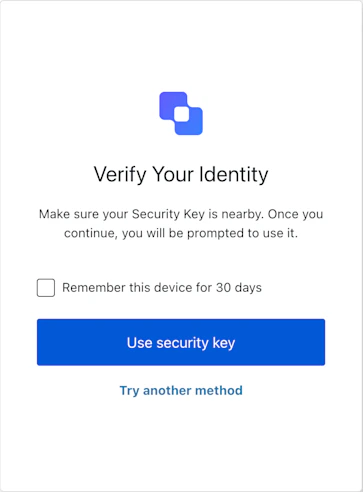
ResetPasswordMfaWebAuthnRoamingChallenge 画面マネージャーのインスタンスを作成します。
import ResetPasswordMfaWebAuthnRoamingChallenge from '@auth0/auth0-acul-js/reset-password-mfa-webauthn-roaming-challenge' ;
const resetPasswordMfaWebAuthnRoamingChallengeManager = new ResetPasswordMfaWebAuthnRoamingChallenge ();
try {
await resetPasswordMfaWebAuthnRoamingChallengeManager . useSecurityKey ({
rememberDevice: true ,
});
} catch ( error ) {
if ( error instanceof DOMException ) {
await resetPasswordMfaWebAuthnRoamingChallengeManager . showError ({
error: { name: error . name , message: error . message },
});
}
}
ブランディングテーマや設定など、ブランディングに関する構成を提供します。
reset-password-mfa-webauthn-roaming-challenge 画面に対して、id、name、logoUrl などのクライアント関連の構成を提供します。
id や name など、ユーザーの組織に関する情報を提供します。
認証フローにおける現在のプロンプトに関するデータを含みます。
構成やコンテキストなど、reset-password-mfa-webauthn-roaming-challenge 画面に固有の詳細を含みます。
id や関連するメタデータなど、テナントに関するデータを含みます。
アクティブな識別子やフローの状態など、reset-password-mfa-webauthn-roaming-challenge 画面のトランザクション固有のデータを提供します。
MFA チャレンジフロー中のユーザー入力など、SDK に渡される信頼できないデータを扱います。
username、email、roles など、アクティブなユーザーの詳細を含みます。
このメソッドは、Universal Login ページの表示言語を変更します。 import ResetPasswordMfaWebAuthnRoamingChallenge from '@auth0/auth0-acul-js/reset-password-mfa-webauthn-roaming-challenge' ;
const resetPasswordMfaWebAuthnRoamingChallengeManager = new ResetPasswordMfaWebAuthnRoamingChallenge ();
resetPasswordMfaWebAuthnRoamingChallengeManager . changeLanguage ({
language: 'fr' ,
});
メソッドのパラメーター 変更先の言語のロケールコードです (例: 'en'、'fr'、'es') 。
'session' に設定すると、選択した言語はセッション中保持されます。
このメソッドは、コンテキストからトランザクションエラーの配列を取得します。エラーがない場合は空の配列を返します。
このメソッドは、ユーザーによるキャンセル (NotAllowedError) や navigator.credentials.get() の timeout など、ブラウザー側の WebAuthn エラーを Auth0 に報告します。 import ResetPasswordMfaWebAuthnRoamingChallenge from '@auth0/auth0-acul-js/reset-password-mfa-webauthn-roaming-challenge' ;
const resetPasswordMfaWebAuthnRoamingChallengeManager = new ResetPasswordMfaWebAuthnRoamingChallenge ();
await resetPasswordMfaWebAuthnRoamingChallengeManager . showError ({
error: { name: error . name , message: error . message },
});
メソッドのパラメーター 報告する WebAuthn API (navigator.credentials.get()) のエラーオブジェクトです。 エラー名です (例: 'NotAllowedError') 。
true の場合、エラー報告時にデバイス記憶の設定も保持されます。
このメソッドを使用すると、ユーザーは別の MFA方式 を選択してチャレンジを完了できます。 import ResetPasswordMfaWebAuthnRoamingChallenge from '@auth0/auth0-acul-js/reset-password-mfa-webauthn-roaming-challenge' ;
const resetPasswordMfaWebAuthnRoamingChallengeManager = new ResetPasswordMfaWebAuthnRoamingChallenge ();
await resetPasswordMfaWebAuthnRoamingChallengeManager . tryAnotherMethod ();
メソッドのパラメーター true の場合、方式を切り替える際にもデバイス記憶の設定を保持します。
このメソッドは、WebAuthn のセキュリティキー チャレンジを開始し、生成された認証情報を送信して、パスワードリセットフロー中の MFA ステップを完了します。ブラウザーが DOMException をスローした場合 (ユーザーによるキャンセルなど) は、エラーをキャッチして showError を呼び出し、Auth0 に通知してください。 import ResetPasswordMfaWebAuthnRoamingChallenge from '@auth0/auth0-acul-js/reset-password-mfa-webauthn-roaming-challenge' ;
const resetPasswordMfaWebAuthnRoamingChallengeManager = new ResetPasswordMfaWebAuthnRoamingChallenge ();
try {
await resetPasswordMfaWebAuthnRoamingChallengeManager . useSecurityKey ({
rememberDevice: true ,
});
} catch ( error ) {
if ( error instanceof DOMException ) {
await resetPasswordMfaWebAuthnRoamingChallengeManager . showError ({
error: { name: error . name , message: error . message },
});
}
}
メソッドパラメーター true の場合、このデバイスを信頼済みとしてマークするため、以後このデバイスではユーザーに MFA が再度求められなくなります。