メインコンテンツへスキップ
ResetPasswordMfaWebAuthnPlatformChallenge クラスは、reset-password-mfa-webauthn-platform-challenge 画面の機能を実装します。この画面では、パスワードリセットフロー中の MFA ステップの一部として、ユーザーにプラットフォーム認証器 (Touch ID や Windows Hello など) を使用した本人確認を求めます。
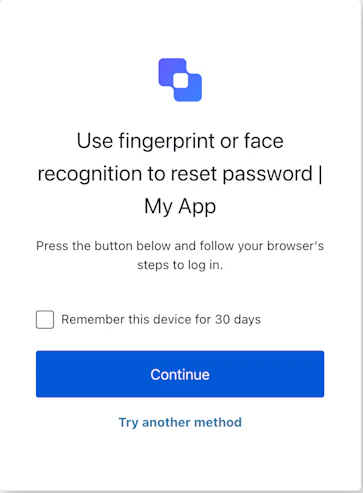
コンストラクター

ResetPasswordMfaWebAuthnPlatformChallenge 画面マネージャーのインスタンスを作成します:
Example
import ResetPasswordMfaWebAuthnPlatformChallenge from '@auth0/auth0-acul-js/reset-password-mfa-webauthn-platform-challenge';
const resetPasswordMfaWebAuthnPlatformChallengeManager = new ResetPasswordMfaWebAuthnPlatformChallenge();
await resetPasswordMfaWebAuthnPlatformChallengeManager.continueWithPasskey({
  rememberDevice: true,
});

プロパティ

ブランディングテーマや設定など、ブランディングに関する構成を提供します。
reset-password-mfa-webauthn-platform-challenge 画面の idnamelogoUrl など、クライアントに関する構成を提供します。
idname など、ユーザーの組織に関する情報を提供します。
認証フロー内の現在のプロンプトに関するデータが含まれます。
構成やコンテキストなど、reset-password-mfa-webauthn-platform-challenge 画面に固有の詳細が含まれます。
id や関連するメタデータなど、テナントに関するデータが含まれます。
アクティブな識別子やフローの状態など、reset-password-mfa-webauthn-platform-challenge 画面に固有のトランザクションデータを提供します。
MFA チャレンジフロー中のユーザー入力など、SDK に渡される信頼できないデータを扱います。
usernameemailroles など、現在のユーザーの詳細が含まれます。

メソッド

changeLanguage
Promise<void>
このメソッドは、Universal Login ページの表示言語を変更します。
Example
import ResetPasswordMfaWebAuthnPlatformChallenge from '@auth0/auth0-acul-js/reset-password-mfa-webauthn-platform-challenge';
const resetPasswordMfaWebAuthnPlatformChallengeManager = new ResetPasswordMfaWebAuthnPlatformChallenge();
resetPasswordMfaWebAuthnPlatformChallengeManager.changeLanguage({
  language: 'fr',
});
メソッドパラメーター
continueWithPasskey
Promise<void>
このメソッドは、WebAuthn の認証器チャレンジを開始し、取得した認証情報を送信して、パスワードリセットフロー中の MFA ステップを完了します。ブラウザーが DOMException (ユーザーによるキャンセルなど) をスローした場合は、エラーを catch して reportBrowserError を呼び出し、Auth0 に通知してください。
Example
import ResetPasswordMfaWebAuthnPlatformChallenge from '@auth0/auth0-acul-js/reset-password-mfa-webauthn-platform-challenge';
const resetPasswordMfaWebAuthnPlatformChallengeManager = new ResetPasswordMfaWebAuthnPlatformChallenge();
try {
  await resetPasswordMfaWebAuthnPlatformChallengeManager.continueWithPasskey({
    rememberDevice: true,
  });
} catch (error) {
  if (error instanceof DOMException) {
    await resetPasswordMfaWebAuthnPlatformChallengeManager.reportBrowserError({
      error: { name: error.name, message: error.message },
    });
  }
}
メソッドパラメーター
getErrors
このメソッドは、コンテキストからトランザクションエラーの配列を取得します。エラーがない場合は空の配列を返します。
reportBrowserError
Promise<void>
このメソッドは、ユーザーによるキャンセル (NotAllowedError) や navigator.credentials.get() のタイムアウトなど、ブラウザー側で発生した WebAuthn エラーを Auth0 に報告します。
Example
import ResetPasswordMfaWebAuthnPlatformChallenge from '@auth0/auth0-acul-js/reset-password-mfa-webauthn-platform-challenge';
const resetPasswordMfaWebAuthnPlatformChallengeManager = new ResetPasswordMfaWebAuthnPlatformChallenge();
await resetPasswordMfaWebAuthnPlatformChallengeManager.reportBrowserError({
  error: { name: error.name, message: error.message },
});
メソッドパラメーター
tryAnotherMethod
Promise<void>
このメソッドを使用すると、ユーザーは別のMFA方法を選択してチャレンジを完了できます。
Example
import ResetPasswordMfaWebAuthnPlatformChallenge from '@auth0/auth0-acul-js/reset-password-mfa-webauthn-platform-challenge';
const resetPasswordMfaWebAuthnPlatformChallengeManager = new ResetPasswordMfaWebAuthnPlatformChallenge();
await resetPasswordMfaWebAuthnPlatformChallengeManager.tryAnotherMethod();