Documentation Index
Fetch the complete documentation index at: https://translations.mintlify.app/llms.txt
Use this file to discover all available pages before exploring further.
 DSPy는 특히 LM이 파이프라인 내에서 한 번 이상 사용될 때, LM 프롬프트와 가중치를 알고리즘적으로 최적화하기 위한 프레임워크입니다. Weave는 DSPy 모듈과 함수를 사용해 이루어진 호출을 자동으로 추적하고 로그를 기록합니다.
언어 모델 애플리케이션의 트레이스를 개발 중과 프로덕션 환경에서 모두 하나의 중앙 위치에 저장하는 것은 중요합니다. 이러한 트레이스는 디버깅에 유용할 뿐만 아니라, 애플리케이션을 개선하는 데 도움이 되는 데이터셋으로도 사용할 수 있습니다.
Weave는 DSPy에 대한 트레이스를 자동으로 수집합니다. 추적을 시작하려면
DSPy는 특히 LM이 파이프라인 내에서 한 번 이상 사용될 때, LM 프롬프트와 가중치를 알고리즘적으로 최적화하기 위한 프레임워크입니다. Weave는 DSPy 모듈과 함수를 사용해 이루어진 호출을 자동으로 추적하고 로그를 기록합니다.
언어 모델 애플리케이션의 트레이스를 개발 중과 프로덕션 환경에서 모두 하나의 중앙 위치에 저장하는 것은 중요합니다. 이러한 트레이스는 디버깅에 유용할 뿐만 아니라, 애플리케이션을 개선하는 데 도움이 되는 데이터셋으로도 사용할 수 있습니다.
Weave는 DSPy에 대한 트레이스를 자동으로 수집합니다. 추적을 시작하려면 weave.init(project_name="<YOUR-WANDB-PROJECT-NAME>")를 호출한 다음, 평소처럼 라이브러리를 사용하면 됩니다.
import os
import dspy
import weave

os.environ["OPENAI_API_KEY"] = "<YOUR-OPENAI-API-KEY>"

weave.init(project_name="<YOUR-WANDB-PROJECT-NAME>")

lm = dspy.LM('openai/gpt-4o-mini')
dspy.configure(lm=lm)
classify = dspy.Predict("sentence -> sentiment")
classify(sentence="it's a charming and often affecting journey.")
 Weave는 DSPy 프로그램에서 발생하는 모든 LM 호출을 로깅하며, 입력, 출력, 메타데이터에 대한 세부 정보를 제공합니다.
직접 DSPy Module 및 Signature 추적하기
Module은 DSPy 프로그램에서 프롬프트 기법을 추상화하며, 학습 가능한 매개변수를 갖는 기본 구성 요소입니다. Signature는 DSPy Module의 입력/출력 동작을 선언적으로 정의한 명세입니다. Weave는 DSPy 프로그램에 포함된 모든 기본 제공 및 사용자 정의 Signature와 Module을 자동으로 추적합니다.
import os
import dspy
import weave

os.environ["OPENAI_API_KEY"] = "<YOUR-OPENAI-API-KEY>"

weave.init(project_name="<YOUR-WANDB-PROJECT-NAME>")

class Outline(dspy.Signature):
    """주제에 대한 포괄적인 개요를 작성합니다."""

    topic: str = dspy.InputField()
    title: str = dspy.OutputField()
    sections: list[str] = dspy.OutputField()
    section_subheadings: dict[str, list[str]] = dspy.OutputField(
        desc="mapping from section headings to subheadings"
    )


class DraftSection(dspy.Signature):
    """기사의 최상위 섹션 초안을 작성합니다."""

    topic: str = dspy.InputField()
    section_heading: str = dspy.InputField()
    section_subheadings: list[str] = dspy.InputField()
    content: str = dspy.OutputField(desc="markdown-formatted section")


class DraftArticle(dspy.Module):
    def __init__(self):
        self.build_outline = dspy.ChainOfThought(Outline)
        self.draft_section = dspy.ChainOfThought(DraftSection)

    def forward(self, topic):
        outline = self.build_outline(topic=topic)
        sections = []
        for heading, subheadings in outline.section_subheadings.items():
            section, subheadings = (
                f"## {heading}",
                [f"### {subheading}" for subheading in subheadings],
            )
            section = self.draft_section(
                topic=outline.title,
                section_heading=section,
                section_subheadings=subheadings,
            )
            sections.append(section.content)
        return dspy.Prediction(title=outline.title, sections=sections)


draft_article = DraftArticle()
article = draft_article(topic="World Cup 2002")
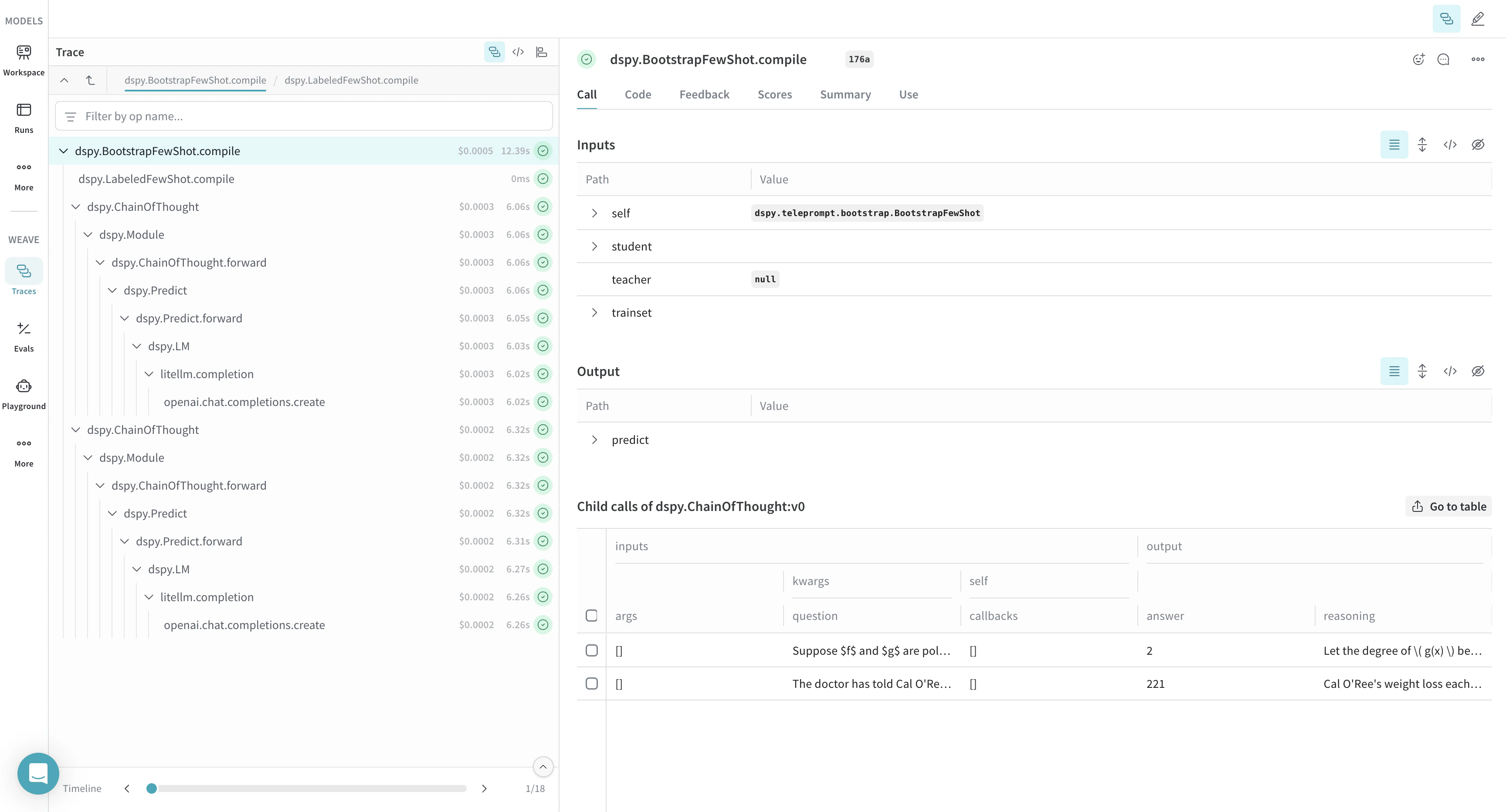
 Weave는 DSPy optimizer와 Evaluation 호출에 대한 트레이스도 자동으로 캡처하므로, 개발용 데이터 세트에서 DSPy 프로그램의 성능을 향상하고 평가하는 데 사용할 수 있습니다.
import os
import dspy
import weave

os.environ["OPENAI_API_KEY"] = "<YOUR-OPENAI-API-KEY>"
weave.init(project_name="<YOUR-WANDB-PROJECT-NAME>")

def accuracy_metric(answer, output, trace=None):
    predicted_answer = output["answer"].lower()
    return answer["answer"].lower() == predicted_answer

module = dspy.ChainOfThought("question -> answer: str, explanation: str")
optimizer = dspy.BootstrapFewShot(metric=accuracy_metric)
optimized_module = optimizer.compile(
    module, trainset=SAMPLE_EVAL_DATASET, valset=SAMPLE_EVAL_DATASET
)


 플랫폼
플랫폼 W&B Models
 W&B Weave
 W&B Inference
 W&B 교육
 릴리스 노트