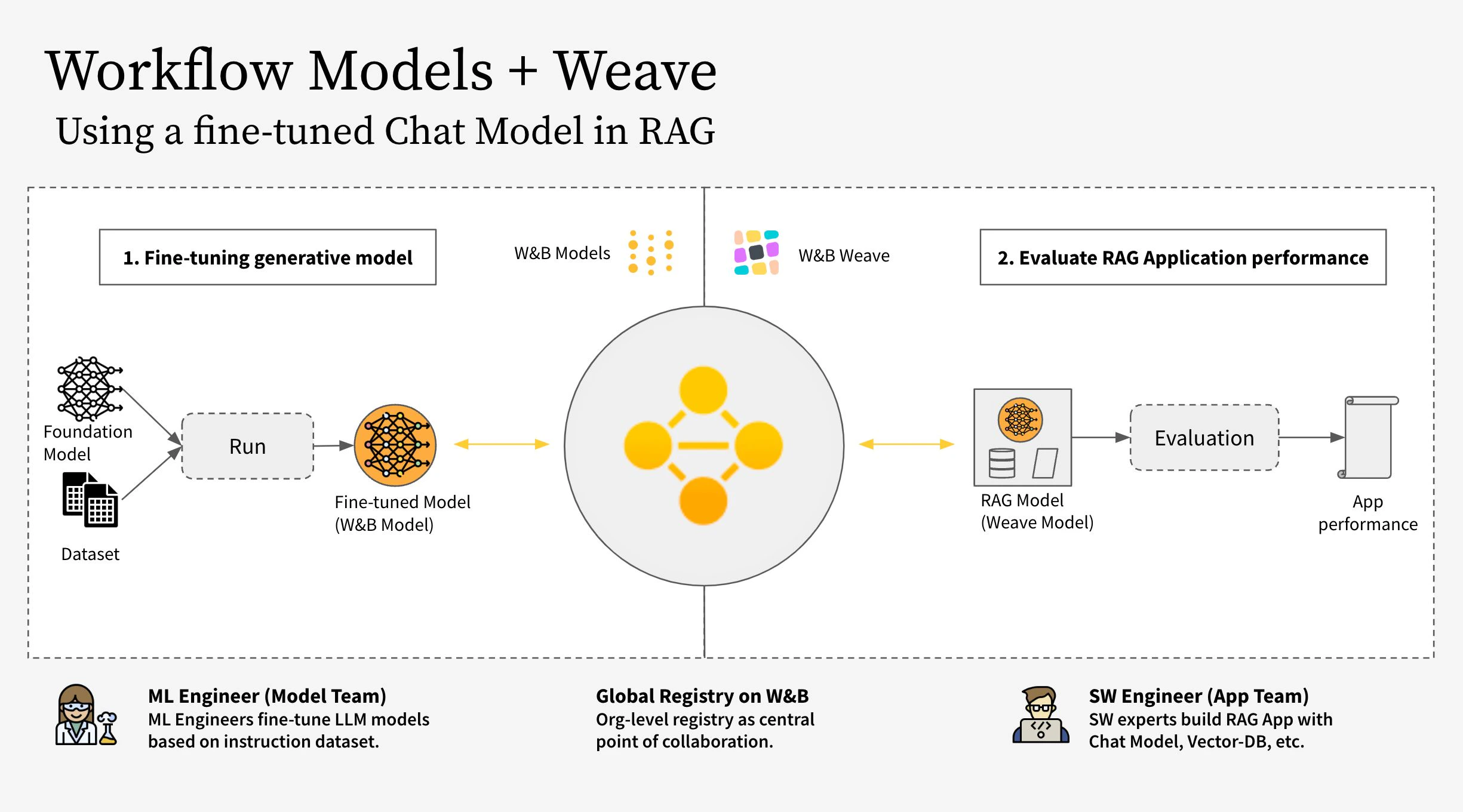
새로 파인튜닝한 모델로 RAG 앱을 구현하고, W&B Weave를 사용해 앱을 평가합니다.
결과에 만족하면, 업데이트된 RAG 앱에 대한 참조를 W&B Registry에 저장합니다.
참고:아래에서 참조하는 RagModel은 최상위 weave.Model로, 하나의 완전한 RAG 앱으로 볼 수 있습니다. 이 모델은 ChatModel, 벡터 데이터베이스, 프롬프트를 포함합니다. ChatModel 역시 또 다른 weave.Model로, W&B Registry에서 아티팩트를 다운로드하는 코드를 포함하며, RagModel의 일부로서 다른 어떤 챗 모델도 지원할 수 있도록 변경할 수 있습니다. 자세한 내용은 Weave의 전체 모델을 참고하세요.
모델 팀은 unsloth 라이브러리를 사용해 다양한 Llama-3.2 모델을 파인튜닝하여 더 빠르게 동작하도록 만들었습니다. 따라서 레지스트리에서 모델을 다운로드한 뒤 로드할 때에는 어댑터가 적용된 전용 unsloth.FastLanguageModel 또는 peft.AutoPeftModelForCausalLM 모델을 사용해야 합니다. 레지스트리의 “Use” 탭에서 모델 로딩 코드를 복사해 model_post_init에 붙여넣으세요.
import weavefrom pydantic import PrivateAttrfrom typing import Any, List, Dict, Optionalfrom unsloth import FastLanguageModelimport torchclass UnslothLoRAChatModel(weave.Model): """ 모델 이름 외에 더 많은 파라미터를 저장하고 버전 관리하기 위한 추가 ChatModel 클래스를 정의합니다. 이를 통해 특정 파라미터에 대한 파인튜닝이 가능합니다. """ chat_model: str cm_temperature: float cm_max_new_tokens: int cm_quantize: bool inference_batch_size: int dtype: Any device: str _model: Any = PrivateAttr() _tokenizer: Any = PrivateAttr() def model_post_init(self, __context): run = wandb.init(project=PROJECT, job_type="model_download") artifact_ref = self.chat_model.replace("wandb-artifact://", "") artifact = run.use_artifact(artifact_ref) model_path = artifact.download() # unsloth 버전 (네이티브 2배 빠른 추론 활성화) self._model, self._tokenizer = FastLanguageModel.from_pretrained( model_name=model_path, max_seq_length=self.cm_max_new_tokens, dtype=self.dtype, load_in_4bit=self.cm_quantize, ) FastLanguageModel.for_inference(self._model) @weave.op() async def predict(self, query: List[str]) -> dict: # add_generation_prompt = true - 생성을 위해 반드시 추가해야 함 input_ids = self._tokenizer.apply_chat_template( query, tokenize=True, add_generation_prompt=True, return_tensors="pt", ).to("cuda") output_ids = self._model.generate( input_ids=input_ids, max_new_tokens=64, use_cache=True, temperature=1.5, min_p=0.1, ) decoded_outputs = self._tokenizer.batch_decode( output_ids[0][input_ids.shape[1] :], skip_special_tokens=True ) return "".join(decoded_outputs).strip()
이제 레지스트리의 특정 링크를 사용해 새 모델을 생성하세요:
ORG_ENTITY = "wandb32" # 여기에 조직 이름을 입력하세요artifact_name = "Finetuned Llama-3.2" # 여기에 아티팩트 이름을 입력하세요MODEL_REG_URL = f"wandb-artifact://{ORG_ENTITY}/wandb-registry-RAG Chat Models/{artifact_name}:v3"max_seq_length = 2048dtype = Noneload_in_4bit = Truenew_chat_model = UnslothLoRAChatModel( name="UnslothLoRAChatModelRag", chat_model=MODEL_REG_URL, cm_temperature=1.0, cm_max_new_tokens=max_seq_length, cm_quantize=load_in_4bit, inference_batch_size=max_seq_length, dtype=dtype, device="auto",)
마지막으로 평가를 비동기적으로 실행하세요:
 await new_chat_model.predict(
     [{"role": "user", "content": "What is the capital of Germany?"}]
 )
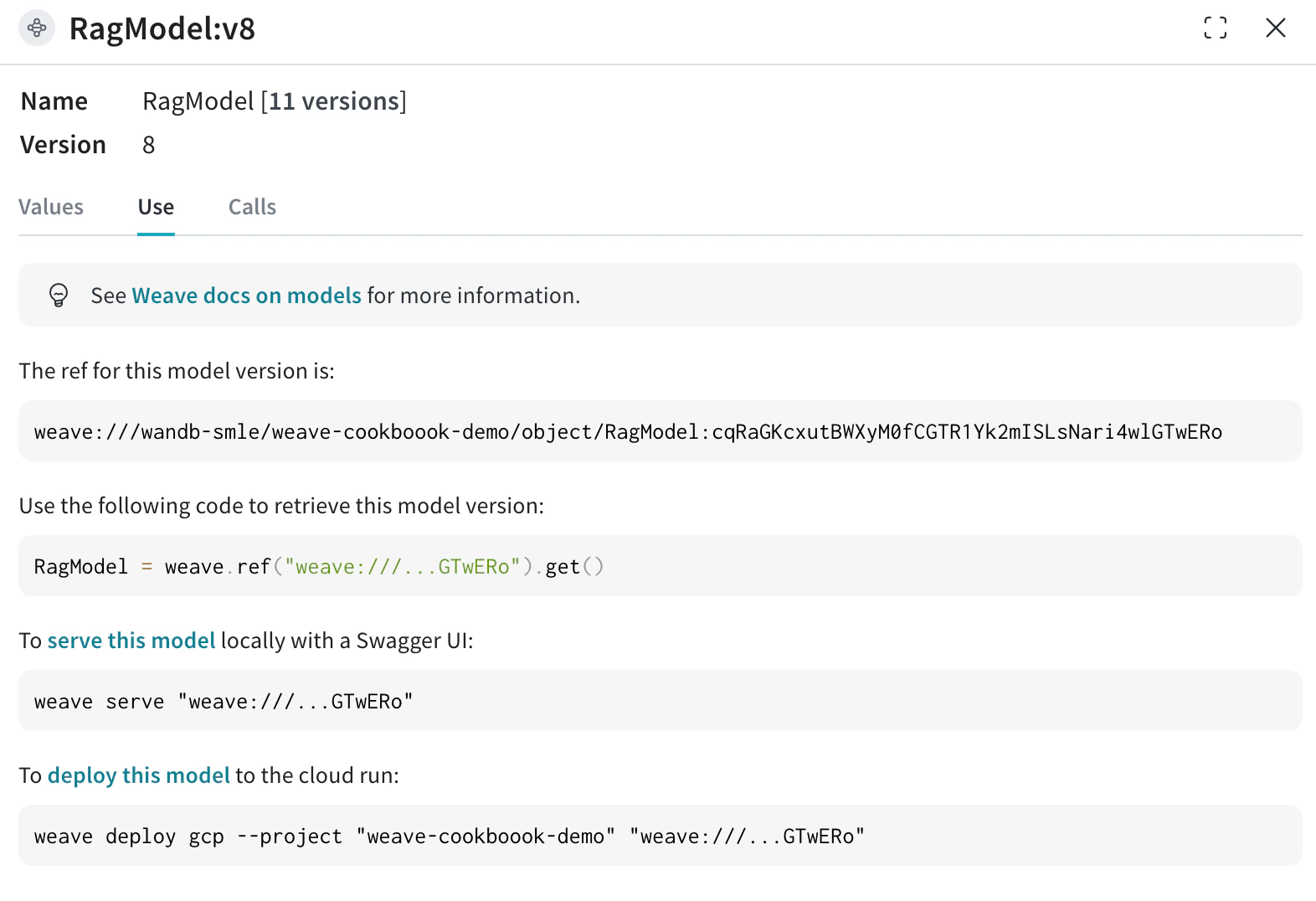
파인튜닝된 챗 모델을 기반으로 RAG 앱을 구축하면, 특히 대화형 AI 시스템의 성능과 활용성을 크게 향상시킬 수 있는 여러 장점이 있습니다.이제 기존 Weave 프로젝트에서 RagModel을 가져와서(RagModel의 현재 Weave ref는 아래 이미지와 같이 Use 탭에서 가져올 수 있습니다) ChatModel을 새로운 버전으로 교체합니다. 다른 컴포넌트(VDB, 프롬프트 등)는 변경하거나 다시 생성할 필요가 없습니다!
pip install litellm faiss-gpu
RagModel = weave.ref( "weave://wandb-smle/weave-cookboook-demo/object/RagModel:cqRaGKcxutBWXyM0fCGTR1Yk2mISLsNari4wlGTwERo").get()# MAGIC: chat_model을 교체하고 새 버전을 게시합니다 (다른 RAG 컴포넌트는 신경 쓸 필요 없음)RagModel.chat_model = new_chat_model# 예측 시 참조될 수 있도록 먼저 새 버전을 게시합니다PUB_REFERENCE = weave.publish(RagModel, "RagModel")await RagModel.predict("When was the first conference on climate change?")


 플랫폼
플랫폼 W&B Models
 W&B Weave
 W&B Inference
 W&B 교육
 릴리스 노트