Documentation Index
Fetch the complete documentation index at: https://translations.mintlify.app/llms.txt
Use this file to discover all available pages before exploring further.
 코드에 Weave를 연동하면, Python과 TypeScript용 Anthropic SDK를 통해 이루어지는 LLM 호출을 자동으로 추적하고 기록합니다. Weave는 Anthropic의
 Messages.create 메서드를 자동으로 호출해 이를 수행합니다.
코드에 weave.init("your-team-name/your-project-name")를 추가하면 Weave가 Anthropic SDK에 대한 트레이스를 자동으로 캡처합니다. weave.init()의 인자로 팀 이름을 지정하지 않으면 Weave는 출력 내용을 기본 W&B 엔터티에 기록합니다. 프로젝트 이름을 지정하지 않으면 Weave는 초기화에 실패합니다.
다음 예시는 Anthropic에 대한 기본 호출에 Weave를 통합하는 방법을 보여줍니다.
import weave
# Anthropic 라이브러리를 평소처럼 사용합니다
import os
from anthropic import Anthropic

weave.init("anthropic_project")

client = Anthropic(
    api_key=os.environ.get("ANTHROPIC_API_KEY"),
)

message = client.messages.create(
    max_tokens=1024,
    messages=[
        {
            "role": "user",
            "content": "Tell me a joke about a dog",
        }
    ],
    model="claude-3-opus-20240229",
)
print(message.content)
import Anthropic from '@anthropic-ai/sdk';
import * as weave from 'weave';
import { wrapAnthropic } from 'weave';

await weave.init('anthropic_project');

// 트레이스를 활성화하기 위해 Anthropic 클라이언트를 래핑합니다
const client = wrapAnthropic(new Anthropic());

const message = await client.messages.create({
    max_tokens: 1024,
    messages: [
        {
            role: 'user',
            content: 'Tell me a joke about a dog',
        }
    ],
    model: 'claude-3-opus-20240229',
});

console.log(message.content);
weave.init()을 포함하면 Weave가 트레이스 정보를 자동으로 캡처하고 링크를 제공합니다. 링크를 클릭하면 Weave UI에서 트레이스를 확인할 수 있습니다.
 Weave op은 실험을 진행하면서 코드에 자동으로 버전을 매기고, 그 입력과 출력을 캡처합니다.
 @weave.op() (Python) 데코레이터를 사용하거나 weave.op() (TypeScript)로 래핑해 Anthropic.messages.create를 호출하면 Weave가 입력과 출력을 자동으로 추적합니다.
다음 예제는 함수를 추적하는 방법을 보여줍니다:
import weave
import os
from anthropic import Anthropic

weave.init("anthropic_project")
client = Anthropic(
    api_key=os.environ.get("ANTHROPIC_API_KEY"),
)

@weave.op()
def call_anthropic(user_input:str, model:str) -> str:
    message = client.messages.create(
    max_tokens=1024,
    messages=[
        {
            "role": "user",
            "content": user_input,
        }
        ],
        model=model,
    )
    return message.content[0].text

@weave.op()
def generate_joke(topic: str) -> str:
    return call_anthropic(f"Tell me a joke about {topic}", model="claude-3-haiku-20240307")

print(generate_joke("chickens"))
print(generate_joke("cars"))
import Anthropic from '@anthropic-ai/sdk';
import * as weave from 'weave';
import { wrapAnthropic } from 'weave';

await weave.init('anthropic_project');
const client = wrapAnthropic(new Anthropic());

const callAnthropic = weave.op(async function callAnthropic(
    userInput: string,
    model: string
): Promise<string> {
    const message = await client.messages.create({
        max_tokens: 1024,
        messages: [
            {
                role: 'user',
                content: userInput,
            }
        ],
        model: model,
    });
    const content = message.content[0];
    return content.type === 'text' ? content.text : '';
});

const generateJoke = weave.op(async function generateJoke(
    topic: string
): Promise<string> {
    return callAnthropic(`Tell me a joke about ${topic}`, 'claude-3-haiku-20240307');
});

console.log(await generateJoke('chickens'));
console.log(await generateJoke('cars'));
weave.op()으로 데코레이트하거나 래핑하면 Weave가 함수의 코드, 입력, 출력 값을 캡처합니다. 중첩된 함수를 포함해 원하는 어떤 함수든 op으로 추적할 수 있습니다.

weave.Model 클래스는 Weave Python SDK에서만 사용할 수 있습니다. TypeScript에서는 구조화된 파라미터를 가진 함수를 추적하기 위해 weave.op() 래퍼를 사용하세요.
Model 클래스를 사용하면 시스템 프롬프트나 사용하는 모델처럼 앱의 실험 세부 정보를 캡처하고 구성할 수 있습니다. 이를 통해 앱의 다양한 버전을 정리하고 비교할 수 있습니다.
코드 버전 관리와 입출력 캡처뿐만 아니라, Model은 애플리케이션의 동작을 제어하는 구조화된 파라미터도 캡처합니다. 이를 통해 어떤 파라미터 조합이 가장 잘 동작하는지 찾을 수 있습니다. 또한 Weave Model은 serve 및 Evaluation과 함께 사용할 수도 있습니다.
다음 예제에서는 model과 temperature를 바꿔가며 실험해 볼 수 있습니다:
import weave
# anthropic 라이브러리를 평소처럼 사용합니다
import os
from anthropic import Anthropic
weave.init('joker-anthropic')

class JokerModel(weave.Model): # `weave.Model`로 변경
  model: str
  temperature: float

  @weave.op()
  def predict(self, topic): # `predict`로 변경
    client = Anthropic()
    message = client.messages.create(
    max_tokens=1024,
    messages=[
        {
            "role": "user",
            "content": f"Tell me a joke about {topic}",
        }
        ],
        model=self.model,
        temperature=self.temperature
    )
    return message.content[0].text


joker = JokerModel(
    model="claude-3-haiku-20240307",
    temperature = 0.1)
result = joker.predict("Chickens and Robots")
print(result)
JokerModel을 생성하고 추적합니다. 이를 통해 추적 데이터를 코드 변경 사항과 연결할 수 있고, 어떤 구성(configuration)이 사용 사례에 가장 적합한지 판단하는 데 도움이 됩니다.
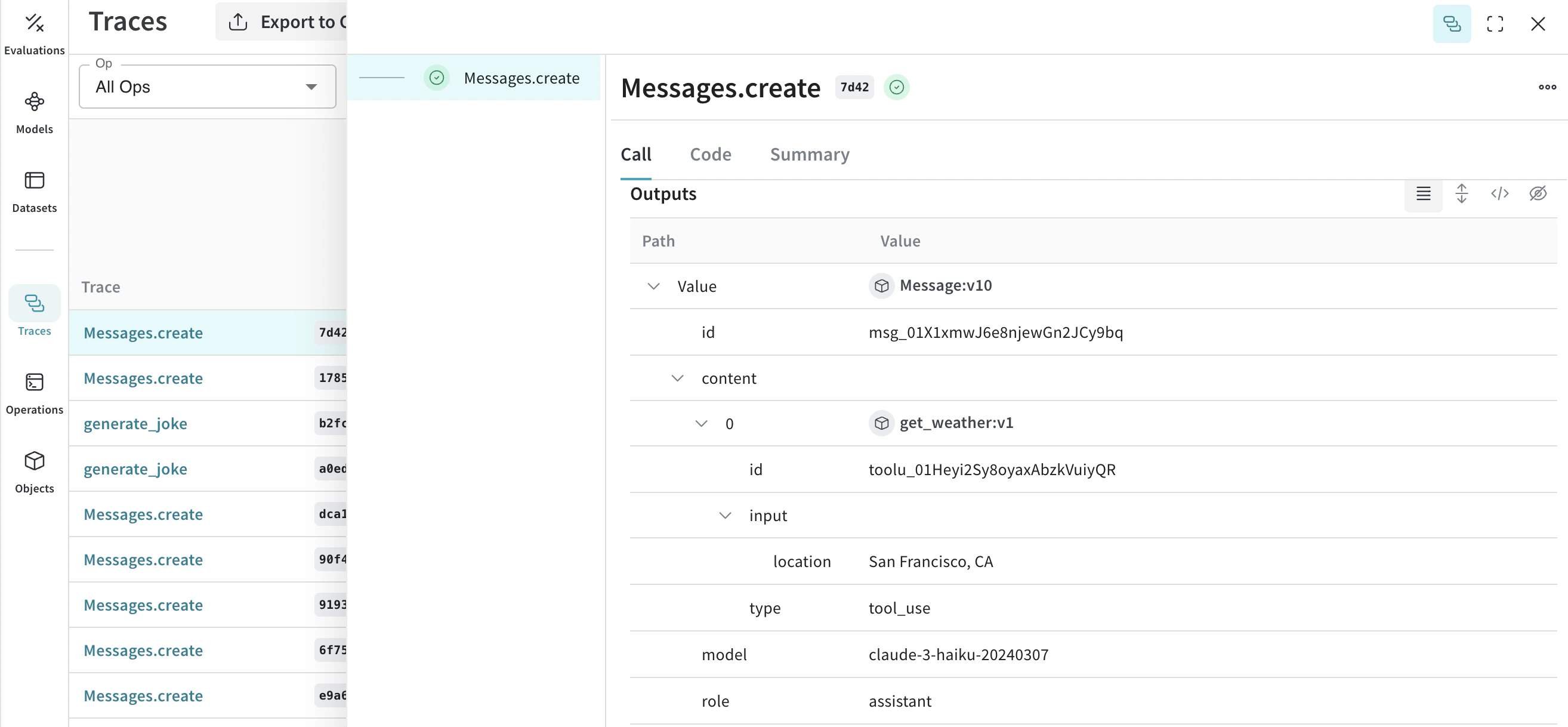
 Anthropic은 Claude가 함수 호출을 요청할 수 있도록 하는 도구 인터페이스를 제공합니다. Weave는 대화 전체에 걸쳐 도구 정의, 도구 사용 요청, 도구 결과를 자동으로 추적합니다.
다음은 Anthropic 도구 구성의 일부 예시입니다:
Anthropic은 Claude가 함수 호출을 요청할 수 있도록 하는 도구 인터페이스를 제공합니다. Weave는 대화 전체에 걸쳐 도구 정의, 도구 사용 요청, 도구 결과를 자동으로 추적합니다.
다음은 Anthropic 도구 구성의 일부 예시입니다:
message = client.messages.create(
    max_tokens=1024,
    messages=[
        {
            "role": "user",
            "content": "What's the weather like in San Francisco?",
        }
    ],
    tools=[
        {
            "name": "get_weather",
            "description": "Get the current weather in a given location",
            "input_schema": {
                "type": "object",
                "properties": {
                    "location": {
                        "type": "string",
                        "description": "The city and state, e.g. San Francisco, CA",
                    }
                },
                "required": ["location"],
            },
        },
    ],
    model=model,
)

print(message)
const message = await client.messages.create({
    max_tokens: 1024,
    messages: [
        {
            role: 'user',
            content: "What's the weather like in San Francisco?",
        }
    ],
    tools: [
        {
            name: 'get_weather',
            description: 'Get the current weather in a given location',
            input_schema: {
                type: 'object',
                properties: {
                    location: {
                        type: 'string',
                        description: 'The city and state, e.g. San Francisco, CA',
                    }
                },
                required: ['location'],
            },
        },
    ],
    model: 'claude-3-opus-20240229',
});

console.log(message);


 플랫폼
플랫폼 W&B Models
 W&B Weave
 W&B Inference
 W&B 교육
 릴리스 노트