Documentation Index
Fetch the complete documentation index at: https://translations.mintlify.app/llms.txt
Use this file to discover all available pages before exploring further.
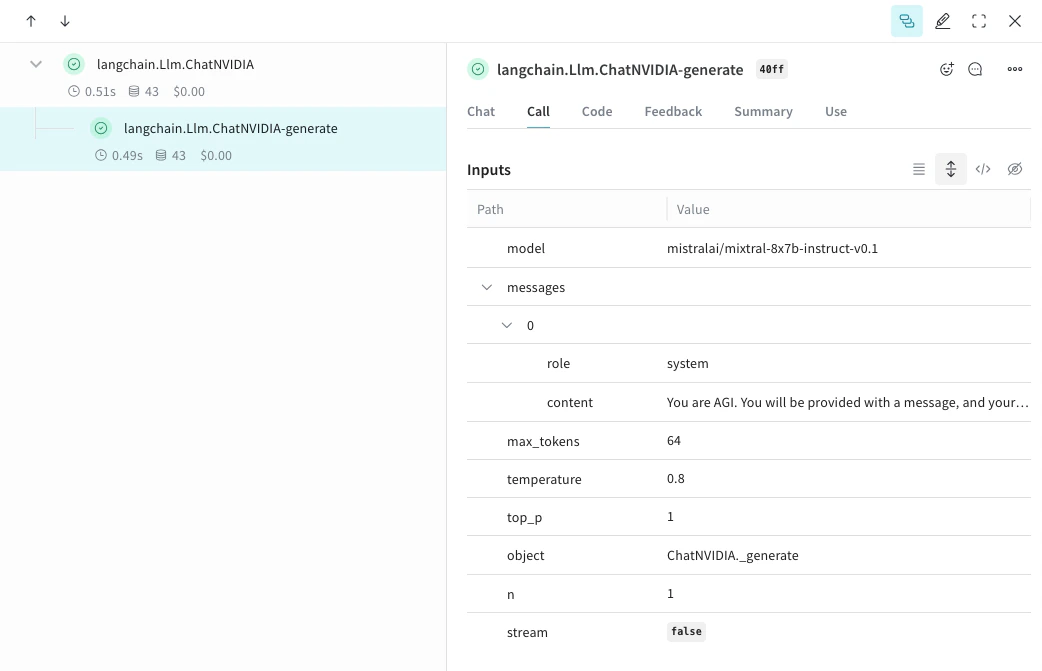
Weave는 weave.init()이 호출된 후 ChatNVIDIA 라이브러리를 통해 이루어진 LLM 호출을 자동으로 추적하고 기록합니다.
LLM 애플리케이션의 트레이스를 개발 및 프로덕션 환경 모두에서 중앙 데이터베이스에 저장하는 것은 중요합니다. 이러한 트레이스는 디버깅에 사용하고, 애플리케이션을 개선하는 동안 평가에 사용할 까다로운 사례들로 구성된 데이터셋을 구축하는 데 활용합니다.
Weave는 ChatNVIDIA Python 라이브러리의 트레이스를 자동으로 캡처할 수 있습니다.먼저 weave.init(<project-name>)을(를) 호출해 원하는 프로젝트 이름을 지정하면 트레이스 캡처가 시작됩니다.from langchain_nvidia_ai_endpoints import ChatNVIDIA
import weave
client = ChatNVIDIA(model="mistralai/mixtral-8x7b-instruct-v0.1", temperature=0.8, max_tokens=64, top_p=1)
weave.init('emoji-bot')
messages=[
{
"role": "system",
"content": "You are AGI. You will be provided with a message, and your task is to respond using emojis only."
}]
response = client.invoke(messages)
이 기능은 해당 라이브러리가 Python으로만 제공되기 때문에 아직 TypeScript에서는 사용할 수 없습니다.
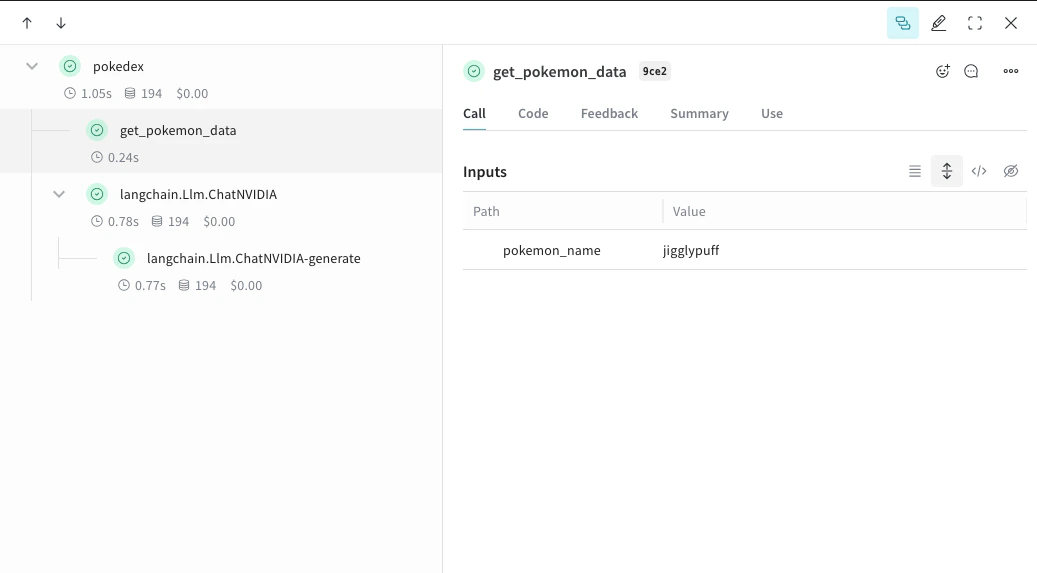
@weave.op으로 함수를 래핑하면 입력, 출력 및 앱 로직 캡처를 시작하므로 데이터가 앱을 통해 어떻게 흐르는지 디버깅할 수 있습니다. op를 여러 단계로 깊게 중첩해 추적하려는 함수들의 트리를 만들 수 있습니다. 또한 실험 과정에서 git에 커밋되지 않은 애드혹한 세부 정보까지 캡처할 수 있도록 코드를 자동으로 버전 관리하기 시작합니다.ChatNVIDIA Python 라이브러리를 호출하는 함수를 @weave.op 데코레이터로 간단히 정의하면 됩니다.아래 예시에서는 op로 래핑된 함수가 2개 있습니다. 이렇게 하면 RAG 앱의 retrieval 단계처럼 중간 단계들이 앱 동작에 어떤 영향을 미치는지 확인할 수 있습니다.import weave
from langchain_nvidia_ai_endpoints import ChatNVIDIA
import requests, random
PROMPT="""Emulate the Pokedex from early Pokémon episodes. State the name of the Pokemon and then describe it.
Your tone is informative yet sassy, blending factual details with a touch of dry humor. Be concise, no more than 3 sentences. """
POKEMON = ['pikachu', 'charmander', 'squirtle', 'bulbasaur', 'jigglypuff', 'meowth', 'eevee']
client = ChatNVIDIA(model="mistralai/mixtral-8x7b-instruct-v0.1", temperature=0.7, max_tokens=100, top_p=1)
@weave.op
def get_pokemon_data(pokemon_name):
# RAG 앱의 retrieval 단계처럼, 애플리케이션 내의 한 단계입니다.
url = f"https://pokeapi.co/api/v2/pokemon/{pokemon_name}"
response = requests.get(url)
if response.status_code == 200:
data = response.json()
name = data["name"]
types = [t["type"]["name"] for t in data["types"]]
species_url = data["species"]["url"]
species_response = requests.get(species_url)
evolved_from = "Unknown"
if species_response.status_code == 200:
species_data = species_response.json()
if species_data["evolves_from_species"]:
evolved_from = species_data["evolves_from_species"]["name"]
return {"name": name, "types": types, "evolved_from": evolved_from}
else:
return None
@weave.op
def pokedex(name: str, prompt: str) -> str:
# 다른 op를 호출하는 루트 op입니다.
data = get_pokemon_data(name)
if not data: return "Error: Unable to fetch data"
messages=[
{"role": "system","content": prompt},
{"role": "user", "content": str(data)}
]
response = client.invoke(messages)
return response.content
weave.init('pokedex-nvidia')
# 특정 포켓몬에 대한 데이터를 가져옵니다.
pokemon_data = pokedex(random.choice(POKEMON), PROMPT)
get_pokemon_data를 클릭하면 해당 단계의 입력과 출력을 확인할 수 있습니다.이 기능은 현재 이 라이브러리가 Python에만 있기 때문에 TypeScript에서는 사용할 수 없습니다.
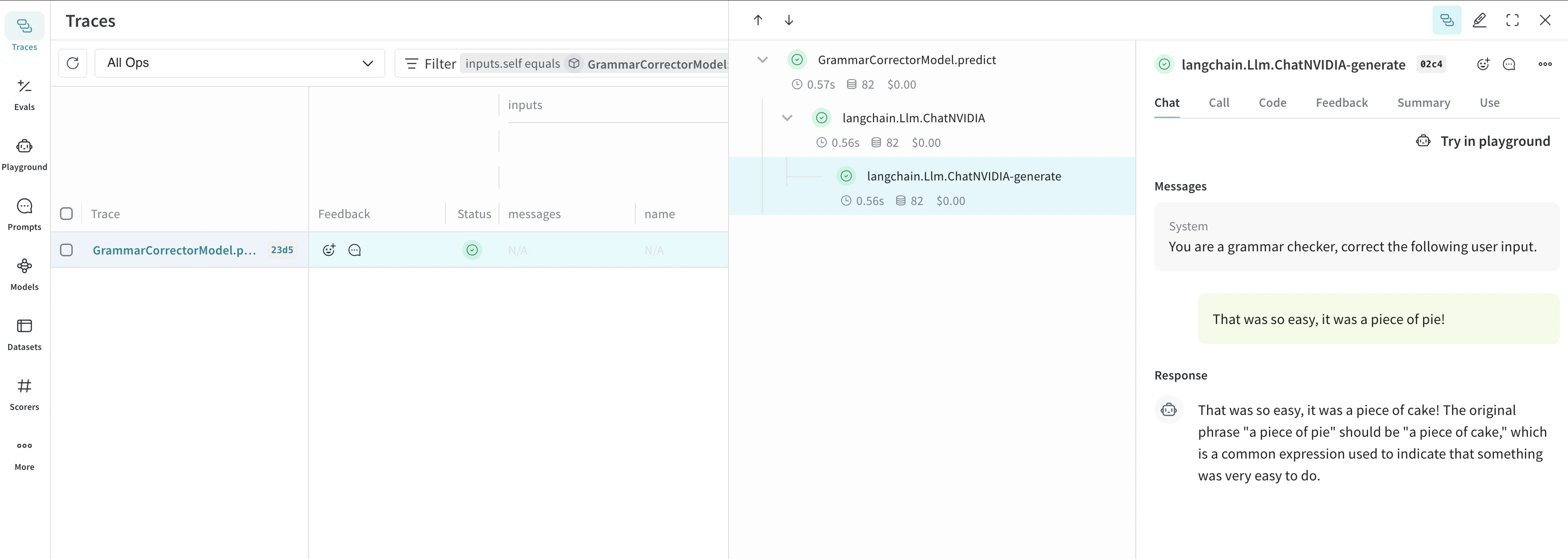
구성 요소가 많을수록 실험을 체계적으로 관리하기가 어렵습니다. Model 클래스를 사용하면 시스템 프롬프트나 사용 중인 모델처럼 앱의 실험 세부 정보를 캡처하고 정리할 수 있습니다. 이를 통해 앱의 다양한 반복 버전을 체계적으로 정리하고 비교할 수 있습니다.코드 버전 관리와 입·출력 캡처뿐만 아니라, Model은 애플리케이션 동작을 제어하는 구조화된 파라미터를 캡처하므로 어떤 파라미터가 가장 잘 동작했는지 쉽게 찾을 수 있습니다. 또한 Weave Model을 serve 및 Evaluation과 함께 사용할 수 있습니다.아래 예시에서는 model과 system_message를 바꿔가며 실험해 볼 수 있습니다. 이 둘 중 하나를 변경할 때마다 GrammarCorrectorModel의 새로운 _버전_이 생성됩니다.import weave
from langchain_nvidia_ai_endpoints import ChatNVIDIA
weave.init('grammar-nvidia')
class GrammarCorrectorModel(weave.Model): # Change to `weave.Model`
system_message: str
@weave.op()
def predict(self, user_input): # Change to `predict`
client = ChatNVIDIA(model="mistralai/mixtral-8x7b-instruct-v0.1", temperature=0, max_tokens=100, top_p=1)
messages=[
{
"role": "system",
"content": self.system_message
},
{
"role": "user",
"content": user_input
}
]
response = client.invoke(messages)
return response.content
corrector = GrammarCorrectorModel(
system_message = "You are a grammar checker, correct the following user input.")
result = corrector.predict("That was so easy, it was a piece of pie!")
print(result)
이 기능은 현재 이 라이브러리가 Python에만 제공되기 때문에 TypeScript에서는 아직 사용할 수 없습니다.
invoke, stream 및 이들의 비동기(async) 버전을 지원합니다. 또한 도구(tool) 사용도 지원합니다.
ChatNVIDIA는 여러 유형의 모델과 함께 사용되도록 설계되었기 때문에 function calling은 지원하지 않습니다.

 플랫폼
플랫폼 W&B Models
 W&B Weave
 W&B Inference
 W&B 교육
 릴리스 노트