

 認証
認証 ユーザー管理
 カスタマイズ
 Auth0 AI
 プラットフォーム
- Dashboard > Applications > Applications に移動し、新しいアプリケーションを作成するか、更新するアプリケーションの名前をクリックします。
- Addons タブに移動し、SAML2 Web App トグルを有効にします。
-
Settings タブで、Application Callback URL を次の値に設定します:
https://www.hostedgraphite.com/complete/saml/{yourUserId}/。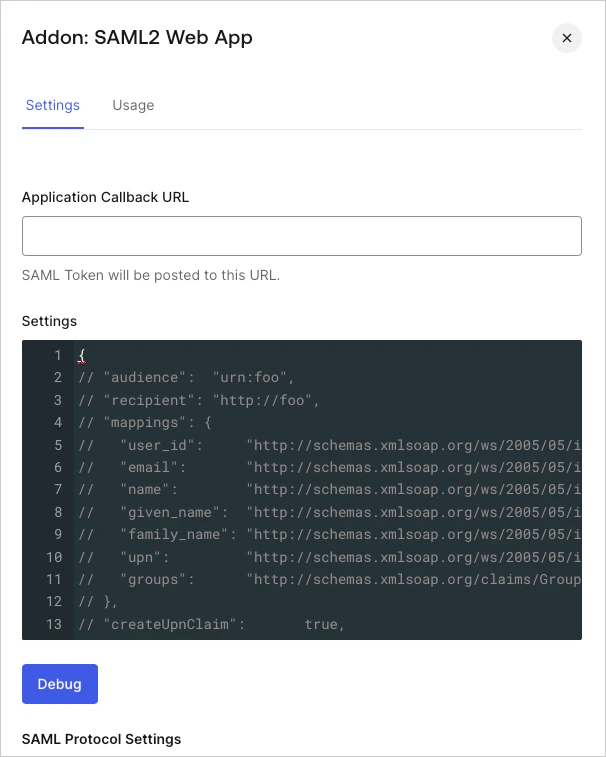
-
次のコードを Settings テキストボックスに貼り付け、Debug をクリックします。
- ページの下部までスクロールし、Enable をクリックします。
-
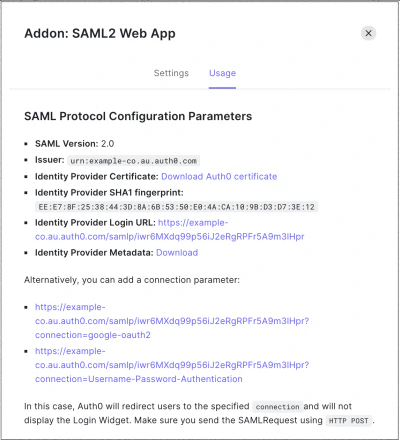
Usage タブで Identity Provider Metadata を探し、Download をクリックしてメタデータファイルをダウンロードします。これは、Auth0 を IDプロバイダーとして設定するときに必要です。
Hosted Graphite を SAML サービスプロバイダーとして設定する
Hosted Graphite 用の SAML2 Web App アドオンを使用して、Auth0 を IDプロバイダーとして設定する方法を説明します。
Hosted Graphite では、次の 設定を使用します。